
Sample sheet: https://app.quadratichq.com/file/d454cd3f-63ab-4fab-a783-c1390d9e5c8a
Getting data from Polygon Finance to your spreadsheet is a simple API call.
We recommend using the Python Requests library to query their API.
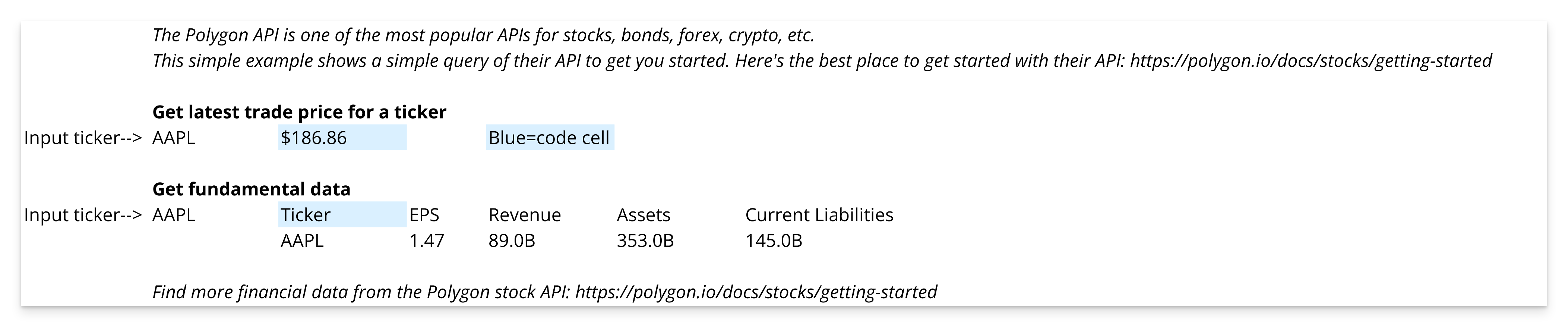
Here are some example workflows...
Stocks
https://polygon.io/docs/stocks/getting-started
Pull the latest trade
import requests

# Query Polygon API and grab data from JSON
# Where c(0,4) is a cell, you put the ticker you'd like to read the latest trade for
latest_trade_query = requests.get('https://api.polygon.io/v2/aggs/ticker/{}/prev?apiKey=<your_api_key_here>'.format(c(0,4)))

# Process data and display the latest trade on the sheet
latest_trade_json = latest_trade_query.json()
latest_trade = latest_trade_json['results'][0]['c']
Fundamental equity data
import pandas as pd
import requests

# Get the ticker symbol from the spreadsheet
ticker = c(0,7)

# Make a request to Polygon API for data
stock_financials = requests.get('https://api.polygon.io/vX/reference/financials?ticker={}&apiKey=<your_api_key_here>'.format(ticker))

# Manipulate the data into the format we want
stock_financials_json = stock_financials.json()
income_statement = stock_financials_json["results"][1]["financials"]["income_statement"]
balance_sheet = stock_financials_json["results"][1]["financials"]["balance_sheet"]
revenue = income_statement["revenues"]["value"]
eps = income_statement['basic_earnings_per_share']["value"]
revenues = income_statement['revenues']["value"]
current_liabilities = balance_sheet['current_liabilities']["value"]
equity = balance_sheet['equity']["value"]
assets = balance_sheet['assets']["value"]

# Put our data into a DataFrame
df = pd.DataFrame([[
    ticker,
    round(eps,2),
    str(float(round(revenues/1000000000, 0)))+'B',
    str(float(round(assets/1000000000)))+'B',
    str(float(round(current_liabilities/1000000000)))+'B',
]], columns=["Ticker", "EPS", "Revenue", "Assets", "Current Liabilities"])

# Display our DataFrame to the grid
df
Options
https://polygon.io/docs/options/getting-started
Latest trade for an options contract
import pandas as pd
import requests

# Use a ticker symbol from the sheet for the query
ticker = c(0,2)

# Query Polygon API and grab data from JSON
latest_trade_query = requests.get('https://api.polygon.io/v2/aggs/ticker/{}/prev?apiKey=<your_api_key_here>'.format(ticker))
latest_trade_json = latest_trade_query.json()
latest_trade = latest_trade_json['results'][0]['c']

# Display the latest trade on the sheet
latest_trade
import pandas as pd
import requests
# Use a ticker symbol from the sheet for the query
ticker = c(0,2)
# Query Polygon API and grab data from JSON
latest_trade_query = requests.get('https://api.polygon.io/v2/aggs/ticker/{}/prev?apiKey=<your_api_key_here>'.format(ticker))
latest_trade_json = latest_trade_query.json()
latest_trade = latest_trade_json['results'][0]['c']
# Display the latest trade on the sheet
latest_tradeForex
https://polygon.io/docs/forex/getting-started
Crypto
https://polygon.io/docs/crypto/getting-started
Need help making this connection? Feel free to reach out to support@quadratichq.com for help.