
Table of contents
- Why Standard AI Generators Fail at Enterprise Scale
- Step 1: Centralizing Data for the Generator
- Step 2: Engineering Prompts for Brand Voice & Variants
- Controlling Output Length and Formatting
- Step 3: The Compliance Layer (Banned-Claims Filtering)
- Step 4: The "Human-in-the-Loop" Review Workflow
- Step 5: Exporting to Your PIM or Storefront
- Building Your Own Free AI Product Description Generator
- Conclusion
For ecommerce managers and catalog teams, the excitement surrounding artificial intelligence often fades the moment they attempt to apply it to a catalog of 5,000 SKUs. While a standard product description generator is impressive for a single item, it typically fails to support the operational reality of enterprise retail. The bottleneck is no longer writing the copy; the bottleneck is workflow management, quality assurance, and maintaining brand consistency across thousands of rows of data, which are key aspects of effective ecommerce product data management and illustrate the significant challenges of scaling generative AI in retail.
When you rely on disconnected tools or chat interfaces, you face a fragmented process that is difficult to scale. You might get a great description for one product, but ensuring that same tone and compliance for the next thousand requires a different approach. The solution is not another standalone tool, but a centralized workspace where data, generation, and review happen simultaneously, much like a powerful no-code database.
By using Quadratic, you can build a custom workflow that integrates your product attributes directly with AI generated product descriptions. This approach transforms a chaotic creative process into a structured data pipeline, allowing you to generate, audit, and approve content without leaving your AI spreadsheet.
Why Standard AI Generators Fail at Enterprise Scale
The primary anxiety for most catalog managers is the "black box" nature of typical AI tools. You input a few keywords, and the software spits out a paragraph. If you are managing a regulated industry, such as supplements or skincare, or if you are strictly adhering to a brand voice, this opacity is dangerous. You cannot see the logic driving the output, and you often cannot force the tool to check its own work against your compliance rules.
Furthermore, standard tools suffer from voice drift. Without strict, programmatic context, an AI model might write a punchy, aggressive description for one SKU and a passive, flowery description for another. This inconsistency makes your catalog look unprofessional. Finally, generic tools rarely account for negative constraints. They focus on what to say, but they rarely have robust filters for what not to say, leaving you vulnerable to publishing banned claims or incorrect specifications.
To solve this, you need a "glass box" approach. You need to see your raw data, your prompt logic, the AI output, and your compliance checks side-by-side in a single view.
Step 1: Centralizing Data for the Generator
High-quality output starts with high-quality input. Before you generate a single word, you must organize your product attributes. In a standard free product description generator found on the web, you are often limited to a text box where you paste messy notes. In Quadratic, you treat your product data as a structured database, a process that highlights the importance of structured data for AI and is essential for effective AI data modeling.
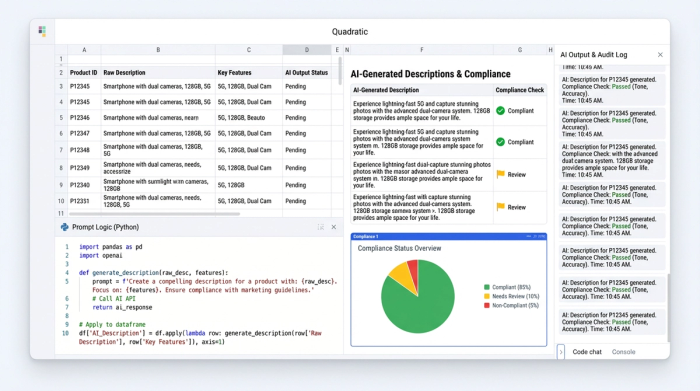
Your workflow begins by importing your core product data into the spreadsheet. You set up columns for every attribute that defines the product: SKU, Product Name, Material, Dimensions, Key Benefits, and Technical Specs. Because Quadratic handles data like a modern grid, you can see all your inputs at once.
This visualization is critical. It allows you to spot missing attributes—such as a missing dimension or undefined material—before the AI attempts to write about them. By centralizing this data in columns A through F, for example, you create a reliable foundation. The AI will eventually reference these specific cells to generate the copy, ensuring that the output is factually grounded in the data you provided, rather than hallucinated.
Step 2: Engineering Prompts for Brand Voice & Variants
Once your data is structured, you move to the generation phase. This is where you move beyond simple prompts and start engineering a scalable system. In Quadratic, you can use AI formulas to reference your attribute columns dynamically. This allows you to chain prompts together, a capability often enhanced by AI Agents for Spreadsheets, instructing the model to "Write a description for the product in cell B2, using the materials listed in C2 and the benefits in D2," which is a core concept of prompt engineering.
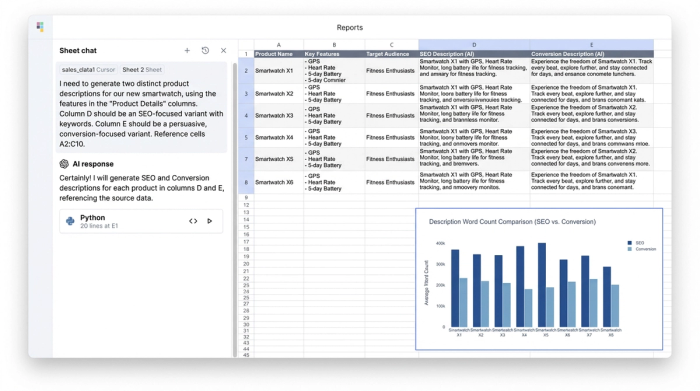
A sophisticated catalog strategy requires more than one type of description. You can set up adjacent columns to generate distinct variants for different purposes:
1. The SEO Variant: In one column, you instruct the AI to prioritize keywords, structure, and clarity. This description is designed for search engine crawlers and category pages where density matters.
2. The Conversion Variant: In the next column, you adjust the prompt to focus on emotional hooks, sensory language, and lifestyle benefits. This copy is designed for the human buyer who needs to be convinced to click "Add to Cart."
This method is also ideal for marketplace-specific requirements. For example, if you are building an Amazon product description generator AI workflow, you can create a specific prompt that generates exactly five bullet points, starts each bullet with a capitalized feature, and strictly adheres to Amazon’s style guide.
Controlling Output Length and Formatting
One of the most frustrating aspects of working with external AI tools is the lack of formatting control. You might ask for 150 words and get 300, breaking your storefront's layout.
Because Quadratic integrates Python directly into the grid, you can enforce strict formatting rules. You can write a simple Python script or use a spreadsheet formula in a "Status" column that counts the characters of the generated output. If the description exceeds your character limit, the cell can flag itself, or you can adjust your prompt to be more restrictive. This allows you to manage the physical constraints of your content management system (CMS) immediately, rather than discovering formatting issues during the upload process.
Step 3: The Compliance Layer (Banned-Claims Filtering)
This step is the most significant differentiator between a hobbyist tool and an enterprise workflow. In regulated industries, or simply for brands that care about accuracy, you cannot blindly trust AI. You must verify that the content is safe to publish.
In your Quadratic workspace, you can implement a "Compliance Layer." This involves creating a list of banned words or phrases—such as "guaranteed," "miracle," "cure," or "unbeatable prices"—that your legal or brand team has flagged.
Using Python or advanced formulas, you can scan every cell of the AI generated product descriptions against this banned list automatically. If a banned word is detected, the cell can turn red, or a "Compliance Status" column can display a warning like "Review Needed: Banned Claim Found." This programmatic quality control acts as a safety net, catching high-risk errors instantly and allowing you to fix them before they reach a human reviewer.
Step 4: The "Human-in-the-Loop" Review Workflow
Automation does not mean removing human oversight; it means making human oversight more efficient. The goal of this system is to auto-draft content so that your team can focus on verifying it, embodying the principles of human-in-the-loop (HITL) AI.
To facilitate this, you add a "Review Column" to your spreadsheet. This can be a simple status dropdown with options like "Draft," "Needs Edit," and "Approved." As a manager, you or your copywriters can scan the sheet. You look at the input data, read the generated output, and check the compliance color codes.
If the description is accurate, on-brand, and green for compliance, you simply mark it as "Approved." If it misses the mark, you can manually edit the cell right there in the grid. This "human-in-the-loop" process solves the trust issue. You are never auto-publishing blindly; you are using AI to do the heavy lifting while retaining final editorial control.
Step 5: Exporting to Your PIM or Storefront
Once your batch of SKUs is marked "Approved," the final step is getting the data out of Quadratic and into your store. Because your work is already structured in a grid, exporting is seamless.
You can filter your view to show only the approved rows and export the data as a CSV or JSON file. This file is ready for direct import into Shopify, Magento, Amazon Seller Central, or your Product Information Management (PIM) system. By keeping the data clean and structured throughout the entire lifecycle—from attribute import to final export—you eliminate the copy-paste errors that plague manual workflows.
Building Your Own Free AI Product Description Generator
Many marketers start their journey searching for a free AI product description generator or a product description generator free of charge. While there are many limited web-based tools available, they often force you into a rigid template that doesn't fit your specific business needs.
Quadratic offers a different value proposition. It provides a flexible, infinite canvas where you can build your own generator logic. You are not renting a piece of software that dictates how you should write; you are constructing a tool that mirrors your exact requirements. Whether you need to incorporate complex technical specs for industrial parts or whimsical storytelling for boutique fashion, the logic is entirely up to you.
By utilizing the free tier of Quadratic, you can experiment with these workflows, connecting your data and testing your prompts without the overhead of expensive enterprise software suites.
Conclusion
To win at scale, ecommerce teams must move away from one-off text generation and embrace workflow automation, which is a critical component of a robust data analytics strategy. The challenge is not just generating words; it is generating the right words, for the right products, with the right compliance checks, thousands of times over.
By building a custom "glass box" generator in Quadratic, you gain visibility into every step of the process. You combine the speed of AI with the precision of structured data and the safety of human review. Stop struggling with disjointed tools and generic outputs. Start building a workflow that respects your brand voice and scales with your catalog.
Use Quadratic to build a custom AI product description generator
- Centralize product data: Organize all product attributes in a single grid, ensuring consistent, high-quality input for AI generation and preventing hallucinations.
- Engineer custom AI prompts: Dynamically generate diverse product descriptions (SEO, conversion, marketplace-specific) that adhere to your brand voice and specific requirements.
- Control output length and formatting: Use native Python and formulas to enforce strict character limits and formatting rules, preventing layout issues in your CMS.
- Automate compliance checks: Implement a "compliance layer" to scan for and flag banned words or phrases instantly, reducing legal and brand risk.
- Streamline human review: Integrate a clear "human-in-the-loop" workflow for efficient auditing, editing, and approval of AI-generated content directly in the spreadsheet.
- Seamlessly export approved content: Easily filter and export approved descriptions to your PIM or storefront systems, eliminating manual copy-paste errors.
Stop struggling with generic tools and build a scalable, custom product description workflow. Try Quadratic.
