
Managing a catalog of products often feels like living in the "messy middle" of data operations, presenting common challenges of managing inventory and pricing data for businesses without enterprise-grade solutions. You likely have too many SKUs to manage comfortably in a standard spreadsheet, yet you may not have the budget or the technical infrastructure for an enterprise-grade Product Information Management (PIM) system. This creates a precarious workflow where thousands of style codes, descriptions, and inventory levels rely on manual entry and fragile formulas. A single copy-paste error or a sorting mistake can misalign data across 5,000 products, leading to incorrect listings on Shopify, Amazon, or your ERP, and poor product data quality can cost businesses millions annually.
Ecommerce product data management is more than just storing information. It is the active workflow of organizing, validating, and distributing accurate product facts across various retail channels. For many data specialists, the goal is not to abandon the flexibility of spreadsheets but to find a way to make them robust enough to handle the workload.
The solution lies in upgrading to a programmable spreadsheet. By using a tool like Quadratic, which combines the familiar grid interface with the computational power of Python and SQL, teams can bridge the gap between manual data entry and complex database software. This approach allows you to automate cleaning, validate listings, and ensure every SKU is publication-ready without leaving the spreadsheet environment.
The challenge of managing extensive tabular datasets
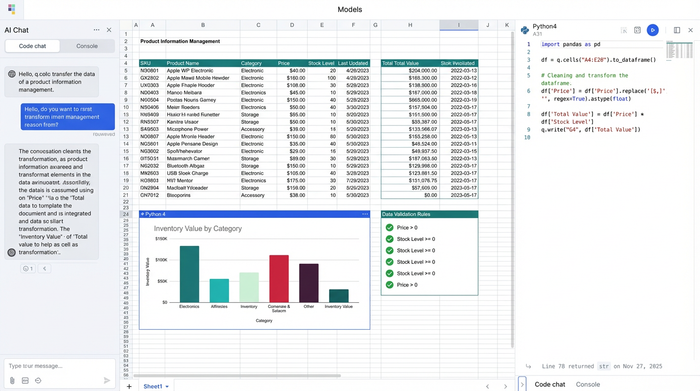
When you are responsible for product data management ecommerce workflows, the complexity of the data often outpaces the tools used to handle it. A typical catalog dataset is not just a list of names and prices. It involves style codes, sizing variations, HTML-rich descriptions, image URLs, and specific metadata tags required for different marketplaces.
Managing this volume of data in traditional spreadsheets introduces significant risk. If you are handling a seasonal update with 1,000 new SKUs, a manual drag-and-drop operation to update pricing can easily desynchronize rows. If the "Price" column shifts one row down while the "Product Name" column stays put, you effectively corrupt your entire catalog. Recovering from these errors takes hours of cross-referencing and often requires reverting to older, potentially outdated versions of the file.
This complexity requires a shift in perspective. You are no longer just an administrator entering text into boxes. You are acting as a data specialist performing Data Operations (DataOps), an agile methodology designed to improve data quality and delivery. This role requires a workflow that can handle volume without breaking and tools that prevent manual errors from propagating through your retail systems, which is a key aspect of data analytics modernization.
Moving beyond manual entry: a programmable workflow
The most effective way to secure your data pipeline is to move from manual manipulation to programmatic control. Quadratic allows you to ingest raw data from CSVs, APIs, or databases onto an infinite canvas where row limits are not a constraint. Once the data is in the grid, the real work of programmable cleaning begins.
In a standard spreadsheet, cleaning data often involves endless "Find and Replace" commands or complex, brittle nested formulas. In a programmable spreadsheet, you can use Python directly within the cells to clean data instantly and accurately, following best practices for effective data cleaning with Python.
Consider the challenge of cleaning HTML tags from product descriptions. Instead of manually stripping tags or using a third-party tool, you can write a short Python script using Regex (regular expressions) to identify and remove all HTML elements across the entire "Description" column.
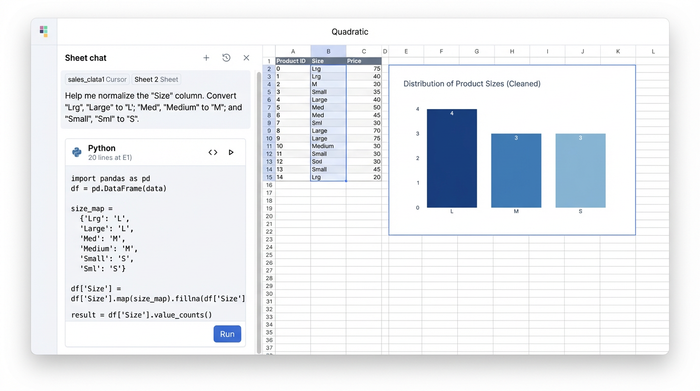
Another common issue is inconsistent sizing formats. Your raw data might contain variations like "Lrg," "Large," and "L" for the same size. Using Python, you can write a script to normalize these values into a standard "L" format. Because this is done via code, it runs across the entire dataset instantly. If you receive a new batch of data, you simply rerun the script, ensuring consistency without repeating manual work. You can also use the spreadsheet to visually flag gaps, such as highlighting rows where high-resolution image URLs are missing, ensuring you catch errors before you attempt an export.
Ensuring quality control and completeness
Verification is the cornerstone of trust in ecommerce. When you are preparing 10,000 rows for a holiday launch, visual inspection is impossible. You cannot check every cell to ensure the inventory count matches the active status.
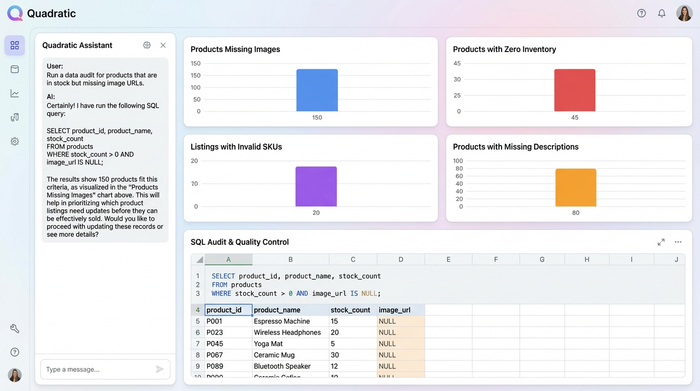
This is where SQL becomes a critical asset in your workflow. Within Quadratic, you can run SQL queries directly against your data to audit for completeness and logic, including various data quality checks you can perform with SQL. Instead of filtering columns one by one, you can write a query to ask specific questions of your data.
For example, you might run a query to "Select all rows where 'Inventory' is greater than 0 but 'Image URL' is NULL." This immediately generates a list of products that are in stock but cannot be sold because they lack images. By treating your spreadsheet like a database, you ensure that only complete, validated data makes it to the next stage. This reinforces the commitment to quality listings, ensuring that errors are caught during the audit phase rather than by a customer on the live site.
Software vs. services vs. the programmable spreadsheet
When looking for solutions, teams often weigh ecommerce product data management software against outsourcing options. Both have distinct downsides for agile teams.
Enterprise PIM software is powerful, but it is often rigid and expensive. Implementation can take months, and making ad-hoc changes to data structures often requires IT intervention. On the other hand, ecommerce product data management services involve outsourcing data entry to third parties. While this frees up internal time, it is often slow, costly, and creates a disconnect between the product experts and the data itself.
Quadratic offers a "sweet spot" between these extremes. It functions as a programmable spreadsheet that offers the flexibility of a grid with the integrity of a database. You retain the ability to manipulate data ad-hoc—adding a new attribute column or changing a calculation on the fly—without waiting for a developer. However, because you are using Python and SQL to perform these changes, you maintain a structured, repeatable process that prevents the manual errors inherent in traditional spreadsheets.
Preparing data for integration
The final step in the workflow is preparing the data for integration into retail systems. Whether you are uploading a CSV to Shopify or sending a feed to Amazon, each platform has strict formatting requirements.
Using a programmable workflow allows you to automate the formatting of your export file. You can write a script that maps your internal column headers to the specific field names required by the destination platform. This ensures that your "Style Code" column is correctly renamed to "Variant SKU" and that your price fields are formatted with the correct currency symbols. Because the cleaning and formatting were handled programmatically, the output is standardized. You can export the data with confidence, knowing that the file structure matches the requirements of the endpoint perfectly.
Conclusion
Effective ecommerce product data management is ultimately about trust. You need to trust that the SKU on your sheet matches the physical product in the warehouse and the listing on the website. Achieving this level of trust does not require abandoning spreadsheets. It requires evolving how you use them.
By moving from manual entry to a programmable workflow, you eliminate the risks of human error and gain the speed of automation. You stop fighting against the limitations of your tools and start scripting them to work for you.
If you are ready to clean your product catalog and learn Python and SQL, try Quadratic to experience a smarter way to manage your data.
Use Quadratic to manage ecommerce product data
- Automate product data cleaning: Use python directly in cells to instantly normalize sizing, remove HTML tags, and standardize product descriptions across your entire catalog, eliminating manual errors.
- Validate data quality with precision: Run SQL queries against your product data to quickly identify missing image URLs, inconsistent inventory counts, or any other data gaps before publishing.
- Prepare data for any platform: Programmatically map and format your product data to meet the specific requirements of Shopify, Amazon, or other retail channels for error-free exports.
- Scale your catalog management: Handle thousands of SKUs on an infinite canvas, leveraging code to prevent desynchronization issues common with large, complex datasets.
- Bridge the gap between spreadsheets and databases: Gain the flexibility of a spreadsheet for ad-hoc changes with the integrity and automation power of Python and SQL for repeatable, error-proof workflows.
Ready to clean your product catalog and streamline your listings? Try Quadratic.
