
Every merchandising professional knows the specific anxiety of "spreadsheet hell." It usually starts on a Monday morning when you receive three different CSV files from three different vendors. One vendor formats dates as DD-MM-YYYY, another uses MM-DD-YYYY, and the third has inexplicably added whitespace to the end of every SKU. You open your master spreadsheet to merge them, but as soon as you paste the data, the file freezes.
For e-commerce managers and data operations specialists, this isn’t just an annoyance; it is a bottleneck that threatens revenue, as poor data quality can lead to poor customer relations, inaccurate analytics, and bad decisions. When you are managing extensive product catalogs, manual data hygiene is unsustainable. If you rely on copy-pasting and fragile formulas, you risk introducing errors that break checkouts or mislabel inventory.
There is a better way to handle product catalog management. By moving away from rigid manual grids and adopting a tool that combines an infinite canvas with the power of code, you can turn a chaotic import process into a streamlined, automated workflow.
What is product catalog management? (And why it’s hard)
At its core, product catalog management is the process of organizing, standardizing, and publishing product data across sales channels, aligning with broader information governance principles for managing organizational data assets, following best practices for standardizing product data. It serves as your "Single Source of Truth" for identifiers, descriptions, pricing, media links, and inventory levels.
While a simple inventory list might suffice for a small shop with ten items, effective ecommerce product catalog management is critical for scaling businesses. It ensures that the data feeding your storefront, ERP, and marketing tools is accurate and consistent.
The difficulty lies in the stakes. A typo in an internal memo is embarrassing, but a typo in a product catalog management system can be disastrous. If a SKU is mismatched, a customer receives the wrong item. If an image link is broken, the product page looks unprofessional. The goal is to create a system where data quality is enforced systematically, not manually.
The challenge: wrangling data from various imports
The primary pain point for most merchandisers is sourcing data from various data imports. You rarely create data from scratch; you inherit it from suppliers, legacy systems, or scraped web data.
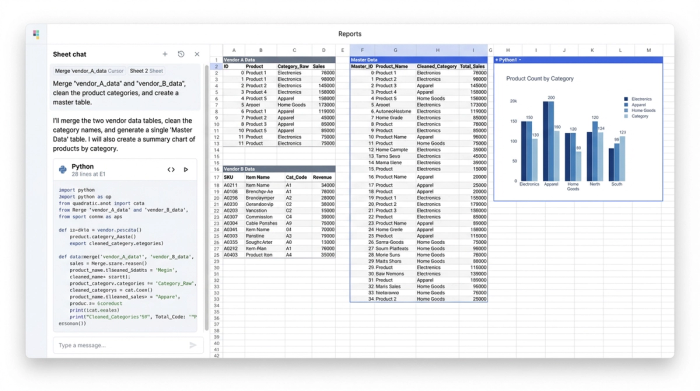
In traditional spreadsheets, handling this involves a frantic dance between tabs. You might have Vendor A in "Sheet 1," Vendor B in "Sheet 2," and a fragile set of VLOOKUPs trying to pull them into a master view. This approach lacks visibility. You cannot easily compare the raw source data against your final output without switching contexts, leading to errors that are hard to trace.
Quadratic takes a different approach with the infinite canvas. Instead of hiding data in separate tabs, you can place your raw vendor tables side-by-side with your master table on a single, expansive surface. This allows you to visually audit the flow of data. You can see the messy import on the left and the cleaned, structured result on the right, giving you immediate confidence in your data pipeline.
Step-by-step: building a clean catalog workflow
Moving your catalog into a code-enabled spreadsheet allows you to act as your own data engineer. You don't need to wait for IT to fix a formatting issue; you can build a reproducible workflow yourself. Here is how you can use Quadratic to master your catalog.
1. Centralizing structured data tables
The first step is aggregation. Rather than opening multiple files and risking a crash, you can import CSVs or connect directly to APIs to pull all your raw data onto the canvas. Because Quadratic is built for performance, it handles larger datasets that often choke standard spreadsheet software.
Once your data is on the canvas, it exists as structured data tables. This distinction is important. Unlike a standard sheet where a cell is just a floating box, structured tables allow you to treat your catalog as a database. This is often a feature touted by expensive product catalogue management software, but here it is accessible within a flexible spreadsheet interface.
2. Automating data hygiene with Python
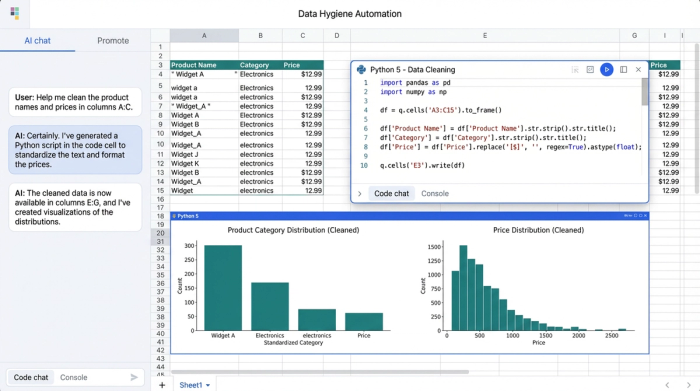
This is where the "Visual + Code" advantage transforms your workflow. In a traditional tool, if you need to remove whitespace from 10,000 SKUs, you might rely on a "Find and Replace" function or a complex formula that slows down the sheet.
In Quadratic, you can use Python directly in a cell to clean data instantly. For example, you can write a short script to trim whitespace, standardize capitalization on product descriptions, or merge "First Name" and "Last Name" attributes.
The real power here is reproducibility. When you receive an updated CSV from a vendor next week, you don't have to repeat your manual formatting steps. You simply update the data source, and your Python script runs automatically, cleaning the new data in seconds. You build the logic once, and it works forever.
3. Validating attributes and media links
Cleaning data is half the battle; ensuring it is valid is the other, requiring the application of essential data validation techniques. Quality control is often the most tedious part of product catalog management, involving spot-checking rows to ensure data integrity.
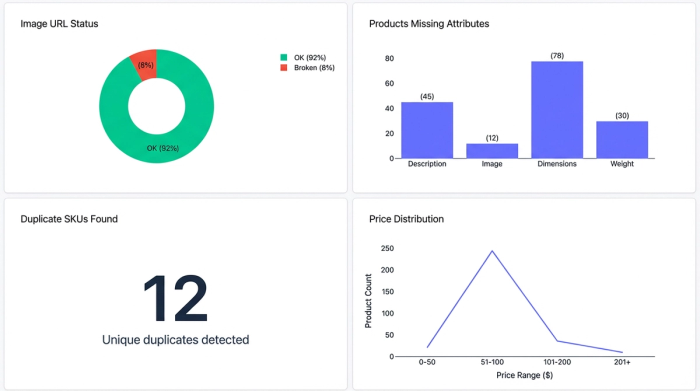
With code-enabled spreadsheets, you can automate validation. Using SQL or Python, you can query your data to flag errors immediately. For instance, you could write a script that checks every image URL in your catalog to ensure it returns a "200 OK" status, instantly identifying broken links before they go live. You can also run SQL queries to identify duplicate SKUs or products missing mandatory attributes like price or weight. This turns your spreadsheet into an active error-detection system.
Why use a code-enabled tool over standard PIMs?
Many growing businesses feel stuck between two extremes. On one side, they have outgrown Excel and Google Sheets, which crash under the weight of large datasets. On the other side, they are not ready for enterprise product catalog management services or Product Information Management (PIM) systems.
Enterprise PIMs are powerful, but they are often rigid and expensive. Implementing a full product catalogue management system can take months, and making simple changes—like adding a new column for a seasonal promotion—often requires submitting a ticket to an IT team.
Quadratic offers a middle ground. It provides the flexibility of a spreadsheet with the power of a database. You get the visual familiarity of rows and columns, but with the ability to handle complex logic and large datasets. It empowers the merchandising professional to own their workflow completely, cleaning and organizing data without the overhead of enterprise software or the fragility of traditional spreadsheets.
Conclusion
Effective product catalog management is not about working harder or staring at rows of data until your eyes blur. It is about using the right tools to automate the repetitive parts of data hygiene so you can focus on strategy and sales.
By moving your workflow into a tool that supports Python and SQL, you eliminate the risk of manual error and the frustration of crashing files. You gain a repeatable, transparent process that turns messy imports into clean, reliable data. Stop formatting cells manually and start automating your catalog workflows with Quadratic.
Use Quadratic to do product catalog management
- Streamline imports: Consolidate messy product data from multiple vendors onto an infinite canvas for clear side-by-side comparison.
- Automate data hygiene: Use Python directly in cells to instantly clean, standardize, and transform product attributes like SKUs and descriptions.
- Validate data proactively: Flag broken image links, duplicate SKUs, or missing attributes with automated SQL and Python queries.
- Scale effortlessly: Manage large product catalogs without spreadsheet crashes, treating your data as structured tables.
- Build reproducible workflows: Set up cleaning and validation logic once, then apply it automatically to all future data imports.
Start automating your catalog workflows today. Try Quadratic
