
Large Language Models (LLMs) have transformed how we generate text and write code, but for data professionals, the experience often hits a wall. You likely know the frustration of the "Copy-Paste Loop." You export a CSV from your database, paste a snippet into a chatbot, prompt it for analysis, and then paste the result back into a spreadsheet or slide deck.
This detached workflow breaks your context. It creates security risks by moving data into third-party windows, and perhaps most critically, it creates a "Black Box." You get an answer, but you cannot easily see the logic used to derive it. If you are a data analyst or technical operator looking for a ChatGPT alternative that actually fits your workflow, you don't need a smarter chatbot; you need a smarter data canvas.
Enter Quadratic, which offers AI spreadsheet analysis that solves the problem of detached data by bringing the AI directly into the grid.
Why "detached" chatbots fail at data analysis
If you search for the best ChatGPT alternatives, you will find a list of impressive conversational bots. While tools like Claude or Gemini are excellent at reasoning and creative writing, they share a fundamental flaw when applied to data analysis: they are disconnected from your source of truth.
This detachment creates two major anxieties for analysts. First, there is the "Black Box" problem. When you paste financial data into a standard alternative to ChatGPT, the model processes it invisibly. You receive a summary or a calculated metric, but you lack a visible, auditable trail of how that number was calculated. For data governance, "trust me, the bot said so" is not an acceptable citation.
Second, there is the issue of stale data. Chatbots generate static text. The moment your underlying sales figures or marketing spend changes, the analysis provided by the chatbot is obsolete. You are forced to repeat the entire export-paste-prompt cycle. A true alternative for data professionals needs to be integrated, verifiable, and dynamic.
The Quadratic workflow: AI that lives in the cell
Quadratic offers a fundamental shift in how you interact with AI. Instead of treating the AI as a sidebar conversation, Quadratic integrates it as a function that runs alongside Python, SQL, and standard spreadsheet formulas.
We call this "Attached AI." In this workflow, AI agents live inside the cell. You don't just ask for an answer; you use the AI to build the machine that creates the answer. By generating actual code (Python or SQL) directly in the grid, Quadratic ensures that your analysis is reproducible and transparent. It combines the ease of natural language prompting with the rigor of code-based data science.
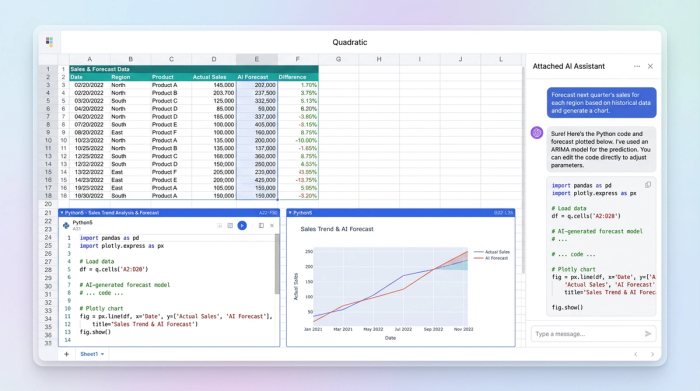
Case study: How a growth analyst uses "Attached AI"
To understand the difference between a standard chatbot and an integrated data workspace, let’s look at a real-world workflow. Consider a growth analyst tasked with merging marketing spend with revenue data to report on campaign efficiency. Here is how they use Quadratic to bypass the friction of detached tools.
1. Cleaning data without the copy-paste
The analyst starts by importing raw exports—messy CSVs with inconsistent date formatting and currency symbols. In a traditional workflow, they might paste this mess into a chatbot and ask it to "clean this."
In Quadratic, the data never leaves the secure environment. The analyst simply selects the column and prompts the in-sheet AI to "write a Python script to parse these dates and remove currency symbols." The AI generates the Python code directly in the cell, executing the transformation instantly. The data remains secure, and the cleaning logic is saved as code that can be inspected or tweaked later.
2. Generating formulas you can trust
Once the data is clean, the analyst needs to calculate complex metrics, such as Customer Acquisition Cost (CAC) weighted by channel. Writing complex SQL or Python queries from scratch can be time-consuming.
Instead of searching for a free ChatGPT alternative to generate code snippets that must be copied and pasted, the analyst asks Quadratic to generate the formula in place. The AI writes the SQL query to join the tables and calculate the metric. Because the code runs immediately within the grid, the analyst can verify the output instantly. If the numbers look off, they can tweak the generated code directly, bridging the gap between natural language and technical execution.
3. Building a visible audit trail
One of the biggest gaps in the current market of ChatGPT alternatives is governance. In this workflow, the analyst builds a clear "prompt-to-result" lineage.
Anyone viewing the spreadsheet can see the progression:
1. Input: The raw data tables.
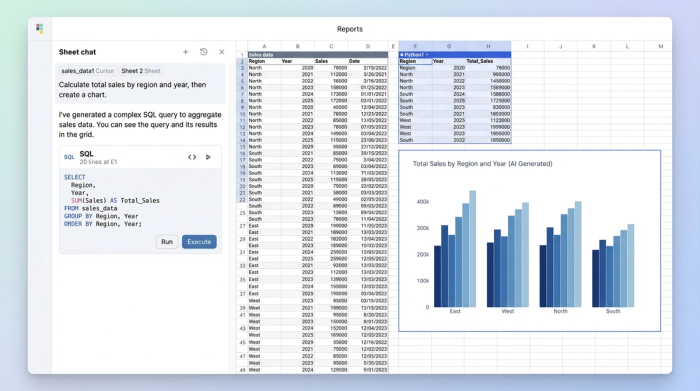
2. Transformation: The AI-generated Python/SQL code (visible and editable).
3. Output: The final clean dataset.
This eliminates the "Black Box." If a stakeholder asks why a specific KPI dropped, the analyst doesn't have to guess what the chatbot was thinking. They can point to the specific line of code that processed the data, ensuring full auditability.
4. Creating dynamic narratives
Finally, the analyst needs to create a summary data table for the weekly report. In a detached chatbot, this summary is static text. Next week, when new data arrives, the text is useless.
In Quadratic, the analyst prompts the AI to write a dynamic narrative that references the computed cells. The AI generates a text block that links directly to the data. When the analyst pastes in next week’s raw data, the Python scripts rerun, the metrics update, and the AI-generated narrative automatically refreshes to reflect the new numbers. This turns a one-off task into a repeatable, automated workflow.
Top ChatGPT alternatives compared
If you are evaluating the best data science tools, it helps to understand where different platforms excel. While many users search for a ChatGPT alternative free of charge, the true cost is often verified in efficiency and accuracy. Here is how the top contenders stack up for data professionals:
- Quadratic: The best choice for data analysis, AI data modeling, and technical operations. It is the only option that integrates AI, Python, and SQL directly into the spreadsheet grid, offering "Attached AI" that ensures data freshness and auditability.
- Claude / Gemini: These are likely the best ChatGPT alternatives for creative writing, brainstorming, and general coding assistance. They excel at long-context reasoning but suffer from the "detached" workflow issues when handling structured data analysis.
- Microsoft Copilot: A strong option for enterprise users deeply embedded in the Office 365 ecosystem. It offers integration with Excel AI but is often constrained by row limits and the traditional limitations of standard spreadsheet formulas compared to Quadratic’s Python-native environment.
Conclusion
Data professionals should stop settling for chatbots that force them to work outside their data. The copy-paste loop is not just annoying; it is a liability that degrades the quality and security of your analysis.
The best ChatGPT alternative for an analyst is one that empowers you to stay in your flow. By bringing the AI into the cell, Quadratic allows you to clean, model, and visualize data without ever leaving the canvas. It transforms the ephemeral nature of a chat into the permanent, reproducible value of a programmed workflow.
Use Quadratic for AI-powered data analysis
- Eliminate the copy-paste loop: Clean, analyze, and transform data directly within your spreadsheet using AI-generated Python or SQL, keeping your workflow integrated.
- Ensure data security and transparency: Keep sensitive data in a secure environment and gain full visibility into AI-generated code, solving the "Black Box" problem with auditable logic.
- Generate dynamic, verifiable insights: Prompt AI to create complex formulas, queries, and narratives that update automatically with new data, ensuring analyses are always fresh and traceable.
- Integrate AI, Python, and SQL: Leverage the power of natural language prompts to generate and execute code directly in cells, combining spreadsheet familiarity with advanced data science capabilities.
- Automate complex data tasks: From cleaning messy CSVs to building summary tables and dynamic reports, automate repetitive steps with "Attached AI" for reproducible workflows.
Ready to experience data analysis without the copy-paste loop? Try Quadratic.
