Table of contents
- Why traditional contract reviews fail (The operational gap)
- Step 1: Centralizing your data (Ingestion)
- Step 2: Building the weakness analysis & financial audit
- Step 3: Quantifying exposure & risk mitigation
- Step 4: The missing documentation dashboard
- Leverage AI for contract analysis
- The executive summary: Reporting for oversight
- Local vs. digital: When to hire an attorney vs. use software
- Conclusion
- Use Quadratic to do construction contract review
Most construction projects do not bleed money because the contract was poorly written. They bleed money because the enforcement of that contract failed during execution, a common issue linked to poor contract administration.
For Project Managers, Auditors, and Financial Controllers, the phrase "construction contract review" often conjures images of static PDFs, highlighted text, and disconnected spreadsheets. You might have a legal team draft the agreement, but once the project breaks ground, that document usually sits in a drawer until a dispute arises. Meanwhile, the actual project data—payment applications, change orders, and audit notes—lives in a completely different system.
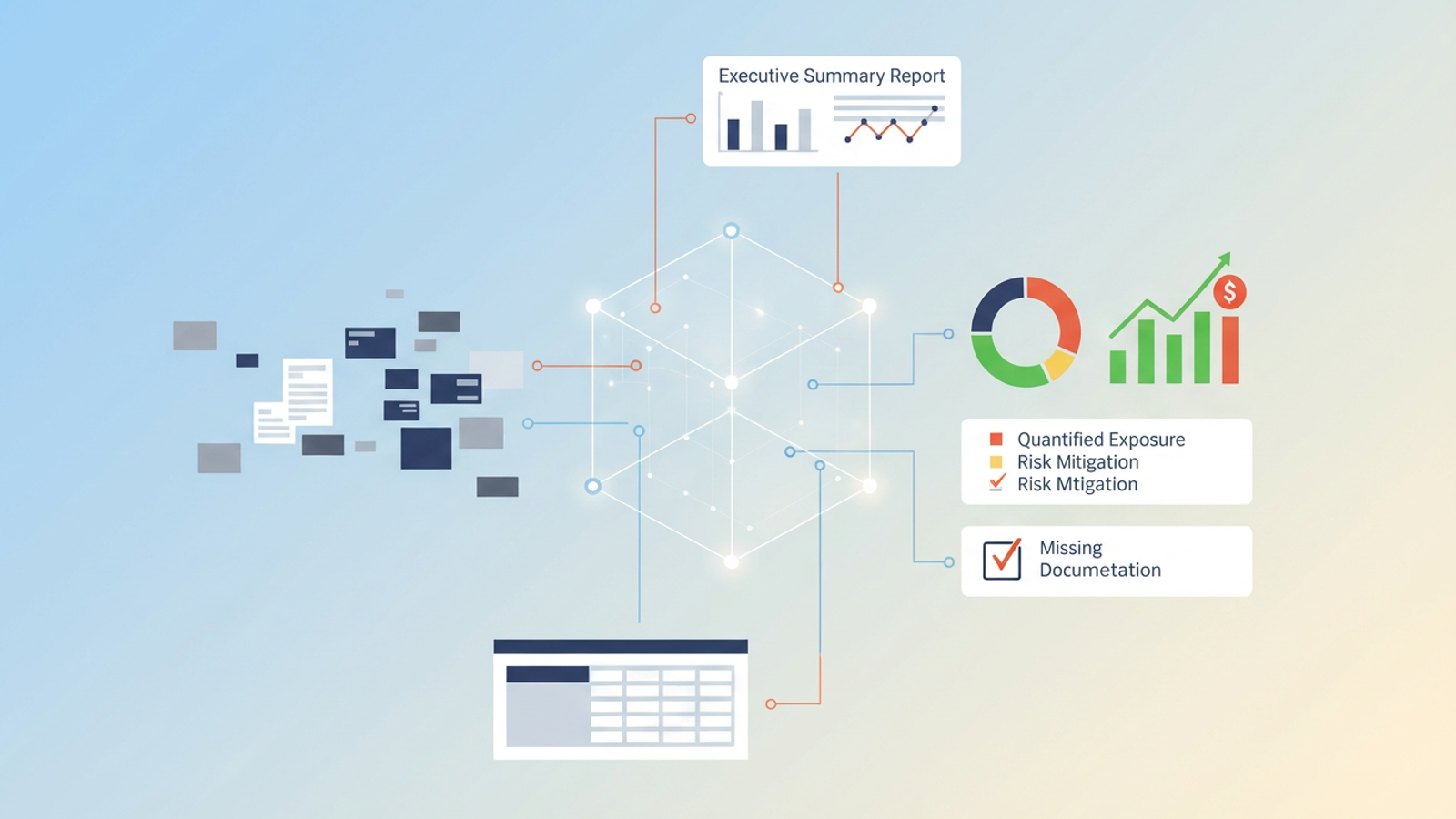
This separation creates a dangerous blind spot. To truly protect a project’s margin, you need to move from a static checklist to a dynamic audit environment. This article explores how a modern Project Manager can use Quadratic to turn a pile of payment records and audit notes into a living Risk Mitigation Dashboard, transforming contract review from a one-time event into an ongoing operational system.
Why traditional contract reviews fail (The operational gap)
The construction industry generally treats contract review as two distinct phases that rarely speak to each other, often diverging from a comprehensive good practice contract management framework. First, there is the capital construction contracting reviews, which happens before signing. This is high-level strategy and risk allocation. Second, there is the daily operational auditing, which happens in the field and the finance office.
The failure point lies in the "Data Silo" problem, and academic research highlights the significant financial implications of these challenges. The contract terms regarding retainage, stored materials, and lien waivers are locked in a PDF. Your payment records are in an ERP or a CSV export. Your audit notes regarding work quality are buried in email chains.
When you search for a Miami attorney construction contract review, you are looking for someone to handle the legal language and liability clauses. That is a critical step for validity. However, an attorney cannot verify if your subcontractor’s Payment Application #4 matches the completion percentage stipulated in Clause 7.2. That operational enforcement falls on the Project Manager.
Without a tool to bridge these elements, you are forced to manually cross-reference data. This manual process is slow, prone to human error, and usually happens weeks after the money has already left the door. To fix this, you need a system that ingests financial data and tests it against contract logic in real time.
Step 1: Centralizing your data (Ingestion)
The first step in a dynamic review is bringing the mess into one place. In a traditional spreadsheet, you are often limited by rigid grid structures that make it difficult to view disparate data types side-by-side.
In Quadratic, a Project Manager can utilize the infinite canvas to view the entire landscape of the project. The workflow begins by importing the raw data. You can pull in your payment records—exported as CSV or Excel files from your accounting software—directly onto the canvas. Next to this quantitative data, you can copy and paste the qualitative audit notes regarding project execution, such as site observation reports or email threads regarding delays.
This differs significantly from standard construction contract management software reviews you might read about, which often describe rigid platforms with pre-set fields. By placing raw financial data next to unstructured audit notes on an infinite canvas, you create a context-rich environment where the numbers and the narrative exist together.
Step 2: Building the weakness analysis & financial audit
Once the data is centralized, the "review" moves from reading to calculating. This is where you build the Weakness Analysis and conduct a financial audit.
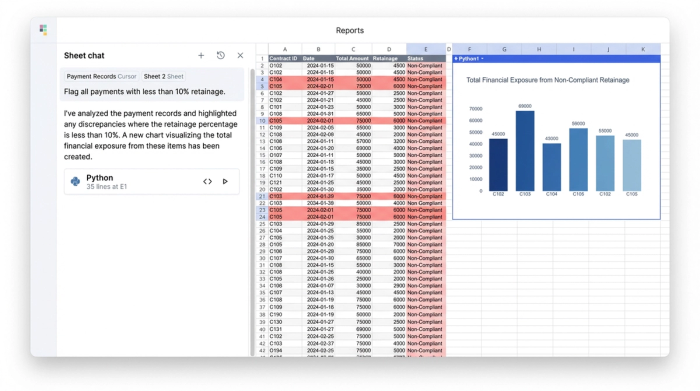
Instead of manually checking each payment application, you can use formulas or Python within Quadratic to cross-reference payment records against the contract terms.
For example, if your contract stipulates a 10% retainage on all labor costs, you do not need to check this with a calculator. You can write a formula that references the "Labor" column in your payment records and flags any row where the withheld amount is less than 10%.
This automated approach renders the traditional construction contract review checklist obsolete. A paper checklist relies on a human remembering to check a box. A formulaic audit, effectively performing automated compliance checks, checks the math for you, instantly identifying every instance where the project has deviated from the agreed-upon terms. If a contractor bills for stored materials without the required insurance certificate, the data model should flag it immediately based on the logic you define.
Step 3: Quantifying exposure & risk mitigation
Identifying an error is only half the battle. The goal of this system is to quantify the financial exposure so you can prioritize which fires to put out first.
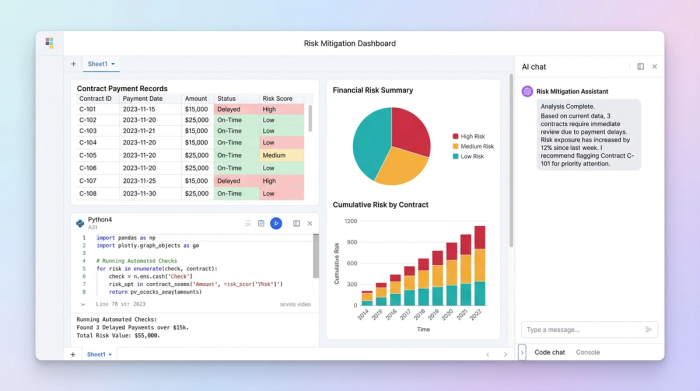
In this phase of the use case, the Project Manager creates a specific section on the Quadratic canvas labeled "High-Priority Risk Mitigation." Here, you can sum up the total dollar value of the flags generated in the Weakness Analysis.
For instance, if you identified five instances of missed retainage and three instances of unverified change orders, the system calculates the total financial risk. This allows you to move from vague concerns to concrete data: "We have $45,000 in unverified exposure this month."
Next to these calculations, you can build a mitigation table. This simple structure defines actionable steps for each flagged issue.
- Issue: Missing Lien Waiver for Subcontractor A.
- Exposure: $12,500.
- Action: Hold Payment until document receipt.
- Owner: Project Manager.
This turns construction contract review into a financial shield. You are no longer just reading clauses; you are quantifying the cost of non-compliance.
Step 4: The missing documentation dashboard
A common requirement in construction audits is tracking the mountain of required paperwork. The user in our use case needed a specific "Missing Documentation Checklist" to ensure governance.
In Quadratic, you can create a visual "Traffic Light" system (Red/Yellow/Green) to track these requirements. By listing the required documents for each pay app—insurance certificates, sworn statements, lien waivers, safety logs—you can use conditional formatting to highlight gaps.
If a cell is empty where a date should be, the row turns Red. If the document is under review, it turns Yellow. This serves as a weekly monitoring dashboard for the team. Rather than digging through file folders to see what is missing, the team can look at the dashboard during the Monday morning meeting and see exactly which documents are holding up cash flow.
This flexibility allows you to build a system that adapts to the specific documents required by your unique project, positioning Quadratic as a powerful no-code database for construction contract review compared to rigid, off-the-shelf alternatives.
Leverage AI for contract analysis
For teams looking to modernize further, integrating AI can accelerate the review of dense legal text. Because Quadratic supports native Python integration, advanced users can connect to Large Language Models (like OpenAI) directly from the spreadsheet to assist with the text-heavy portions of the review.
You can paste the text of complex contract clauses into a cell and use Python to send that text to an AI model with a prompt to "Summarize the indemnification requirements" or "Extract all submission deadlines."
The future of AI construction contract review is not a black box that makes decisions for you. It is a tool that extracts data from paragraphs of text so you can use it in your analysis. Using Python for AI contract review construction workflows allows you to automatically pull key dates—like "Substantial Completion" or "Notice to Cure" timelines—and feed them directly into your schedule or alert system.
The executive summary: Reporting for oversight
The final deliverable in this workflow is the Executive Summary Report. Senior management and project owners do not need to see every missing lien waiver; they need to know the project's health status.
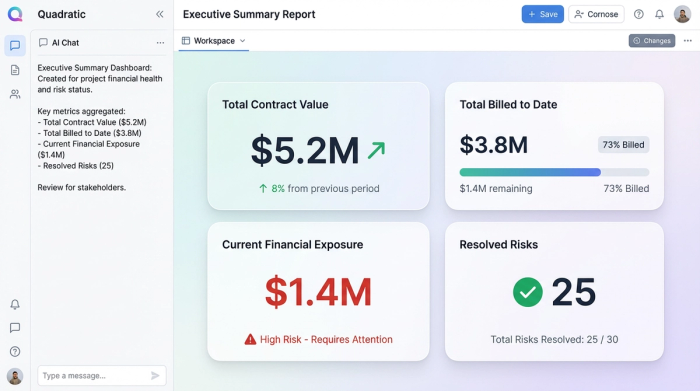
On the top layer of your Quadratic canvas, you can aggregate the key metrics from all the detailed sections below. This summary should display:
- Total Contract Value
- Total Billed to Date
- Current Financial Exposure (Risk)
- Resolved Risks (This Period)
- Pending Actions
Because this report is linked to the underlying data, it updates automatically. When a Project Manager marks a risk as "Resolved" in the mitigation table, the exposure number in the Executive Summary drops in real time. This restores proper governance and compliance, providing stakeholders with a transparent view of the project without requiring the PM to spend hours manually compiling a report.
Local vs. digital: When to hire an attorney vs. use software
It is important to distinguish between legal drafting and project management. If you are at the beginning of a project and need to draft the initial agreement, you should search for a Miami attorney construction contract review (or a firm in your specific jurisdiction) to ensure the contract is legally valid and enforceable under local law.
However, once that contract is signed, the management of that contract becomes a data challenge. Whether you are building in Florida or looking for construction contract review Colorado services, the math of project management remains the same. A 10% retainage error is a financial loss regardless of the state.
For the drafting phase, hire counsel. For the execution phase, use a data tool like Quadratic to ensure the terms that the attorney wrote are actually being followed.
Conclusion
Effective contract review is not about reading; it is about auditing. It requires moving from a static pile of documents to a comprehensive suite of management tools that live and breathe with the project.
By using Quadratic, you can ingest payment records, automate compliance checks, quantify financial risk, and maintain a real-time dashboard for missing documentation. This approach prevents financial leakage and ensures that the contract governs the project in reality, not just in theory.
Stop relying on static checklists that get ignored. Build your dynamic Contract Review Dashboard in Quadratic today.
Use Quadratic to do construction contract review
- Centralize project data: Bring payment applications, audit notes, and contract clauses into one dynamic workspace, eliminating disconnected spreadsheets and static PDFs.
- Automate compliance checks: Instantly cross-reference payment records against contract terms (e.g., retainage percentages, stored materials conditions) using formulas or Python to automatically flag deviations.
- Quantify financial exposure: Calculate the real-time dollar value of non-compliance and build actionable mitigation plans for identified risks, moving from vague concerns to concrete data.
- Track missing documentation: Create a visual "traffic light" dashboard to monitor required paperwork like lien waivers, insurance certificates, and safety logs, quickly identifying gaps.
- Leverage AI for contract analysis: Integrate AI via Python to summarize complex contract clauses and extract key dates or requirements, speeding up the review of dense legal text.
- Generate real-time executive reports: Provide senior management with an automatically updating summary of project health, financial risk, and pending actions, ensuring transparent oversight without manual compilation.
Ready to transform your contract review process? Try Quadratic.
