
Managing a heavy equipment catalog requires more than just listing part numbers and prices. It involves handling massive datasets with strict taxonomy requirements, varying manufacturer standards, and the increasingly critical need for internationalization. For industrial data managers, the challenge often lies in taking a raw export of English part descriptions and transforming it into a localized, procurement-ready asset for global teams.
Traditional spreadsheets struggle to handle this level of complexity. When you need to append foreign language descriptions, such as Russian, and enforce strict character limits across thousands of SKUs, manual copy-pasting is not an option. Conversely, enterprise Product Information Management (PIM) software is often too expensive and rigid for agile data projects. Quadratic offers a powerful middle ground, combining the familiarity of a spreadsheet with the ability to use Python for automated data enrichment. By bringing code directly into the grid, you can transform a static part list into a dynamic heavy equipment parts catalog in a fraction of the time.
The challenge of managing industrial parts data
Industrial data is unique because of its depth and specificity. Unlike retail inventory, which might consist of distinct, unrelated items, heavy machinery data is deeply hierarchical. A dataset resembling a Caterpillar heavy equipment catalog, for example, contains thousands of parts ranging from massive engine blocks and hydraulic assemblies down to the smallest consumables like O-rings and filters.
The difficulty spikes when this data needs to be localized for international supply chains. A simple translation is rarely enough. Technical descriptions must be accurate to ensure the correct part is ordered, preventing costly downtime on a job site. Furthermore, internal databases often have strict formatting constraints. You might need to generate a Russian description that is detailed enough to be useful but concise enough to fit within a 500-character limit. Additionally, these parts need to be sorted into a logical hierarchy (Category and Subcategory) based solely on their descriptions. Doing this manually for thousands of rows is prone to human error and creates a massive bottleneck in the procurement workflow.
Why standard spreadsheets fail at enrichment
Most data managers attempt to solve this problem using standard spreadsheet functions, but they quickly hit a wall. Functions like VLOOKUP or XLOOKUP are designed for data retrieval, not data generation or transformation. They cannot translate text from English to Russian, nor can they parse a description to intelligently assign a category based on context.
To bridge this gap, companies often turn to enterprise PIM software. While these tools are powerful, they require significant implementation time, training, and budget. For a data manager who simply needs to clean and enrich a specific list of parts, a PIM is often overkill.
Quadratic solves this by allowing users to run Python directly within the spreadsheet cells. This capability enables you to process data in bulk using logic and scripts that standard formulas cannot handle, all without leaving the grid interface. You get the flexibility of a coding environment with the visual layout of a spreadsheet.
Step-by-step: Building a multi-language heavy equipment catalog
In this workflow, we will look at how an industrial data professional uses Quadratic to enrich a raw parts list. The goal is to take English part numbers and descriptions and automatically generate Russian translations, categorize the parts, and ensure all text fits within database constraints.
1. Ingesting manufacturer data
The process begins by importing the raw tabular data into Quadratic. This is typically a CSV or Excel file export from a manufacturer or a legacy system. The dataset usually contains the basics: Part Number, Original English Description, and perhaps a generic group code.
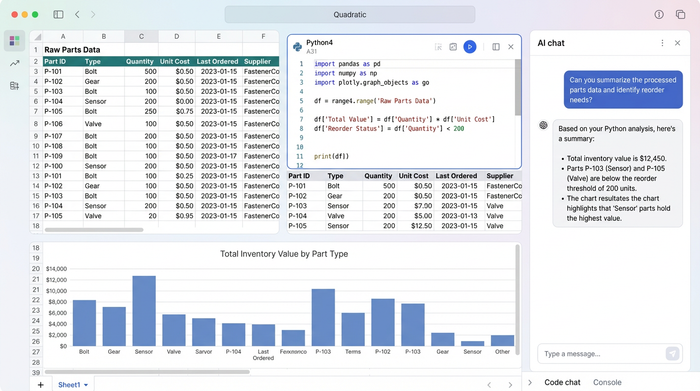
At this stage, the data is unstructured. A "Hydraulic Hose Assembly" might sit right next to a "Piston Ring" without any clear categorization. The immediate goal is to prepare this data for a global audience by adding the necessary context and translation.
2. Automating translation and description with Python
In a standard spreadsheet, translating thousands of rows requires exporting the data to a translation tool and pasting it back in, or paying for an expensive third-party add-on. In Quadratic, you can use Python to automate this directly in the sheet.
Using a Python cell, the user can write a script that iterates through the "English Description" column. The script can utilize translation libraries or connect to an external API to generate the Russian equivalent for each part.
Crucially, this is where the user enforces data governance. The requirement is a description under 500 characters. The Python script can be written to not only translate the text but also check the string length. If the translation exceeds the limit, the script can logically truncate it or flag it for manual review. This ensures that the final heavy equipment parts catalog is fully compatible with the character limits of the organization's ERP or inventory management system.
3. Intelligent categorization
Once the descriptions are translated, the next step is organizing the parts into a usable taxonomy. A flat list of 5,000 parts is difficult to search. The user needs to assign a "Category" and "Subcategory" to each item.
Instead of manually tagging rows, the user writes a Python function in Quadratic to classify items based on keywords found in the description, a process akin to automated product classification. The logic follows a clear set of rules:
- If the description contains "piston," "crankshaft," or "valve," assign Category: Engine and Subcategory: Internal Components.
- If the description contains "hose," "pump," or "cylinder," assign Category: Hydraulics.
- If the description contains "filter" or "seal," assign Category: Consumables.
This automated approach ensures consistency across the catalog. It eliminates the risk of one user tagging a part as "Motor" and another tagging it as "Engine," keeping the data clean and searchable.
Visualizing the data for procurement
After the enrichment process is complete, the user has a comprehensive view of the data. The spreadsheet now displays the original Part Number and English Description alongside the new Russian Description, Category, and Subcategory.
This visual validation is essential for procurement teams. A purchasing agent in a Russian-speaking region can now look up a part number and see the technical details in their native language, alongside the correct classification. Because the data resides in Quadratic, the user can easily filter by "Hydraulics" or "Engines" to audit the results or export the enriched dataset for upload into a master procurement system. The result is a significant reduction in ordering errors and administrative overhead.
Conclusion
Transforming a raw parts list into a functional heavy equipment catalog, a key aspect of effective product catalog management, does not have to be a manual struggle or an expensive software project. By moving beyond standard formulas and utilizing a programmable spreadsheet, data professionals can leverage data automation software to automate the tedious tasks of translation, formatting, and categorization.
Quadratic empowers users to handle complex industrial data with the speed and accuracy of code, all within a familiar interface. This approach saves countless hours of manual entry and ensures that global procurement teams have access to accurate, localized data. If you are managing large datasets and hitting the limits of traditional tools, try importing your parts list into Quadratic to see how automation can streamline your workflow.
Use Quadratic to do multi-language data enrichment for a heavy equipment catalog
- Automate multi-language translation: Instantly translate thousands of heavy equipment part descriptions from English to any language (e.g., Russian) directly within the spreadsheet using Python.
- Enforce strict data formatting: Automatically apply character limits and other data governance rules to translated descriptions, ensuring compatibility with your ERP or inventory systems.
- Intelligently categorize parts: Use Python to automatically parse descriptions and assign accurate categories and subcategories, creating a searchable and consistent heavy equipment catalog.
- Streamline complex data enrichment: Perform advanced data generation, validation, and transformation tasks that traditional spreadsheets can't handle, all within a familiar grid interface.
- Deliver procurement-ready data: Quickly transform raw manufacturer data into a fully localized, categorized, and compliant heavy equipment parts catalog for global teams, reducing errors and manual effort.
Ready to streamline your heavy equipment catalog management? Try Quadratic.
