
Table of contents
- What is inventory analytics? (and why spreadsheets usually fail)
- The data-first approach: managing multi-sheet inventory
- Step-by-step: building an inventory analytics workflow in Quadratic
- Visualization: building your inventory dashboard
- Evaluating tools for your stack
- Conclusion
- Use Quadratic to do inventory analytics
There is a fundamental difference between inventory tracking and inventory analytics. Tracking tells you that you have 50 units of a specific SKU in Warehouse B. Analytics tells you why you have 50 units, how fast they are depleting, and whether that stock level aligns with your current demand forecasts.
For most operations teams and supply chain managers, this data lives in spreadsheets. You likely have a workbook containing multiple tabs: one for raw stock quantities, another for warehouse locations, and a third for article IDs and metadata. To make sense of this information, you rely on a web of brittle formulas—VLOOKUP, INDEX/MATCH, or XLOOKUP—to cross-reference data across sheets.
As your SKU count grows, these spreadsheets become fragile. A single broken link or a dragged formula that stops ten rows too short can corrupt your entire view of inventory.
The solution isn’t necessarily abandoning spreadsheets for an expensive ERP system. Instead, it requires changing how you interact with data inside the grid. By using a connected python spreadsheet like Quadratic, you can move beyond cell linking and start using SQL and Python to query your data directly. This approach allows you to build a robust inventory analytics workflow that joins stock, location, and ID tables instantly without disrupting your raw data.
What is inventory analytics? (and why spreadsheets usually fail)
Inventory analytics is the process of synthesizing data to optimize stock levels, predict demand, and streamline supply chain operations. While inventory tracking focuses on the present state of your goods, analytics focuses on the trends, relationships, and actionable insights hidden within that data.
Many operations professionals search for dedicated inventory analytics software or the best supply chain analytics tools for inventory management. However, the reality is that most of this data still originates in CSV exports and disparate spreadsheets. The bottleneck isn't usually the lack of data; it is the inability to consolidate it effectively.
Standard spreadsheets struggle with this consolidation because they treat data as physical cells rather than structured information. If you have a "Stock Quantities" sheet and a "Warehouse Locations" sheet, combining them usually involves creating a third sheet full of lookup formulas. This increases the file size and processing time, often leading to crashes. More importantly, it introduces a high risk of manual error when trying to align inventory tracking and analytics by product SKU, with inventory errors estimated to cost businesses anywhere from 10% to 30% of their annual profits. If your lookup value isn't unique or if the data isn't sorted correctly, you might be making purchasing decisions based on incorrect stock levels.
The data-first approach: managing multi-sheet inventory
To solve the multi-sheet chaos, you need to change your approach from linking cells to querying tables, adopting a data-first approach that prioritizes data quality and strategic use from the outset. This is particularly relevant for workflows involving detailed tables for article IDs, stock types, and statuses spread across various sheets.
In a standard spreadsheet, you might try to pull the "Stock Status" from Sheet A into Sheet B to see if an item is "Available" or "Quarantined." If you have 10,000 rows, that is 10,000 formulas recalculating every time you make a change.
In a data-first environment like Quadratic, you treat your spreadsheet tabs like database tables. You import your raw CSVs—one for stock, one for locations, one for metadata—into separate sheets and leave them untouched. This ensures data integrity because you are never manually manipulating the source of truth.
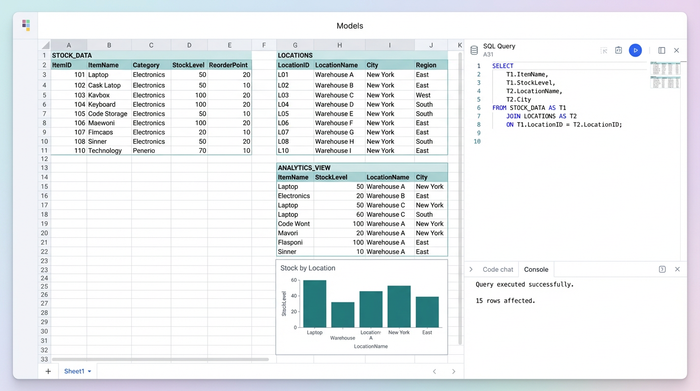
Instead of adding columns to these raw sheets, you create a separate "Analytics View." Instead, you use SQL and Python to pull data from the raw sheets, join them together based on common keys (like Article ID), and output a clean, consolidated table. This allows you to consolidate information without disrupting existing data, keeping your raw exports pure while giving you the flexibility to analyze them deeply.
Step-by-step: building an inventory analytics workflow in Quadratic
Moving from fragile formulas to robust queries simplifies how you manage multi-location stock. Here is how you can build a scalable workflow using Quadratic.
1. Ingesting and structuring data
The first step is bringing your raw datasets into the spreadsheet. In this use case, you likely have three core datasets:
- Table A: Stock Quantities & Status (e.g., Qty, Stock Type, Status).
- Table B: Warehouse Locations & Zones (e.g., Zone ID, Bin Number).
- Table C: Article IDs & Metadata (e.g., SKU, Article Name, Description).
In Quadratic, you can import these CSVs or connect directly to a database. Because Quadratic is built to handle large tabular datasets, you can load tens of thousands of rows without the lag typically associated with Excel or Google Sheets. Once the data is in, it resides in its own sheet, ready to be queried.
2. SQL joins: the VLOOKUP killer
This is where the transition from tracking to analytics happens. In a SQL spreadsheet like Quadratic, you write a single SQL query directly in the cell. For example, to create a master view that shows stock levels alongside location and article details, you would write a query that joins the "Stock" table with the "Location" table on the Article_ID.
This method instantly consolidates multi-location data. You do not need to drag formulas down a column or worry about broken references. If you update the raw data in Table A, the SQL query automatically re-runs and updates your master view. This ensures that your inventory tracking and analytics by product SKU are always accurate and up to date.
3. Python for predictive analytics
Once your data is joined, you can move into advanced territory: inventory management predictive analytics. Using Python (specifically the Pandas library) directly within the Quadratic grid, you can perform complex calculations that are difficult or impossible with standard spreadsheet formulas, making it accessible even if you want to learn python with zero knowledge.
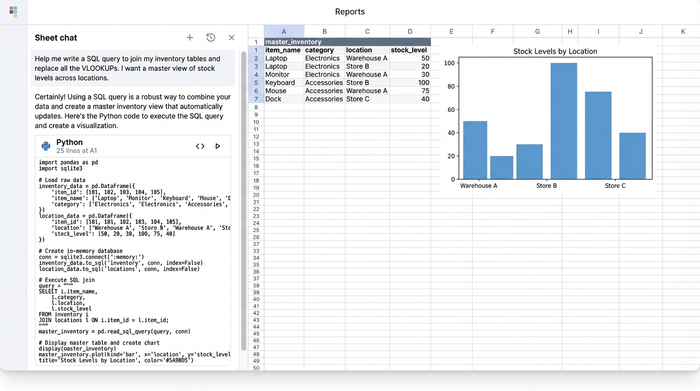
A powerful use case for this is identifying logic mismatches in your warehouse. You can write a Python script to flag items that are listed as "Available" in your system but are physically located in a "Quarantine" or "Damaged" zone. This type of automated discrepancy checking prevents fulfillment errors and helps maintain inventory hygiene.
Visualization: building your inventory dashboard
Visualizing your data is critical for communicating insights to stakeholders. While you could export your consolidated data to a third-party BI tool, you often don't need to.
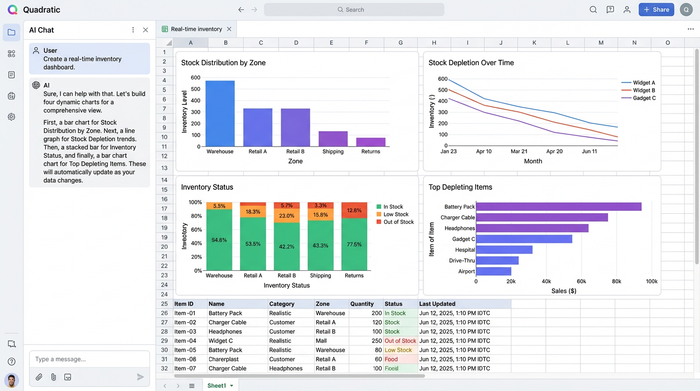
Unlike the best inventory analytics dashboard providers that require complex integrations and separate licenses, Quadratic lets you visualize data where it lives. Because your data is already structured via SQL and Python, creating charts is straightforward.
You can build dynamic bar charts or line graphs that reference your query results. For instance, you might create a visualization showing stock distribution across different warehouse zones or a trend line showing stock depletion over the last 30 days. As your SQL queries process new raw data, these visualizations update automatically, giving you a real-time view of your inventory health without ever leaving the spreadsheet.
Evaluating tools for your stack
When deciding how to build your inventory analytics stack, it is important to choose the right tool for the complexity of your data, understanding the nuances of a database vs spreadsheet.
Standard Spreadsheets (Excel, Google Sheets) are excellent for simple lists and basic tracking where data volume is low (typically under 1,000 rows) and relationships between tables are minimal.
Quadratic is the ideal bridge for teams that need inventory analytics power but want the flexibility of a coding spreadsheet.
Enterprise ERPs are necessary for compliance-heavy environments. You should evaluate logistics data analytics tools like SAP or Oracle if you are in a highly regulated vertical, such as automotive dealership inventory management, where rigid process control is required. However, even in these environments, Quadratic often serves as the agile analytics layer on top of the ERP, allowing analysts to work with data more freely than the rigid ERP interface permits.
Conclusion
Effective inventory management is not just about counting boxes; it is about connecting data points to see the bigger picture. By moving away from fragile inventory tracking templates and cell-linking formulas, you can build a system that actually works for you rather than against you.
Using SQL and Python within a connected spreadsheet allows you to join multi-location data instantly, forecast demand accurately, and identify discrepancies before they become problems. Quadratic offers the environment to build this robust, code-powered inventory system that scales alongside your warehouse operations.
If you are ready to stop fixing broken formulas and start analyzing your supply chain, try building your first SQL-powered inventory model in Quadratic today.
Use Quadratic to do inventory analytics
- Eliminate brittle
VLOOKUPformulas: Use SQL to instantly join multi-location stock data, article IDs, and warehouse details from separate sheets without manual linking errors. - Maintain data integrity: Treat raw inventory data sheets as immutable tables, querying them with SQL and Python to create robust analytics views without altering your source data.
- Identify stock discrepancies automatically: Leverage Python directly in the grid to flag logic mismatches, such as "available" items in "quarantine" zones, preventing fulfillment errors.
- Analyze large datasets without lag: Ingest tens of thousands of inventory rows into a single sheet, performing complex calculations and consolidations efficiently.
- Build dynamic, real-time dashboards: Create visualizations that automatically update as your raw inventory data changes, providing an always-current view of stock levels and trends.
Ready to build a more robust inventory system? Try Quadratic.
