
Support operations analysts often inherit the messiest parts of an organization's data. You might be staring at a CSV export from a legacy ticketing system, a dump of unstructured notes from sales calls, or a long list of email signatures pasted into a document. Buried within that noise is valuable contact information, but accessing it is rarely straightforward.
The immediate instinct is to look for standard data cleaning tools, such as a phone number extractor tool. While these tools can successfully scrape digits from a block of text, they rarely solve the actual business problem: data hygiene. Finding the number is only the first step. The real challenge for effective customer data management lies in verifying that the number is valid, identifying the country code, and formatting it so your CRM or dialer software accepts it.
This is where a programmable spreadsheet like Quadratic bridges the gap. Instead of choosing between manual data entry and writing a complex standalone Python script, you can build a transparent extraction workflow directly in your spreadsheet. This guide details how to extract, validate, and standardize contact data into the E.164 format using a workflow that keeps a human in the loop for quality control.
The gold standard: understanding E.164
Before discussing the "how," it is critical to understand the "what." In the world of data management, the target for phone numbers is almost always E.164 compliance. E.164 is the international standard for phone number formats, designed to ensure that a number can be routed correctly across the globe.
A number in E.164 format includes a plus sign (+), the international country calling code, and the subscriber number, with no spaces, hyphens, or parentheses (e.g., +15550102030).
Most modern CRMs, such as Salesforce or HubSpot, and communication APIs like Twilio, require this format to function correctly. However, humans rarely type phone numbers this way. They use dashes, periods, local conventions, and extensions. The best phone number extractor workflow does not just identify a string of digits; it translates human-readable formats into machine-readable E.164 compliance without losing context.
From unstructured text to structured data
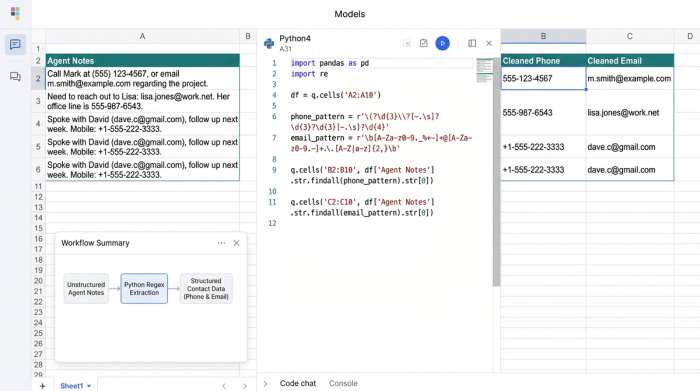
Consider a common scenario for a Support Ops analyst. You have a dataset containing thousands of rows of "Agent Notes." These notes are unstructured text blocks where support agents have pasted contact details during triage. The data is messy; some entries contain email addresses, some have landlines, others have mobile numbers, and many contain formatting errors.
Your goal is to parse this column and create a clean, structured table with separate columns for verified emails and standardized phone numbers.
Attempting this with standard spreadsheet formulas is frustrating and error-prone. Conversely, using two or three different browser plugins—perhaps an email and phone number extractor alongside a separate validation tool—fragments your workflow and poses security risks when pasting customer data into third-party web forms. In Quadratic, you can consolidate this entire process into a single grid using Python cells that run directly alongside your data.
Step 1: Ingesting and parsing with regex
The first step in the workflow is ingestion. You paste your raw text data into the spreadsheet. Because Quadratic supports Python natively, you don't need to rely on limited spreadsheet functions to find patterns. You can use Regular Expressions (Regex), a powerful sequence of characters that specifies a search pattern.
In a Python cell, you can write a short script to scan your raw text column. Unlike a rigid software tool, working in a code-enabled spreadsheet allows you to tweak the Regex logic to fit your specific data oddities. For example, if your dataset heavily features international clients, you can adjust the pattern to be more permissive with length.
This step is purely about extraction. The script pulls every potential match out of the text block and places it into a new column. This is also where you can categorize the data types. If your project requires a specific cell phone number extractor logic to distinguish mobile formats from landlines for SMS campaigns, you can define those parameters right in the code cell, filtering out numbers that don't match mobile patterns.
Step 2: Validation and normalization (E.164)
Once the raw numbers are extracted, the workflow moves to validation. This is the most distinct advantage of using a programmable spreadsheet over a "black box" tool. A simple extractor might tell you it found "555-1234," but it won't tell you if that number is actually reachable.
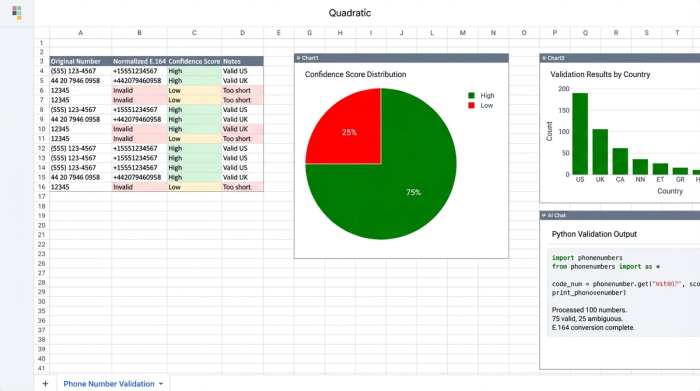
Using Python libraries available in Quadratic, such as phonenumbers (a port of Google's libphonenumber), you can programmatically check the validity of each extracted string. The script attempts to parse the number and convert it to E.164.
Crucially, this workflow introduces a "Confidence Score." If the logic infers a country code (e.g., assuming "+1" for the US) but isn't 100% sure because the format is ambiguous, it can flag that specific cell for review.
This allows for a "human-in-the-loop" approach. Rather than blindly trusting an algorithm, the analyst can glance at the spreadsheet, filter by "Low Confidence," and manually correct the ambiguous entries. You automate the heavy lifting of processing thousands of rows but retain the ability to apply human judgment where it matters most.
Step 3: Deduplication and CRM readiness
After validation, you may find that the same customer appears multiple times with slightly different contact details. A generic phone number extractor extension typically exports a list of every match found, leaving you to deal with duplicates in Excel later.
In this workflow, the final step is a deduplication script. Because the numbers have been normalized to E.164, the system can easily identify that "(555) 123-4567" and "555.123.4567" are the same record. The script merges these duplicates, ensuring that when you export your final CSV or sync to your database, you are uploading unique, clean customer profiles.
Why a spreadsheet workflow beats black-box tools
Building this extraction pipeline in Quadratic offers significant advantages over relying on rigid, single-purpose tools.
Flexibility: Data sources change. If your support team switches ticketing platforms or the format of your raw text changes, you can update the Python logic in your sheet in seconds. You are not locked into the limitations of a vendor's algorithm.
Data Privacy: Security is a major concern for Operations Managers. Pasting lists of customer phone numbers into random web-based extraction tools creates unnecessary risk. By processing data within your own secure spreadsheet environment, you maintain better control over customer information.
Scalability: This workflow handles thousands of rows more efficiently than manual copy-pasting but is significantly faster to set up than a full-scale enterprise ETL (Extract, Transform, Load) tool.
Conclusion
Turning messy, unstructured text into clean contact data doesn't have to be a manual nightmare or a complex engineering project. By using a programmable spreadsheet, Support Ops analysts can build a phone number extraction workflow that is transparent, accurate, and tailored to their specific needs.
The result is E.164 compliant data that is ready for immediate use in your CRM, leading to higher connectivity rates and more effective support operations. Instead of relying on a black box, you can build a glass box—seeing exactly how your data is processed and intervening only when necessary.
To start cleaning your own contact lists with the precision of Python and the ease of a spreadsheet, try building this workflow in Quadratic.
- Extract phone numbers from unstructured text blocks using Python and Regex directly in your spreadsheet.
- Validate and convert numbers to the E.164 international standard, ensuring they are CRM and dialer-ready.
- Implement a "human-in-the-loop" process to review ambiguous extractions, combining automation with precise judgment.
- Deduplicate contact lists automatically after normalization, ensuring unique, clean customer profiles.
- Consolidate your entire data cleaning workflow in one secure environment, eliminating fragmented tools and privacy risks.
- Adapt your extraction logic instantly to new data formats without relying on rigid, black-box software.
Ready to clean your contact data efficiently and accurately? Try Quadratic.
