
Your billing details are in Stripe, your sales context lives in Salesforce, support tickets are piling up in Zendesk, and product usage logs are sitting in a separate analytics tool. You know that somewhere in that fragmented mess lies a clear picture of who your customer is, but you can’t see it.
For most lifecycle marketers and growth managers, the advice for solving this problem usually involves two unappealing options: buy an expensive enterprise software suite that takes months to integrate, or file a ticket with the data engineering team and wait weeks for a response.
You can build a "Customer 360" view directly in a no code database using AI. You don’t need a massive data warehouse to master customer data management; you need a flexible workspace where AI handles the heavy lifting of cleaning, connecting, and unifying your records. By using Quadratic, you can bridge the gap between raw data and revenue-driving strategy without writing complex code or waiting on IT.
At its core, customer data management is the active process of ingesting, cleaning, and unifying data from multiple sources to create a single, trusted user profile. It is not simply storage; it is the strategic organization of information to drive business outcomes.
This process is notoriously difficult because data is rarely clean or consistent. You are often dealing with two distinct types of information: customer relationship management data, which is frequently entered manually and prone to human error (typos, duplicate entries), and system data, such as rigid transaction logs or event streams.
When you try to merge a manually typed company name from a CRM with a precise billing ID from a payment processor, things break. Without a robust customer data management system, teams are left guessing which record is accurate, leading to embarrassing marketing errors like sending a "Welcome" email to a churned client or an upsell offer to a customer with an open support ticket. Modern customer data management solutions aim to solve this by creating a reliable flow of information between these disconnected silos.
The gap: Excel vs. enterprise CDPs
When marketers try to solve this problem, they often fall into one of two traps.
The first is the spreadsheet trap. You export CSVs from every tool and try to stitch them together in standard Excel or Google Sheets. This works for the first few thousand rows, but eventually, the system buckles. You hit row limits, the workbook crashes, and you find yourself in "VLOOKUP hell," manually trying to match rows that don't quite align.
The second is the enterprise trap. You might look for dedicated software, leading to the debate of a customer data platform vs data management platform. While a Customer Data Platform (CDP) is powerful, it is often prohibitively expensive and rigid, designed for massive enterprises with dedicated technical teams. A Data Management Platform (DMP), on the other hand, is typically focused on anonymous ad-targeting audiences rather than known customer profiles.
Quadratic positions itself as the bridge between these two worlds. It offers the flexibility and familiarity of a spreadsheet interface but backs it with the computational power and AI capabilities usually reserved for complex data engineering tools.
Step-by-step: Building a unified customer view in Quadratic
1. Centralize your data sources
The first step is bringing your data into one view. In a traditional workflow, this involves opening five different browser tabs and downloading five different files. Imagine pulling your product analytics (to see usage frequency), your CRM exports (to see sales context), your billing data (to see plan value), and your support logs (to see sentiment) onto a single infinite canvas.
Because Quadratic supports Python and SQL natively within the grid, you aren't limited by standard cell counts. You can place these datasets side-by-side in the same workspace, allowing you to visualize the connections between a user’s payment history and their recent support tickets instantly.
2. Automate data hygiene with AI
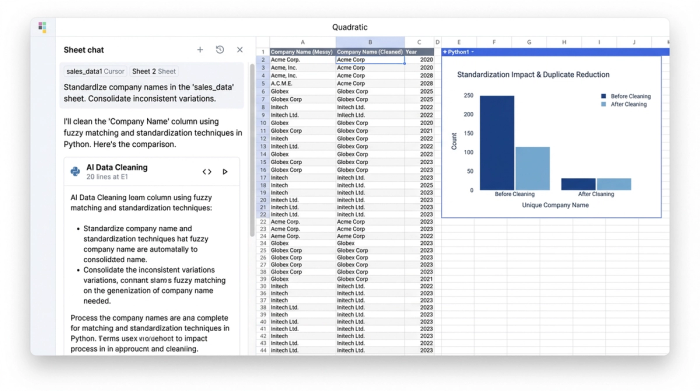
Once the data is in one place, you will immediately notice the "dirty data" problem. Your CRM might list a client as "Acme Inc.," while your billing system lists them as "Acme, LLC," and your support tool just says "Acme." A standard spreadsheet requires complex formulas or manual editing to fix this.
In Quadratic, you can utilize built-in AI to handle this hygiene. Instead of writing complex Regex formulas to strip out suffixes, you can simply prompt the AI to "Standardize company names in column A and identify potential duplicates." The AI acts as an intelligent assistant, scanning the rows and applying logic to normalize the text. This is a lightweight form of customer master data management, the practice of creating a "golden record" that serves as the absolute truth for your organization.
3. Identity resolution: Creating the "canonical ID"
With standardized names, the next step is identity resolution. This is the process of linking the email address in your CRM to the User ID in your product analytics.
Using a combination of SQL queries or Python scripts right inside the sheet, you can join these disparate tables. You might map the Stripe customer_email to the Salesforce Contact Email, creating a new, unified table. This "Customer 360" table becomes your source of truth. It contains one row per customer, with columns aggregating data from all sources: total spend, last login date, account manager, and open ticket count.
From raw data to lifecycle marketing
You can move beyond maintenance and start analyzing lifecycle stages using various data analytics techniques.
Deriving insights for segmentation
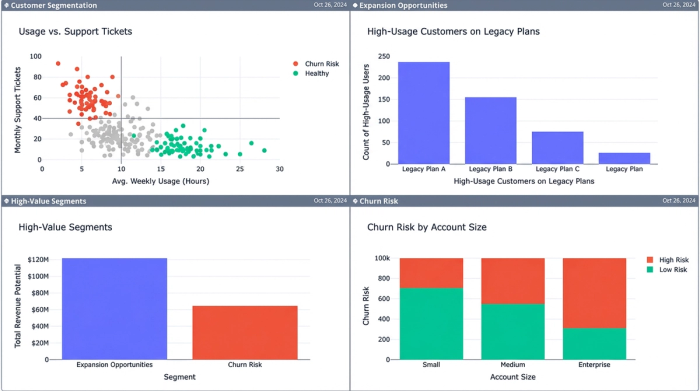
With a unified table, you can ask questions that were previously impossible to answer. You can identify churn risk by filtering for customers who have a high number of support tickets combined with low product usage. Conversely, you can spot expansion opportunities by finding accounts with high usage that are still on legacy pricing plans.
This approach applies across industries. For example, in retail customer data management, a similar process allows teams to connect in-store point-of-sale data with online browsing history. By unifying these records, a retailer can see that a customer who buys jeans in-store often browses for belts online a week later, opening up precise cross-selling opportunities.
Activating the data
Clean data shouldn't just sit in a spreadsheet; it needs to drive action. In Quadratic, once you have defined your segments—such as an "Activation Cohort" of users who signed up but haven't utilized a key feature—you can generate that list and export it directly. These refined lists can be pushed back into email marketing tools or CRMs, ensuring your campaigns are based on real-time, accurate behavior rather than stale assumptions.
Why AI is the future of customer data management software
Historically, only someone with a computer science degree could perform the joins and transformations required to build a Customer 360 view.
Today, customer data management software must be accessible to the people who actually use the data. By bringing AI into a programmable spreadsheet, Quadratic democratizes this capability. You get the speed of a startup—moving from raw export to actionable insight in an afternoon—with the data sophistication of an enterprise, bridging the gap between data science vs data analytics.
Conclusion
A Customer 360 view is often considered the holy grail of growth marketing, but you do not need to wait for a data engineering team to build it for you. By leveraging Quadratic, you can take control of your data, automating the messy work of cleaning and connecting records so you can focus on strategy, enabling a data driven transformation for your business.
You might find that the clarity you have been searching for is just a few AI prompts away, demonstrating the power of AI for business intelligence.
Use Quadratic to build a 360° customer view
- Unify fragmented customer data: Bring all your customer details—from billing (Stripe) to sales (Salesforce) and support (Zendesk)—into one flexible workspace for a complete view.
- Automate data cleaning and standardization with AI: Eliminate "dirty data" problems like inconsistent company names by using AI prompts instead of complex formulas or manual edits.
- Resolve customer identities to create a "golden record": Easily link disparate records, like CRM emails and product user IDs, using native Python or SQL to form a single, trusted "Customer 360" profile.
- Move from raw data to actionable marketing segments fast: Identify churn risks or upsell opportunities by analyzing unified data, then export precise customer lists directly to your marketing tools.
- Skip expensive enterprise CDPs and VLOOKUP hell: Get the power of advanced data management and AI without the cost and rigidity of enterprise software or the limitations of traditional spreadsheets.
Ready to build your own unified customer view and drive smarter marketing actions? Try Quadratic.
