
Table of contents
- The state of the video analytics market (and why you need a custom tool)
- Designing the architecture: departmental vs. consolidated views
- Step 1: Building departmental data sheets with Python
- Step 2: Programming KPI logic and alert conditions
- Step 3: The consolidated dashboard & interactive filters
- Why Python-powered sheets win over standard templates
- Conclusion
- Use Quadratic to build a scalable video marketing analytics system
The video analytics market is exploding, with leading research firms in video marketing analytics projecting massive growth in AI-driven tools and automated reporting. For agencies and operations managers, this boom offers an abundance of external data regarding views, click-through rates, and audience retention. However, having access to external metrics is only half the battle. The real challenge lies in tracking internal operational performance—measuring how efficient your team was in generating those results.
Most agencies struggle to bridge the gap between production costs and performance outcomes. They often rely on fragile spreadsheets that break under the weight of weekly reporting, complex KPI logic, and massive datasets. Formulas become corrupted, links between sheets break, and version control becomes a nightmare.
To solve this, operations leaders are moving toward building a "KPI System" rather than a standard spreadsheet. By using Quadratic—an AI-powered spreadsheet that integrates Python and SQL directly into the grid—you can create a dynamic, self-sustaining dashboard. This approach allows you to track everything from production costs to engagement metrics in a stable environment that scales with your agency.
The state of the video analytics market (and why you need a custom tool)
To understand why a custom build is necessary, it helps to look at the current landscape. The rise of AI video analytics software has democratized access to data. Even specialized sectors, such as the video analytics in banking market, are driving demand for granular, real-time insights. Tools are becoming smarter, faster, and more predictive.
However, a significant gap remains. While many professionals are using analytics tools for video marketing—such as YouTube Studio, Vimeo Analytics, or specialized SaaS platforms—these tools are siloed. They tell you how the video performed, but they rarely connect that performance data with your internal operational data. They cannot answer questions like, "How much did it cost us in editorial hours to generate those 10,000 views?" or "Which client yields the highest engagement relative to production effort?"
A custom dashboard built in Quadratic allows you to blend these two worlds. You can ingest external market data and merge it with your internal production logs to create a true view of agency efficiency. This is not just about observing the video content analytics market; it is about mastering your own business metrics.
Designing the architecture: departmental vs. consolidated views
A robust analytics system requires a separation of concerns. In a standard spreadsheet, trying to cram production logs, distribution metrics, and high-level dashboards into one tab—or even linked tabs—often leads to calculation errors and slow performance.
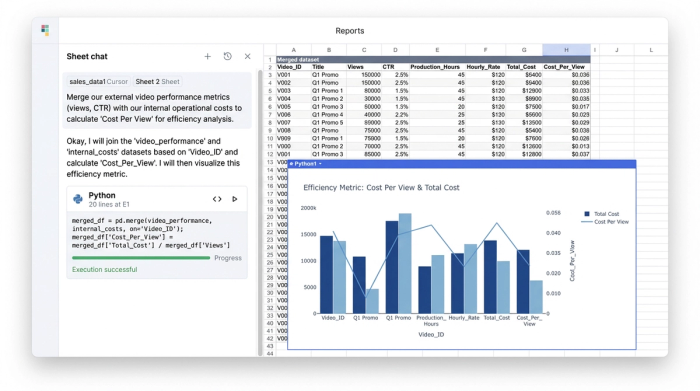
In Quadratic, you can leverage the infinite canvas to organize your system into distinct "zones" that live side-by-side but function independently. For a video agency, the architecture typically follows three stages:
1. Departmental data sheets: These are the granular input zones for specific teams, such as Production, Distribution, and SEO.
2. The "brain": This is where Python scripts and formulas live to process the raw data against targets.
3. Consolidated dashboard: This is the high-level, client-facing or executive view that aggregates the results.
This structure ensures that a video editor logging hours in the production zone does not accidentally break a formula in the executive dashboard.
Step 1: Building departmental data sheets with Python
The first step in building your system is establishing a reliable data pipeline. In traditional spreadsheets, consolidating weekly reports often involves manual copy-pasting or fragile VLOOKUP chains that are prone to user error.
In Quadratic, you can use Python to enforce structure and automate ingestion. Instead of hoping your team formats the date column correctly, you can write a Python script to validate and format incoming data automatically.
For the departmental sheets, you should create specific columns for video content analytics metrics (like Views, Watch Time, and CTR) alongside operational metrics (Hours Logged, Edit Rounds, and Software Costs). Because Quadratic allows you to treat data as Python DataFrames, you can easily merge these datasets based on a unique "Project ID." This ensures that your operational data is always perfectly synced with your performance data, eliminating the "row mismatch" errors common in standard Excel workflows.
Step 2: Programming KPI logic and alert conditions
Once the data is structured, the next step is defining and calculating your KPIs. This is where the "Logic First" approach distinguishes a system from a simple sheet.
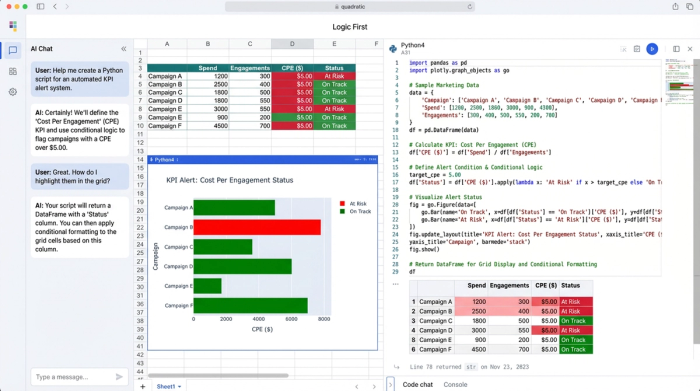
Agencies often need to calculate complex metrics, such as "Cost Per Engagement" or "Resource Utilization Rate." In a traditional spreadsheet, you would write a complex formula and drag it down 5,000 rows. This bloats the file size and slows down calculation speed.
In Quadratic, you can write a single Python function to perform these calculations across the entire dataset instantly. For example, you can calculate the efficiency of a campaign by dividing total production cost by total watch time hours. Because this is done in code, the logic is transparent and easy to audit.
You can also program alert conditions to flag underperformance automatically. Using Python's conditional logic, you can set rules such as: "If Weekly_Output is less than Target, tag the status as 'At Risk'." You can then use this status to trigger conditional formatting, highlighting the cell red. This transforms your dashboard from a passive report into an active monitoring system that alerts you when specific KPIs fall below the agreed-upon threshold.
Step 3: The consolidated dashboard & interactive filters
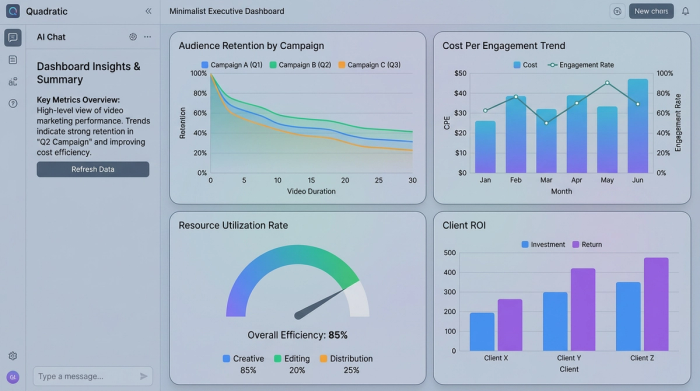
The final piece of the architecture is the consolidated dashboard. This is the visualization layer where stakeholders can view the health of the agency and the performance of their content without seeing the underlying code or raw data.
Using SQL within Quadratic, you can build interactive input fields. For instance, you can create a dropdown menu to "Select Client" or "Select Month." When a user changes this selection, an SQL query runs immediately against your dataframes, filtering the charts and tables to show only the relevant data.
This allows you to arrange the dashboard on the Quadratic canvas so that the technical backend is hidden. The user sees a clean, professional interface featuring "video marketing analytics" summaries, trend lines, and efficiency scores. It offers the interactivity of a BI tool like Tableau but with the flexibility and familiarity of a spreadsheet.
Why Python-powered sheets win over standard templates
When comparing this engineering-grade setup to a standard Excel template, the differences in stability and scalability are clear.
Standard spreadsheets are fragile. They break when data scales, they are difficult to debug when complex logic is involved, and they often require manual updates that waste valuable time. They are simply not designed to handle the volume of data required to analyze the modern AI video analytic market effectively.
Quadratic, by contrast, handles large datasets with ease. The logic is readable because it is written in code rather than obscure, nested formulas. The system is reproducible and stable, meaning you can trust the numbers you are presenting to your clients. For professionals in video analytics marketing, this reliability is essential for maintaining client trust and making informed internal decisions.
Conclusion
To succeed in the competitive video analytics market, agencies need internal tools that are as sophisticated as the content they produce. Relying on fragile templates limits your ability to scale and introduces unnecessary risk into your reporting. By building a robust, engineering-grade KPI tracking system with Quadratic, you gain the ability to blend operational and performance data seamlessly. Stop fixing broken formulas and start building a system that works for you.
Use Quadratic to build a scalable video marketing analytics system
- Connect operational costs to video performance: Seamlessly blend external video performance metrics (views, CTR, watch time) with internal production costs (editorial hours, software costs) to calculate true efficiency and return on investment.
- Automate data ingestion and validation: Use Python to automatically structure, validate, and format incoming data, eliminating manual errors and fragile
VLOOKUPchains common in traditional spreadsheets. - Build dynamic, scalable KPI dashboards: Create robust dashboards that scale with your agency, using Python for complex KPI calculations like "cost per engagement" and SQL for interactive filters, without breaking or slowing down.
- Ensure data integrity and auditability: Manage large datasets as Python DataFrames, ensuring operational data perfectly syncs with performance data and providing transparent, auditable calculation logic.
- Proactively monitor video campaign health: Program alert conditions with Python to automatically flag underperforming KPIs, transforming your reports into an active monitoring system.
- Consolidate all analytics in one stable environment: Organize granular departmental data, processing logic, and high-level dashboards on an infinite canvas, preventing accidental formula breaks and ensuring system stability.
Ready to build a robust video marketing analytics system? Try Quadratic.
