
Table of contents
- The gap in modern data management: why spreadsheets need AI
- Step 1: Auto-generating the data catalog
- Step 2: Intelligent schema mapping and lineage
- Step 3: Automating data quality (DQ) checks
- Building your own "AI agent" for data stewardship
- Conclusion: The future of usable data
- Use Quadratic to do AI data management
If you are a data steward, analyst, or the unofficial "data ambassador" for your team, you likely face a recurring dilemma. You are responsible for ensuring data is trustworthy, understandable, and usable, but your tools often work against you, especially when considering that poor data quality costs organizations at least $12.9 million a year on average. You might find yourself trapped in a cycle of manually updating a "Data Catalog" tab in Excel that becomes obsolete the moment a row is added, or perhaps you are looking at expensive enterprise governance platforms that are wildly out of budget for your current needs.
There is a shift happening in how we handle data governance. AI data management is no longer just a high-level strategy reserved for massive corporations with six-figure software licenses. It is becoming a practical, hands-on workflow that can be implemented directly within the spreadsheet environment you already use.
This is where Quadratic changes the equation. By combining the familiarity of a spreadsheet with the power of integrated Python, SQL, and AI, Quadratic allows you to build data management workflows that are automated and intelligent. Instead of manually typing metadata, you can leverage data management with AI to create systems that document, clean, and monitor themselves.
The gap in modern data management: why spreadsheets need AI
To understand why this approach is necessary, it helps to look at the current landscape of data tools. On one end of the spectrum, you have enterprise-grade governance suites. These are powerful but often abstract, requiring strict adherence to complex frameworks that slow down agile teams. on the other end, you have the manual approach: typing descriptions into spreadsheet columns to explain what "Column_X" actually means.
The problem with the manual approach is that spreadsheets are traditionally static. You might spend hours documenting a dataset, but as soon as the data source changes or a new export is pasted in, your documentation is outdated.
This is the gap that AI augmented data management fills. By bringing AI into the spreadsheet, your data environment becomes "active." It doesn't just hold rows and columns; it understands them. With the right AI data management tools, specifically those that integrate code and large language models (LLMs) like Quadratic, you can create a system where the documentation evolves alongside the data.
Step 1: Auto-generating the data catalog
The first step in any data stewardship role is defining what the data actually is. In a traditional workflow, this involves staring at a CSV file and manually typing out definitions for every header. In Quadratic, you can automate this entire process using AI for data management.
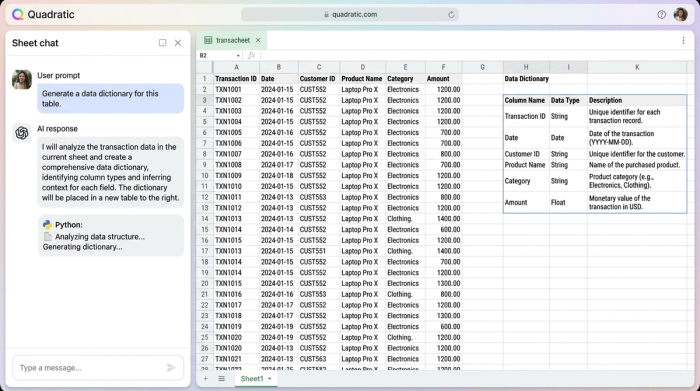
Imagine you import a raw dataset containing thousands of transaction records. Instead of manually reviewing the columns, you can use Quadratic’s integrated AI to analyze the dataset instantly. You can prompt the AI to generate a "Data Dictionary" in a new sheet, effectively automating data summaries with clear explanations. The AI scans the columns, identifies data types (e.g., integers, strings, timestamps), and detects the set of valid values for categorical fields.
For example, the AI can look at a column labeled "status_id" and not only tell you it contains numbers but also infer that it represents order statuses like "Pending," "Shipped," or "Cancelled" based on the context of the data. It then writes these definitions directly into a catalog tab. This application of AI in data management turns hours of documentation drudgery into seconds of review, giving you a baseline of truth without the manual effort.
Step 2: Intelligent schema mapping and lineage
One of the most frustrating aspects of data management is merging data from different sources that use different names for the same thing. Marketing might call a field "Client_ID" while Sales calls it "Cust_Ref." Merging these usually requires complex, brittle VLOOKUP formulas or manual visual checks.
This is where data management and AI truly shine. In Quadratic, you can use AI to propose schema mappings. Because the AI understands the semantic context of the headers—not just the exact character string—it can suggest that "Client_ID" and "Cust_Ref" are likely the same field.
Furthermore, you can document the transformation steps directly in the grid. Because Quadratic runs Python natively, you can perform the merge using code and have the AI generate comments explaining the logic. This creates a clear lineage. You aren't just getting a final joined table; you are getting a transparent record of how the data moved from point A to point B, also known as data lineage. Unlike a standard spreadsheet formula that hides its logic, this approach leaves a readable audit trail.
Moving beyond "manual" governance
This transparency is critical for trust. When stakeholders ask, "Where did this number come from?" you don't have to point to a black-box calculation. You can point to the Python code and the AI-generated explanation that accompanies it. This satisfies the need for compliance and auditability without requiring a heavy external platform.
Step 3: Automating data quality (DQ) checks
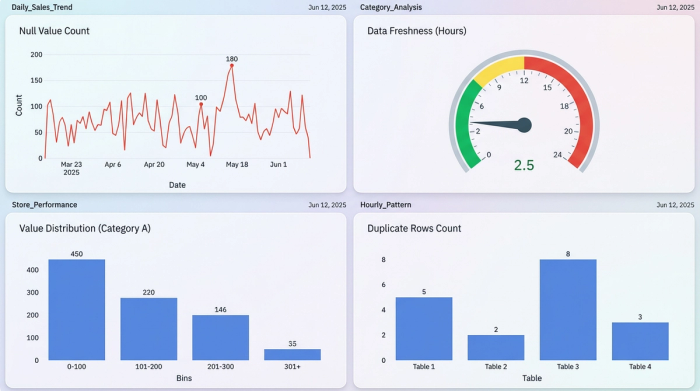
A data catalog is only useful if the underlying data is clean. If your dataset is full of null values or duplicates, the best documentation in the world won't save your analysis. To solve this, you can use Quadratic to set up automated guardrails, positioning it as one of the best AI data management solutions for agile teams.
In this workflow, you don't just store data; you write Python scripts (assisted by AI) to monitor it.
- Completeness: For example, you can implement data validation by setting up a script to flag rows where critical fields, like email addresses or transaction IDs, are missing.
- Freshness: You can automate checks on timestamps to ensure the data isn't stale, alerting you if the latest entry is older than expected.
- Drift detection: Perhaps the most powerful feature is using AI to detect drift. If a new dataset is pasted in and the distribution of values changes significantly—for example, a sudden spike in null values or a change in currency formats—the system can highlight these anomalies immediately, leveraging various methods for detecting drift.
In Quadratic, these checks can trigger visual cues, such as conditional formatting, so you see errors the moment they happen. This transforms data quality from a monthly cleanup task into a real-time, automated process.
Building your own "AI agent" for data stewardship
When you combine these steps—auto-cataloging, intelligent mapping, and automated quality checks—you are doing something strategic. You are effectively building a custom "Agent" for data stewardship.
This concept might sound technical, but AI data management for beginners is surprisingly accessible in Quadratic, demonstrating how AI agents can augment data stewardship. You do not need to be a software engineer to build this agent. You simply need to know your data and use natural language to prompt the AI. You can tell the system, "Check this column for non-standard state abbreviations and highlight them in red," and the AI will generate the Python code to make it happen.
This empowers you to act as a "Data Ambassador." You are bridging the gap between technical requirements and business users, providing a clean, governed environment without waiting for IT to build a data warehouse pipeline.
Conclusion: The future of usable data
The transition from manual data entry to AI and data management is about more than just saving time; it is about reliability. Usable data requires management, but that management shouldn't require endless hours of copy-pasting and manual verification.
Quadratic offers a unique environment where the flexibility of a spreadsheet meets the rigor of code and the intelligence of AI. By adopting these workflows, you can ensure your data is documented, traceable, and high-quality, all while working in a tool that feels familiar. If you are ready to stop fighting with your spreadsheets and start managing your data intelligently, try building your first automated data catalog in Quadratic today.
Use Quadratic to do AI data management
- Automate data cataloging: Use AI to instantly generate data dictionaries that understand column context and infer meanings, replacing tedious manual documentation.
- Intelligently map and merge data: Leverage AI to suggest schema mappings across disparate sources and generate code comments for clear data lineage.
- Automate data quality checks: Implement AI-assisted Python scripts for real-time monitoring of data completeness, freshness, and drift directly within your spreadsheet.
- Build custom data stewardship agents: Empower your team to create automated systems for documenting, cleaning, and monitoring data using natural language prompts.
- Combine spreadsheet flexibility with AI governance: Get robust, automated data management and transparency in a familiar environment, without complex enterprise platforms.
Ready to manage your data intelligently? Try Quadratic.
