
Table of contents
- Why standard spreadsheet validation isn't enough for compliance
- Step 1: Defining the "Golden Schema" (the setup)
- Step 2: Implementing logic and reference tables
- Step 3: The "Fix Queue" – automating error resolution
- Governance & metrics: tracking data quality
- Conclusion: enterprise rigor, spreadsheet flexibility
Business operations teams often run the world on spreadsheets, yet a single typo in a billing ID or a malformed address field can trigger a cascade of downstream compliance failures and revenue loss, contributing to the significant cost of poor data quality. While the flexibility of the grid is unmatched for speed, it is often the enemy of accuracy. This creates a difficult trade-off for managers who must choose between the agility of a spreadsheet and the rigidity of enterprise software.
Data validation is more than just a feature that prevents a user from typing text into a number field. It is a comprehensive governance strategy that ensures data integrity from the moment of entry. The conflict arises when teams try to enforce this governance in standard tools, only to find that the controls are too brittle to sustain high-volume workflows. By implementing a "Golden Schema" within a modern data analytics platform like Quadratic, teams can maintain the flexibility they love while enforcing the strict data quality controls their organization demands.
Why standard spreadsheet validation isn't enough for compliance
For strategic leaders and technical leads, the limitations of standard data validation tools often become apparent during critical audits. The primary issue is fragility. In traditional software, Excel data validation rules are attached to specific cells. If a user copies and pastes data from an external source over those cells, the validation rules are frequently overwritten or deleted entirely without warning. This leaves the dataset vulnerable to the exact errors the rules were designed to prevent.
There is also a significant complexity gap. Modern operations require logic that goes beyond simple dropdowns or number ranges. Teams often need to validate entries against external standards, such as cross-referencing Salesforce data validation address fields or applying complex regex patterns to Tax IDs. Standard cells struggle to process this logic without breaking or slowing down the workbook.
These limitations create a troubleshooting loop that kills productivity. Because the controls are rigid and often buggy, users frequently search for how to remove data validation in Excel just to get their work done. When validation becomes a blocker rather than a guardrail, users strip it out, leaving the process undefined and risky.
Step 1: Defining the "Golden Schema" (the setup)
To solve this, operations teams are moving toward a "Golden Schema" approach inside Quadratic. This workflow begins by establishing a protected "Schema Sheet" that acts as the single source of truth for the entire project. Instead of scattering rules across random cells, the schema defines the required column structures, allowed data types, and formatting standards in one central location.
This approach significantly improves upon the traditional Excel data validation list. In legacy spreadsheets, lists are often static and require manual updates whenever a vendor is added or a SKU changes, a critical aspect of effective product data management. In the Golden Schema workflow, reference lists are dynamic. They can be pulled directly from live databases or master tables. When the master list updates, the validation logic automatically propagates to every cell that references it, ensuring that Excel data input validation remains accurate without manual intervention.
Step 2: Implementing logic and reference tables
Once the schema is defined, the next step is implementing the logic that enforces it. Because Quadratic integrates Python and SQL directly into the grid, teams can write sophisticated validation scripts and perform predictive modeling and analytics that standard formulas cannot handle.
For example, an operations lead can use Python to define strict formatting rules for distinct ID types or date ranges. This capability is essential for diverse use cases. Whether a team is handling financial reconciliation or managing simulation data and experimental dat validation plot journal entries for scientific research, the underlying requirement is the same: the system must process complex technical logic instantly.
In this workflow, the spreadsheet does more than just reject bad data; it provides visual feedback. Conditional flags are programmed to check rows against the Golden Schema in real time. If an "Onboarding Date" is set in the past or a "Region" does not match the allowed territory list, the system automatically flags the row. This allows users to enter data freely while the system quietly marks errors for later review.

Step 3: The "Fix Queue" – automating error resolution
The most powerful differentiator in this workflow is the shift from preventing errors to managing them through robust automating error resolution. In standard data validation in Excel, an error usually results in a pop-up that stops the user in their tracks. In a high-volume data entry environment, this is disruptive.
The Quadratic use case leverages a "Fix Queue." Instead of forcing an analyst to hunt for red cells within a dataset of 10,000 rows, the team uses SQL to generate a specific view that displays only the rows with validation failures. This view acts as a dynamic to-do list.
The logic prioritizes these errors by criticality. A missing Tax ID might appear at the top of the list, while a formatting inconsistency appears at the bottom. As the user corrects the data in the queue, the row automatically disappears from the list. This turns the drudgery of data governance into a gamified, efficient workflow where the goal is simply to clear the queue.
Governance & metrics: tracking data quality
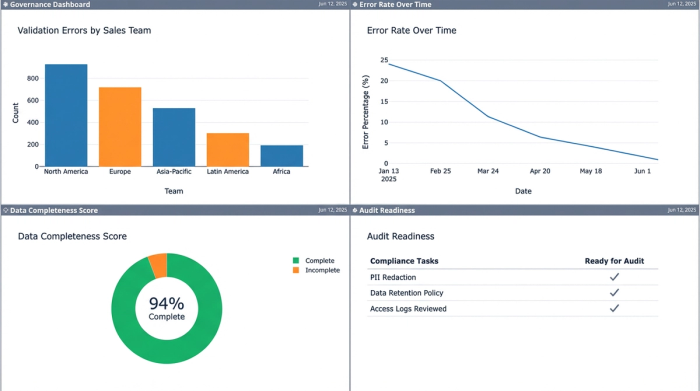
For operations managers and compliance officers, visibility is as important as accuracy. The final piece of the validation workflow is the dashboarding capability. By querying the validation status of the dataset, leaders can build real-time metrics that track data quality by owner or department.
A dashboard might reveal that "Sales Team A" has 15 pending validation errors, while "Sales Team B" has zero. This creates a culture of accountability. It ensures that the dataset is always audit-ready, rather than requiring a mad scramble for data quality checks right before a quarterly review.
Conclusion: enterprise rigor, spreadsheet flexibility
You do not need to abandon the spreadsheet interface to achieve enterprise-grade compliance. The choice isn't between flexible grids and rigid SaaS tools; it is about choosing a spreadsheet that supports true data engineering workflows. By building a Golden Schema and utilizing automated fix queues in Quadratic, teams can stop fighting against their tools and start trusting their data.
Use Quadratic to do data validation for compliance
- Establish a protected "Golden Schema" to prevent validation rules from being overwritten, ensuring data integrity across high-volume workflows.
- Implement complex validation logic using native Python and SQL, cross-referencing external data and applying advanced regex patterns directly within the grid.
- Automate error resolution with a "Fix Queue" that dynamically displays and prioritizes validation failures, allowing users to correct errors efficiently without disruptive pop-ups.
- Maintain dynamic reference lists that automatically update from live databases or master tables, ensuring validation logic is always current without manual intervention.
- Track data quality in real-time with customizable dashboards, providing clear metrics by team or department for enhanced accountability and audit readiness.
Ready to enforce rigorous data quality without losing spreadsheet flexibility? Try Quadratic.
