
For financial planners and sophisticated investors, the search for the best financial calculators for mortgage planning often ends in frustration. Most web-based tools are designed for the average consumer—they ask for a loan amount and an interest rate, then spit out a monthly payment. While this is helpful for a quick estimate, it fails to answer the complex, holistic questions clients actually ask. Can they afford the mortgage while paying for daycare? How does the tax deduction impact their net disposable income over the next decade? What happens if their bonus structure changes?
When you rely on pre-made calculators, you are forced to work within the limitations of someone else's logic. Enterprise financial software, on the other hand, can be prohibitively expensive and too rigid for bespoke client scenarios. The solution for professionals is not to find a better static calculator, but to adopt a builder mindset. Programmable financial modeling bridges the gap between rigid apps and fragile spreadsheets. By using a programmable data environment like Quadratic, you can construct custom mortgage models that account for multi-year horizons, variable income sources, and specific tax implications. This approach transforms a simple calculation into a comprehensive financial narrative.
Why standard mortgage calculators fall short for professionals
The internet is saturated with mortgage calculators, yet few meet the rigorous standards of professional financial planning. These tools generally suffer from a "black box" problem. You input data, and a number comes out, but the underlying logic—specifically regarding tax assumptions, amortization schedules, and insurance estimates—remains hidden. For a fiduciary, relying on opaque calculations is a significant risk. If you cannot verify the math or adjust the assumptions to fit a specific tax bracket, the output is useless for high-stakes decision-making.
Furthermore, standard calculators operate in a vacuum. They suffer from an integration gap where the mortgage data does not talk to the rest of the client's financial life. A standard tool cannot automatically factor in structured financial data such as restricted stock unit vesting schedules, changing dividend yields, or spousal income variations.
Historically, the fallback for this level of detail has been Excel. However, Excel presents its own set of challenges. As models grow in complexity—adding sheets for amortization, tax tables, and cash flow—they become fragile. Links break, formulas get corrupted, and version control becomes a nightmare. Professionals need a middle ground: a tool that offers the flexibility of a spreadsheet but the power and transparency of a software application.
The case for programmable financial modeling
Programmable financial modeling bridges the gap between rigid apps and fragile spreadsheets. In this environment, you are not just filling in cells; you are defining the logic that governs the financial projection. This is essential for creating custom mortgage planning tools that serve as a source of truth for your clients.
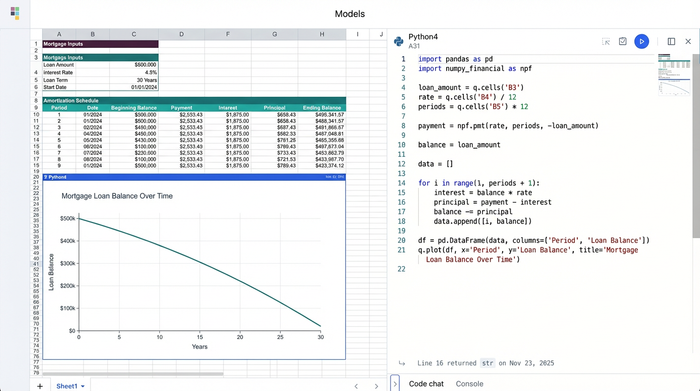
The primary benefit of this approach is transparency. In a tool like Quadratic, you can use Python directly within the grid to handle complex logic. This means anyone reviewing the model can see exactly how a tax rate was applied or how an adjustable-rate mortgage adjusts over time. There is no hidden code.
Customization is the second major advantage. You define the columns, the inputs, and the outputs. If a client needs to see a projection that includes a rental income offset starting in year three, you simply program that variable into the model. Finally, this approach enhances visualization. Instead of switching between a calculator and a presentation deck, you can graph the results instantly next to the data, turning rows of numbers into a clear visual story.
Workflow: building a comprehensive mortgage plan in Quadratic
Building a custom model allows you to answer the specific questions that standard tools ignore. The following workflow outlines how a financial planner can use Quadratic to move beyond simple amortization and create a holistic mortgage plan.
1. Structuring the data inputs
The foundation of any robust model is structured data. In a standard calculator, your inputs are usually limited to "Loan Amount," "Term," and "Rate." In a custom model, you can expand these inputs to reflect reality.
You begin by setting up a "Source" area in your spreadsheet. Here, you define the standard loan parameters, but you also add complex variables that impact affordability. You can input income sources as separate line items—base salary, variable bonuses, and dividends—allowing you to toggle them on or off to test stability.
Crucially, you can model phased living expenses. A common scenario involves clients who currently pay high daycare costs that will disappear in three years, only to be replaced by private school tuition or college savings in year ten. By structuring these expenses as time-based variables rather than a flat monthly number, the model becomes a dynamic reflection of the client's life.
2. Calculating the "real" numbers (Python integration)
Once the data is structured, the next step is processing it to find the metrics that matter. This is where Python integration within the spreadsheet becomes a superpower. Instead of chaining together endless nested formulas that are prone to error, you can write clean, readable Python scripts to handle the heavy lifting.
A specific use case for this is calculating net disposable income. A standard calculator stops at the monthly payment. A custom model goes further. You can write a script that takes the Gross Income, applies specific tax logic (potentially using a Python library for tax brackets), subtracts the mortgage payment, and then subtracts the phased living expenses for that specific year.
The result is a programmatically generated table that shows the "True Disposable Income" for every year of the mortgage. Because this is built with code, the entire multi-year projection updates instantly if you change a single variable, such as the interest rate or the start date of a specific expense. This allows for real-time adjustments during client meetings without the fear of breaking a formula.
3. Visualizing the financial horizon
Data tables are necessary for accuracy, but they are rarely the best way to communicate with a client. The research on visual communication suggests that clients understand their financial health better when they can see the trends. In Quadratic, you can turn your generated data tables into comprehensive financial summaries. You can create a chart that overlays Debt Paydown against "Asset Growth" or visualizes "Disposable Income Trends" over a 10-year horizon. Unlike a static screenshot pasted into a PowerPoint, these visualizations are live. If a client asks, "What if we put 20% down instead of 10%?" you change the input, and the chart updates immediately. This transforms the planner from a data entry clerk into a strategic advisor who uses data storytelling to explain the "why" behind the recommendation.
Advanced features for financial planners
For high-level planning, static data is often insufficient. A robust custom model should be able to pull in outside information. Quadratic allows you to connect to live data sources, meaning your model can automatically fetch current interest rates or update a client's portfolio value before a meeting. This ensures the advice is always based on the most current market conditions.
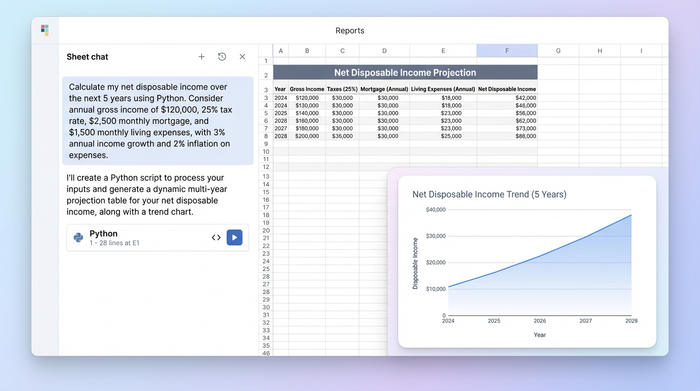
Presentation matters as much as calculation. Professional planners require precise currency formatting and custom column arrangements to make the output client-ready. You can programmatically format your tables to ensure dollar signs, commas, and decimal places are consistent, regardless of how the underlying data changes.
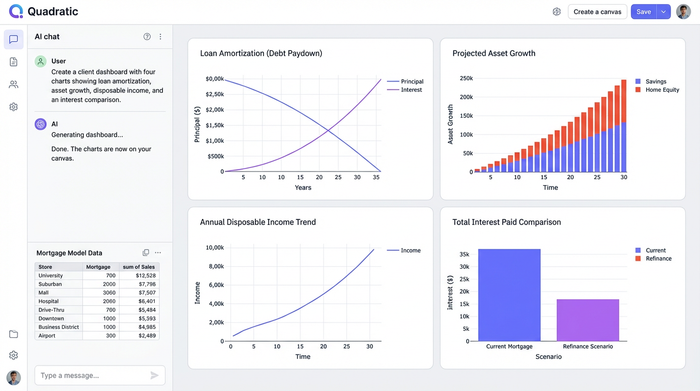
Finally, scenario planning becomes significantly easier. You can duplicate your logic blocks to create side-by-side comparisons—Scenario A (30-year fixed) versus Scenario B (ARM with aggressive paydown)—without having to rebuild the entire spreadsheet. This allows clients to weigh the risks and benefits of different mortgage products based on their unique net disposable income projections.
Summary: the best calculator is the one you control
The search for the best financial calculators for mortgage planning ultimately leads away from pre-canned web tools and toward flexible, programmable environments. For professionals dealing with complex tax brackets, phased expenses, and multi-year horizons, a generic tool will never provide the necessary depth.
By building your own models in a tool like Quadratic, you gain transparency, accuracy, and the ability to tell a compelling financial story. You move from simply quoting a monthly payment to showing a client exactly how a home purchase fits into their life over the next decade. To elevate your planning capabilities, start with a blank canvas or a template in Quadratic and build the exact mortgage projection model your clients need.
Use Quadratic to build custom mortgage planning models
- Build comprehensive, custom mortgage models: Go beyond basic payments to incorporate multi-year horizons, variable income, specific tax implications, and phased living expenses.
- Ensure transparent and verifiable calculations: Use native Python directly within the grid to define complex logic, making every assumption and calculation visible and auditable for fiduciaries.
- Model dynamic client scenarios: Easily factor in changing income sources, structured financial data, and evolving expenses like daycare or college savings over time.
- Visualize financial futures instantly: Turn complex data into live charts that show debt paydown, asset growth, and disposable income trends, updating in real-time with any input changes.
- Conduct robust scenario planning: Compare multiple mortgage options or financial strategies side-by-side to help clients weigh risks and benefits effectively.
- Integrate live data: Connect to external data sources to automatically update interest rates or portfolio values, ensuring your advice is always based on current information.
Ready to elevate your financial planning? Try Quadratic
