
Table of contents
When a financial analyst sits down to create a budget format for an event, they are rarely looking for a simple shopping list of napkins and AV cables. They are building a complex financial model designed to predict profitability, manage cash flow, and determine pricing strategies. The stakes are high because events are volatile. A sudden change in participant count does not just affect catering; it ripples through venue tiers, staffing requirements, and insurance brackets.
The problem with the standard spreadsheet approach is fragility. You spend hours building a "perfect" template, but the moment you link operational costs to revenue projections across different tabs, the model becomes unstable. Formulas break, references get lost, and you end up staring at a #REF! error right before a stakeholder meeting. To fix this, you need to move beyond static templates and adopt a dynamic approach. By using a tool like Quadratic, you can build a resilient financial model where logic is centralized, errors are traceable, and profitability is engineered rather than guessed.
The standard "checklist" approach vs. dynamic modeling
If you search for advice on building a budget, you will mostly find static checklists. These resources tell you to include line items for the venue, catering, marketing, speakers, and contingency funds, which are essential for effective business expense tracking. While these categories are necessary, a list is not a model. A list tracks what you have spent in the past, but it is terrible at projecting what will happen in the future.
The gap between a checklist and a functional financial model becomes obvious when variables start to interact. In a standard spreadsheet, you might have one tab for fixed costs and another for variable revenue based on ticket sales. The moment you try to link these static costs to variable revenue streams, calculation errors inevitably occur. A truly effective budget format for an event must be dynamic. It needs to accept input changes—like a drop in attendance or a hike in vendor prices—and instantly recalculate the bottom line without breaking the underlying formulas.
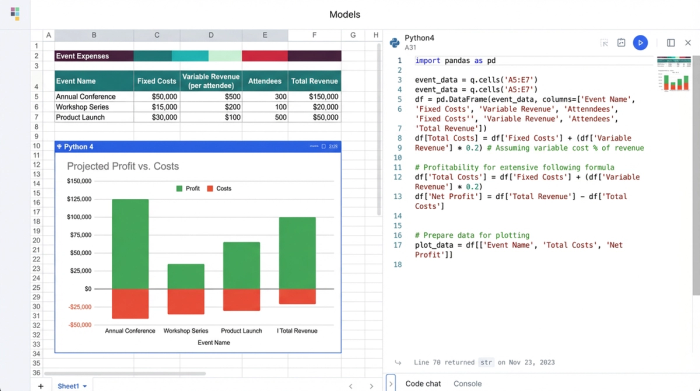
Diagnosing common budget errors
Before you can boost profit, you have to stop the bleeding caused by broken data. For financial analysts, the frustration usually stems from three specific structural failures in traditional spreadsheets, which are part of the common budget errors encountered in financial modeling.
Hidden dependencies
In most spreadsheet tools, the logic that drives the numbers is hidden inside the cells. To audit a budget, you have to click through individual cells to see if a number is a hard value or the result of a formula. This lack of visibility makes it nearly impossible to spot errors until it is too late. You might think your profit margin is healthy, only to realize that a summation formula missed the last three rows of expenses.
Cross-sheet chaos
Event budgets almost always require multiple sheets to separate operational expenses from revenue streams. The issue arises when you attempt to pull data from an "Operational Expenses" sheet into a "Revenue Projection" sheet. In traditional tools, these links are often fragile cell references. If you sort a column or add a row in the source sheet, the reference in the destination sheet might shift, pulling in the wrong data or breaking entirely.
The "hard-code" trap
This is the most dangerous error of all. When a formula breaks or returns an error like #REF!, the temptation is to manually type the correct number over the formula just to get the report finished. This destroys data integrity. The moment you hard-code a number, that cell stops updating when the underlying data changes, turning your dynamic model into a static snapshot that lies to you.
How to fix your format: a step-by-step workflow
To move from a fragile spreadsheet to a robust financial engine, you need to change how you structure your data. Quadratic allows you to combine standard spreadsheet functionality with Python and SQL, giving you the power to fix these structural issues permanently.
Step 1: Centralize your logic
The first step in fixing your format is to bring your logic out of the shadows. In Quadratic, you can use code to define your calculations. Instead of burying a complex IF/THEN statement inside a cell, you can write a clear Python script or formula that defines exactly how costs are calculated. This provides immediate auditability. You do not have to hunt for the error because you can read the logic like a document. If a calculation is wrong, you fix the code in one place, and it updates everywhere.
Step 2: Linking sheets systematically
Stop relying on fragile cell coordinates like Sheet1!C45. When you build your budget in Quadratic, you can treat your data as structured tables or dataframes. This allows you to pull data from your "Operational Expenses" sheet into your "Revenue" sheet based on column names or named variables rather than physical cell locations. If you add a row for "Emergency Security" in your expenses, your revenue sheet automatically accounts for it without you needing to drag and drop formulas.
Step 3: Resolving calculation errors
When a summation error occurs in a traditional spreadsheet, you often have to trace precedents arrow by arrow. In a code-enabled environment, the error usually comes with a specific message telling you exactly what went wrong. Perhaps you tried to divide by zero because the participant count was set to null. Because the logic is visible, you can identify the broken formula at the source and implement a fix that propagates correctly throughout the entire model.
Scenario planning: from "breaking even" to "boosting profit"
Once your data structure is sound, you can stop troubleshooting and start strategizing. A clean budget format for an event transforms your spreadsheet from a calculator into a simulator, enabling effective scenario planning.
Dynamic participant counts
The biggest variable in any event is attendance. In a dynamic model, you can set participant_count as a primary variable. You can write logic that says: "If participants > 500, unlock Tier 2 Catering Pricing." When you change that single number in your dashboard, the model automatically updates the catering costs, venue requirements, and staffing ratios. This lets you instantly see the financial impact of selling 50 more tickets or losing a major sponsor.
Calculating break-even points
With a corrected format, break-even analysis becomes instant. You can set up your sheet to solve for the ticket price required to cover costs. If your venue notifies you of a 10% rent hike, you do not need to rebuild the budget. You simply update the venue cost, and your model tells you exactly how much you need to increase ticket prices to maintain your break-even point.
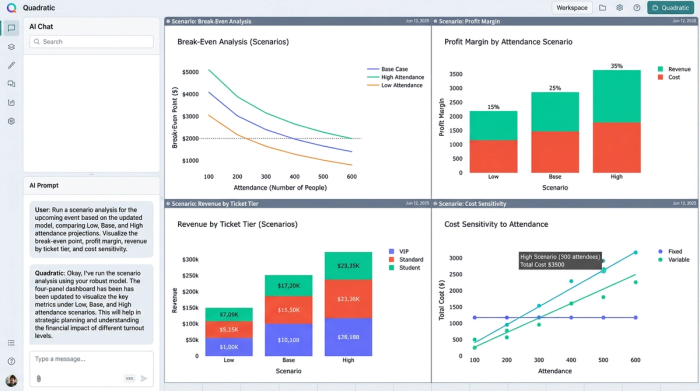
Optimal pricing strategies
Profitability is not just about covering costs; it is about maximizing return through thorough cost benefit analysis. A dynamic model allows you to run "what-if" scenarios, such as a Monte Carlo simulation, to find the sweet spot for pricing. You can test different pricing tiers—such as Early Bird vs. VIP—to see which combination yields the highest ROI. By simulating these scenarios in a risk-free environment, you can make data-driven decisions that directly boost the event's bottom line.
Why auditability matters for event ROI
A clean budget format for an event provides more than just neat rows and columns; it provides trust. When you present a budget to stakeholders, they need to know that the numbers are real. If you are unable to explain how a profit margin was calculated because the formula is hidden or broken, you lose credibility.
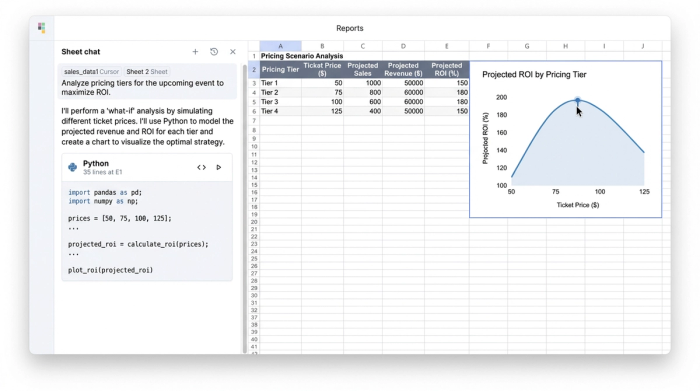
In an environment like Quadratic, the logic is visible. Stakeholders can see the data sources, the variables, and the calculations. This transparency ensures that when you project a 20% profit margin, the team can trust the projection and approve the budget with confidence.
Conclusion
Fixing the errors in your event budget is not just an exercise in housekeeping. It is the foundation of profitability. You cannot optimize what you cannot accurately measure. By moving away from fragile, static checklists and adopting a dynamic, auditable approach, you gain control over the financial chaos that often accompanies event planning.
Stop wrestling with templates that break every time you add a row. Start building resilient financial models that allow you to plan for every scenario. When your budget format for an event works for you, you spend less time fixing formulas and more time ensuring your event is a financial success.
Try Quadratic, the AI spreadsheet that does your work for you
Use Quadratic to Build an Event Budget Format
- Build resilient financial models for events by centralizing logic with code, eliminating fragile cell references and hidden dependencies.
- Instantly recalculate profitability and costs as variables like participant counts or vendor prices change, moving beyond static checklists to dynamic projections.
- Conduct precise scenario planning for break-even analysis, optimal pricing strategies, and "what-if" attendance impacts in a risk-free environment.
- Ensure full auditability and stakeholder trust by making all calculations and data sources transparent, preventing hard-code errors and cross-sheet chaos.
Stop wrestling with templates that break every time you add a row. Start building robust financial models for your events. Try Quadratic, the AI spreadsheet that does your work for you.
