Table of contents
- The basics: Are out of pocket medical expenses tax deductible?
- The math: How much of medical expenses are tax deductible?
- Step 1: Setting up your tax workspace (data ingestion)
- Step 2: Categorizing and compliance
- Step 3: Automating the calculation (the 7.5% rule)
- Step 4: Formatting for submission
- Why use Quadratic for tax prep?
- Final thoughts
- Use Quadratic to manage tax deduction of medical expenses
For many taxpayers and financial professionals, tax season is defined by the "shoebox problem." You have a disorganized collection of receipts, invoices, and explanation of benefits statements, all needing to be reconciled against a specific set of government rules. When it comes to itemizing, figuring out the tax deduction of medical expenses is often the most labor-intensive part of the process. It usually involves a calculator, a static spreadsheet, and a lot of manual cross-referencing that leaves room for error.
Instead of relying on rigid templates, such as a traditional small business bookkeeping template, or paper lists, you can build a dynamic workspace that ingests your raw data, understands the specific math required by the IRS, and formats a report ready for submission. By using Quadratic, you can create an audit-proof tax engine that places your source documents right next to your calculations, automating the complex eligibility logic so you never have to second-guess your math.
The basics: Are out of pocket medical expenses tax deductible?
Before building your workflow, it is important to clarify the eligibility rules to ensure your efforts yield a return. The short answer to the question "are out of pocket medical expenses tax deductible" is yes, but with specific caveats.
First, you must choose to itemize your deductions (using Schedule A) rather than taking the standard deduction. You should only do this if your total itemized deductions exceed the standard deduction amount for your filing status. Second, the expenses must be "qualified." According to IRS Publication 502, this generally includes payments for the diagnosis, cure, mitigation, treatment, or prevention of disease. This covers payments to doctors, dentists, surgeons, psychiatrists, and payments for insulin and prescribed drugs.
However, simply having these receipts does not guarantee a refund. The IRS imposes a strict threshold on the out of pocket medical expenses tax deduction, which brings us to the mathematical challenge of this process.
The math: How much of medical expenses are tax deductible?
The most common point of confusion for taxpayers is determining exactly how much of medical expenses are tax deductible. The IRS does not allow you to deduct every dollar you spent. Instead, you can only deduct the portion of your total medical expenses that exceeds 7.5% of your Adjusted Gross Income (AGI).
For example, if your AGI is $100,000, the first $7,500 of your medical expenses is not deductible. If you spent $10,000 total, you can only claim a deduction of $2,500.
This logic is where standard spreadsheets often fail. Most basic templates require you to perform this calculation manually on the side and plug in the final number. If you find an extra receipt later, you have to redo the side calculation. When you ask "what percentage of medical expenses are tax deductible," the answer depends entirely on your specific income for that year. In the following steps, we will script this logic directly into the spreadsheet using advanced spreadsheet programming so the deduction limit calculates itself automatically.
Step 1: Setting up your tax workspace (data ingestion)
The first step in modernizing your tax preparation is solving the data ingestion gap, which often involves digitizing and formatting financial statements for analysis through methods like OCR financial statements. In a traditional workflow, you might have a PDF viewer open on one half of your screen and a spreadsheet grid on the other, constantly toggling between them to type in numbers.
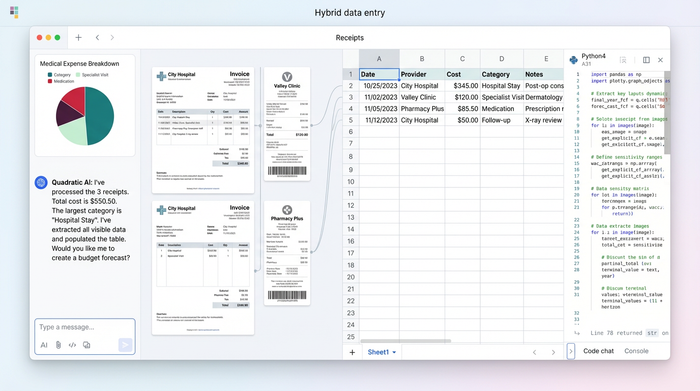
In Quadratic, you can leverage the infinite canvas to streamline this. Because Quadratic allows you to place objects anywhere—not just in the grid—you can copy and paste scanned images of your medical payment certificates, receipts, and invoices directly onto the canvas.
Arrange your scanned receipts visually on the left side of the workspace. On the right, position your data grid. This "split view" allows you to transcribe the data (Date, Service Code, Provider, Cost) from the image into the cells without ever leaving the tab. This creates an immediate audit trail; anyone reviewing the file can simply look to the left of the data row to see the original source document verifying the expense.
Step 2: Categorizing and compliance
Once your data is entered, you need to ensure it is structured correctly for the out of pocket medical expenses tax deduction. In your grid, create distinct columns for "Date of Service," "Description," "Provider," and "Cost."
To ensure compliance, you can use the infinite canvas to create a "Reference Table" separate from your main calculation grid. In this reference table, list the valid categories based on IRS Pub 502 (e.g., "Prescription," "Dental," "Vision," "Mileage"). You can then use this list to validate the data in your main grid, ensuring that every line item you are attempting to claim falls under a qualified category.
This step is critical for professionals managing data for multiple clients, where diligent business expense tracking ensures compliance. By standardizing the categories, you ensure that the final output is clean, consistent, and easy for tax authorities to understand.
Step 3: Automating the calculation (the 7.5% rule)
Now that your data is clean and backed by source documents, you can automate the math. This solves the problem of determining what percent of medical expenses are tax deductible for your specific financial situation.
First, create a dedicated cell or small table on your canvas for "Adjusted Gross Income (AGI)." Enter your AGI for the tax year here.
Next, you need to calculate the deduction. In a standard spreadsheet, this requires a complex nested formula. In Quadratic, you can use Python or standard formulas to handle the logic cleanly, establishing it as a powerful Python spreadsheet. You want to write a formula that sums your "Cost" column to get the Total Medical Expenses. Then, compare that total against 7.5% of the AGI cell you created.
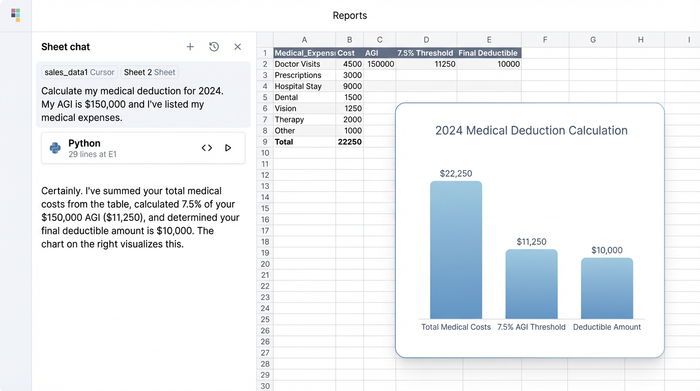
The logic follows this path: If your total expenses are greater than 7.5% of your AGI, your allowable deduction is the difference. If they are lower, the deduction is zero.
By implementing this as a formula, the value becomes dynamic. If you find a forgotten dental bill in a drawer, you simply drag the scan onto the canvas, add the row to your grid, and your allowable deduction amount updates instantly. You no longer have to ask "how much of medical expenses is tax deductible" every time you add a receipt; the engine tells you immediately.
Step 4: Formatting for submission
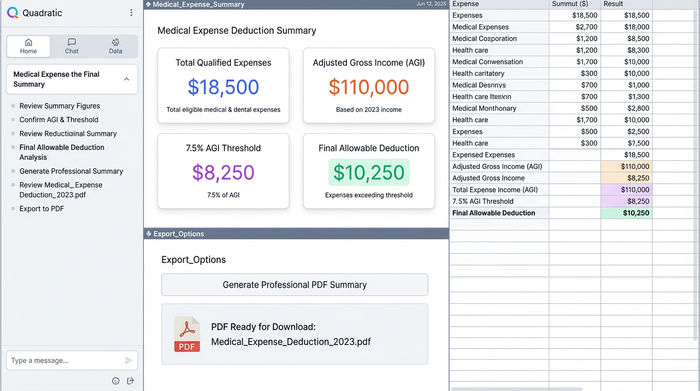
The final step is presenting your data, which often involves the need to summarize a data table effectively for clarity. Tax authorities require clear, legible documentation. Because you have built this in a flexible workspace, you can design a "Summary" section at the top of your grid that highlights the key figures: Total Qualified Expenses, the 7.5% Threshold, and the Final Allowable Deduction.
Quadratic allows you to export specific views or frames to PDF. You can frame your main data grid along with the summary header to create a professional attachment for your tax return. This report serves as your itemized evidence, clean of any scratchpad calculations or reference tables you kept on the side of the canvas.
Why use Quadratic for tax prep?
Using a tool like Quadratic transforms tax preparation from a static recording task into a dynamic analysis workflow.
The primary advantage is the audit trail. By keeping your scanned source documents on the same infinite canvas as your data, you reduce the risk of losing proof or misremembering what a specific transaction was for. The documentation and the data live together.
Furthermore, the dynamic logic handles the complexity of the 7.5% rule automatically. You are not just typing numbers into a form; you are building a system that reacts to changes in your data. This flexibility is essential for handling complex tax situations where income adjustments or late-arriving receipts can change the final outcome.
Final thoughts
Tax deductions do not have to be a manual nightmare of calculators and loose paper. By using a workspace that combines data ingestion, storage, and code-based logic, you can answer the question of how much of medical expenses is tax deductible with confidence and precision. Stop fearing the math and start building an audit-proof tax engine that does the heavy lifting for you.
Use Quadratic to manage tax deduction of medical expenses
- Solve the "shoebox problem" by organizing receipts and invoices directly on an infinite canvas, linking them to your data.
- Automate the 7.5% adjusted gross income (AGI) threshold calculation, ensuring your deduction updates dynamically as you add expenses.
- Create an audit-proof record by placing scanned receipts and invoices directly alongside your expense data for immediate verification.
- Streamline data entry by transcribing information from scanned medical documents directly into your grid within a single workspace.
- Ensure compliance by validating medical expense categories against IRS Publication 502 using customizable reference tables.
- Generate clear, submission-ready reports that summarize qualified expenses, the AGI threshold, and your final allowable deduction.
Ready to simplify your tax preparation? Try Quadratic
