Template overview
This single-sheet tool, built within what many consider the best open source spreadsheet, is designed for standard physics calculations. It integrates interactive input fields with static reference data to perform immediate computations. The template demonstrates formula-based dependency chains, much like a quadratic formula template, without the need for scripts or external code. For those interested in other applications, Quadratic also offers a variety of personal finance templates.
Key components
Calculator section
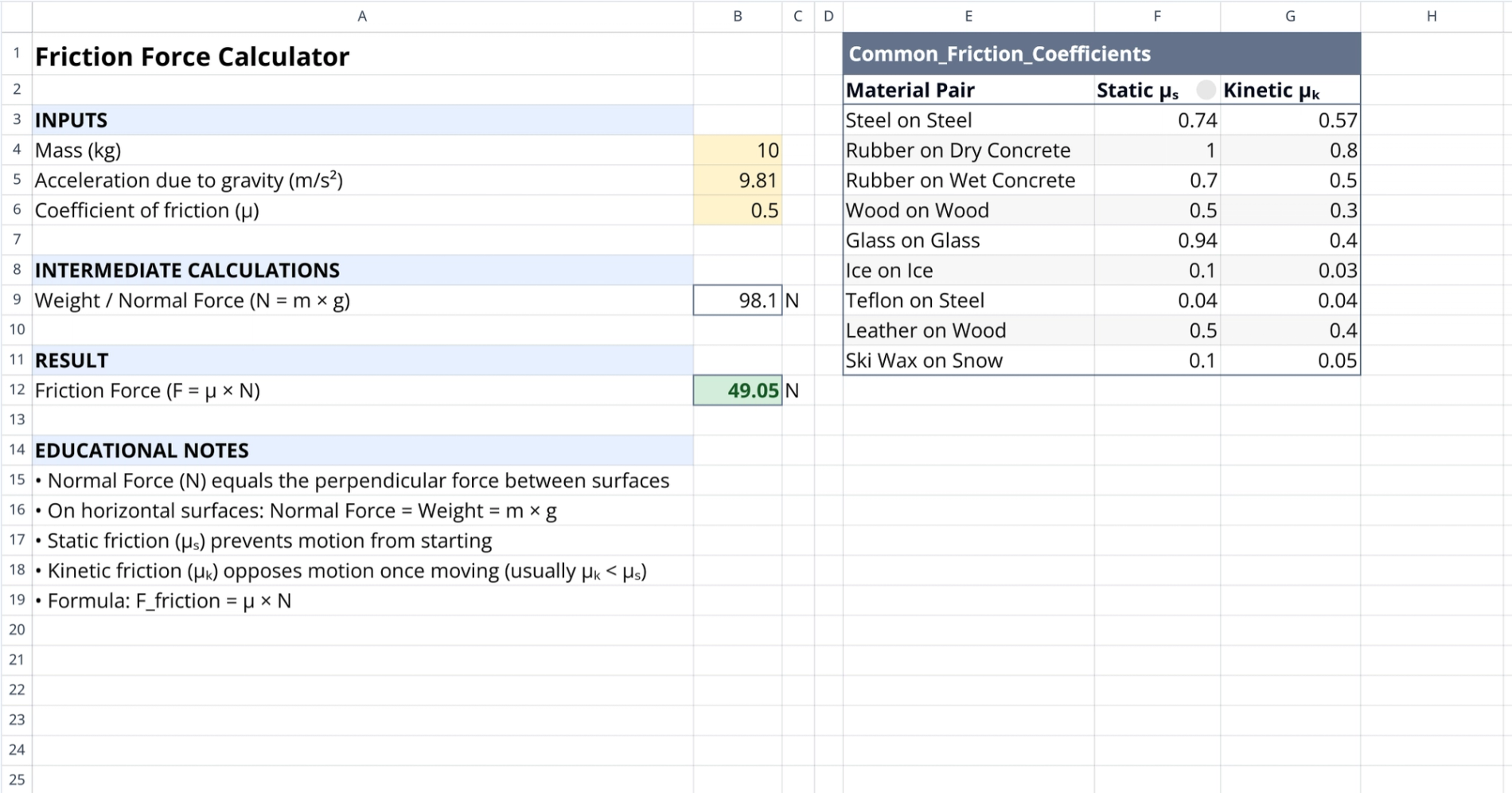
Occupying columns A through D, this section serves as the primary interface. It relies on standard spreadsheet formulas, positioning it as a powerful Google Sheets alternative, to link inputs to results.
- Inputs: User-defined fields for mass (kg), gravitational acceleration ($m/s^2$), and the friction coefficient, common in any robust data science spreadsheet.
- Intermediate calculations: The sheet displays the computed normal force ($N$) based on the mass and gravity inputs.
- Result: The final calculated friction force is output in Newtons.
Reference data table
Located in columns E through G, the "Common_Friction_Coefficients" table acts as a lookup resource to ensure input accuracy.
- Lists coefficients for ten material pairs, such as steel on steel or rubber on concrete.
- Provides specific values for both static and kinetic friction scenarios.
- Helps users select the correct coefficient range for their specific calculation.
How to calculate friction force with this tool
Setting parameters
To begin, the user enters the object's mass and the local gravitational acceleration in the input section. Next, the user identifies the relevant material pair from the reference table. The appropriate coefficient, whether static or kinetic, is then manually entered into the calculator's coefficient field.
Automated formula logic
Once inputs are set, the system automatically calculates the normal force by multiplying mass by gravity. Because the sheet uses standard spreadsheet formulas, which an AI formula generator can help create, all values update instantly whenever an input cell is modified. Because the sheet uses standard spreadsheet formulas, all values update instantly whenever an input cell is modified.
Educational notes and context
Found at the bottom of the calculator interface, this section explains the physics principles behind the formulas. It clarifies the relationship between normal force and weight on horizontal surfaces. Additionally, it distinguishes between static friction, which applies to stationary objects, and kinetic friction, which applies to moving objects. For those looking to add custom functionality, Quadratic also offers templates to get started with JavaScript.
Who this friction force calculator is for
- Educators demonstrating basic mechanics concepts and spreadsheet formula logic, or even the power of a coding spreadsheet for advanced tasks.
- Educators demonstrating basic mechanics concepts and spreadsheet formula logic.
- Engineers requiring quick estimates for material interaction forces without setting up complex simulations.
Use Quadratic to calculate friction force
- Input mass, gravitational acceleration, and friction coefficients directly.
- Reference a built-in table for common static and kinetic friction coefficients.
- View normal force and final friction force calculated instantly with input changes.
- Understand the underlying physics with integrated educational notes.
- Demonstrate formula dependencies without needing external scripts.
- Obtain quick estimates for material interaction forces for engineering.