
Table of contents
For many small business owners, freelancers, and growth-minded founders, the end of the month brings a familiar sense of dread. You have a folder full of bank PDF statements, a CSV export from a credit card, and a static file that you rely on to make sense of it all. You want the flexibility of a spreadsheet because you can mold it to your specific needs, but you are tired of the manual data entry, the broken formulas, and the constant copy-pasting that defines the typical bookkeeping process, which is exactly why a QuickBooks spreadsheet sync can make bookkeeping workflows far more reliable.
A small business accounting spreadsheet should be more than just a list of expenses or a digital shoebox for receipts. Ideally, it serves as the command center for your financial health, offering clarity on cash flow, profitability, and burn rate. However, as transaction volume grows, maintaining this clarity in a traditional grid becomes a liability.
The problem is that traditional excel accounting spreadsheets are brittle. A single accidental deletion or an incorrect cell reference can break an entire workbook, rendering your P&L inaccurate. This is where the concept of a "programmable ledger" comes into play.
By moving your books into Quadratic, you can combine the familiar interface of a spreadsheet with the power of Python and AI. This approach allows you to automate the boring work of categorization and enforce the accuracy required for a clean set of books, effectively bridging the gap between manual entry and expensive Enterprise resource planning (ERP) software.
Why traditional Excel accounting spreadsheets break
If you have researched solutions in the search results, you have likely noticed a divide between rigid, expensive software and basic, manual templates. Most users stick with the latter because they fear the complexity of SaaS tools, but they eventually hit a wall.
The first point of failure is manual import fatigue. Every month, you download a CSV from your bank, open it, format the date columns, and paste it into your master sheet. This process is not only tedious but also prone to human error. A missed row or a double-paste can throw off your balances for days.
The second issue is a lack of validation. In standard accounting spreadsheet examples found online, there are rarely guardrails preventing you from making mistakes. You might type "Software Subscription" in one row and "SaaS Tool" in another. To a computer, these are two different expenses, which leads to a fragmented Profit and Loss statement.
Finally, there is the "black box" risk. As you add more tabs and complex VLOOKUP formulas to handle the growing data, the spreadsheet becomes slow and difficult to audit. You end up with a system that only you understand, which is a dangerous position for a growing business.
Building a modern general ledger (the workflow)
The solution is not necessarily to abandon spreadsheets, but to upgrade the engine running them. By using a programmable accounting spreadsheet template in Quadratic, you can replicate the logic of professional accounting software while retaining the flexibility to customize reports on the fly. If you are looking for an accounting spreadsheet for Excel, consider how a platform integrated with Python can transform your workflow from data entry to data analysis and support more advanced QuickBooks data analytics.
1. Automated data ingestion
In a standard workflow, getting data into the ledger is the biggest bottleneck. In Quadratic, you can replace manual copy-pasting with Python scripts. Instead of manually formatting columns every time you download a bank statement, you can write a simple script—or have Quadratic’s AI write it for you—that reads the raw CSV, standardizes the date formats, and appends the new transactions to your master ledger automatically.
This shifts your mindset from "batch accounting," where you dread doing a month’s worth of work at once, to a continuous accounting methodology. You can drop in a file, run the script, and see your updated financial position instantly.
2. Smart categorization rules
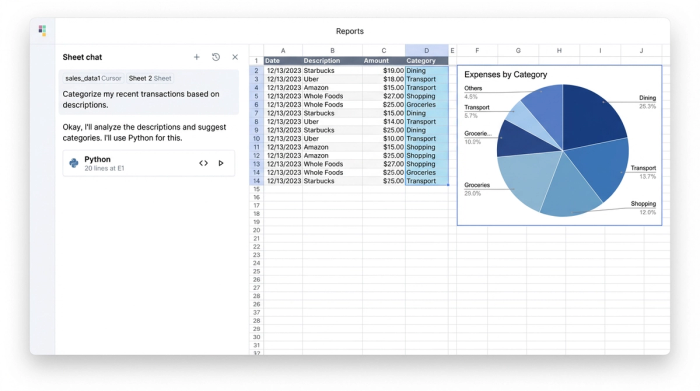
One of the most powerful features you can build into your ledger is automated categorization, often referred to as "AutoCat." In a programmable environment, you can set up logic that acts as a filter for your transactions. This aligns with the broader benefits of automating the finance function. For example, you can create a rule that states: "If the description contains 'Starbucks', tag the category as 'Meals & Entertainment'."
For transactions that do not fit your pre-set rules, you can leverage AI integration. Rather than manually tagging every unknown expense, you can ask the AI to analyze the description and suggest the most likely category based on your historical data, demonstrating the growing role of AI in financial statement analysis. This turns a task that used to take hours of line-by-line review into a quick verification process. You watch hundreds of transactions get tagged instantly, leaving you to manage only the few exceptions.
3. The chart of accounts & validation
To maintain professional-grade books, you need a defined Chart of Accounts. This is simply a list of all the buckets where money can go (e.g., Revenue, Marketing Expense, Payroll).
In a brittle spreadsheet, users often make up categories on the fly. In a controlled Quadratic environment, you can enforce validation. The spreadsheet can be set up to reject any entry that does not match your approved Chart of Accounts. This ensures that your account balance spreadsheet always ties out correctly and that your reports remain consistent month over month.
Month-end close: reconciliations and controls
Governance is often the missing piece in DIY accounting, which is why having robust financial reconciliation tools is crucial. A robust system needs active controls to ensure that what is in your spreadsheet matches what is in the bank.
In this workflow, you can build automatic tie-outs. The spreadsheet can compare the sum of your ledger transactions against the ending balance provided by your bank. If there is a discrepancy—even by a penny—the sheet can flag it immediately using conditional formatting or a status alert. This prevents you from finalizing a month with missing data.
Variance checks are another essential control. You can program the sheet to highlight anomalies, such as a marketing spend that is double the average of the last three months. Additionally, for tax season preparation, you can create a clean audit trail by linking specific transactions to supporting notes or URLs within the cell, ensuring you never have to scramble to remember what a specific expense was for.
Reporting: P&L, balance sheet, and cash flow
The ultimate goal of this data work is the final output: clean, actionable financial statements. If you are looking for an accounting spreadsheet sample that impresses investors or gives you peace of mind, the reporting phase is critical.
Because your General Ledger is structured and validated, your financial statements can be generated automatically. There is no need to manually sum up rows or copy numbers into a presentation. The P&L and Balance Sheet update live as data flows in.
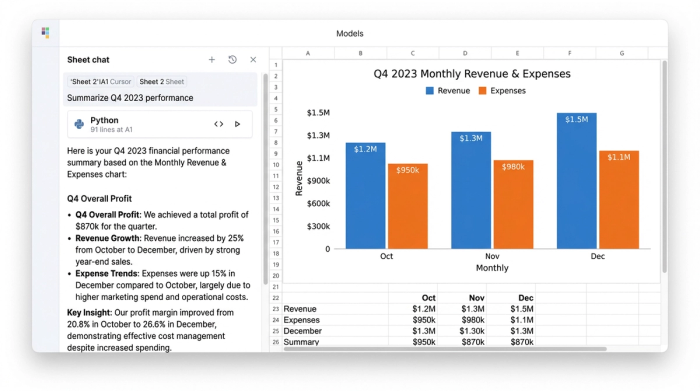
Quadratic takes this a step further with narrative generation. While a standard spreadsheet gives you a grid of numbers, Quadratic’s AI can analyze your P&L and write a summary for you. It might tell you, "Marketing spend is up 15% due to the Q3 ad campaign, while software costs have stabilized." This acts like a junior accountant, explaining the why behind the numbers so you can communicate financial performance clearly to partners or stakeholders.
Get the automated accounting spreadsheet template
You do not need to be a programmer to benefit from a programmable ledger. The advantage of Quadratic is that it bridges the gap between the flexibility you love and the automation you need. It is a small business accounting spreadsheet that behaves like robust software.
If you are ready to stop manual data entry and start trusting your numbers, you can duplicate the Quadratic framework to get started immediately. Download this accounting spreadsheet template to start automating your books today.
Frequently asked questions
Can I use this as a small business bookkeeping spreadsheet?
You can import your existing Excel files directly into Quadratic. However, unlike a standard Excel file, Quadratic allows you to use Python and AI to automate the cleaning, categorization, and reporting of that data.
Is this suitable for a small business accounting spreadsheet?
Yes. It is ideal for businesses that have outgrown manual entry and simple templates but do not yet need the complexity or cost of an enterprise ERP system like NetSuite.
How do I maintain an account balance spreadsheet?
By using the automated reconciliation features described above. You can set up the sheet to mathematically verify that your ledger balance equals your bank balance, flagging any errors automatically.
Use Quadratic to Automate Your Accounting Spreadsheet
- Automate data ingestion: Replace tedious manual CSV imports and formatting with Python scripts to automatically standardize and append transactions, eliminating copy-paste errors.
- Streamline categorization: Use AI and programmable rules to instantly categorize transactions, ensuring consistent data for accurate profit and loss statements.
- Enforce data accuracy: Implement a Chart of Accounts to validate entries, preventing inconsistencies and maintaining the integrity of your financial records.
- Simplify month-end close: Build automatic reconciliations and variance checks to quickly identify discrepancies and ensure your ledger matches bank statements.
- Generate instant reports: Create live, accurate financial statements (P&L, Balance Sheet) automatically, with AI providing narrative summaries to explain the numbers.
Ready to upgrade your bookkeeping? Try Quadratic.
