Table of contents
- Why automate bank reconciliation? (Beyond speed)
- The challenge: Why standard spreadsheets struggle with automation
- Step 1: Centralizing your data (Import & prep)
- Step 2: Constructing the matching logic
- Step 3: Managing exceptions and duplicates
- Step 4: Generating the audit-ready month-end report
- A comparison: Quadratic vs. traditional tools
- Conclusion
- Use Quadratic to do automated bank reconciliation
It is the end of the month, and you are likely staring at two screens. On the left is your bank statement CSV, downloaded fresh this morning. On the right is your general ledger export. For the next several hours—or days—your job is to play a high-stakes game of "spot the difference," manually ticking off rows, hunting for transposed numbers, and trying to remember if that $450 charge was for office supplies or a software subscription.
This manual matching process is often identified as a key financial close process bottleneck. It is slow, it is tedious, and because it relies on human eyesight and patience, it is prone to error, with research indicating a high prevalence of common spreadsheet errors. Traditional spreadsheet methods, like VLOOKUP or INDEX-MATCH, often break the moment a transaction description changes slightly or a date shifts by twenty-four hours. Conversely, enterprise resource planning (ERP) modules that promise to solve this are often prohibitively expensive and rigid, acting as "black boxes" that obscure how matches are actually made.
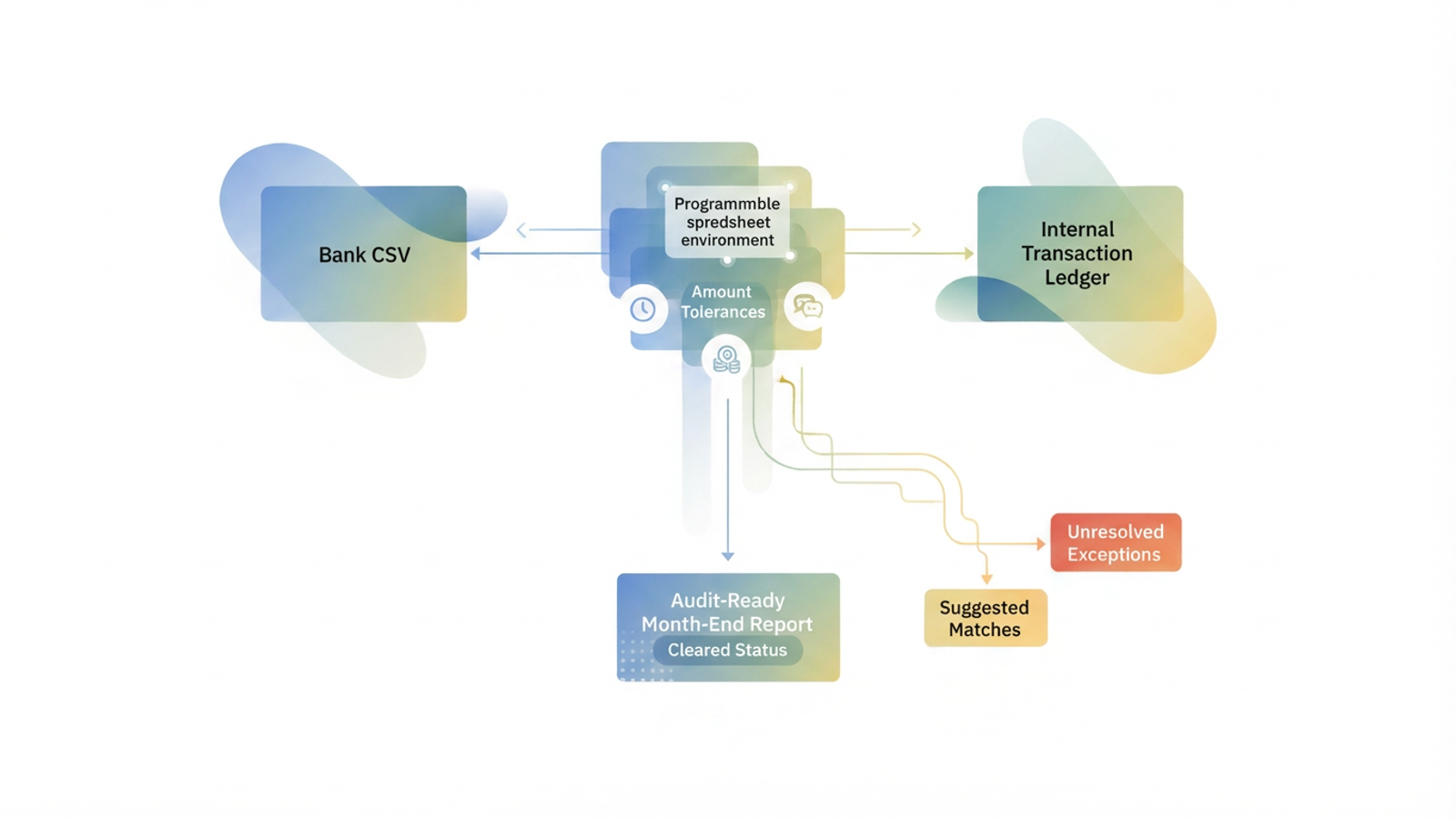
There is a better way. By utilizing a programmable spreadsheet environment like Quadratic, you can build an automated bank reconciliation workflow that combines the flexibility of a spreadsheet with the power of code-based logic, enabling true spreadsheet automation. This approach allows you to automate the drudgery of data matching while retaining full control over your audit trail, bridging the gap between manual work and rigid enterprise software.
Why automate bank reconciliation? (Beyond speed)
While saving time is the most obvious benefit, the strategic value of finance automation goes much deeper. For finance leaders, the goal is to shift the team’s focus from data entry to financial data analysis. When you successfully CFO simplify ERP bank reconciliation automation, you are not just cutting hours; you are increasing the integrity of your financial reporting.
Here are the core benefits of moving away from manual matching:
- Accuracy and risk reduction: Manual data entry and visual matching are the leading causes of reconciliation errors. Automation removes the "fat finger" risk, ensuring that figures are compared exactly as they appear in the source data.
- Audit readiness: Instead of a spreadsheet full of hard-coded values and colored highlights, you have a programmatic history of why specific transactions were matched, aligning with reconciliation best practices.
- Cost efficiency: You do not always need to purchase a new, expensive ERP module to solve reconciliation challenges. A flexible data tool can often replicate the functionality of high-end software at a fraction of the cost.
- Scalability: Manual processes collapse as transaction volume grows. Automated logic handles 5,000 rows as easily as it handles 50, making it easier to scale without hiring more staff.
Understanding the difference between automated bank reconciliation vs manual processes is critical for modernizing the finance function. This same automation approach can be applied to other critical financial processes, such as accounts receivable reconciliation, to further streamline operations. It allows the finance team to stop looking backward at what happened and start looking forward at what the data means.
The challenge: Why standard spreadsheets struggle with automation
If spreadsheets are the standard tool for finance, why do they fail at reconciliation? The answer lies in the difference between lists and logic. Standard Excel or Google Sheets are excellent for storing lists of data, but they struggle with complex logic.
In a standard spreadsheet, matching relies heavily on exact text strings. If your ledger says "Check #101" but the bank feed reads "Payment 101 - Cleared," a standard VLOOKUP returns an error. To fix this, bookkeepers often resort to complex, brittle nested formulas that break easily. Furthermore, standard spreadsheets struggle with "fuzzy" logic, such as matching a transaction that cleared three days after it was recorded in the ledger.
This creates a demand for automated bank reconciliation in Excel contexts—users want the familiar grid interface, but they need a more powerful engine underneath. They need a tool that can handle thousands of rows without crashing and apply Python or SQL logic to handle the nuances of real-world banking data. This is where Quadratic’s infinite canvas and integrated code capabilities transform the workflow.
Step 1: Centralizing your data (Import & prep)
The first step in a robust reconciliation workflow is getting all your data into one environment. In Quadratic, this process is streamlined to handle the volume and variety of modern financial data.
You start by importing your two primary sources: the Bank CSV export and the Internal Transaction Ledger from your accounting software (like QuickBooks, Xero, or NetSuite). Because Quadratic supports Python and SQL natively within the grid, you are not limited by row counts or sluggish performance. You can pull in data from Stripe, PayPal, and traditional bank feeds simultaneously.
This stage is also where you clean and normalize the data. US B2B transactions are notoriously messy. Descriptions are often cluttered with ACH codes, store numbers, and wire transfer fees. Using automated reconciliation features B2B banking USA requires a tool that can strip away this noise.
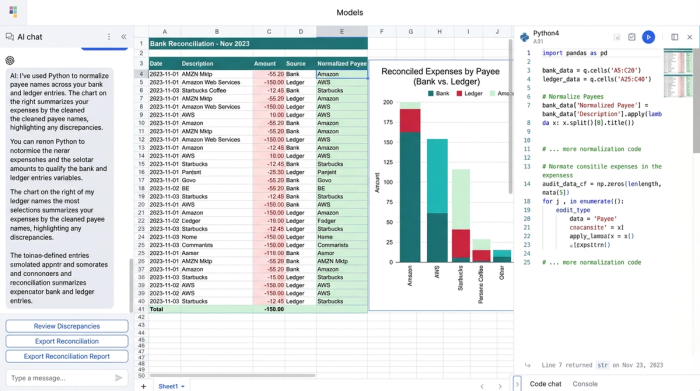
For example, you can write a simple Python script directly in a cell to parse the "Description" column, removing random strings of numbers or standardized bank prefixes. This prepares the data for matching, ensuring that you are comparing clean vendor names (e.g., "Amazon") rather than raw bank strings (e.g., "AMZN MKTPLC WA 445").
Step 2: Constructing the matching logic
This is the core of the automated workflow. Instead of manually ticking off rows, you define the rules of engagement. In a programmable spreadsheet, you can build transaction matching logic that mimics how a human bookkeeper thinks, but executes it instantly across thousands of rows.
Unlike rigid automated bank reconciliation software that hides its matching rules inside a proprietary "black box," Quadratic lets you see, write, and tweak the formulas directly. You can build a matching engine based on three critical criteria:
Date windows
Money rarely moves instantly. A check written on the 30th might not clear until the 2nd of the next month. Standard formulas fail here because the dates don't match. in Quadratic, you can set a logical rule that looks for a match within a specific window—for example, ±3 days. This allows the system to pair a ledger entry from March 31st with a bank clearing from April 2nd automatically.
Amount tolerances
Penny differences are common, especially when dealing with international currency exchange rates or third-party processor fees. You can program a tolerance rule (e.g., ±$0.05) that accepts these minor variances as a match, preventing a 1-cent discrepancy from holding up your month-end close.
Payee normalization
This logic handles the text discrepancies mentioned earlier. You can create a mapping table or use fuzzy matching scripts to equate "Home Depot #445" with "The Home Depot."
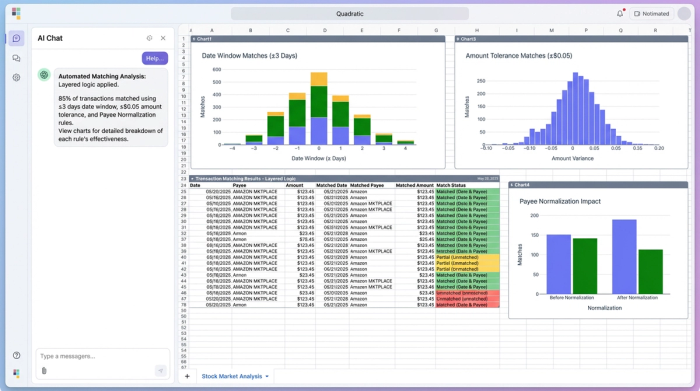
By layering these rules, you automate bank reconciliation to a high degree of accuracy. The system does the heavy lifting, pairing up the obvious matches so you don't have to.
Step 3: Managing exceptions and duplicates
The goal of automation is not to remove the human from the loop entirely, but to focus human attention where it matters: the exceptions. Once the matching logic runs, your focus shifts to what didn't match.
In this workflow, the system generates a dynamic "Unmatched" queue. This is a list of transactions that failed the date, amount, or payee criteria. This is where your expertise as a finance professional is required. Perhaps a check was lost in the mail, or a subscription fee increased without notice.
Crucially, this workflow also handles duplicate flagging. One of the most common errors in bookkeeping is recording a transaction twice. Automated reconciliation features in B2B banking workflows within Quadratic can instantly flag if a single bank line item is trying to match with two different ledger entries, or vice versa.
By filtering out the 90% of transactions that match perfectly, you reduce the reconciliation workload from hours of checking to minutes of reviewing exceptions.
Step 4: Generating the audit-ready month-end report
The final output of this process is the Reconciliation Report. In a traditional Excel workflow, this is often a static, hard-coded sheet that becomes obsolete the moment a correction is made. In Quadratic, the report is live.
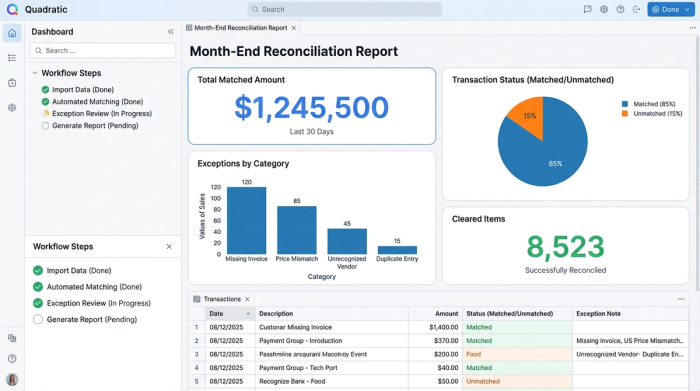
You can structure your output to display clear, audit-ready columns:
- Cleared status: A boolean (True/False) indicating if the funds have settled.
- Suggested matches: The system’s best guess for ambiguous items, ready for your approval.
- Unresolved exceptions: The "To-Do" list for the finance team.
As you fix an exception in the source data or adjust a matching rule, the report updates instantly. This provides a clear audit trail for the CFO or external auditors, proving that the cash balance in the ledger matches the bank reality. This transparency is the hallmark of a modern financial workflow.
A comparison: Quadratic vs. traditional tools
To understand where this solution fits in the market, it helps to compare the three main approaches to transaction reconciliation.
- Manual Excel:
- Pros: Extremely flexible; low cost; familiar interface.
- Cons: High error rate; time-consuming; brittle formulas (VLOOKUP); struggles with large data volumes; no audit trail.
- SaaS Tools (e.g., BlackLine, FloQast):
- Pros: Highly automated; built specifically for accounting; secure.
- Cons: Expensive; rigid implementation; "black box" logic (you can't see why a match happened); requires learning a new interface; difficult to customize for unique business needs.
- Quadratic:
- Pros: Flexible like a spreadsheet, but powerful like software; transparent logic (you own the code); handles large datasets; connects to live data; cost-effective.
- Cons: Requires setup of logic (though templates simplify this).
Conclusion
Automated bank reconciliation does not require you to abandon the spreadsheet interface you rely on. It simply requires a tool that can handle the complex logic that standard spreadsheets cannot. By moving your reconciliation process into Quadratic, you gain the speed and accuracy of enterprise automation without sacrificing the flexibility and transparency of a spreadsheet.
You can stop spending your month-end ticking off rows and start spending it analyzing the financial health of your business. To see how programmable logic can transform your close process, try loading your next month’s bank CSV into Quadratic and experience the difference firsthand.
Use Quadratic to do automated bank reconciliation
- Automate manual matching: Eliminate hours of manual "spot the difference" by applying code-based logic to reconcile transactions instantly.
- Handle complex matching rules: Easily define flexible rules for date windows (e.g., ±3 days), amount tolerances (e.g., ±$0.05), and fuzzy payee normalization (e.g., "AMZN MKTPLC" to "Amazon").
- Ensure data accuracy and audit readiness: Reduce human error and automatically generate a transparent, programmatic audit trail for every match.
- Manage exceptions efficiently: Focus human review only on unmatched transactions and automatically flagged duplicates, rather than sifting through entire datasets.
- Scale with growing data volumes: Process thousands of bank and ledger entries without performance issues, maintaining speed and accuracy as your business grows.
- Maintain control and transparency: Build and customize your reconciliation logic with native Python or SQL directly in the spreadsheet, avoiding rigid "black box" software.
Ready to simplify your month-end close? Try Quadratic.
