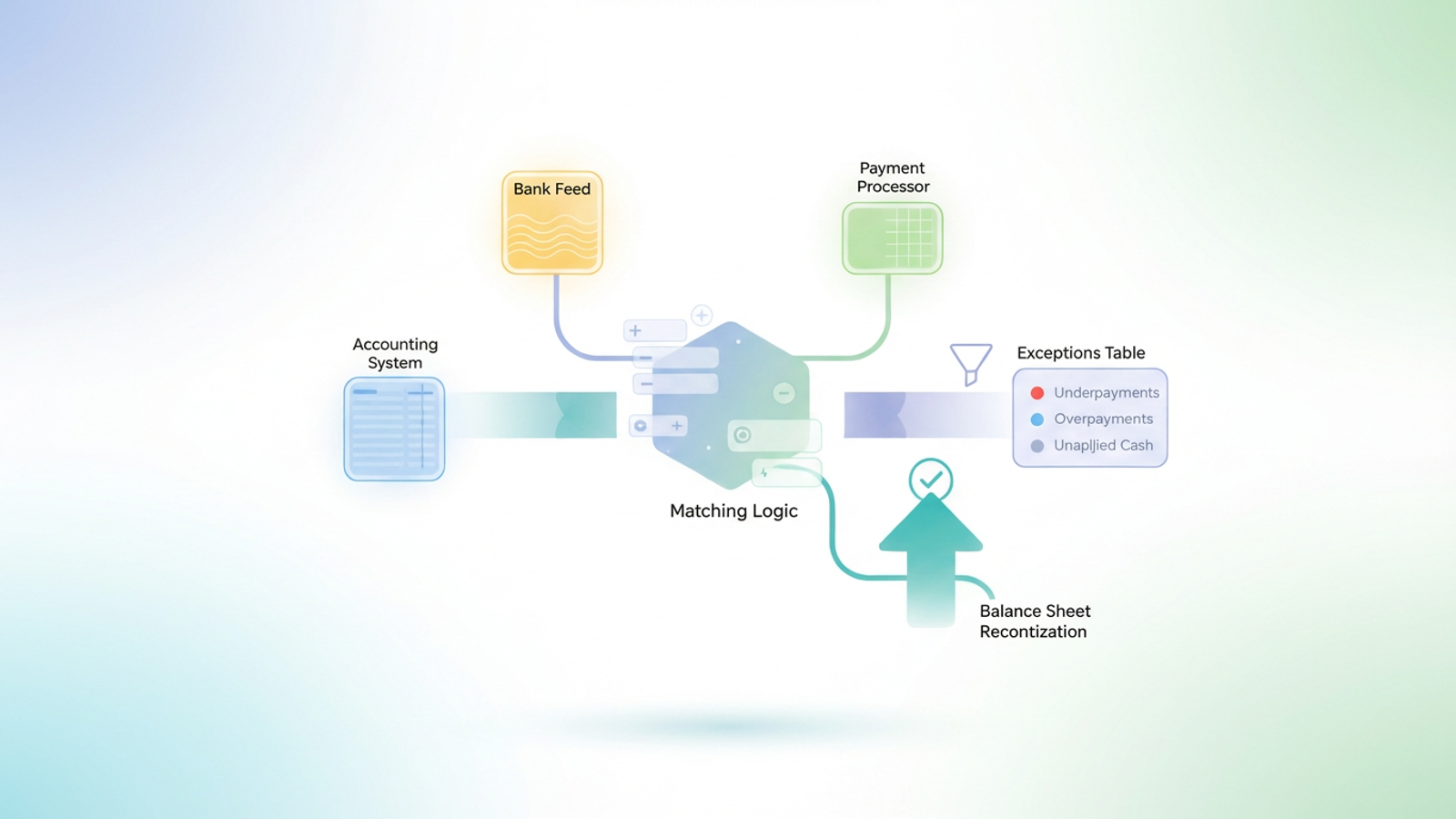
For finance and operations teams, the month-end close often creates a chaotic reality. You are chasing unapplied cash, deciphering lump-sum bank deposits that don’t match invoice totals, and manually cross-referencing payment processor reports against your ERP. This friction is the defining characteristic of the accounts receivable reconciliation process.
At its core, accounts receivable reconciliation is the process of verifying that the payments received in your bank account match the invoices issued in your general ledger. When these records align, you have a clean balance sheet. When they don’t, you have "unapplied cash"—money that belongs to the business but hasn't been credited to a specific customer account.
The problem is that most teams attempt to solve this data mess with fragile tools. They rely on a static accounts receivable reconciliation excel template that breaks the moment a customer makes a partial payment, or they struggle with rigid enterprise software that requires expensive consultants to customize. Neither option solves the fundamental issue: modern finance data comes from multiple disconnected sources.
There is a builder’s middle ground. By using a flexible data tool like Quadratic, finance professionals can automate the matching logic themselves. This approach allows you to handle complex, multi-source reconciliation without waiting on engineering resources or forcing data into a rigid template.
Why standard AR reconciliation processes fail
The traditional approach to the reconciliation of accounts receivable typically forces finance teams into a binary choice: rely on manual data entry or trust a "black box" software solution. Manual entry is prone to human error and burnout, while automated software is often too expensive or inflexible to handle specific business nuances.
This dilemma is complicated by the fact that modern reconciliation is rarely a simple two-way match between a bank statement and a ledger. It is usually a three-way match involving:
1. The Accounting System: The source of truth for open invoices (e.g., NetSuite, QuickBooks, Xero).
2. The Bank Feed: The actual cash deposits, often appearing as lump sums or obscure wire transfer codes.
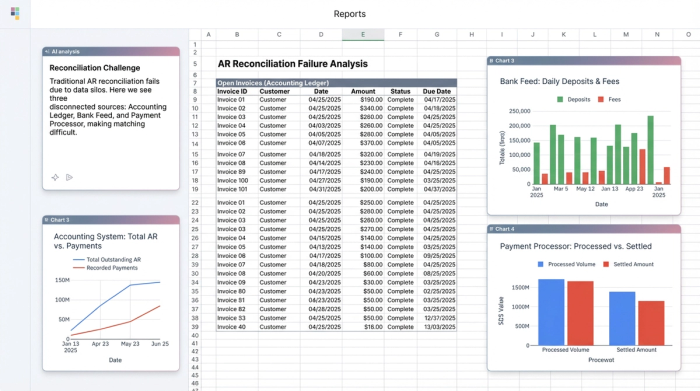
3. The Payment Processor: Detailed reports from Stripe, PayPal, or lockbox services that break down who actually paid what.
Standard workflows fail because they cannot bridge these silos effectively. Bank deposits often lack remittance advice, and processor fees create discrepancies between the invoice amount and the cash received. When teams search for account receivable and reconciliation services or software, they often find tools that can’t handle these specific edge cases.
Furthermore, relying on a downloaded account receivable reconciliation template excel file creates a "template trap." These static sheets rely on fragile formulas like VLOOKUP, which are designed to find a single match. They break immediately when a customer pays multiple invoices with one check or splits a single invoice across two payments. To solve this, you need a tool that understands relationships between data, not just cell references.
The workflow: Reconciling AR with Quadratic
The most effective way to clean up your AR aging report is to build a workflow that mimics the logic of a human analyst but operates at the speed of a computer. In this walkthrough, we will look at how a finance operations analyst uses Quadratic to reconcile open invoices against bank and processor data.
Step 1: Ingesting data from three sources
In a traditional spreadsheet, you would likely open three different workbooks and start copying and pasting columns into a master file. In Quadratic, the analyst pulls data directly into the infinite canvas.
- Source A (The Ledger): The analyst performs invoice data capture by importing the "Open Invoices" report from the accounting system as a CSV or via a direct database connection. This dataset contains the Invoice ID, Customer Name, and Expected Amount.
- Source B (The Bank): The bank feed is pulled in, showing the date, description, and deposit amount.
- Source C (The Processor): The payment processor report is ingested, which provides the critical link between a lump-sum bank deposit and the individual customer transactions.
Because Quadratic supports SQL and Python natively within the grid, these datasets can live side-by-side without needing to be manually aligned or formatted into a specific table structure first.
Step 2: Matching logic & handling partial payments
The most painful part of AR is "unapplied cash." Consider a scenario where a customer owes $10,000 but pays $9,500. Or, a customer sends a single wire for $20,000 to cover three different invoices. A standard spreadsheet formula will struggle to match these because the numbers don't align perfectly, especially with partial payments or when a single payment covers multiple invoices.
In this workflow, the analyst uses SQL within Quadratic to join these datasets. Instead of a VLOOKUP that stops at the first result, the analyst writes a query to join the Payment Processor data with the Open Invoices data based on a common identifier, such as the Customer Name or Invoice ID.
This allows for "many-to-one" matching. The SQL query can aggregate multiple small payments and compare them against a single invoice, or split a large payment across multiple open items. This logic creates a dynamic view where the data is joined based on rules you define, ensuring that complex remittances are handled accurately.
Step 3: Calculating balances and exceptions
Once the data is joined, the analyst needs to identify discrepancies. Using Python or standard formulas directly in the grid, the workflow calculates the difference between the expected revenue and the actual cash received.
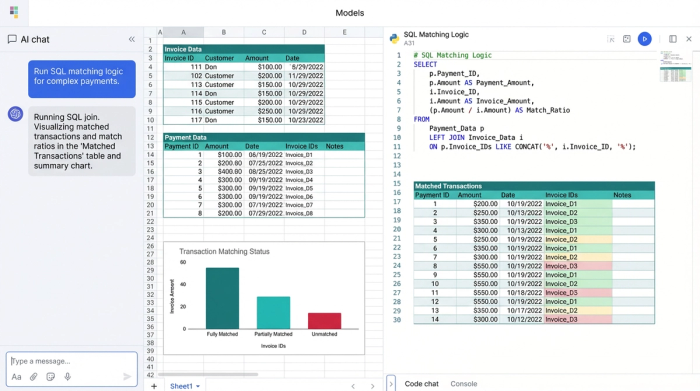
The logic is straightforward: Invoice Amount minus Payment Amount equals Remaining Balance.
However, because this is built in a code-enabled environment, the analyst can add logic to handle tolerances. For example, if the difference is less than $0.50 (likely a currency exchange variance), the script can mark it as "Immaterial Write-off." If the difference is exactly equal to the credit card processing fee, it can be categorized as "Fees."
This serves as a dynamic accounts receivable reconciliation example. Unlike a static PDF export, this workflow updates automatically. If you load next month's bank data, the Python and SQL logic runs again instantly, flagging the new set of exceptions without requiring you to rebuild the model.
The output: Generating the exceptions table
The goal of this process is not just to match rows but to produce actionable intelligence. The workflow culminates in generating an "Exceptions Table." This is a clean, filtered dataset that isolates only the transactions requiring human intervention.
The Exceptions Table typically highlights:
1. Underpayments: Customers who short-paid an invoice, triggering a notification to the collections team.
2. Overpayments: Instances where a customer paid twice, signaling that a credit memo or refund is needed.
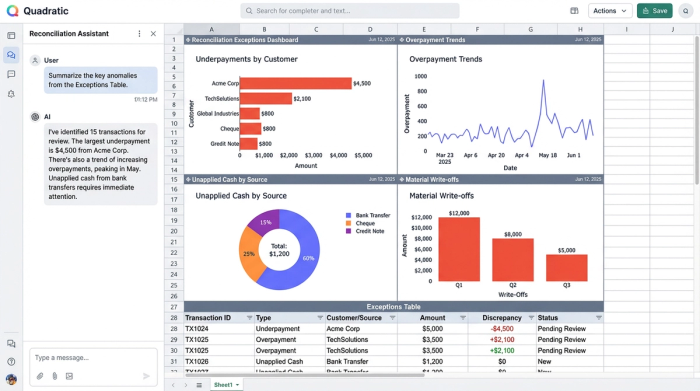
3. Unapplied Cash: Payments that do not match any open invoice logic, requiring a manual review of the remittance advice.
By generating this table, the finance ops team can ignore the thousands of transactions that matched perfectly and focus their energy solely on the anomalies. This directly supports accounts receivable balance sheet reconciliation by validating the ending balance and ensuring that the aging report reflects reality, not just data entry lag.
Beyond the Excel template: Why code-based reconciliation wins
Many professionals start by searching for an accounts receivable reconciliation template or an accounts receivable reconciliation excel template. While these resources can provide a basic structure, they inevitably fail as transaction volume grows.
Building your reconciliation logic in a code-enabled spreadsheet like Quadratic offers three distinct advantages over traditional templates:
Auditability: In a standard Excel sheet, complex matching logic is often buried in nested formulas that are difficult to read and easy to break. In Quadratic, the SQL queries and Python scripts are visible and readable. An auditor or a controller can look at the code and understand exactly how the matching rules were applied.
Scalability: Standard templates often crash or slow down significantly when processing thousands of rows of data. A Python-backed environment handles high-volume datasets effortlessly, allowing you to reconcile large batches of transactions without performance issues.
Flexibility: Bank file formats change. Payment processors update their CSV exports. If you are using a rigid template, these changes can break your entire workbook. In a builder-focused tool, you simply tweak the SQL query to point to the new column name, and the rest of the workflow continues to function without a total rebuild.
Conclusion
The shift from manual matching to automated, logic-based transaction reconciliation allows finance teams to reclaim days of work during the month-end close. You do not need to purchase expensive enterprise software or rely on brittle templates to solve the issue of unapplied cash. You simply need an environment that allows you to build the logic that fits your specific data.
By treating accounts receivable reconciliation as a financial data analytics challenge rather than a data entry task, you gain accuracy, speed, and a cleaner balance sheet. For your next month-end close, try building your reconciliation workflow in Quadratic to see the difference that code-powered data handling can make.
Use Quadratic to do accounts receivable reconciliation
- Ingest data from multiple sources: Easily pull open invoices from your accounting system, bank feeds, and payment processor reports (Stripe, PayPal) into one workspace.
- Automate complex matching logic: Use SQL and Python directly in the grid to handle partial payments, lump-sum deposits, and many-to-one invoice matching, moving beyond fragile VLOOKUPs.
- Identify and categorize discrepancies: Build custom logic to automatically calculate remaining balances and categorize exceptions like immaterial write-offs or processing fees.
- Generate an actionable exceptions table: Focus your team's efforts by creating a dynamic report that highlights only the underpayments, overpayments, and unapplied cash requiring human intervention.
- Ensure auditability and scalability: Maintain clear, auditable matching logic with visible code and process high volumes of transactions without performance slowdowns.
- Adapt to changing data formats: Quickly adjust your reconciliation workflow by tweaking SQL queries as bank or processor file formats evolve, without needing to rebuild your entire model.
Stop chasing unapplied cash and start working smarter. Try Quadratic and automate your AR reconciliation.
