
Table of contents
- The "Excel hell" of vendor payment schedules
- A better way: building a dynamic payment engine
- Step 1: Centralizing contract data
- Step 2: Automating the schedule with Python
- Step 3: Visualizing cash flow & totals
- Why this beats static templates & expensive SaaS
- Best practices for managing vendor payments
- Conclusion
- Use Quadratic to automate vendor payment management
For many finance teams, the end of the month signals a familiar struggle: opening a massive spreadsheet to update the contract schedule. You find yourself manually adding columns for the new month, dragging formulas across rows, and praying that you didn’t break a hidden link. This is the reality of vendor payment management for thousands of controllers and FP&A professionals. It is tedious, error-prone, and surprisingly fragile.
The problem with traditional spreadsheets is that they are static, exhibiting well-documented limitations of static financial models. If you miss a renewal date or accidentally overwrite a formula, you risk double payments or face common challenges in cash flow forecasting. However, enterprise vendor payment management software is often too rigid or expensive for agile teams that need more flexible QuickBooks analytics and forecasting workflows.
In this post, we’ll build a dynamic payment scheduler that automatically allocates costs based on contract start and end dates, especially useful in workflows that begin with a QuickBooks spreadsheet sync. By using Quadratic—a modern spreadsheet that runs Python natively—we can create a flexible, self-updating system that eliminates manual column dragging and ensures your payment data is always accurate.
The "Excel hell" of vendor payment schedules
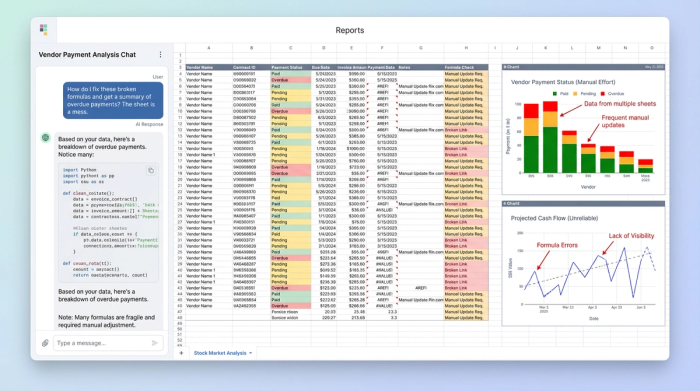
Most professionals have a set of best practices for managing large vendor payments cash management, but their tools often let them down. The typical workflow involves a "waterfall" spreadsheet where rows represent vendors and columns represent months. While this looks intuitive, maintaining it is a nightmare.
First, you face the issue of static columns. Every time a new month arrives, you must manually insert a column and copy-paste formulas. Second, the formulas themselves are fragile. You likely rely on complex nested logic—something like =IF(AND(Date>=Start, Date<=End), Amount, 0)—to determine if a payment is due. If a user sorts the data incorrectly or inserts a row, those references can break, leading to silent errors that persist for months.
Finally, there is a lack of visibility. As the sheet grows, it becomes impossible to get a global view of your recurring vendor payments without scrolling horizontally for eternity. This manual maintenance increases the risk of compliance errors and makes it difficult to answer simple questions about future cash liabilities.
A better way: building a dynamic payment engine
There is a middle ground between a broken spreadsheet and an expensive SaaS platform. In Quadratic, you can build a tool that functions like a custom vendor payment management system. The difference lies in how the data is processed. Instead of placing a fragile formula in every single cell, we use Python to treat the spreadsheet like an application.
The workflow is simple:
1. Input: You maintain a clean, simple table for contract details (Vendor, Amount, Start Date, End Date).
2. Processing: A Python script reads that table and calculates the schedule.
3. Output: The script automatically generates the matrix for the relevant months.
This approach means you never have to drag a formula again. If a contract gets extended, you update one cell in the input table, and the Python script redraws the entire schedule instantly.
Step 1: Centralizing contract data
The first step in this workflow is to create a dedicated area for data entry. Unlike standard Excel templates where data and calculation are mixed together, we want to keep them separate.
Create a simple table with headers such as Contract Name, Vendor, Monthly Amount, Start Date, and End Date. This will serve as your "Single Source of Truth." Because this section is just for data entry, you don’t need to worry about breaking formulas. Whether you are tracking software subscriptions, retainer fees, or property expenses, this clean input method ensures your raw data remains accurate and auditable, making it ideal for business expense tracking.
Step 2: Automating the schedule with Python
This is where the magic happens. In a standard spreadsheet, you would now be writing an IF statement and dragging it across 24 columns. In Quadratic, we use a Python code cell to do the heavy lifting.
The Python script performs three specific actions:
1. Time generation: It creates a timeline of months based on the earliest start date and the latest end date in your data.
2. Logic application: It iterates through each contract and checks if a specific month falls within the active contract period. If it does, it populates the cell with the monthly amount.
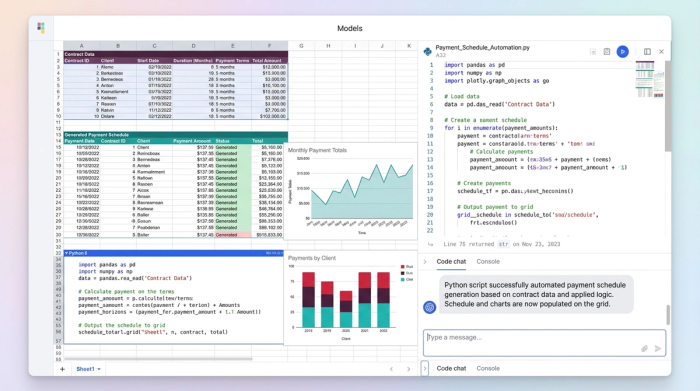
3. Filtering: You can set a "Cutoff Date" variable in the script. This allows you to hide historical data or limit the view to the current fiscal year, keeping your view clean.
The result is a dynamic gap between your data and your reporting. If a contract extends by six months, the code automatically draws six new columns. You don't have to touch the layout.
Step 3: Visualizing cash flow & totals
Once the Python script generates the payment matrix, you have immediate insight into your financial obligations, enabling robust financial analysis. You can easily sum the dynamic columns to see total monthly outflows.
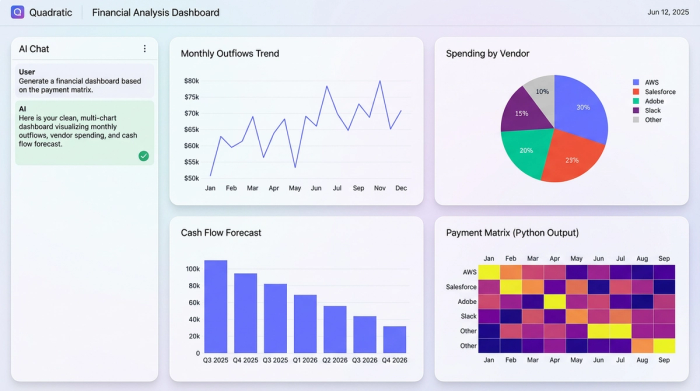
This aligns with cash flow forecasting best practices, as it gives you a real-time forecast. You can instantly see how a new contract impacts cash flow in Q4 without needing to manually aggregate data from different tabs. Because the output is a standard set of cells, you can still use standard spreadsheet formulas to sum the totals or build charts on top of the Python-generated data.
Why this beats static templates & expensive SaaS
This hybrid approach offers significant advantages over both manual spreadsheets and rigid software.
Compared to manual spreadsheets, Quadratic is far less error-prone, offering many benefits of financial automation. The logic is centralized in one readable code block rather than hidden in thousands of individual cells. If there is an error in your logic, you fix it in one place, and it propagates instantly across the entire schedule.
Compared to enterprise vendor payment management software, this method offers superior flexibility. Specialized tools can be expensive and difficult to customize. For example, if you are a procurement manager UAE vendor payments VAT compliance officer, you might need to apply specific tax rules to your schedule, a common challenge in financial localization. In a rigid app, you are stuck with their default fields. In Quadratic, you can simply tweak the Python code to include a tax multiplier or currency conversion.
This versatility extends to other use cases as well. Whether you are managing payment flows in a multi-vendor platform or tracking simple office rent, the underlying logic remains the same, but the customization is entirely up to you.
Best practices for managing vendor payments
To maintain a healthy financial workflow, consider these strategic points:
- Centralize your data: Keep all contract variables in one clean table. Do not scatter dates and amounts across different tabs.
- Automate date logic: Relying on human memory to update columns is a recipe for disaster. Use tools that understand dates programmatically.
- Forecast, don't just record: Your schedule should tell you what is coming, not just what you have already paid.
- Audit your logic: Using Python allows you to read the logic in plain English, making it one of the best platforms for managing recurring vendor payments globally because the rules are transparent.
Conclusion
You do not have to choose between a rigid, expensive application and a fragile, manual spreadsheet. By combining the familiarity of a grid with the power of Python, you can build a tool that adapts to your needs. This approach saves time, reduces risk, and gives you the clarity needed for effective financial data analytics and cash flow management.
Stop fighting with date formulas and manual updates. Clone this Vendor Payment Template in Quadratic and automate your schedule today.
Use Quadratic to automate vendor payment management
- Automate monthly schedules: Eliminate manual column dragging and formula updates by using Python to dynamically generate and refresh your vendor payment timelines.
- Ensure payment accuracy: Centralize all contract logic in a single, auditable Python script, preventing fragile cell formulas and reducing errors like double payments or broken links.
- Gain instant cash flow visibility: See real-time future cash liabilities and total monthly outflows, with schedules automatically adapting to contract changes for robust forecasting.
- Customize complex rules: Easily integrate specific tax rules, currency conversions, or unique contract terms by directly modifying the underlying Python code, avoiding rigid software limitations.
- Centralize contract data: Maintain a clean, dedicated input table for all vendor details, ensuring a single source of truth and simplified auditing.
Stop fighting with date formulas and manual updates. Try Quadratic and automate your schedule today.
