
Table of contents
- Strategic vs. administrative loan portfolio management
- The workflow: moving beyond static spreadsheets
- Simulating outcomes: the Monte Carlo approach
- Optimization: finding the "sweet spot"
- Evaluating loan portfolio management software
- Conclusion: modernizing the analyst's toolkit
- Use Quadratic to do loan portfolio management
Lending is fundamentally a game of trade-offs. If a financial institution is too conservative with its approval criteria, it leaves potential revenue on the table. If it is too aggressive, the volume of defaults can wipe out profitability. For financial analysts and credit risk managers, applying financial data analytics to find the precise balance between volume and risk is the core challenge of the job.
While much of the industry focuses on the administrative side of the business—tracking payments, sending notices, and managing customer relationships—true loan portfolio management is a strategic discipline guided by established principles for the management of credit risk. It is the science of using historical data to predict future performance and optimize decision-making.
In this guide, we will walk through a complete workflow that moves beyond simple tracking. We will demonstrate how to ingest raw data, apply predictive analytics using Python, and run Monte Carlo simulations to identify the optimal credit score cutoff that maximizes profit. By using Quadratic, an infinite canvas Python spreadsheet, we can bridge the gap between complex code and visual, interactive financial modeling.
Strategic vs. administrative loan portfolio management
When professionals search for loan portfolio management, they often encounter two very different categories of software. It is important to distinguish between them to understand where value is created.
Administrative systems are designed for operations. These include CRMs and servicing platforms that handle the day-to-law logistics of a loan: processing payments, calculating amortization schedules, and managing documents. These are essential for keeping the lights on, but they rarely offer the flexibility required for deep strategic analysis.
Strategic modeling, on the other hand, is where profitability is engineered. This involves analyzing the composition of the portfolio, stress-testing it against economic downturns, and adjusting underwriting criteria, often guided by traditional frameworks like the 5 Cs of credit. Effective loan portfolio management requires more than just tracking; it requires forecasting. The workflow we are exploring here focuses entirely on this strategic side—using data to make better lending decisions before the money ever leaves the bank.
The workflow: moving beyond static spreadsheets
For years, analysts have been stuck in a dilemma between accessibility and power. Excel is the standard for financial modeling because it is visual and flexible. However, it struggles with the heavy lifting required for modern risk analysis. It has row limits, lacks native ability to run complex statistical libraries, and often crashes when attempting large-scale Monte Carlo simulations.
Alternatively, data scientists use Python or R. These languages are powerful enough to handle millions of rows and run sophisticated predictive models (like logistic regression for default probabilities). The downside is that Python scripts are often "black boxes" to stakeholders. A portfolio manager cannot easily "play" with a Python script to see how changing an interest rate impacts the bottom line without asking the data scientist to re-run the code.
Quadratic solves this by allowing analysts to run Python libraries—like pandas and scikit-learn—directly within a spreadsheet grid. This enables a workflow where heavy computation happens in code, but the inputs (like approval thresholds) and outputs (profit charts) remain in a familiar, interactive interface.
Step 1: ingesting and analyzing raw loan data
The first step in any modeling exercise is data consolidation. In a typical scenario, an analyst needs to review historical loan applications to understand the relationship between applicant attributes (credit score, income, debt-to-income ratio) and performance (paid off vs. defaulted).
In a traditional spreadsheet, you might have to export data from a SQL database into a CSV, then copy-paste it into a sheet. In Quadratic, you can pull this data directly via SQL or import large CSV files without worrying about standard row limits.
For business loan portfolio management, where data sources often vary between commercial credit bureaus and internal banking ledgers, having a single workspace to query and clean data for automated data processing is essential. The analyst can write a SQL query to pull the relevant columns—Loan Amount, FICO Score, Annual Income, and Status—directly into the canvas, ready for analysis.
Step 2: predictive analytics & probability of default (PD)
Once the historical data is in the grid, the goal is to predict the future behavior of new applicants. This is where we move from arithmetic to data science.
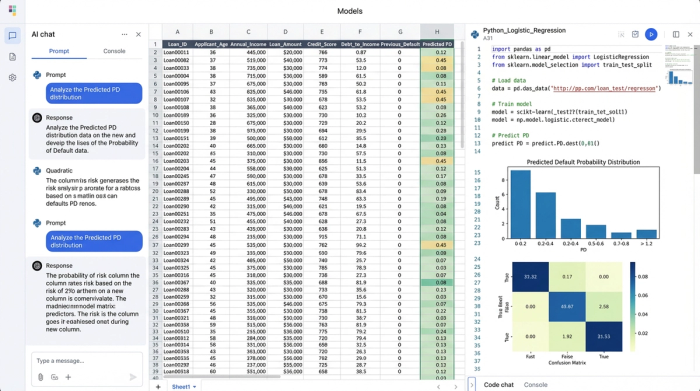
Instead of relying on basic lookup tables, an analyst can use a Python cell to calculate the Probability of Default (PD) for every loan in the dataset. By importing a library like scikit-learn, the analyst can train a logistic regression model on the historical data, a common approach in machine learning models for credit default prediction.
The Python script effectively looks at past loans and learns that, for example, a credit score below 600 combined with a high debt-to-income ratio has an 18% chance of default. The script then generates a new column in the spreadsheet: "Predicted PD."
At this stage, the model can also assign interest rates based on risk tiers. The Python code can contain logic that assigns a 5% rate to low-risk applicants and a 12% rate to higher-risk applicants. This logic lives right next to the data, transparent and auditable, rather than hidden in a separate file system.
Simulating outcomes: the Monte Carlo approach
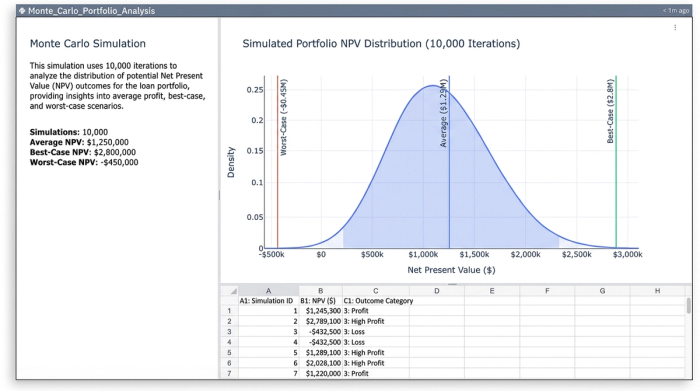
Knowing the probability of default is useful, but it doesn't tell the whole story. If a loan has a 10% chance of defaulting, it might pay off in full, or it might result in a total loss. To understand the risk of the entire portfolio, we need to simulate these outcomes thousands of times.
This is where the Monte Carlo method comes in. We can write a Python loop within Quadratic that simulates the portfolio's performance 1,000 or 10,000 times. In each iteration, the code uses a random number generator against the "Predicted PD" to decide if a specific loan defaults or pays back.
By aggregating the results of these thousands of simulations, the analyst can calculate the Net Present Value (NPV) of the portfolio under various conditions. This provides a distribution of outcomes—not just the average expected profit, but the worst-case and best-case scenarios. This level of rigor gives credit risk managers the confidence to set capital reserves and approval targets.
Optimization: finding the "sweet spot"
The ultimate question for the portfolio manager is: "What is the lowest credit score we should accept to maximize profit?", a challenge often addressed through advanced techniques like optimizing the acceptance threshold of a credit score.
If the cutoff is too low, defaults eat the profit. If it is too high, the loan volume is too small to cover fixed costs.
In Quadratic, this optimization process becomes interactive. The analyst can set up a specific cell as a variable, labeled "Approval Threshold." The Python simulation code references this cell.
1. The analyst types "640" into the threshold cell.
2. The Python simulation automatically re-runs, filtering out anyone with a score below 640.
3. The charts update instantly, showing the projected total profit and the number of approved loans.
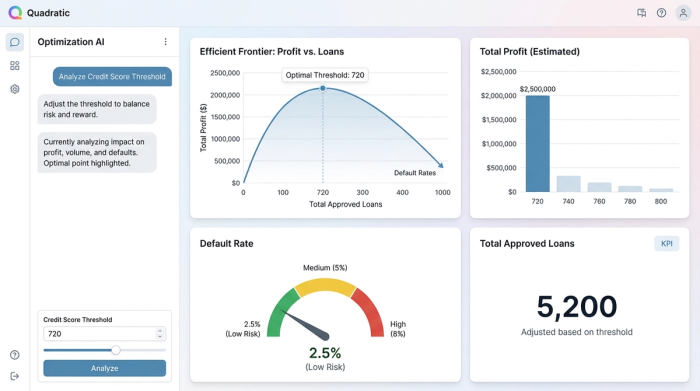
4. The analyst changes the cell to "680." The simulation runs again, showing a lower default rate but also lower total revenue due to volume loss.
By visualizing these results on an "Efficient Frontier" curve, the analyst can pinpoint the exact score—say, 662—where the risk-adjusted return is highest. This turns a complex statistical exercise, a form of quantitative data analysis, into a tangible business decision.
Evaluating loan portfolio management software
Because the term covers such a broad range of tools, selecting the right software depends entirely on the problem you are trying to solve.
For large enterprises focused on operations, commercial loan portfolio management software like nCino or Salesforce Financial Services Cloud is the standard. These tools excel at workflow automation, document collection, and regulatory compliance.
For smaller firms, loan portfolio management for small business often defaults to Excel. While familiar, this approach hits a ceiling quickly. As data grows or models become more complex (like the Monte Carlo example above), standard spreadsheets become slow and prone to errors.
For teams focused on modeling, analysis, and strategy, Quadratic stands out as one of the best coding spreadsheets for managing loan-based investment portfolios. It does not replace the CRM, but rather acts as the analytical layer on top of it. It offers the computational power of a data science notebook with the usability of a spreadsheet, making it the ideal environment for stress testing and optimization.
When conducting a loan portfolio management software comparison, consider whether your bottleneck is administrative (processing paperwork) or analytical (optimizing profit). If it is the latter, you need a tool that supports code-based modeling.
Conclusion: modernizing the analyst's toolkit
Effective portfolio management is about foresight. It requires moving from a reactive stance—looking at who missed a payment yesterday—to a proactive stance—predicting how a change in credit policy today will impact profitability next year.
By combining the data ingestion capabilities of Python and SQL, alongside the visual flexibility of a spreadsheet, analysts can build models that are both rigorous and accessible. Quadratic provides the environment where this modern workflow thrives, allowing teams to simulate, optimize, and share their insights without friction.
To see this workflow in action, you can explore the Monte Carlo simulation template in Quadratic. Try changing the approval threshold variables yourself and watch how the profit projections adapt in real-time.
Use Quadratic to do loan portfolio management
- Perform strategic loan portfolio analysis to optimize profit and balance risk, moving beyond basic tracking.
- Ingest and clean millions of rows of raw loan data directly via SQL or large CSV imports.
- Build and run predictive models (like logistic regression for probability of default) using Python within the familiar spreadsheet grid.
- Execute complex Monte Carlo simulations to accurately assess portfolio risk and net present value.
- Interactively optimize credit score cutoffs and other lending criteria, instantly visualizing profit impacts.
- Bridge the gap between powerful Python code and visual financial modeling for transparent, auditable analysis.
Ready to optimize your lending strategy? Try Quadratic
