
The landscape of marketing automation tools is vast, fragmented, and often overwhelming. For Marketing Operations Managers and Heads of Demand Gen, the challenge isn't finding software; it is filtering through hundreds of options to find the specific platform that aligns with an existing technical stack. When you search for what are marketing automation tools, you are often met with generic definitions or surface-level reviews that fail to address the complexity of enterprise buying decisions.
The problem with most evaluations is that they compare "apples to oranges." One vendor prices based on contact volume, another based on emails sent, and a third based on seat count. Feature names differ, but functionality overlaps. To make a confident decision, you need to move beyond static PDF checklists and "top 10" blog posts. You need a Weighted Decision Matrix—a logical framework that scores vendors based on your specific requirements.
In this guide, we will demonstrate how to build this evaluation engine using Quadratic. By moving this process into an AI-enabled spreadsheet that supports Python and formulas, you can automate the heavy lifting of data normalization and create a living document that evolves as your constraints change.
Why standard "top 10" lists fail marketing ops
When a stakeholder asks for a recommendation on the best marketing automation tools, the instinct is often to search for industry reports or quadrant charts. While these provide a high-level overview of market leaders, they fundamentally fail the Marketing Ops professional because they lack context. A tool ranked #1 by an analyst might be a disaster for your team if it doesn't support your specific Salesforce custom objects or exceeds your budget at your current email volume.
Most teams attempt to bridge this gap with static spreadsheets. They download a template, manually copy-paste pricing data from vendor websites, and attempt to score features 1 through 5. This approach is flawed for two reasons. First, it is labor-intensive; manually updating rows every time a vendor changes pricing is unsustainable. Second, it is static. If your CFO cuts the budget by 20% or your CTO mandates a new security compliance standard, a static spreadsheet cannot instantly re-calculate the "winner." This is where spreadsheet automation becomes critical.
There is a better way. Instead of a static list, you can build a dynamic evaluation workflow. This approach treats integrating marketing automation tools into your stack as a mathematical equation involving variables like API limits, user counts, and budget caps.
The framework: building an intelligent evaluation matrix
To make a data-driven decision, you need an environment that handles variables and logic better than a standard grid. In Quadratic, you can combine standard spreadsheet data with Python code and AI, allowing you to build a system that normalizes messy vendor data into clean, comparable metrics.
1. Define your parameters and constraints
Before you even look at a vendor, you must define the internal constraints of your organization. In a standard spreadsheet, these numbers are often buried inside complex cell formulas, making them hard to find and update.
In Quadratic, you can set these up as global variables or clearly defined input cells at the top of your sheet. You should define:
- Current Contact Volume: (e.g., 150,000 records)
- Projected Growth: (e.g., 20% year-over-year)
- Email Send Volume: (e.g., 1.2 million/month)
- CRM Requirement: (e.g., Must have native bi-directional sync with Salesforce)
- Attribution Model: (e.g., Multi-touch capability required)
By isolating these variables, you ensure that every calculation downstream—from total cost of ownership to feature scoring—references a single source of truth. If your email volume changes, you update one cell, and the entire evaluation model recalculates, much like performing a what-if analysis in financial modeling.
2. Automate data gathering with AI
The most tedious part of evaluating automated marketing tools is gathering the data. visiting pricing pages, downloading technical documentation, and hunting for API limits takes hours.
Quadratic allows you to bypass manual data entry by using built-in AI. You can paste the text from a vendor's pricing PDF or technical documentation directly into the spreadsheet and use an AI formula to parse it. For example, you can prompt the AI to "Read the text in column A and extract the cost per 1,000 contacts for the Enterprise tier."
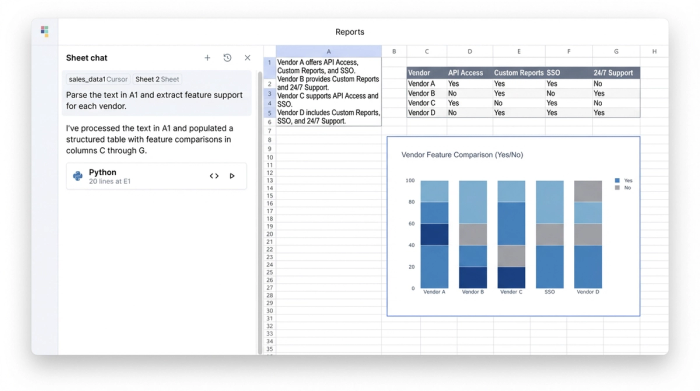
This is particularly useful for analyzing feature sets. Instead of manually reading documentation to see if a platform supports "Custom Objects," you can use AI tools for data science within Quadratic to scan the vendor's feature list and return a "Yes" or "No" in your comparison row. This transforms unstructured text from websites into structured data you can analyze.
3. Normalizing the data (apples-to-apples)
Vendor pricing models are rarely consistent. Vendor A might charge $2,000/month flat plus $0.01 per email. Vendor B might charge $0 for the platform but $500 per 10,000 contacts. Comparing these side-by-side in a standard sheet usually requires complex, brittle formula chains.
In Quadratic, you can use Python to normalize these costs. You can write a short script that references your "Contact Volume" and "Email Volume" variables defined in step one, applies the specific math for each vendor, and outputs a single "Total Cost of Ownership (TCO)" metric. This ensures that when you compare price, you are comparing the actual cost to your business, not just the advertised starting price.
Tutorial: creating the weighted scoring engine
Once you have normalized data, the next step is scoring. A raw list of features is not a decision; you need to apply weight based on what matters to your organization.
Assigning weights to features
Not all features are created equal. If your organization relies heavily on account-based marketing (ABM), ABM functionality should have a higher influence on the final score than a generic feature like "Landing Page Builder." This approach is similar to an analytic hierarchy process where weights are assigned to criteria.
Create a column in your Quadratic sheet for "Importance Weight" using a 1-5 scale.
- 5 (Critical): The system must do this well, or it is disqualified (e.g., integrating marketing automation tools with your specific CRM).
- 3 (Important): A strong differentiator, but not a dealbreaker.
- 1 (Nice to have): Useful, but doesn't justify a higher price tag.
You can then calculate a "Weighted Score" for each vendor. This is the raw score of the feature multiplied by your importance weight. This method ensures that a tool with a thousand mediocre features doesn't beat a tool with the five specific features you actually need.
Scenario modeling (startup vs. enterprise)
This is where the power of a dynamic engine becomes apparent. Different stakeholders prioritize different things. Your CFO cares about cost; your CISO cares about security; your CMO cares about speed to market.
In Quadratic, you can create a "Scenario Toggle" to dynamically re-rank vendors. You can set up a cell with a dropdown list containing options like "Startup Mode" (prioritizing low cost and ease of use) and "Enterprise Mode" (prioritizing security, API limits, and support).
Using Python, you can link the weights to this toggle. When you switch the cell to "Enterprise Mode," the script automatically updates the weights—giving security a "5" and cost a "2"—and instantly re-sorts the vendors. This allows you to show stakeholders exactly how the recommendation changes depending on the strategic priority.
Top contenders to input into your matrix
To populate your matrix, you need a shortlist of platforms. While you should conduct your own research, most evaluations will include a mix of these three categories to ensure a broad view of the market.
All-in-one suites
Platforms like HubSpot and Marketo are often the first names that come up when discussing the best marketing automation tools. They offer broad functionality covering email, social, ads, and CRM. They are typically strong on integration but can be expensive.
Email-first platforms
Tools like Klaviyo or Mailchimp began as email service providers and evolved into email marketing automation tools. They are often superior for B2C e-commerce brands where transactional data and high-volume sending are the priorities, often at a lower price point than the all-in-one suites.
B2B and account-based tools
Platforms like Pardot (Account Engagement) or 6sense are specialized automation marketing tools designed for complex B2B sales cycles. If your constraints include deep Salesforce integration or lead scoring based on account intent, these should be in your matrix.
The output: generating a stakeholder-ready recommendation
Once your data is populated, normalized, and scored, you need to present the decision. Sending a raw spreadsheet to a VP is rarely effective. You need a narrative.
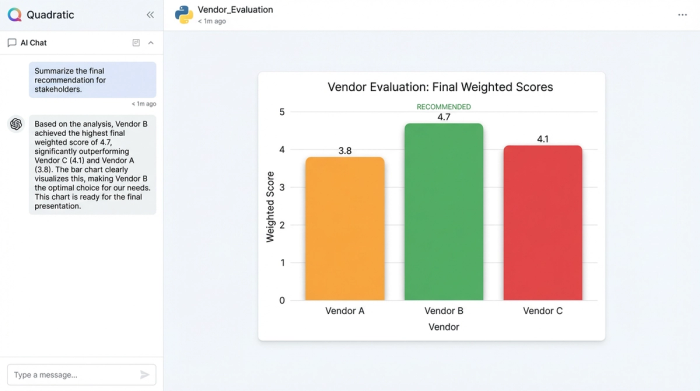
Quadratic allows you to synthesize your findings within the same workspace. You can use the built-in AI to analyze your final scoring grid and summarize the data table. For example, you can prompt the AI to "Write a paragraph explaining why Vendor A won the Enterprise scenario despite being more expensive than Vendor B."
Furthermore, you can visualize the data using Quadratic’s charting capabilities. A simple bar chart comparing the "Weighted Score" of the winner versus the runner-up provides an instant visual justification for your recommendation. This combination of hard data, scenario modeling, and visual summary creates a defensible business case that is ready for stakeholder review.
Conclusion
Selecting the right technology is one of the highest-leverage activities a Marketing Ops leader performs. Relying on gut feel or static templates introduces risk and inefficiency into the process. By treating the selection of marketing automation tools as a data problem, you can build a robust, defensible evaluation.
Using Quadratic, you elevate the process from manual data entry to dynamic modeling. You can automate the ingestion of vendor data, normalize pricing using Python, and toggle between strategic scenarios to find the best fit for your specific context. Stop manually filling out dead spreadsheets and start building a second brain for your marketing ops with a living decision engine that gives you the confidence to choose the right tools for your stack.
Use Quadratic to Evaluate Marketing Automation Tools
- Build a dynamic evaluation engine that automatically scores and ranks marketing automation tools based on your unique organizational needs and constraints.
- Automate data gathering from vendor pricing pages and technical documentation using AI formulas, eliminating manual copy-pasting.
- Normalize inconsistent vendor pricing and feature sets with Python, ensuring true apples-to-apples cost and functionality comparisons.
- Define and update key parameters like contact volume, budget, and CRM requirements in a single place, instantly recalculating your entire evaluation.
- Apply weighted scoring to features, prioritizing what matters most (e.g., ABM capabilities or specific CRM integrations).
- Model different scenarios (e.g., "Startup Mode" vs. "Enterprise Mode") to dynamically re-rank vendors based on evolving stakeholder priorities.
- Generate stakeholder-ready recommendations by summarizing data with AI and creating clear visualizations directly within your sheet.
Stop manually comparing static lists and start building your intelligent evaluation matrix. Try Quadratic
