Table of contents
- Introduction: The "Trust Gap" in AI Mathematics
- Why standard chatbots struggle with math
- Step 1: Setting up the verifiable workflow
- From derivation to visualization: plotting the math
- The "solution sheet": reporting and verification
- Best practices for using ChatGPT for mathematics
- Conclusion
- Use Quadratic to do verified mathematical analysis
Introduction: The "Trust Gap" in AI Mathematics
We have all experienced the specific frustration of using generative AI for quantitative work. You ask a sophisticated question about calculus, financial modeling, or statistical analysis, and the chatbot responds with supreme confidence. It lays out the steps, creates convincing-looking formulas, and arrives at a final number. But when you double-check the work, the logic falls apart. The number is wrong. This is the "AI trust gap"—the difference between sounding smart and actually being correct.
For students, data analysts, and researchers, this gap renders standard chatbots unreliable for serious work, highlighting the need for specialized platforms among the best data science tools. However, the solution isn't to abandon AI; it is to change the environment in which the AI operates. Users are looking for a mathematical ChatGPT—an experience that combines the conversational ease of a large language model (LLM) with the rigor of a computational engine.
The fundamental problem with standard ChatGPT mathematics is that LLMs are prediction engines, not calculators. They predict the next likely token in a sentence based on patterns, rather than executing logical operations. To make AI viable for mathematics, it must be grounded in a "verified environment"—a workspace where the AI generates code (like Python or SQL) rather than just text, and where that code is executed to produce a proven result.
This article demonstrates a practical workflow using Quadratic, an AI-powered spreadsheet. We will explore how a student or analyst can use this environment to ensure AI does the heavy lifting while the mathematics remains verified, step-by-step.
Why standard chatbots struggle with math
To understand why a specialized environment is necessary, we must first address the limitations of standard text-based interfaces. When you ask a general-purpose chatbot to solve a complex equation, it attempts to construct the answer linguistically. This leads to hallucinations, where the AI might correctly identify a formula but fail at the arithmetic, or conversely, get the arithmetic right but apply the wrong theorem.
For professionals and academics, ChatGPT and mathematics often make for a volatile mix because there is no mechanism for formal verification within a standard chat window. You cannot "audit" the bot's thought process easily because there is no underlying code to inspect—only a stream of text.
The search for "formal reasoning" in AI is driven by this need for auditability. Users do not just want an answer; they need to know the answer is derived correctly without manually re-doing every step. This is where Quadratic shifts the paradigm. By moving the interaction into a spreadsheet grid that supports native Python, the AI stops guessing numbers and starts writing scripts to calculate them.
Step 1: Setting up the verifiable workflow
The journey to a verified analysis begins with setting the stage. In a standard chatbot, you might paste a messy paragraph of context. In Quadratic, the user—let's say a physics student or a financial analyst—starts by structuring their inputs.
The user enters the core components of the problem into the grid: raw datasets, governing equations, and specific constraints (such as interest rates, time deltas, or physical constants). This creates a "ground truth" that the AI can reference accurately.
Once the data is in place, the user prompts the AI. However, the role of the AI shifts here. It acts as an assistant, not an oracle. The user might ask the AI to "derive the rate of change based on the values in column A." Instead of replying with a paragraph of text, the AI generates Python code directly into a cell.
This is the critical difference. If the AI hallucinates a variable that doesn't exist, or writes invalid syntax, the Python cell returns an error immediately. This provides an instant reality check that text-only bots lack. If the code runs without error, the user can inspect the logic within the cell to ensure it matches the mathematical principles they are applying.
From derivation to visualization: plotting the math
Mathematics is rarely just about single numeric outputs; it is often about understanding relationships and trends. A major advantage of using ChatGPT for mathematics inside a code-enabled environment is the ability to visualize abstract concepts instantly.
In this stage of the workflow, the user asks the AI to generate a plot based on the derived formulas. For example, after calculating a trajectory or a revenue forecast, the user can prompt the system to "visualize the results using a line chart." The AI writes the necessary Python code—using libraries like Matplotlib or Plotly—and renders the graph directly in the spreadsheet.
This capability unlocks powerful sensitivity checks. A user can ask, "What happens if the variable $x$ doubles?" In a static document or a standard chat, this would require re-prompting and hoping the AI updates every number consistency. In Quadratic, because the model is built on dynamic models using code and cell references, the user simply updates the input cell for variable $x$. The derived formulas recalculate, and the Python-generated plots update instantly. This turns a static answer into a dynamic, explorable model, facilitating AI data modeling and predictive analytics. This turns a static answer into a dynamic, explorable model, leveraging spreadsheet automation.
The "solution sheet": reporting and verification
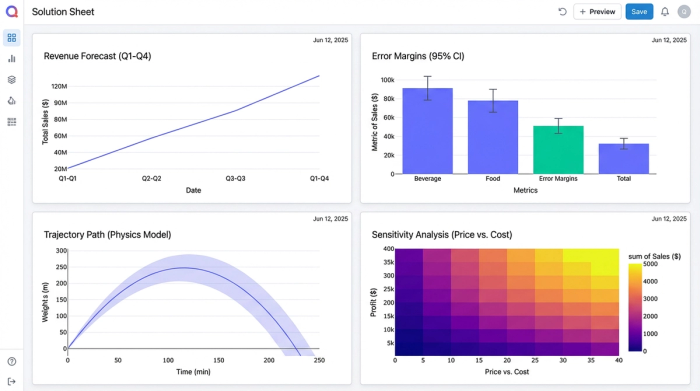
One of the most significant gaps in current AI workflows is the lack of a clean "Solution Sheet"—a presentation layer that separates raw work from final reporting. Researchers and analysts often struggle to present their findings in a way that is both readable and auditable.
In Quadratic, the user can organize their analysis to clearly separate assumptions from results. The "Solution Sheet" becomes a dashboard where the raw data and Python scripts live in the background, while the final, formatted answers are displayed prominently.
This facilitates a robust verification loop:
1. The AI proposes a step or a formula.
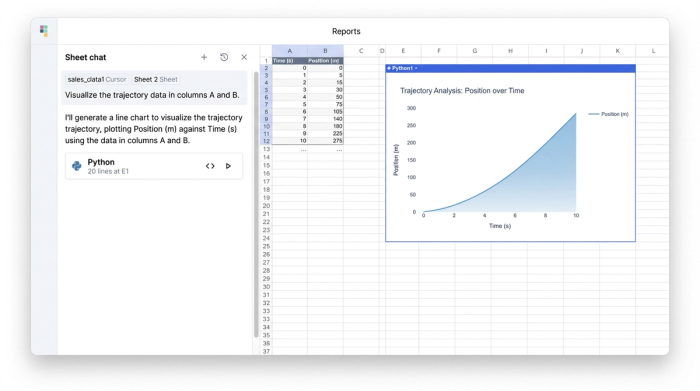
2. Quadratic runs the code in the grid.
3. The user verifies the numeric output against the symbolic derivation.
If the numbers look off, the user can click into the cell to see exactly what code generated them. This differentiation creates a unified view where the "scratchpad" work and the final "report" exist together, satisfying the rigorous requirements of academic or technical reporting.
Best practices for using ChatGPT for mathematics
To truly leverage math ChatGPT workflows, users should adopt a few best practices that prioritize accuracy over speed.
Don't trust, verify.
Always ask the AI to write code (Python or SQL) rather than plain text answers. Code is binary; it either runs or it doesn't. This forces the AI to be precise and gives you a concrete audit trail.
Iterative refinement.
Avoid the temptation to paste a massive word problem and ask for a single answer. Instead, use the grid to break complex problems into smaller, verifiable cells. Ask the AI to solve for variable A in one cell, then reference that cell to solve for variable B. This modular approach isolates errors and makes the model easier to debug.
By treating the AI as a coding partner rather than a calculator, you transform it from a source of frustration into a powerful engine for analysis, similar to how AI agents for spreadsheets can automate complex tasks.
Conclusion
A true mathematical ChatGPT experience is not about building a smarter chatbot; it is about embedding that chatbot in a smarter environment. By moving AI spreadsheet analysis into Quadratic, students and data professionals stop fighting with text-based hallucinations and start building verifiable, code-backed models.
The outcome of this workflow is not just a single answer to a homework problem or a business query. It is a reusable, dynamic asset that can be audited, visualized, and adjusted. If you are tired of second-guessing AI math, it is time to move your analysis into a workspace designed for verification.
Use Quadratic to do verified mathematical analysis
- Verify AI-generated math: Directly execute AI-generated Python code in the grid to eliminate hallucinations and ensure computational accuracy, bridging the "AI trust gap."
- Ground AI with structured data: Provide AI with clear inputs like datasets, equations, and constraints within the spreadsheet, ensuring precise calculations and reducing errors.
- Debug AI logic instantly: Get immediate feedback on AI-generated code errors directly within the Python cells, allowing for quick inspection and correction of mathematical logic.
- Visualize dynamic mathematical models: Use AI to generate Python plots that update in real-time as input variables change, enabling dynamic sensitivity analysis and explorable models.
- Produce auditable solution sheets: Organize complex analyses into clear "Solution Sheets" that separate assumptions from results, providing a transparent and verifiable reporting layer for academic or professional work.
- Break down complex problems: Deconstruct large mathematical challenges into modular, verifiable steps within individual cells, enhancing accuracy and debugging efficiency.
Ready to get verifiable results from AI math? Try Quadratic.
