
Table of contents
- Why standard PTO Excel trackers fail at scale
- The Quadratic solution: a better way to track time off
- Step 1: Structuring your data (the input)
- Step 2: Automating logic and validation with Python
- Step 3: Calculating balances by leave type
- Step 4: Generating the manager report (the output)
- Conclusion: compliance without the cost
- Use Quadratic to build a PTO tracker
Managing time off is one of the highest-stakes administrative tasks for any growing business. Effective employee PTO tracking is not just about marking dates on a calendar; it is a critical intersection of compliance, payroll accuracy (often managed with a robust payroll template), and resource planning. A mistake here doesn't just annoy a manager; it can lead to violations of labor laws like FMLA, incorrect paycheck accruals, or staffing shortages during critical operational periods.
For many HR administrators and office managers, finding the right HR time and attendance software to manage this process is a source of constant frustration. On one end of the spectrum, you have the best PTO tracking software—enterprise SaaS solutions that are powerful but often prohibitively expensive and rigid for small-to-mid-sized teams. On the other end, you have the ubiquitous PTO tracker Excel spreadsheet. While flexible and free, these spreadsheets are notoriously fragile. A single broken formula or a manual data entry error can throw off accrual balances for the entire year.
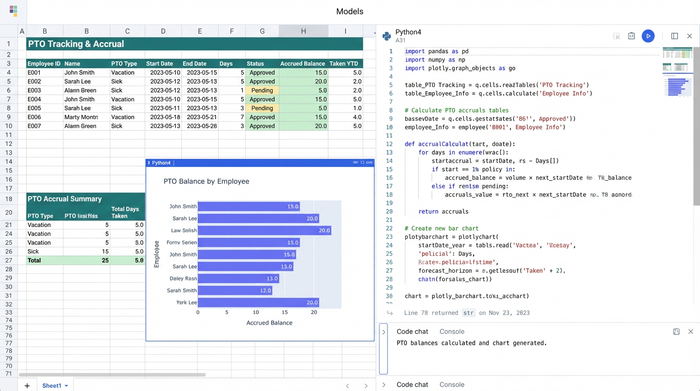
There is, however, a third option. By using a programmable spreadsheet like Quadratic, you can build a custom, free PTO tracker that combines the familiar interface of Excel with the rigid logic and safety of a database. This approach allows you to handle complex accruals (like those managed by a PTO accrual calculator), enforce date validation, and automate reporting without the cost of enterprise subscriptions.
Why standard PTO Excel trackers fail at scale
When a business is small, a simple list of dates works fine. But as you scale, the limitations of a standard PTO tracker Excel template become dangerous liabilities. The primary issue lies in the "logic gap." Standard spreadsheets are excellent for storing data but struggle with complex logic.
For example, distinguishing between "Sick," "Administrative," and "Vacation" days while simultaneously accounting for weekends, holidays, and fiscal year boundaries requires incredibly complex nested formulas. These formulas are difficult to write and even harder to audit. If a user accidentally books leave on a Saturday or inputs a date outside the current fiscal year, a standard spreadsheet will rarely flag the error. It simply accepts the data, leading to inaccurate balances.
Furthermore, there is a significant "reporting gap." Most Excel-based solutions result in a static table of raw data. They lack a dynamic "Manager View" that automatically aggregates totals. To see how many sick days an employee has left, an administrator often has to manually filter rows or run risky pivot tables. This manual intervention increases the likelihood of human error, creating a fear of "breaking the sheet" that paralyzes many HR workflows.
The Quadratic solution: a better way to track time off
We recently worked with a workforce manager who needed to solve this exact problem. They required a system to manage diverse leave types across multiple employees with strict date validation. The goal was to move away from fragile manual counting, often found in a basic timesheet template, and toward a system where the software handled the math.
Here is how we utilized Quadratic to build a robust PTO time tracker that manages inputs, validates dates, and reports on balances automatically.
Step 1: Structuring your data (the input)
The first step in building a reliable system is to change how you view your data. In a typical PTO tracker Excel file, users often "paint" cells different colors to represent leave. While visually intuitive, this data is impossible to query or analyze programmatically.
In Quadratic, we treat the input sheet like a database. We set up a raw data table with specific, standardized columns: Employee Name, Leave Type (Paid, Sick, Administrative), Start Date, End Date, and Notes.
By structuring the data this way, every entry becomes an audit-ready record. There is no ambiguity. An entry is not just a red cell on a calendar; it is a specific row of data defining who is taking off, what category of leave it falls under, and the exact duration. This structure is the foundation that allows us to apply automation in the next steps.
Step 2: Automating logic and validation with Python
This is where the power of Quadratic differentiates itself from a standard spreadsheet. To address the "logic gap," we need to ensure that the dates entered by the HR admin are valid.
In a traditional spreadsheet, you might try to write a complex data validation rule to prevent errors. In Quadratic, we use Python. We wrote a simple Python script directly in the sheet that acts as a guardrail for data entry.
The script looks at the Start Date and End Date columns for every new entry. It automatically checks if those dates fall within the current operational fiscal year. If an administrator accidentally types "2023" instead of "2024," or tries to log a date that doesn't exist, the system flags it immediately.
This transforms the spreadsheet from a passive text editor into an active partner in data quality. It prevents the most common source of PTO tracking errors—bad data entry—before it ever affects the final report.
Step 3: Calculating balances by leave type
Once the data is structured and validated, the next challenge is the "math" of HR. You aren't just tracking time off generally; you are tracking specific buckets of time. A standard PTO time tracker often struggles to differentiate between a "Sick Day" deduction and a "Vacation Day" deduction without manual intervention.
Using the power of Python within the grid, we automated this calculation. The system looks at the Start Date and End Date for each row and calculates the duration automatically.
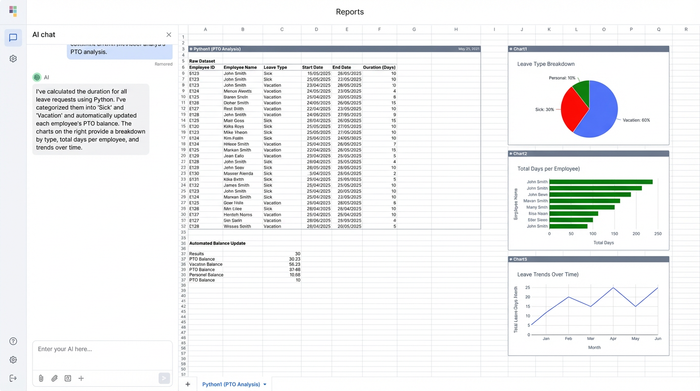
More importantly, it categorizes these durations based on the "Leave Type" column. This means the system knows that a 3-day entry labeled "Sick" should only impact the Sick Leave balance, not the Vacation balance. By automating this calculation, the HR manager no longer needs to count days on a calendar or manually subtract hours. The risk of calculation errors drops to near zero.
Step 4: Generating the manager report (the output)
The final piece of the puzzle is the "Reporting Gap." Collecting data is useless if you cannot easily see who has taken what leave, or effectively manage a daily employee attendance sheet. This is where many users feel forced to buy PTO tracking software—simply to get a dashboard.
In Quadratic, we recreated the functionality of a SaaS dashboard using SQL queries directly within the spreadsheet. Instead of manually updating a summary table or wrestling with pivot tables, we wrote a query to generate a "Summarized Report."
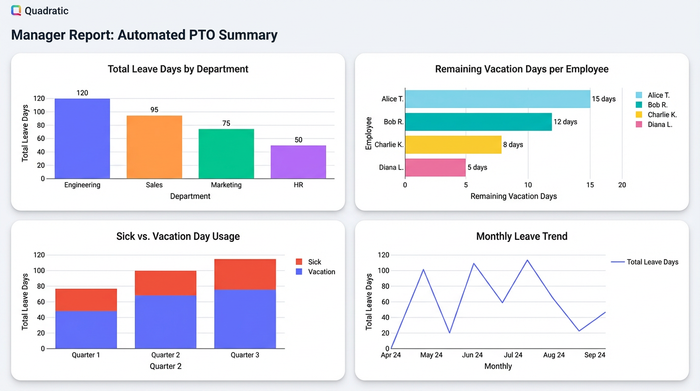
This report is a clean, read-only table that aggregates the raw data. It lists every employee and provides a breakdown of their total days taken by category (e.g., "Jane Doe: 5 Sick Days, 10 Vacation Days"). Because this report is generated via code, it updates automatically whenever new data is added to the input table. It gives the manager an instant, accurate snapshot of the workforce without requiring any manual assembly.
Conclusion: compliance without the cost
You do not need to choose between a fragile, manual spreadsheet and an expensive monthly subscription to manage your team's time off. By using a programmable spreadsheet, you can bridge the gap.
With Quadratic, you gain the audit trail of a database, the calculation power and safety of Python, and the familiar ease of a spreadsheet interface. This approach allows you to build a free PTO tracker that is robust enough to handle compliance and accruals but flexible enough to adapt to your specific company policies.
If you are ready to stop worrying about broken formulas and start trusting your leave data, try building your tracker in Quadratic today. It is the modern way to bring order to workforce management.
Use Quadratic to build a PTO tracker
- Structure time off data like a database, ensuring every entry is an audit-ready record for compliance.
- Automate complex accrual calculations and enforce strict date validation using Python directly within the grid.
- Generate dynamic, real-time manager reports with SQL to instantly see employee leave balances and types without manual aggregation.
- Build a custom, flexible PTO tracker that combines spreadsheet familiarity with rigid database logic, avoiding costly enterprise software subscriptions.
Stop wrestling with fragile spreadsheets and manual calculations. Build a reliable PTO tracker today. Try Quadratic.
