Purpose of the determinant of inverse matrix template
This Python template automates the calculation of a 4x4 matrix inverse and computes key linear algebra metrics using Python. It serves as a practical demonstration of how to determine the inverse of a matrix using NumPy within the Quadratic Python spreadsheet.
By processing raw data through Python code cells, the template:
- Provides immediate feedback on matrix invertibility and eigenvalues.
- Demonstrates Python-based linear algebra workflows in a spreadsheet interface.
Inputting matrix data
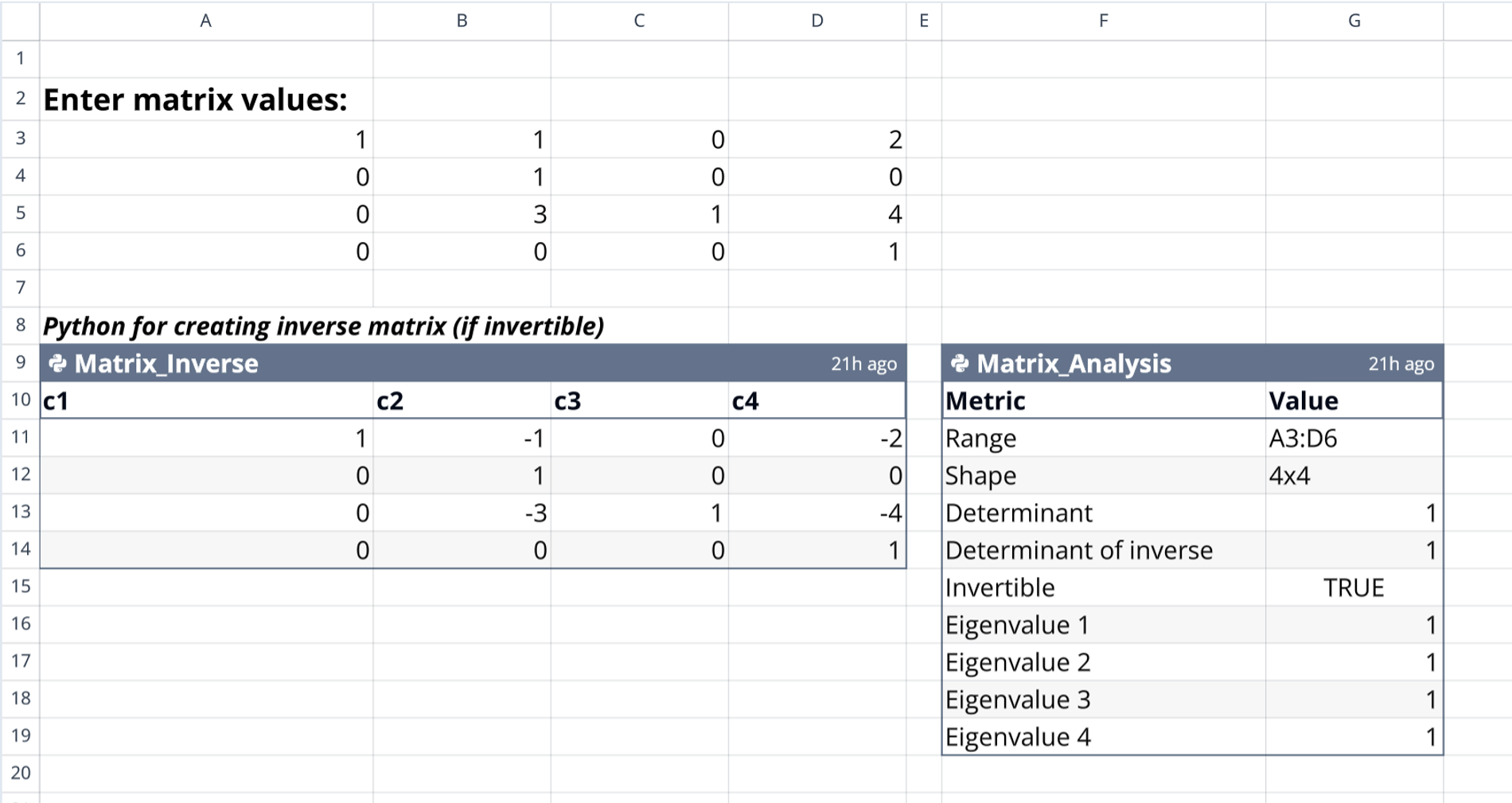
Users begin by locating the designated input workspace in cells A3:D6. This area is clearly marked by a descriptive label in cell A2 to verify the active input location.
To prepare the data for analysis:
- Enter raw numerical values to populate the 4x4 grid.
- Ensure the matrix remains square to allow for valid determinant calculations.
Python logic and calculation flow
Matrix_Inverse code cell
This code cell reads user-defined values directly from the input range A3:D6. It applies NumPy linear algebra functions to compute the inverse and handles the necessary mathematical operations required to find the inverse of a matrix determinant. The cell automatically recalculates whenever input values change.
Matrix_Analysis code cell
The analysis cell performs a comprehensive scan of the source matrix to derive deeper insights. It calculates the determinant of an inverse matrix alongside the original determinant to provide a complete picture of the matrix's properties.
Key functions performed by this cell include:
- Verifying if the matrix is invertible by returning a boolean value.
- Computing all four eigenvalues for the 4x4 dataset.
Understanding the analysis outputs
Inverse matrix results
The template outputs the calculated inverse matrix to the range A9:D14. This section includes generic column headers (c1 through c4) for easy referencing by other cells and updates dynamically based on the invertibility of the source data.
Analytical metrics table
A summary table in range F9:G19 displays the core analytical data. It lists the source range and matrix shape dimensions for verification.
The table structures the results as follows:
- Shows the determinant and inverse of a matrix in a two-column format.
- Provides specific eigenvalue results derived from the input.
Who this determinant of inverse matrix is for
This template is designed for specific technical use cases, ranging from education to engineering applications.
It is particularly useful for:
- Linear algebra students verifying manual 4x4 calculations.
- Data scientists requiring quick validation of matrix properties for predictive modeling and analytics.
- Engineers needing to determine the inverse of a 3x3 matrix or larger for integer linear programming or other systems of equations.
- Python users looking to integrate NumPy calculations directly into spreadsheet workflows.
Use Quadratic to calculate the determinant of an inverse matrix
- Input 4x4 matrix data directly into the spreadsheet grid.
- Automatically compute the inverse matrix and its determinant using native NumPy Python.
- Instantly verify matrix invertibility and calculate all four eigenvalues.
- See all linear algebra metrics and the inverse matrix dynamically update with input changes.
- Streamline complex 4x4 matrix analysis for educational or engineering applications.