Table of contents
Every controller knows the sinking feeling of discovering a material discrepancy after the books are closed. Whether it is a misapplied revenue cutoff or a significant expense capitalization error, the realization triggers an immediate shift from forward-looking strategy to retrospective damage control. When you need to correct prior year accounting errors, the pressure is not just about compliance; it is about the operational nightmare of reopening the past without breaking the present.
While accounting standards like ASC 250 dictate the rules for reporting these corrections, they offer no guidance on the data engineering required to execute them. Most finance teams struggle not with the accounting theory, but with the mechanics of the reconciliation, often needing robust financial reconciliation tools to manage the process. They are forced to wrestle with static CSV exports, fragile spreadsheet links, and version control issues that make the audit process painful.
This guide outlines a modern workflow for handling these corrections. By moving beyond traditional manual spreadsheets to a data-connected environment like Quadratic, you can build a defensible, automated "Adjustment Package" that satisfies auditors and restores confidence in your financial data.
The regulatory context: ASC 250 and materiality
Before diving into the data workflow, it is important to briefly frame the regulatory landscape. This establishes the scope of work required for the adjustment package.
Under US GAAP, specifically ASC 250, you must distinguish between a change in accounting estimate and the correction of an error. A change in estimate is prospective, meaning you fix it moving forward. However, an error correction is retrospective. This requires a prior period adjustment to ensure that historical financial statements accurately reflect the company's performance.
The severity of the correction dictates the reporting requirement, often categorized as "Big R" or "Little r" restatements. A "Big R" restatement involves a material error that renders previously issued financial statements unreliable, requiring them to be reissued. A "Little r" restatement involves immaterial errors that can be corrected in the current period by adjusting the prior period information presented for comparative purposes.
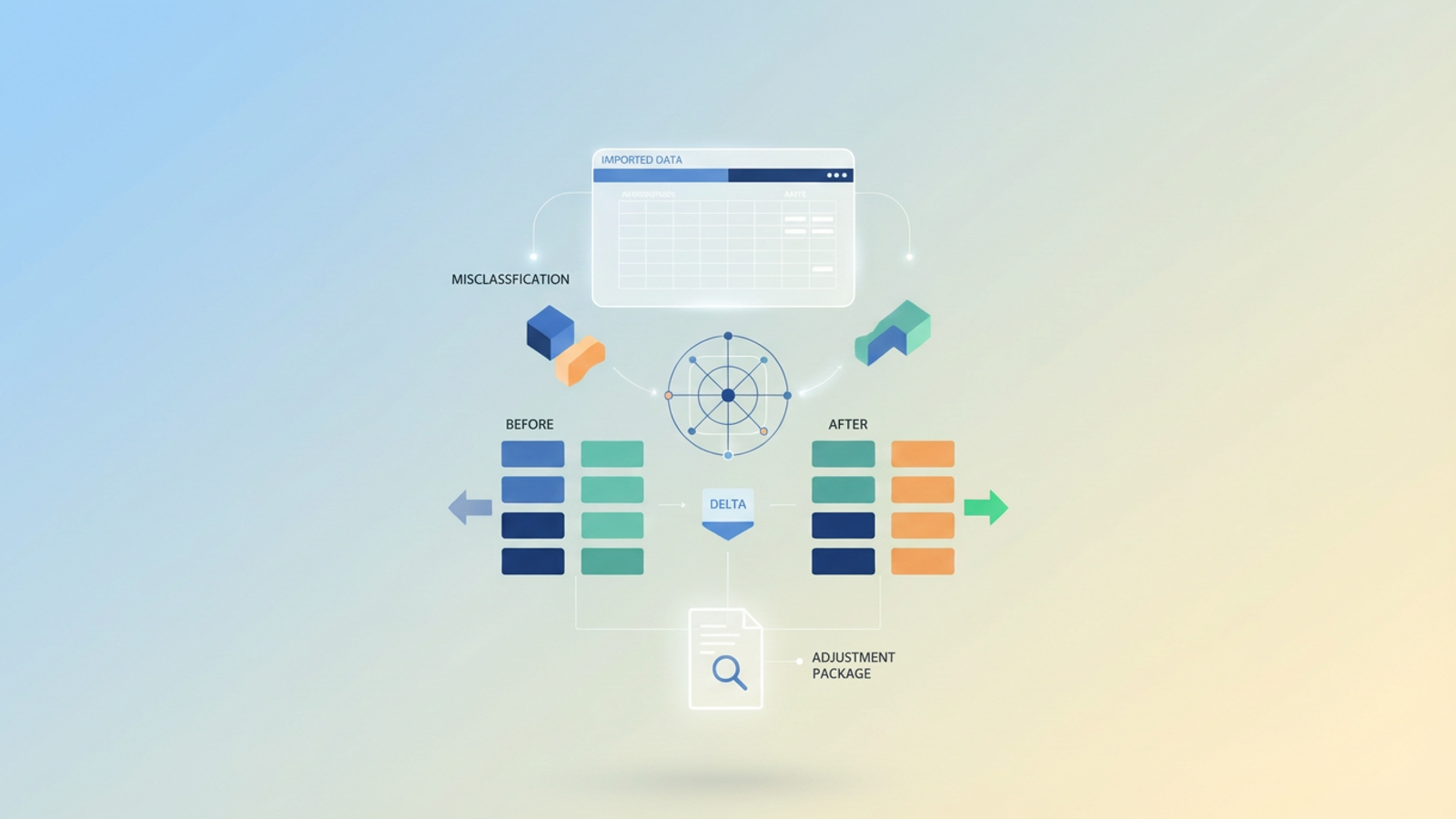
Regardless of the classification, the operational goal remains the same: you must isolate the error, calculate the exact difference, and create a transparent audit trail that justifies the retained earnings adjustment.
The operational challenge: why spreadsheets fail at restatements
The theoretical side of a restatement is straightforward, but the practical application is where finance teams lose days of work. Traditional spreadsheets are ill-equipped for the forensic nature of this task.
The primary disconnect is data isolation. To correct a prior year error, you often have to export a static version of the prior year’s General Ledger (GL). Once that data is in a standard spreadsheet, it is disconnected from your source system. If you find a revenue cutoff error—where revenue was recognized in December but the service was delivered in January—fixing it usually involves manual hard-coding or complex VLOOKUP chains that are prone to breaking.
Furthermore, documentation becomes a significant hurdle. Auditors do not just want the corrected number; they need to see the "Before," the logic applied to the adjustment, and the "After." in a standard spreadsheet, the logic is often buried inside cell formulas or, worse, overwritten entirely. This lack of a clear audit trail turns the review process into an interrogation, as you struggle to reconstruct how you arrived at the new figures.
Step-by-step: how to build a defensible adjustment package
To solve this, you need a workflow that treats the correction as a data engineering problem. Using Quadratic, you can import raw data and use Python or SQL to programmatically identify and correct errors. This creates a self-documenting trail that auditors can follow step-by-step.
1. Centralize and isolate the data
The first step in a robust adjustment process is obtaining the raw source of truth. Instead of copy-pasting truncated reports into tabs, you should import the full prior-year GL and relevant supporting schedules directly into Quadratic.
Because Quadratic connects to data sources and handles large datasets efficiently, you can work with the granular transaction details rather than summarized trial balances. This ensures that your analysis is built on the actual transactional history, preventing aggregation errors from hiding the root cause of the discrepancy.
2. Identify the variance (cutoffs and capitalization)
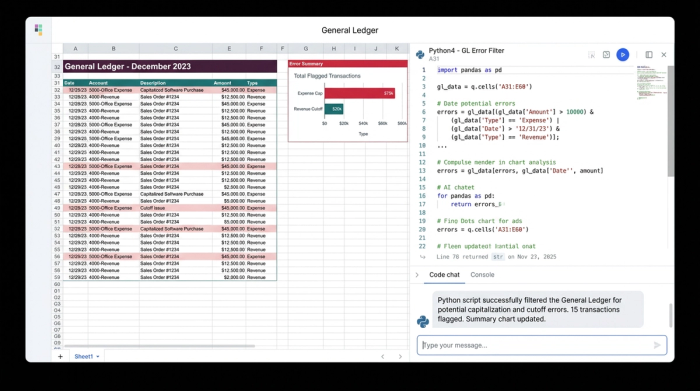
Once the data is in the system, the manual hunt for errors is replaced by programmatic filtering. Suppose you are correcting an expense capitalization error where software development costs were expensed immediately rather than capitalized.
In a traditional workflow, you might manually scan vendor names or invoice descriptions. In Quadratic, you can use a SQL query or Python script to filter the entire dataset instantly. You can write a query to pull all transactions tagged as "Software Expense" that exceed a certain dollar threshold and occurred within the specific development window.
This approach is particularly powerful for analyzing revenue cutoff issues. You can query shipping dates against invoice dates to flag transactions where revenue was recognized in the wrong period, a key step in effective transaction reconciliation. By defining these rules in code, you not only find the errors faster but also create a reproducible logic trail. If an auditor asks how you identified the misclassified items, you simply show them the query.
3. Calculate the "delta" (the correcting entry)
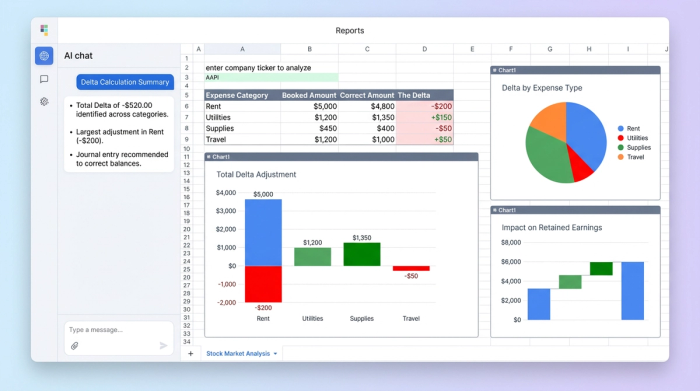
With the specific erroneous transactions isolated, the next step is calculating the financial impact. You can set up a dynamic table that compares the original state to the corrected state.
Structure your analysis with three clear columns:
- Booked Amount: The value originally recorded in the GL.
- Correct Amount: The value as it should have been recorded based on your new logic.
- The Delta: The difference between the two, which represents the necessary journal entry.
This calculation directly informs your retained earnings adjustment. Because this is built on live formulas or code, any change to the underlying assumptions—such as adjusting the capitalization threshold—will instantly update the delta. This eliminates the risk of recalculation errors that plague manual spreadsheet models.
4. Visualize the "before and after" for auditors
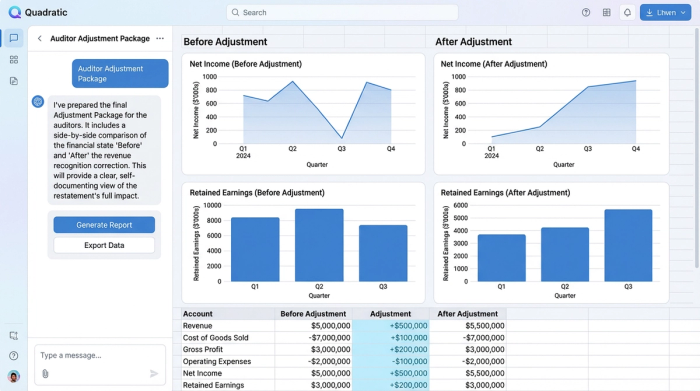
The final piece of the calculation puzzle is presentation. Auditors need to verify that the adjustment flows correctly through the financial statements.
By applying strong financial data visualization, you can visualize the "Before" and "After" states adjacent to your calculation logic, providing a comprehensive view of the restatement. The code-based nature of the platform means the "Adjustment Package" is self-documenting; the path from raw data to final adjustment is visible and verifiable.
Best practices for documenting the correction
A calculation alone is not an audit defense. It must be accompanied by context.
Standard procedure dictates that a technical memo citing the relevant accounting standard (such as ASC 250) must accompany the adjustment. In Quadratic, you can write this memo directly on the canvas alongside your data tables and queries. This keeps the qualitative explanation linked to the quantitative evidence.
Finally, once the adjustment package is approved, it is critical to lock the data. This prevents accidental edits during the current year close and preserves the integrity of the restatement for future reference.
From panic to process
Correcting prior year accounting errors is inherently stressful, but the chaos often stems from the tools rather than the accounting itself. When you rely on fragile spreadsheets, every variable adds risk. By shifting to a data-connected canvas, you turn a potential "Big R" nightmare into a controlled, transparent operation.
A well-structured adjustment package does more than just fix the numbers; it demonstrates competence and control to your auditors and stakeholders.
Try Quadratic, the AI spreadsheet that does your work for you, to automate your variance analysis and build audit-proof adjustment packages.
Use Quadratic to correct prior year accounting errors
- Centralize prior-year data: Directly import full general ledger and supporting schedules to work with granular transaction details, avoiding static CSVs.
- Programmatically identify errors: Use Python or SQL to instantly filter and pinpoint discrepancies like revenue cutoff or expense capitalization errors across large datasets.
- Automate adjustment calculations: Create dynamic tables that compare original vs. corrected amounts, with deltas updating automatically to prevent recalculation errors.
- Visualize "before and after": Clearly present the impact of adjustments with integrated visualizations, providing auditors with a comprehensive view.
- Build a self-documenting audit trail: Capture all logic, queries, and calculations directly on the canvas, ensuring transparency and defensibility from raw data to final adjustment.
- Collaborate and secure: Work with your team on adjustment packages and lock down approved data to prevent accidental edits and preserve integrity.
Ready to simplify your accounting error corrections? Try Quadratic.
