Table of contents
- Why standard budgeting fails the "feast or famine" cycle
- Step 1: Automate data ingestion (stop manual tracking)
- Step 2: Establish your "bare bones" baseline
- Step 3: Build the "holding tank" and buckets
- Step 4: Dynamic forecasting (the Quadratic advantage)
- Beyond the spreadsheet: why you need code, not just cells
- Conclusion: Making volatility boring
- Use Quadratic to manage your irregular income budget
For freelancers, commission-based sales professionals, and gig economy workers, a robust expense and income tracker is essential, as the standard financial advice to "give every dollar a job" often feels like a cruel joke. It is easy to assign jobs to dollars when you know exactly how many of them will show up on the 1st and the 15th of the month. It is much harder when your income graph looks like a roller coaster, oscillating between record-breaking months and dry spells where invoices sit unpaid for weeks. This "feast or famine" cycle creates a specific type of anxiety that standard budgeting apps simply cannot resolve.
The problem isn't your spending; it is the rigidity of traditional tools. Most spreadsheets are static, requiring manual updates that look backward rather than forward. Rigid budgeting apps often discourage forecasting, leaving you unprepared for the inevitable lean months. To truly gain control, you need an irregular income automated budget that is dynamic and capable of smoothing out volatility.
This is where Quadratic changes the workflow. By moving beyond standard cells and utilizing a canvas that integrates Python, SQL, and direct data connections, you can build a system that doesn't just track spending but actively engineers stability. With Quadratic, you can connect directly to your bank data via Plaid, analyze income patterns using Python, and create a "living" model that turns variable deposits into a steady, simulated paycheck.
Why standard budgeting fails the "feast or famine" cycle
The primary reason standard budgeting fails for variable earners is a mismatch in logic. Traditional budgets are linear: Income minus Expenses equals Savings. When income is the variable, that equation breaks. If you try to budget based on your "average" income, you will inevitably run out of cash during a below-average month.
There is also a pervasive myth in the personal finance software industry—championed by apps like YNAB—that forecasting is dangerous. The argument is that you should only budget money you currently have. While this is excellent advice for steady earners, it is a critical error for those learning how to budget with irregular income. If you are a freelancer, forecasting and knowing how to reduce taxable income are not luxuries; they are survival skills. The difference lies in the execution. Forecasting fails when it is based on optimism. It succeeds when it is based on data.
The goal of a robust system in Quadratic is "Income Smoothing." This process decouples the timing of your client payments from the timing of your personal expenses. Instead of your lifestyle riding the roller coaster of your deposits, your budget acts as a shock absorber, capturing excess cash in high months to fill the gaps in low months. To do this effectively, you need to stop guessing and start engineering.
Step 1: Automate data ingestion (stop manual tracking)
The first step in stabilizing your finances is removing the friction of manual entry. Many competitors and blog posts suggest listing your irregular income sources in a static list. This is tedious, prone to human error, and almost always outdated by the time you finish. You cannot effectively manage volatility if you are making decisions based on data from 30 days ago.
In Quadratic, the workflow begins with automation. Because Quadratic integrates with Plaid, you can pull your transaction streams directly into the spreadsheet canvas. This provides a real-time feed of every deposit across all your accounts. Instead of typing in invoice amounts, you have a live dataset that updates automatically.
This capability is why a programmable canvas is often the best budget app for irregular income management. It gives you the flexibility of a spreadsheet with the connectivity of a fintech app. By automating data ingestion, you ensure that your baseline calculations and safety buffers are always reflecting reality, not your memory of it.
Step 2: Establish your "bare bones" baseline
Once your data is flowing into Quadratic, the next step is determining your "baseline" budget. A common mistake is budgeting based on an average monthly income. If you earn \$10,000 one month and \$2,000 the next, your average is \$6,000. If you build a lifestyle costing \$6,000 a month, you will be insolvent during the \$2,000 month.
You must budget based on your "floor"—the lowest likely income you can rely on. In Quadratic, you can use native Python formulas to analyze your historical Plaid data. Rather than just eyeing the numbers, you can write a simple script to calculate the 10th percentile of your monthly income over the last year. This figure represents your "Bare Bones" number—the amount that covers rent, utilities, and food.
This programmatic approach answers the difficult question of how to budget on an irregular income with mathematical confidence. By setting your expenses against this conservative baseline rather than an optimistic average, you ensure that your essential needs are covered even when business is slow.
Step 3: Build the "holding tank" and buckets
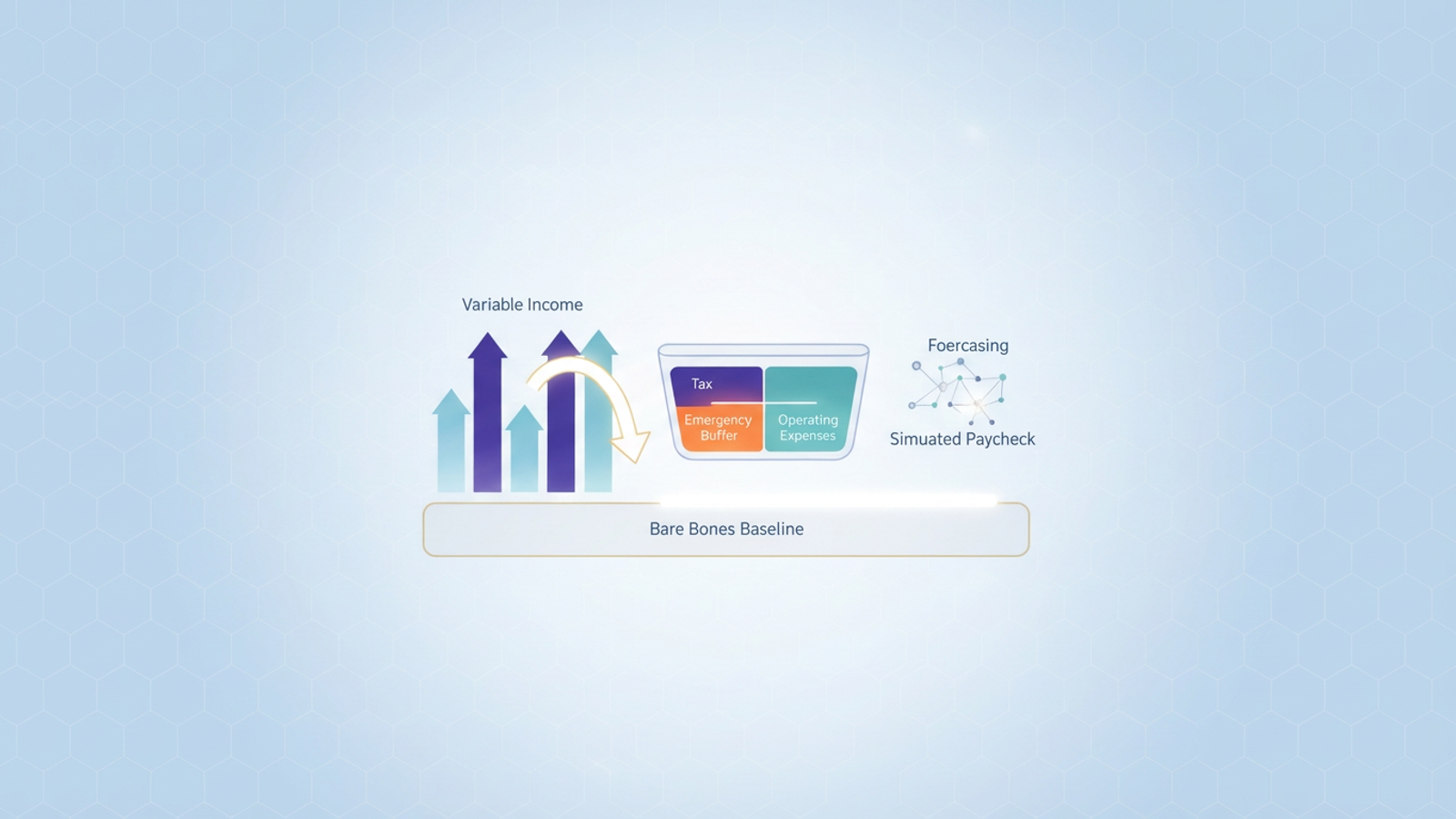
With a baseline established, you can build the core logic of the income smoothing system: the bucket mechanism. In your Quadratic canvas, this takes the form of a flow of funds that separates "Gross Income" from "Net Spendable Income."
When a deposit hits your account (synced via Plaid), the system should automatically allocate it into specific buckets before you ever consider spending it.
- Tax Bucket: Using a formula, immediately strip 25-30% of every deposit into a sinking fund to ensure you are never scrambling during tax season.
- The Holding Tank (Buffer): This is the most critical component. Surplus income—anything above your "Bare Bones" baseline—does not go to your checking account. It stays in the Holding Tank.
- The Paycheck: You then pay yourself a flat, consistent salary from the Holding Tank that matches your baseline.
This structure allows you to visualize exactly how to budget with an irregular income by creating an artificial steady paycheck. During a "feast" month, the Holding Tank fills up. During a "famine" month, you draw down the tank, but your personal checking account sees the exact same deposit amount regardless of what clients did that month.
Step 4: Dynamic forecasting (the Quadratic advantage)
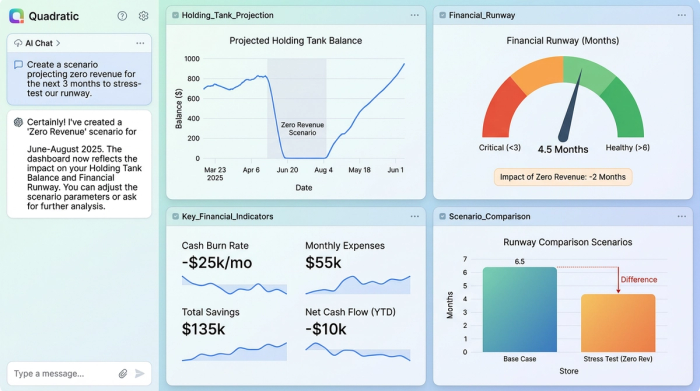
This is where the power of Quadratic separates itself from standard spreadsheets. Once your buckets are built, you can run dynamic forecasts to stress-test your financial runway.
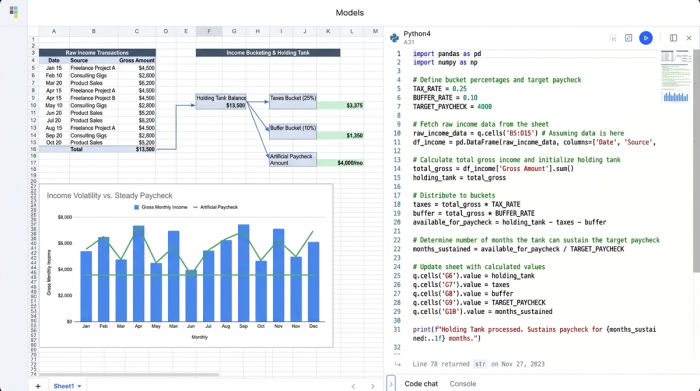
Because your data is live and your logic is built with Python or SQL, you can create scenarios. You can ask the system: "If I make \$0 in revenue for the next two months, will the current balance in my Holding Tank cover my baseline expenses?"
In Quadratic, you can set up a variable for "Projected Revenue" and watch your financial data visualization, like your runway graphs, update instantly. This turns your budget into a living projection. You aren't just tracking where money went; you are mathematically verifying that you are safe for the future.
Beyond the spreadsheet: why you need code, not just cells
You might be wondering if you could just download an irregular income budget excel template to achieve this. While Excel is a powerful tool, it has distinct limitations when handling this level of complexity. Excel templates are generally static; they require manual export/import of bank data (CSV files), and complex logic often results in fragile formulas that break easily.
The "Quadratic edge" is the ability to mix code with cells. If you need to calculate a progressive tax rate on your income or run a moving average that excludes outliers (like that one huge project payment that won't happen again), doing so in Excel formulas is a headache. In Quadratic, you can write a few lines of Python to handle that logic cleanly. This keeps your budget robust, auditable, and capable of handling the complexity of real-world freelance finances without breaking.
Conclusion: Making volatility boring
The ultimate goal of an irregular income budget is not just to organize your numbers, but to change your emotional relationship with money. By connecting your bank data via Plaid, calculating a data-backed baseline, and filtering your income through a "Holding Tank," you remove the panic from low-income months.
The workflow is simple but powerful: Connect Data $\rightarrow$ Calculate Baseline $\rightarrow$ Fill Buckets $\rightarrow$ Forecast Future. When you build this system in Quadratic, you turn financial volatility into a boring, manageable background process. You know that even if a client pays late, your system has already accounted for it. If you are ready to stop riding the roller coaster and start engineering your financial stability, it is time to build your dynamic budget in Quadratic.
Use Quadratic to manage your irregular income budget
- Automate income tracking: Connect directly to your bank accounts via Plaid for real-time transaction data, eliminating manual entry and ensuring your budget is always up-to-date.
- Establish a reliable baseline: Use native Python to analyze historical income and calculate a conservative "bare bones" budget, rather than relying on optimistic averages.
- Smooth out income volatility: Implement dynamic "holding tanks" and allocation rules to create a steady, simulated paycheck from irregular deposits.
- Forecast with confidence: Run live financial scenarios using Python or SQL to stress-test your budget and verify your financial runway for future months.
- Build robust, adaptable models: Combine spreadsheet cells with native Python and SQL for complex calculations and custom financial logic that traditional spreadsheets can't handle.
Ready to take control of your variable income? Try Quadratic.
