
We often treat December like a financial emergency. Between holiday gifts, end-of-year charitable giving, and travel costs, the bills pile up, causing stress that feels unpredictable. But these expenses aren't emergencies; they are inevitabilities. The stress stems from a lack of allocation, not a lack of warning. This is where a sinking fund becomes the most powerful tool in your personal finance arsenal.
To define sinking fund simply: it is a strategic method of saving a small amount of money over time to pay for a specific, known future expense. Rather than scrambling to find $1,200 for car insurance in a single month, you set aside $100 every month for a year. When the bill arrives, the money is already there, waiting to be spent.
While the concept is straightforward, the execution often fails because traditional tracking methods are flawed. Most people rely on static spreadsheets that require tedious manual entry or mental math to keep up to date. In this guide, we will explore what is a sinking fund, identify key categories to track, and demonstrate how to upgrade your workflow using Quadratic to build a dynamic, automated tracker connected to real-time banking data.
What are sinking funds vs. emergency funds?
Before building your tracker, it is vital to distinguish between these two financial safety nets. A common mistake is dipping into an emergency fund to pay for predictable costs, which leaves you vulnerable when a true crisis hits.
An emergency fund is for the unknown. It is a pool of cash reserved for sudden job loss, an unexpected medical diagnosis, or a natural disaster. You hope you never have to use it.
In contrast, a sinking fund is for the known. You fully intend to spend this money. You know that your car tires will eventually wear out, your annual software subscriptions will renew, and the holidays will happen on the same date every year. By clearly establishing this sinking fund definition, you protect your emergency savings. When the "check engine" light comes on, you don't panic because you have been repairing your car financially for months in advance.
Essential sinking fund categories
Determining what to track depends on your lifestyle, but most successful budgeters focus on large, irregular expenses that break a standard monthly budget. This process is essentially a form of category spend analysis. Based on common user workflows in Quadratic, here are the most effective categories to include in your sinking funds:
- Annual subscriptions: This includes Amazon Prime, gym memberships, software licenses, or credit card annual fees.
- Occasional bills: Property taxes, biannual car insurance premiums, and quarterly water or trash bills fall into this bucket.
- Lifestyle and giving: Holiday gifts, birthday funds, and vacation savings are classic examples.
- Maintenance: This is often the hardest to predict but the most necessary. Saving for car repairs, home maintenance, or even veterinary visits ensures you are ready for wear and tear.
Once you have identified your categories, you need a reliable way to track progress. A weekly spending tracker can also help monitor your overall finances. Writing these goals on a napkin or using a rigid budgeting app often leads to frustration when real life interferes with your plan. Quadratic, however, can serve as a flexible family budget app.
The problem with static tracking
Standard financial advice suggests setting up a recurring transfer and forgetting about it. However, this "set it and forget it" mentality assumes your income and expenses are perfectly consistent. For freelancers, business owners, or anyone with fluctuating income, a static plan is brittle.
If you use a traditional sinking fund spreadsheet, you face a manual data entry burden. However, Quadratic offers personal finance templates to streamline this process. Every time you make a contribution, earn interest, or dip into the fund early, you must manually update the cells. If you miss a month due to lower income, the spreadsheet doesn't automatically tell you how to catch up. This lack of flexibility is why many people abandon their sinking funds after a few months.
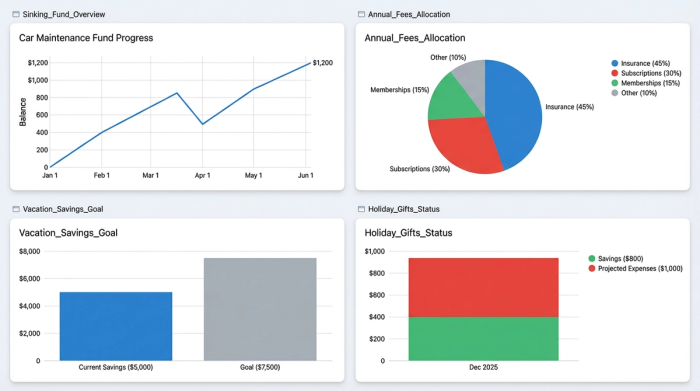
How to build a dynamic sinking fund spreadsheet
To make this strategy work long-term, you need a workflow that adapts to your financial reality, effectively creating an automated budget for your future expenses. By using Quadratic, you can move beyond static cells and build a tracker that integrates with live data. This allows for real-time sinking fund tracking that updates itself.
1. Automate the data
The friction of manual entry is the enemy of consistency. This is where spreadsheet automation in Quadratic becomes invaluable. In a standard spreadsheet, you have to log into your bank, check your savings balance, and type it into your sheet. In Quadratic, you can utilize the Plaid integration to pull live cash flow data directly into the grid.
By syncing your savings account balance, your spreadsheet always knows your actual current cash position. You can dedicate specific sub-accounts or virtual buckets to different goals, and the sheet will reflect those balances instantly without you lifting a finger.
2. Set targets and timelines
Next, structure your data. Create columns for the Category (e.g., "Holiday Gifts"), the Target Amount ($1,000), and the Due Date (Dec 1st). Because Quadratic allows you to mix Python and formulas, you can easily handle date calculations that might be cumbersome in other tools.
3. Calculate the monthly burn rate
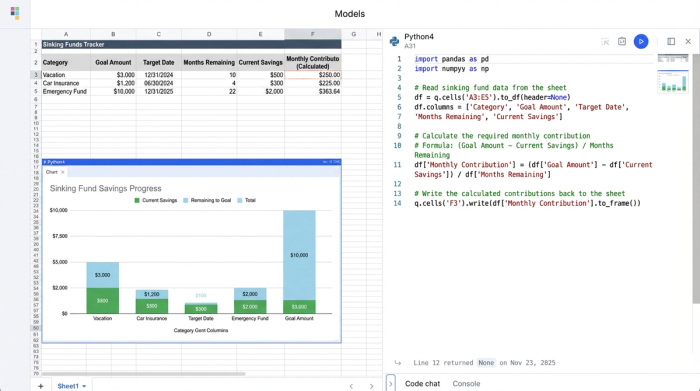
This is where the automation shines. You need to know exactly how much to contribute monthly to hit your goal. The formula is generally: (Target Amount - Current Balance) / Months Remaining.
In a static sheet, the "Current Balance" is often outdated. In your connected Quadratic sheet, this formula updates every time your bank data refreshes. If you are ahead of schedule, the required monthly contribution drops. If you are behind, it adjusts upward. This provides an accurate, up-to-the-minute view of your financial requirements.
4. Visualize progress
Seeing a list of numbers can be dry. To maintain motivation, use the charting capabilities within Quadratic to visualize your progress. A stacked bar chart can show exactly how close you are to fully funding your car insurance or vacation. Watching the bars fill up transforms the abstract concept of "saving" into a tangible achievement.
Adapting to fluctuating income
The true power of this workflow is its ability to handle irregularity. Life rarely goes exactly to plan. You might have a low-income month where you cannot contribute the full amount, or you might receive a bonus and want to fully fund a category immediately.
With a live connection, you can perform a quick sinking fund analysis. If you skip a contribution in March, the spreadsheet automatically recalculates the burden for April through December. You don't have to break your formulas or redesign your sheet. You can simply look at the new "Monthly Required" column and decide if that number is feasible.
This dynamic approach turns your spreadsheet into a decision-making engine. It allows you to answer questions like, "If I lower my vacation savings this month to pay for a repair, how much extra do I need to save next month to stay on track?"
Conclusion
Sinking funds are the secret to turning financial stress into boring, planned transactions. By identifying your key expenses and separating them from your emergency savings, you gain control over your future cash flow. However, the success of this strategy relies on the tools you use.
Moving away from static, manual trackers to a dynamic Quadratic workflow ensures your plan remains relevant, even when your income fluctuates. By automating your data and visualizing your goals, you can stop worrying about future bills and start planning for them with confidence.
Use Quadratic to Plan & Track Sinking Funds
- Automate data entry: Connect directly to your bank accounts to pull live balances, eliminating manual updates and ensuring your sinking fund tracker is always current.
- Dynamically calculate contributions: Automatically adjust your required monthly savings based on real-time balances, target amounts, and due dates, adapting instantly to fluctuating income.
- Visualize financial progress: See your sinking fund goals fill up with integrated charting, transforming abstract savings into tangible, motivating achievements.
- Adapt to financial changes: Instantly recalculate your plan if you miss a contribution or receive a bonus, turning your tracker into a flexible decision-making tool.
- Protect emergency savings: Clearly separate and track funds for known future expenses, ensuring your emergency fund remains untouched for true crises.
Start building your dynamic sinking fund tracker today. Try Quadratic.
