
April brought major improvements across organization, imports, AI, embeds, and infrastructure in Quadratic. We introduced folders for organizing files, launched direct Google Sheets import, added an MCP server for tools like Claude and Cursor, refreshed the Quadratic brand across the product, and continued improving onboarding, billing, and overall reliability.
File and folder organization
You can now organize your personal and team files into folders.
April introduced nested folder structures, drag-and-drop file movement between folders and teams, and an expandable sidebar tree for navigating your workspace. Folder creation, renaming, deletion, and movement are now built directly into the dashboard experience, making it easier to keep large numbers of files organized.
We also continued improving folder behavior throughout the month with optimistic folder creation and moves, more accurate bulk actions, better keyboard and click interactions, and faster updates in the UI when files or folders are moved.
Google Sheets import
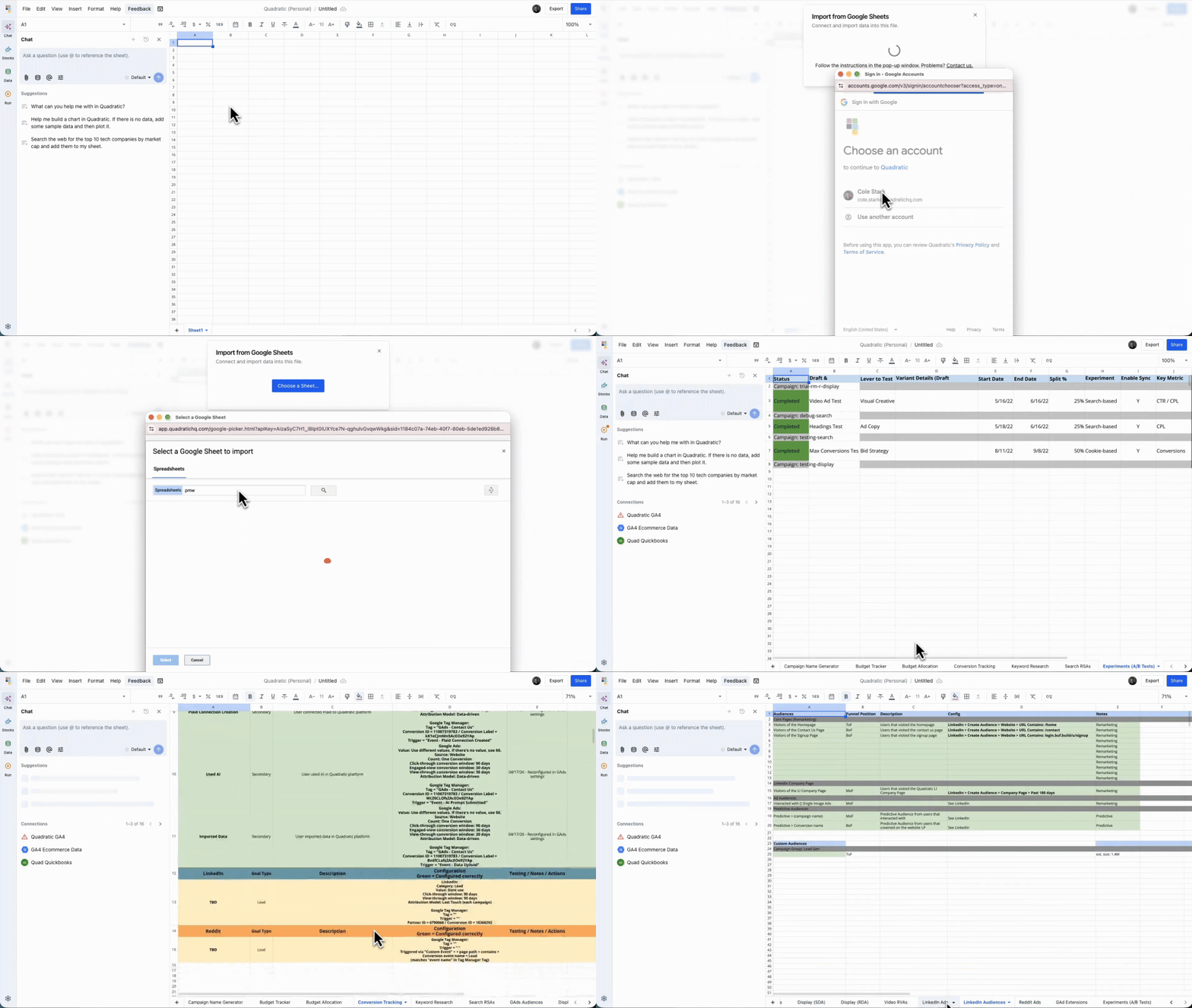
You can now import Google Sheets directly into Quadratic.
Google Sheets import supports values, formulas, and multiple sheets, and became easier to access throughout April. Import can now be started from the data sidebar, file menu, command palette, and even AI workflows. In addition to creating a new file, you can also import a Google Sheet directly into the active sheet from within the editor.
We also improved authentication reliability and error messaging around the Google import flow, making it smoother to bring spreadsheet data from Google Sheets into Quadratic.
MCP server
April introduced a new MCP server that lets AI assistants like Claude and Cursor interact directly with your Quadratic spreadsheets.
With MCP, compatible clients can read and write spreadsheet data, execute Python and JavaScript code, import files, and manage spreadsheets through a secure OAuth device authorization flow. The server includes rich spreadsheet context such as schemas, table outlines, and dependency graphs, along with support for batched and parallel tool calls for faster workflows.
Later in the month, we also updated the MCP server to align with Claude’s Connectors Directory requirements, improving standards compliance and reliability for production use.
This creates a much more direct path for users who want to work with Quadratic from external AI clients while still operating on live spreadsheet context.
Quadratic brand refresh
We refreshed Quadratic’s visual identity across the app in April.
This included a new wordmark, updated in-product logo usage, refreshed favicons, and a new paint-on loading animation for the first-load experience. We also made favicon contrast improvements so the branding reads more clearly across both light and dark browser chrome.
These updates give the product a cleaner and more polished first impression while keeping the in-app experience more consistent.
Team secrets
Teams can now securely store and use API keys, tokens, and other credentials directly in Quadratic.
A new Secrets tab in team settings makes it possible to create, edit, and manage secrets centrally. Secrets can be injected automatically into Python and JavaScript code for allowed external domains, so teams no longer need to paste sensitive values directly into spreadsheets.
We also added an AI tool that lets the AI analyst list available secret names and guide users on how to use them safely in generated code. This makes it easier to build workflows that rely on external APIs while keeping credentials scoped and controlled.
Stock data panel and financial analyst persona
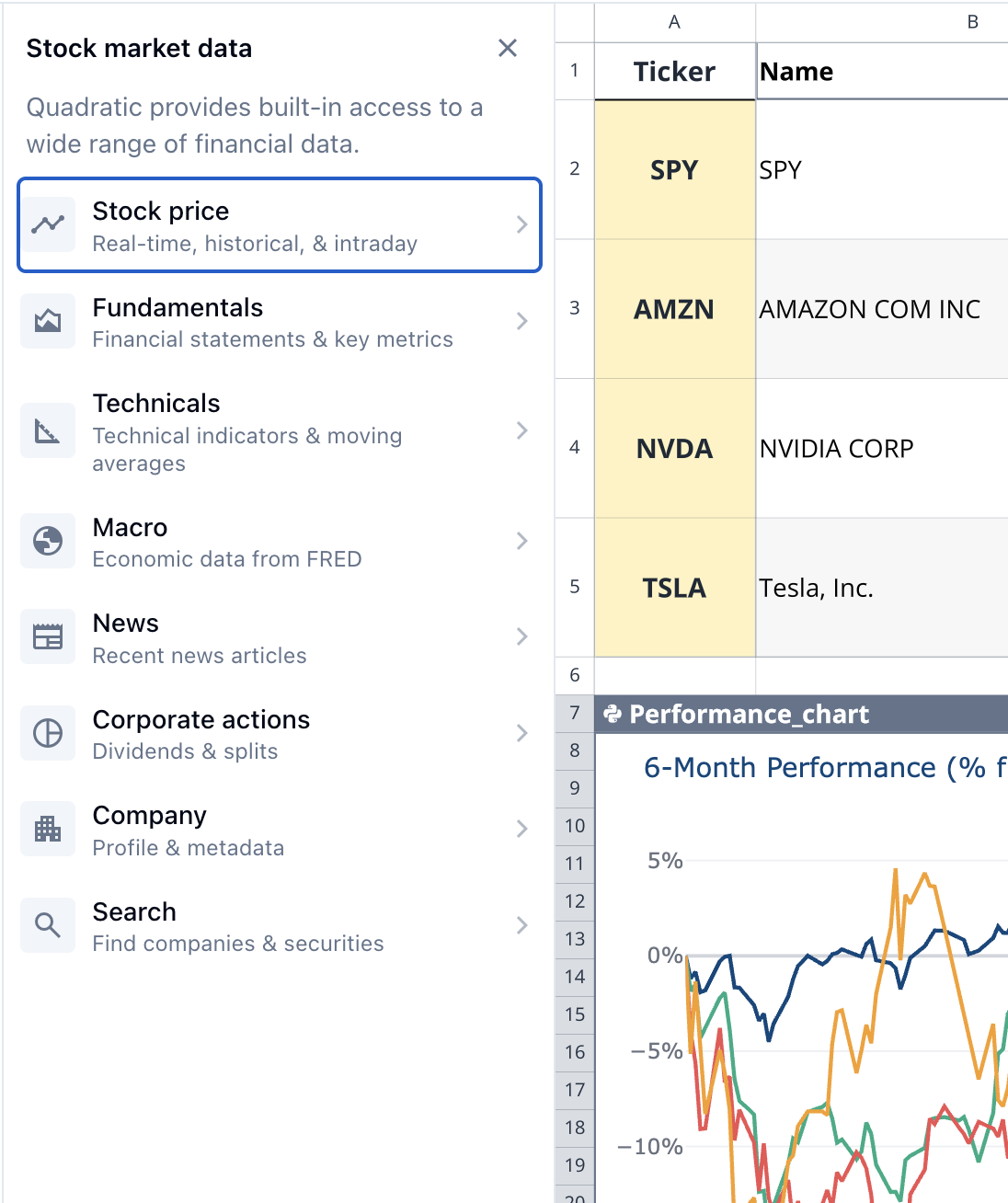
April added a new Stock Data panel in the sidebar for exploring and inserting financial data workflows more quickly.
The panel includes ready-to-use Python snippets, configurable parameters, one-click insertion, and direct prompts for asking AI about stock data categories. We also launched a new financial analyst persona to create a more tailored onboarding experience for finance-focused users, with the stock data panel open by default and finance-specific suggestions ready to go.
Together, these updates make financial workflows easier to discover and faster to start.
Personalized onboarding and recipe picker
We continued improving onboarding in April with more personalized and guided entry points.
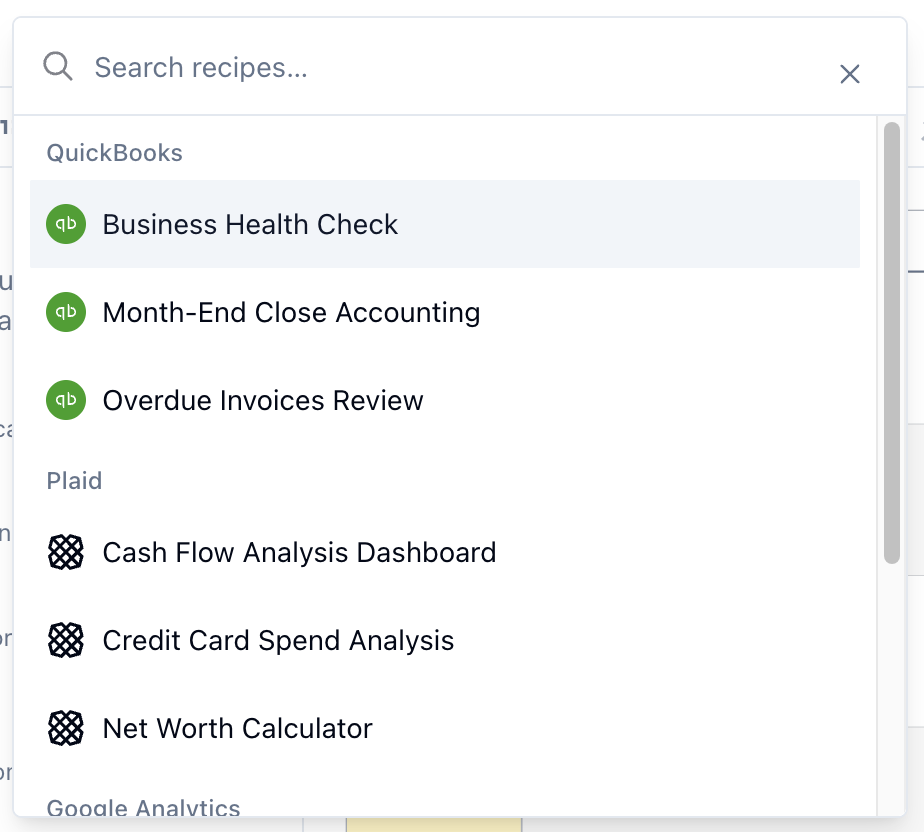
A new persona-based onboarding flow now tailors the getting-started experience to a user’s role and intended use case. We also added a recipe picker in the data sidebar and command palette, giving users a faster path to common connection workflows without starting from scratch.
These changes help users get to useful work faster, especially when they are new to Quadratic or arriving with a specific workflow in mind.
Better embeds and PDF import discovery
Embeds continued to improve in April with better viewport clamping, initial view configuration, improved scrollbar behavior, and cleaner customization flows.
We also made PDF import easier to discover by adding it directly to the Data sidebar import menu alongside CSV, Excel, Parquet, and Google Sheets. This gives users a clearer path to bringing PDF data into the editor without needing to hunt for it.
Data validation and formula improvements
April also brought several spreadsheet usability upgrades.
Data validation dropdowns are now easier to discover and use, with better handling for formula-based list validation and cleaner interactions between dropdowns and validation warnings. We also added a number of new formula functions, including comparison functions like EQ and LT, engineering conversion helpers, improved date and time parsing, FLATTEN, and distinct-count functions such as COUNTDISTINCT and UNIQUECOUNT.
These changes make Quadratic more capable for both structured workflows and day-to-day spreadsheet work.
AI improvements
We made a number of important AI improvements throughout April.
AI workflows became more reliable across model support, tool handling, context ordering, and parallel tool calls. We improved Gemini compatibility, refined tool call behavior, reduced noise in AI-related errors, and added dedicated tool calls for scheduled tasks so automated runs are easier to configure and inspect in chat.
We also upgraded the default AI analyst model to Claude Opus 4.7 and improved AI behavior around financial data by using adjusted prices by default for historical analysis.
Better navigation and dashboard interactions
A lot of April’s work focused on making navigation and dashboard interactions feel smoother.
We improved single-page app navigation between the dashboard, folders, and files, fixed back-button and return-to-dashboard behavior, and reworked file history and version switching so in-app navigation behaves more predictably. On the dashboard, drag-select, multi-file selection, bulk actions, long-press support on mobile, and keyboard shortcuts all got better across the month.
These improvements make the app feel faster and more dependable, especially for users managing many files or moving frequently between the dashboard and editor.
Billing improvements
We made billing improvements for both annual plans and AI usage visibility.
Annual billing calculations and checkout flows were fixed for team plans, and team settings now include a yearly AI usage chart with a collapsed summary view for faster review. These changes make billing more understandable for teams that need better visibility into usage over time.
Reliability, infrastructure, and error reduction
A large portion of April was focused on making Quadratic more reliable behind the scenes.
We reduced non-actionable error noise, improved deployment checks, strengthened CI/CD workflows, expanded test coverage, and hardened both the backend and client against transient failures. This included better retry behavior, safer API caching, better auth edge-case handling, improved file loading paths, and more resilient deployment verification.
These improvements are less visible than new features, but they make the product feel sturdier and more dependable in everyday use.
Bug fixes
We shipped a wide range of bug fixes and polish throughout April, including improvements to dashboard selection, mobile interactions, AI tool cards, file navigation, drag behavior, inline editing, connection flows, spreadsheet rendering, and deployment stability.
