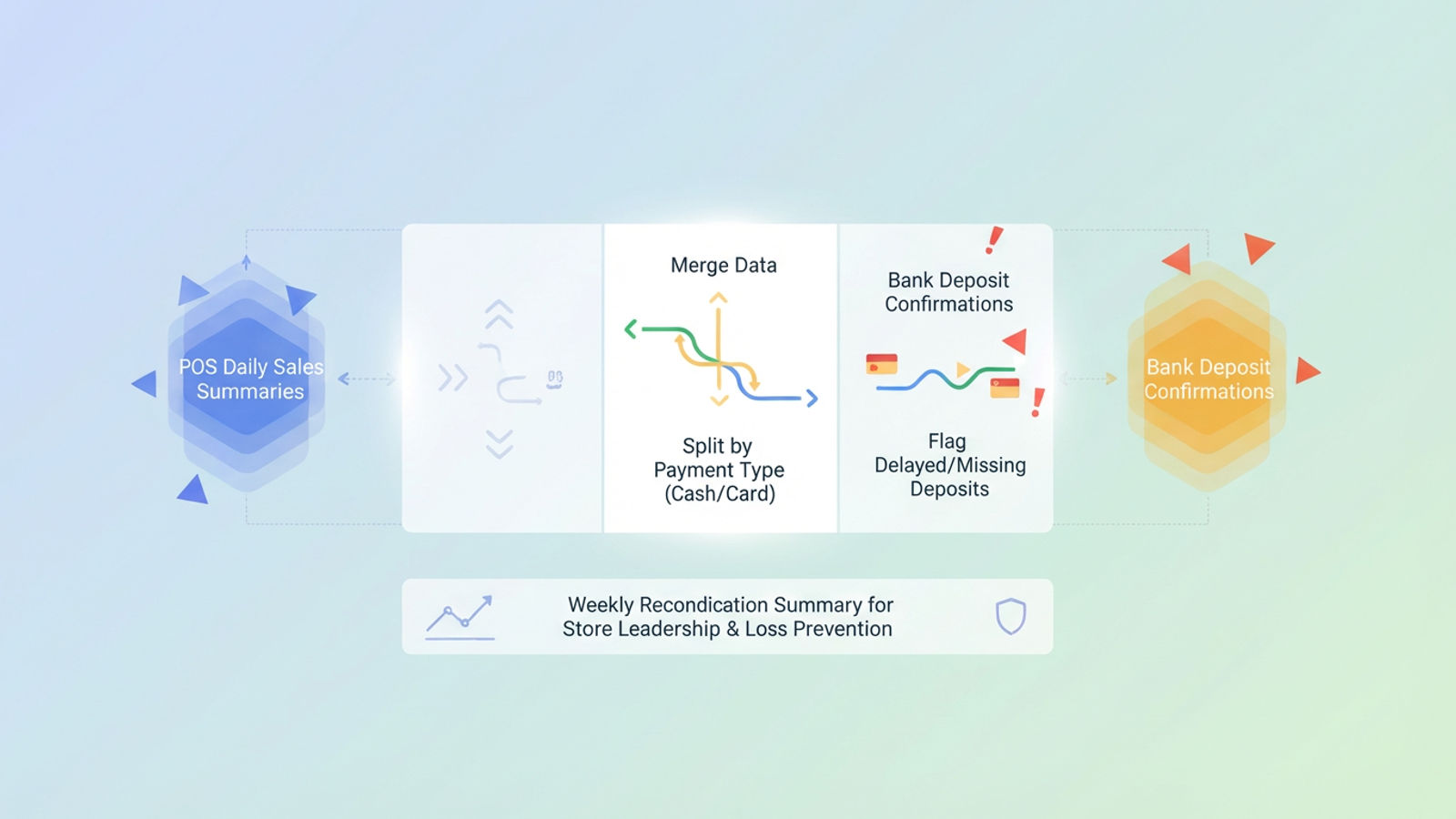
Every retail manager knows the specific anxiety of closing out the till at the end of the night. Your Point of Sale (POS) system declares you made $5,000 in revenue, but your bank account only shows a realized deposit of $4,850. Is the money missing? Was it a cash handling error? Or is it simply a credit card batch that hasn't cleared yet?
For operations leads and finance managers, this discrepancy is a daily headache, highlighting the importance of effective cash management. This manual entry is where errors happen and where "cash shrinkage" goes unnoticed, making adherence to retail cash management best practices crucial. To solve this, you need a modern deposit log—not just a static list of numbers, but a dynamic reconciliation tool that bridges the gap between your sales data and your bank statement. In this article, we will demonstrate how to build a log in Quadratic that automatically merges data, handles complex batch splits, and flags errors before they become losses.
Why standard bank deposit logs fail retailers
When most professionals search for a bank deposit log, they are often looking for a simple, printable sheet to record cash drops. While that might work for a lemonade stand, it is insufficient for modern retail operations. The fundamental problem with static spreadsheets or paper logs is that they cannot handle the "one-to-many" nature of modern transactions.
A single day of sales in your POS is an aggregate number. It includes cash, Visa, MasterCard, Amex, and perhaps third-party delivery payouts like UberEats or DoorDash. However, your bank does not receive this as one lump sum. The cash is physically deposited at the branch. The Visa and MasterCard transactions might batch out overnight. Amex might delay by 48 hours. The delivery apps might pay out weekly.
This creates a timeline mismatch. A static log of deposits and withdrawals from a checking account only tells you what cleared, not what should have cleared. If you are relying on a static spreadsheet, you are forced to manually match Monday’s sales against Wednesday’s bank activity. This is where the system breaks down. To fix this, you need a staging ground—a flexible workspace that sits between your POS and your bank to align these mismatched timelines dynamically.
Building a dynamic deposit log in Quadratic
By using Quadratic, you can ingest data from multiple sources onto a single infinite canvas and use formulas or Python to automate the matching process. Unlike a static deposit log template, this workflow adapts to your specific batching logic.
Step 1: Ingesting the data
The first step in a proper reconciliation workflow is to stop typing numbers manually. Manual entry is the primary source of false discrepancies. In Quadratic, you can import your daily POS summary (the "source of truth" for what was sold) and your bank transaction download (the "source of truth" for what was received).
Because Quadratic allows you to work with data flexibly, you can place your POS export on the left side of the canvas and your bank CSV on the right. This visual separation is critical. It allows you to see the raw data in its original state before any transformation occurs, ensuring that you always have a clean audit trail.
Step 2: The logic of splitting
This is the most critical part of the workflow. You need to tell the system how to break down the aggregate POS number to match the individual bank batches.
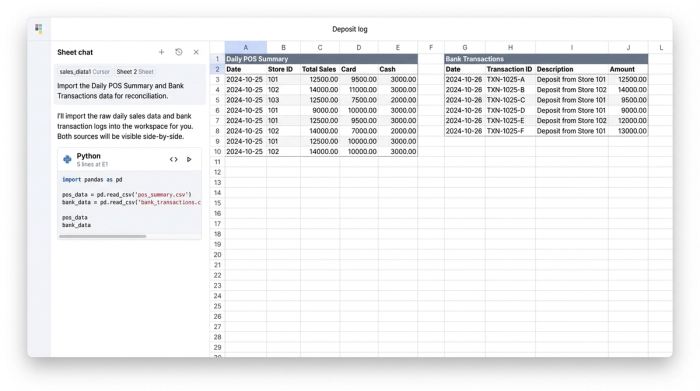
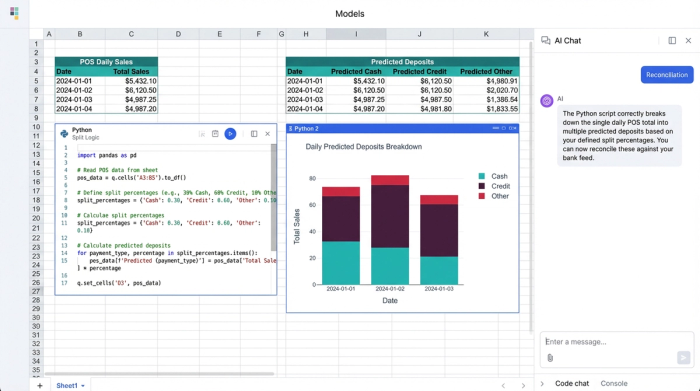
Using standard spreadsheet formulas or Python within Quadratic, you can create a logic layer in the middle of your canvas. For example, you can write a simple script that takes the total daily sales and splits them based on payment type.
- Cash: This amount should match the physical deposit slip.
- Card Batch: This amount represents Visa/MasterCard and should match the merchant services deposit.
- Delayed Batch: This separates Amex or third-party delivery fees that will not appear for several days.
By programmatically splitting these values, you create a "predicted deposit" column. You are no longer comparing apples to oranges; you are comparing the predicted deposit against the actual bank feed.
Step 3: Flagging discrepancies
Once the data is split and aligned, the final step is to flag variances. In a traditional spreadsheet, you might have to scan rows of numbers to find a mismatch. In Quadratic, you can set up conditional formatting or Python logic to instantly highlight rows where the POS Amount does not equal the Bank Amount.
This allows you to immediately distinguish between "deposits in transit" (funds that are safe but delayed) and actual missing money. If the cash column is short, you know it is a physical loss at the store level. If the card column is short, you know it is a processing fee or a technical error. This granularity turns a confusing financial mess into a clear checklist of items to investigate.
Loss prevention: turning data into security
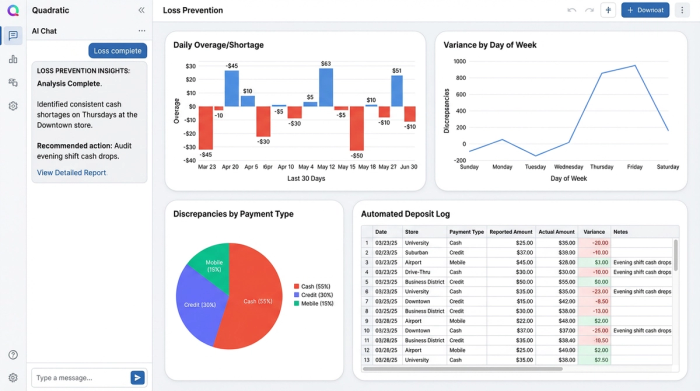
While many competitors focus on the accounting aspect of reconciliation, the real value for a retail manager lies in loss prevention. A well-constructed deposit log is a security tool. When you automate the matching process, you free up time to analyze patterns rather than just checking boxes.
With your data organized in Quadratic, you can easily visualize trends over time. Is the cash deposit consistently $20 short on Tuesdays? That is no longer a clerical error; that is a pattern that warrants a conversation with the Tuesday shift lead. Is the Amex batch consistently 3% lower than expected? That might indicate a hidden hike in merchant processing fees.
This provides store leadership and loss prevention teams with a "live" dashboard that verifies cash handling procedures are being followed, ensuring that revenue isn't leaking out of the business unnoticed.
Strategic advantages of a programmable log
The retail landscape moves too fast for rigid software or fragile manual spreadsheets. Enterprise solutions like HighRadius are often "black boxes" that are difficult to customize and expensive to implement. On the other hand, traditional Excel sheets break easily when someone accidentally deletes a formula.
Quadratic offers a strategic middle ground. It gives the retail manager control over the logic. If you are tired of wrestling with mismatched batches and manual data entry, try building your reconciliation workflow in Quadratic. This flexibility ensures your reconciliation process evolves as your business grows.
Furthermore, this approach offers transparency. Instead of emailing static attachments that become obsolete the moment they are sent, you can share the Quadratic workspace with your finance team or district manager. They can see the logic, the raw data, and the final reconciliation in one view, eliminating the back-and-forth communication that typically slows down month-end closing.
Conclusion
A proper deposit log is the first line of defense against revenue loss. It bridges the critical gap between sales data and realized cash, turning a chaotic daily chore into a streamlined security process. By moving away from static templates and adopting a dynamic workflow, retail managers can stop chasing discrepancies and start focusing on profitability.
It is the modern way to ensure every dollar earned is a dollar banked.
Use Quadratic to build a dynamic deposit log
- Ingest and merge data seamlessly: Automatically import POS summaries and bank transactions onto a single canvas, eliminating manual entry and reducing reconciliation errors.
- Handle complex batch splits: Programmatically break down aggregate sales data into individual payment types (cash, card batches, delayed payments) using Python or formulas to match bank deposits accurately.
- Automate discrepancy flagging: Instantly highlight variances between predicted deposits and actual bank activity with conditional formatting or custom logic, clearly distinguishing between deposits in transit and missing funds.
- Prevent losses with pattern analysis: Turn your deposit log into a security tool by analyzing trends over time to identify consistent shortages or unexpected fees, enabling proactive loss prevention.
- Gain real-time transparency and collaboration: Share live reconciliation workflows with finance teams or district managers, fostering clear communication and accelerating month-end close without static attachments.
Stop chasing discrepancies and start securing your revenue. Try Quadratic.
