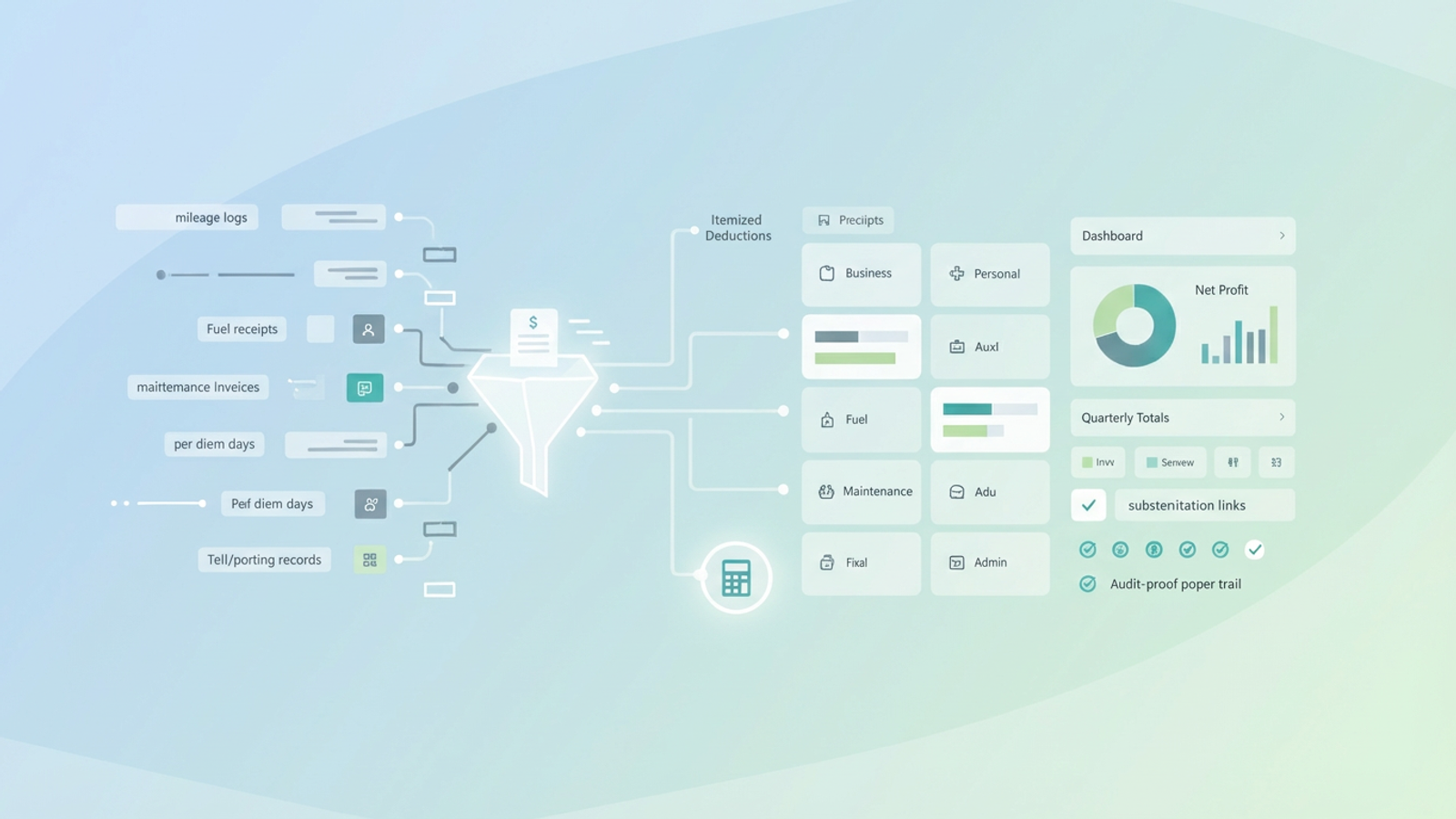
Making the jump from company driver to owner-operator is one of the most liberating moves in the industry. You finally own the truck, you choose your loads, and you control your schedule. However, that freedom comes with a significant administrative burden: you are no longer just driving; you are managing a small business. For many new owner-operators, the financial side of the business relies on the "shoebox method"—stuffing fuel receipts, toll tickets, and repair invoices into a bag and hoping a tax professional can make sense of it later.
While driving generates revenue, effective record-keeping is what protects your profit. Knowing what you can write off is only half the battle; having a reliable system to track those expenses is how you actually save money. If you miss receipts or fail to categorize expenses correctly, you are essentially tipping the IRS. This guide covers the essential truck driver itemized deductions you need to know and introduces a modern workflow using Quadratic to track them automatically, ensuring you keep more of your hard-earned money.
The "master list" of Truck Driver Itemized Deductions
When you file as a self-employed owner-operator, usually on Schedule C, your goal is to lower your taxable income by deducting legitimate business expenses. The IRS allows you to deduct costs that are "ordinary and necessary" for your trade. For truck drivers, this list is extensive.
Here are the high-value write-offs you need to track:
- Vehicle expenses: This is invariably your largest category. It includes fuel (diesel and DEF), tires, routine maintenance, major repairs, insurance premiums, and the Heavy Highway Vehicle Use Tax.
- Travel and living: If your work requires you to be away from home overnight to obtain rest, you can deduct lodging costs (if you aren't sleeping in the sleeper berth), toll fees, parking costs, and scale fees.
- Business operations: These are the costs of running the back office. It includes union or association dues, cell phone and data plans (specifically the percentage used for business), uniforms and safety gear like steel-toe boots or high-vis vests, and fees associated with your ELD (Electronic Logging Device).
For every item on this list, there is a data source. Fuel costs come from fuel card statements or individual receipts. Tolls are often logged by transponders like E-ZPass. Maintenance usually generates detailed invoices. The challenge isn't spending the money; it is consolidating these fragmented data sources into a single, usable format.
The big choice: standard mileage vs. actual expenses
One of the most common questions new owner-operators ask is whether they should use the standard mileage rate or track actual expenses. For most passenger vehicles or light delivery vans, the standard mileage rate is convenient. However, for heavy-duty Class 8 trucks, the math is different.
Operating a semi-truck is expensive. Between fuel efficiency that averages 6 to 8 miles per gallon and high maintenance costs, your cost per mile is usually significantly higher than the IRS standard mileage rate. Therefore, most owner-operators choose the actual expenses method to maximize their tax savings.
There is a catch to using actual expenses: you must prove every penny. If you claim $60,000 in fuel but lose $10,000 worth of receipts, you cannot legally deduct that missing amount. This is where most drivers fail. It is not that they didn't spend the money; it is that they lost the record of it. To make the actual expenses method work, your truck driver record keeping must be impeccable.
How to automate your deduction tracking
Moving away from the shoebox method requires a tool that can handle data, not just a simple calculator. This is where Quadratic changes the workflow. Instead of manually typing numbers into a ledger or relying on a rigid mobile app, you can use Quadratic to import, sort, and calculate your deductions with precision.
Step 1: Centralize your data
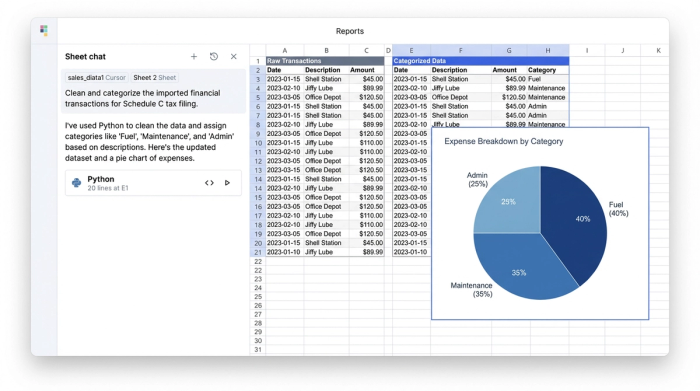
The first step is moving from manual entry to data ingestion. Most modern tools you use—fuel cards, ELDs, and bank accounts—allow you to export data as CSV files. In Quadratic, you can import these disparate files directly into the grid. You can pull in your mileage logs, your fuel card statements, and your digital maintenance invoices. This eliminates the risk of typos and saves hours of data entry time.
Step 2: Clean and categorize
Once your data is in Quadratic, you can organize it to match tax categories. You can create a column to tag expenses as "Business" or "Personal." This is critical for expenses like your cell phone bill or a personal vehicle used occasionally for work. You can then filter and group these expenses by category—Fuel, Maintenance, Admin—so they map directly to the line items on your Schedule C tax form.
Step 3: The per diem calculator
Per diem for truck drivers is a massive deduction that simplifies meal tracking. Instead of saving receipts for every sandwich and coffee, the IRS allows a standard daily rate for meals and incidental expenses for each day you are away from home. In Quadratic, you can automate this calculation. By importing your log data to determine your "days on road," you can set up a simple formula: Days on Road × Current IRS Per Diem Rate = Total Deduction. This ensures you get the full deduction you are entitled to without the headache of managing hundreds of small receipts.
Preparing for quarterly estimated taxes
Unlike company drivers who have taxes withheld from every paycheck, owner-operators are responsible for paying their own taxes. To avoid penalties, you generally need to make estimated tax payments four times a year: April, June, September, and January.
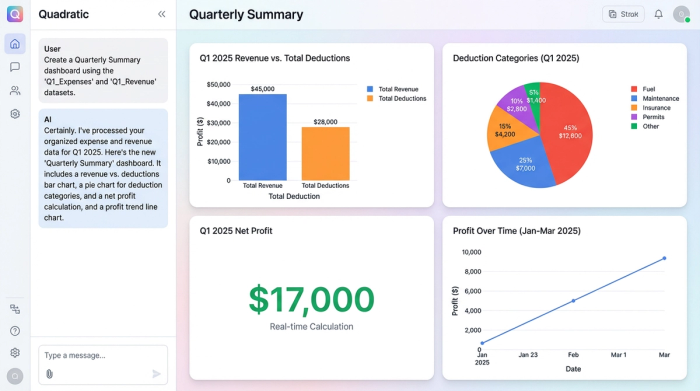
The anxiety of quarterly taxes often comes from the unknown. If you don't know your net profit, you are guessing at what you owe. By maintaining your data in Quadratic, you can produce a "Quarterly Summary" view instantly.
With your data categorized, you can see a real-time calculation: Total Revenue - (Itemized Deductions + Per Diem) = Net Profit. This visibility allows you to set aside the exact percentage needed for that quarter. You stop treating your bank balance as "available cash" and start seeing it as "business capital" and "tax holdbacks," preventing the scramble for cash when the deadline hits.
Creating an audit-proof paper trail
The IRS requires substantiation for your deductions. In the event of an audit, a spreadsheet with numbers is not enough; you need to show the source documents. This is where the digital workflow becomes your safety net.
In your Quadratic workspace, you can create substantiation links. Next to a line item for a major engine repair, for example, you can include a link to the digital invoice stored in your cloud drive. If an auditor asks about a specific expense, you don't have to dig through a physical box. You simply click the link in your data grid and produce the proof immediately. This level of organization turns a potential nightmare scenario into a manageable administrative task.
Summary: turn compliance into cash flow
Understanding truck driver itemized deductions is the foundation of a profitable trucking business. However, knowledge alone doesn't put money back in your pocket—organization does. The old way of managing taxes involved stress, lost receipts, and conservative guessing that left money on the table.
The new way, using a tool like Quadratic, turns compliance into a streamlined process. By importing your logs and expenses, categorizing them accurately, and automating your per diem calculations, you gain total visibility into your business finances. You can drive with the confidence that your records are audit-proof and your tax savings are maximized.
Try Quadratic to consolidate your next quarter's logs and receipts, and experience the difference that data control can make for your business.
Use Quadratic to Maximize Your Truck Driver Deductions
- Centralize all expense data: Import fuel card statements, ELD logs, mileage records, and digital invoices directly into one grid, eliminating manual entry and lost receipts.
- Automate expense categorization: Tag business and personal expenses, then easily filter and group them into IRS-ready categories for accurate Schedule C filing.
- Calculate per diem automatically: Link your log data to instantly calculate your full meal and incidental expense deductions, removing the hassle of tracking hundreds of small receipts.
- Gain real-time tax visibility: See your net profit and estimated tax liability instantly, helping you accurately budget for quarterly payments and avoid penalties.
- Build an audit-proof record: Attach digital receipts and invoices directly to line items, creating a verifiable paper trail for every deduction.
Ready to streamline your tax prep and keep more of your earnings? Try Quadratic.
