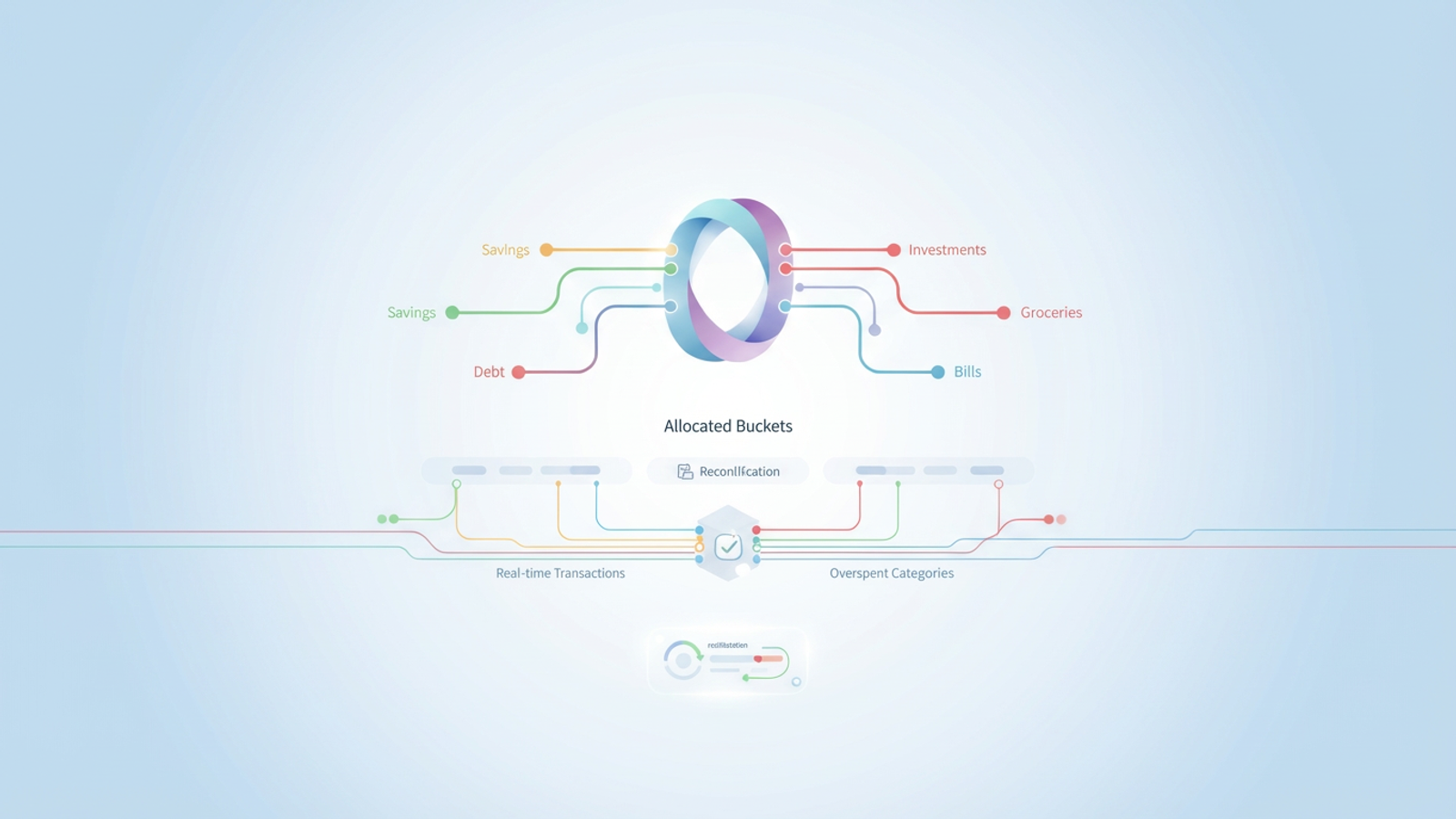
The promise of zero-based budgeting is enticing: total control over your financial life by ensuring you give every dollar a job. Ideally, this method eliminates waste, accelerates savings, and provides a crystal-clear picture of where your money goes. However, the reality of maintaining this system often falls short of the promise. For many, the process becomes a second job consisting of tedious data entry, receipt hoarding, and wrestling with static spreadsheets that break the moment real life deviates from the plan.
The problem isn't the philosophy; it's the execution. Most people abandon the method because the administrative burden of tracking every penny manually is too high. But if you treat your household finances like a data problem rather than a clerical chore, the dynamic changes. By using a connected data canvas like Quadratic, you can automate the heavy lifting—syncing accounts and reconciling transactions—allowing you to focus on the strategy of wealth building rather than the monotony of data entry.
This guide covers what is zero-based budgeting, why it is the gold standard for financial clarity, and how to implement a modern, automated workflow that updates in real-time.
What Is Zero-Based Budgeting?
To understand the method, we must first answer the foundational question: what is a zero based budget?
At its simplest, it is a method where your income minus your expenses equals zero, a core principle of balancing income and expenses within a budget. This does not mean you have zero dollars left in your bank account at the end of the month. Rather, it means that every single dollar of income you expect to receive is assigned to a specific category.
In traditional budgeting methods, such as the 50-30-20 rule, you might look at last month's spending and try to keep it roughly the same. In a zero-based budgeting approach, you start from scratch every month. You list your total income, and then you allocate funds to expenses, savings, investments, and debt payments until you reach a budget base zero calculation. If you have $200 left over after paying bills, that money isn't "extra"—it must be assigned to a job, such as an emergency fund or a vacation savings goal.
For those asking what is zbb in a corporate context, the definition is similar but applied at scale: managers must justify every expense for a new period rather than automatically rolling over the previous year's budget.
The core principles: how zbb works
While the math is simple, the effectiveness of the system relies on two core principles: justification and alignment.
The first principle is justification. Because you are assigning funds from scratch, you are forced to justify every expense. This naturally filters out "legacy spending"—those subscription services you rarely use or the gym membership you forgot to cancel. If you cannot justify assigning dollars to a category, that category gets cut.
The second principle is alignment. zero-based budgeting forces your spending to effectively achieve aligning your spending with your personal values and current reality. If your goal this month is to pay off a credit card, you might allocate heavily toward debt service and reduce the dining out category. The following month, if your goal is to save for the holidays, you adjust the allocations accordingly. This flexibility brings corporate-grade financial clarity to personal finance, ensuring resources are always directed toward your highest priorities.
The workflow: automating zbb with Quadratic
The theory of zero-based budgeting is sound, but the manual workflow is where most people fail. A standard spreadsheet is static; it requires you to manually input every coffee purchase and grocery run.
A modern approach uses Quadratic to turn a static budget into a dynamic application, leveraging the power of spreadsheet automation. By leveraging Quadratic’s ability to connect to live data sources and APIs, you can build a system that breathes. Here is how a data-driven user implements this workflow.
1. Connect and centralize
The first step in the manual method usually involves logging into five different bank and credit card portals to check balances. In Quadratic, you can bypass this by connecting directly to your financial data sources. Whether you use an API to pull banking transactions or simply import raw CSVs from your institutions, you start your budgeting session with accurate, live data. This eliminates the risk of working with outdated numbers and removes the friction of gathering data.
2. Assign every dollar
Once your income data is visible, the planning phase begins. You look at your expected income for the month and begin allocating it to your buckets: fixed costs (rent/mortgage, utilities), variable costs (groceries, entertainment), and financial goals (ETF investments, savings).
Because you are working in a code-enabled spreadsheet, you can set up logic to alert you if your allocations do not equal your income. You can visually see exactly how much you have left to assign, ensuring you truly give every dollar a job before the month begins. This is zero based budget planning at its most efficient—strategic and forward-looking.
3. Reconcile actuals vs. plan
This is the phase that typically causes burnout. In a standard setup, you have to save receipts and type them in at the end of the week. In Quadratic, you can automate the reconciliation.
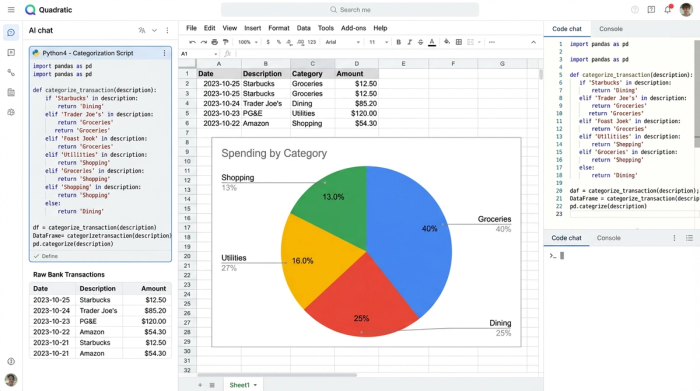
As transactions clear your accounts, they can be pulled into your data canvas. Using Python or SQL directly within the sheet, you can automatically perform transaction categorization for known merchants (e.g., automatically tagging "Whole Foods" as "Groceries"). Your role shifts from data entry clerk to data analyst. You simply review the transactions to ensure they are categorized correctly, and the spreadsheet automatically sums the actual spending against your planned budget.
4. The pivot: dynamic reallocation
The most powerful feature of this workflow is dynamic reallocation. A budget is a plan, but life rarely follows the plan perfectly. Perhaps you overspent on groceries by $50, but you spent $50 less on gas than expected.
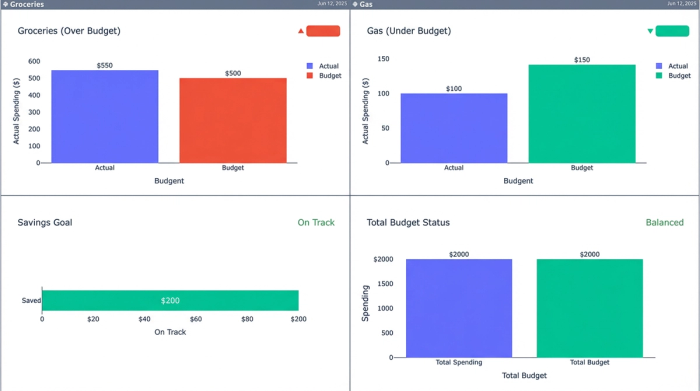
In a rigid app, this might just show up as a red "failed" category. In Quadratic, you can treat this as a reallocation of resources. You simply move the surplus $50 from the "Gas" bucket to the "Groceries" bucket. The math re-balances instantly. You haven't broken your budget; you have managed it. By catching these variances in real-time, you ensure that you still hit your savings goals by the end of the month, rather than realizing you overspent after it is too late.
Pros and Cons of Zero-Based Budgeting
Before diving in, it is helpful to weigh the benefits against the challenges, specifically looking at how a modern tool changes the equation.
Pros:
- Maximum awareness: You know exactly what your expenses are, eliminating financial anxiety.
- Prevents lifestyle creep: When you get a raise, those extra dollars are immediately assigned to savings or debt, rather than disappearing into general spending.
- Faster goal achievement: By intentionally directing capital, users often pay off debt or save for down payments significantly faster than with other methods, with one study showing a remarkable 15% increase in wealth when using a goals-based financial planning framework.
Cons (and how to fix them):
- "It is too time-consuming."
- The fix: This is only true if you do it manually. By using Quadratic to sync and categorize data, you reduce the time commitment from hours per week to minutes.
- "It is too rigid."
- The fix: Rigidity comes from tools that don't allow easy changes. A flexible data canvas allows you to reallocate funds instantly, making the budget resilient to real-life changes.
Zero-Based Budget Apps vs. the Quadratic Canvas
When searching for tools, you will likely encounter various dedicated zero based budget apps. These mobile-first applications are convenient for quick checks while on the go, but they often suffer from "black box" limitations. They force you into their categories, their reporting styles, and their logic. If you want to visualize your savings rate over time or forecast complex investment growth, you often hit a wall.
On the other end of the spectrum are traditional spreadsheets. They offer infinite flexibility but require manual maintenance and are prone to breaking if you accidentally delete a formula.
Quadratic offers a third way. It provides the connectivity of an app—allowing you to pull in data automatically—combined with the limitless flexibility of a spreadsheet. You build the dashboard that fits your specific financial life, not the developer’s idea of it. You can visualize your net worth progression using Python libraries, query your spending habits with SQL, and maintain a rigorous zero-based budgeting system that adapts as your life becomes more complex.
Conclusion: making your budget work for you
zero-based budgeting remains the most effective method for anyone serious about optimizing their finances. It transforms money from a source of stress into a tool for achieving your goals. To streamline this process, Quadratic provides various personal finance templates that users can customize. However, the discipline required to maintain it should be focused on decision-making, not data entry.
Don't let the fear of administrative work stop you from gaining control over your money. By using a tool that handles the data ingestion and reconciliation for you, you can focus on the high-value work: assigning every dollar to the things that matter most to you. With the right workflow, you stop wondering where your money went and start telling it where to go.
Use Quadratic to do zero-based budgeting
- Automate data ingestion: Connect directly to your bank and credit card accounts to pull live transaction data, eliminating manual data entry and receipt hoarding.
- Streamline budget allocation: Use code-enabled logic to ensure every dollar is assigned and your budget balances to zero before the month begins.
- Automate transaction categorization: Apply Python or SQL rules directly within your sheet to instantly categorize spending as it clears, shifting your focus from data entry to analysis.
- Enable dynamic reallocation: Easily adjust funds between categories in real time, allowing your budget to adapt to unexpected changes without rigidity.
- Build custom financial dashboards: Create personalized visualizations and detailed analysis to track progress, forecast goals, and gain deeper insights into your financial health.
Stop letting manual data entry hold you back from full financial control. Ready to take charge of your money? Try Quadratic.
