
For high-volume sellers, a refund isn't just a reversed transaction—it is an e-commerce financial reconciliation challenges nightmare involving inventory adjustments, sales tax reclamation, and payment processor fee reversals. When you are processing thousands of orders a month, the standard reports from Shopify, Stripe, or Amazon often fail to provide the granularity needed for accurate bookkeeping. This leaves finance teams manually keying journal entries or wrestling with rigid accounting software that cannot handle the nuance of modern e-commerce.
To solve this, finance operations managers need to move beyond simple transaction lists and build a "Unified Refund Schedule" especially when a QuickBooks spreadsheet sync is part of the broader accounting workflow. This is a dynamic data view that aggregates inputs from various payment processors and aligns them with bank payouts before they ever hit the General Ledger (GL). Quadratic provides the infinite canvas and computational power necessary to act as this staging layer, allowing you to clean, categorize, and net your data automatically. By mastering accounting refunds, you stop reacting to month-end reconciliation chaos and start gaining visibility into revenue leakage with stronger QuickBooks analytics.
The hidden complexity of accounting refunds
Most "out of the box" reports provided by payment gateways are designed for customer support, not finance. They tell you that a customer was refunded, but they rarely structure the data in a way that aligns with double-entry accounting.
The primary challenge is the "black box" of netting. When you issue a refund on a platform like Stripe, the processor typically deducts that amount from your next daily payout. If you sold $10,000 in gross merchandise but issued $500 in refunds, the bank deposit will be $9,500 (minus fees). If your accounting team books the gross sales based on the order system but reconciles against the net bank deposit, the books will never balance.
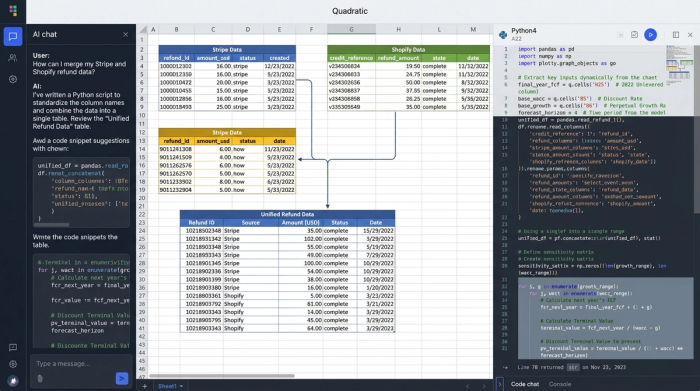
This is compounded by platform fragmentation. Sellers often deal with multiple inputs that format data differently. Whether you are reconciling a complex Microsoft account refund flow or a standard Stripe return, the data structure varies wildly between platforms. One export might list "refund_id" while another uses "credit_reference." Attempting to map these different sources together in a standard spreadsheet usually results in broken formulas and manual copy-pasting errors.
Building a custom refund schedule
To regain control, you need a workflow that sits between your operational data and your ERP. This is where Quadratic’s ability to combine spreadsheets with Python and SQL becomes essential.
Step 1: Aggregating the data
The first step is pulling raw CSV exports from your payment processors and your ERP into Quadratic. Unlike a traditional spreadsheet where you might hit row limits or struggle with VLOOKUPs across files, you can use SQL queries within the sheet to standardize column headers. You can write a script that automatically maps "credit_amt" from PayPal and "return_value" from Shopify into a single, standardized "Refund_Amount" column, a key step in cleaning transaction descriptions in financial data. This creates a unified dataset ready for analysis.
Step 2: Categorizing refund types
This is the most critical step for accurate financial reporting. There is a distinct accounting difference between a product return and a goodwill credit, yet many teams lump them together under "Refunds."
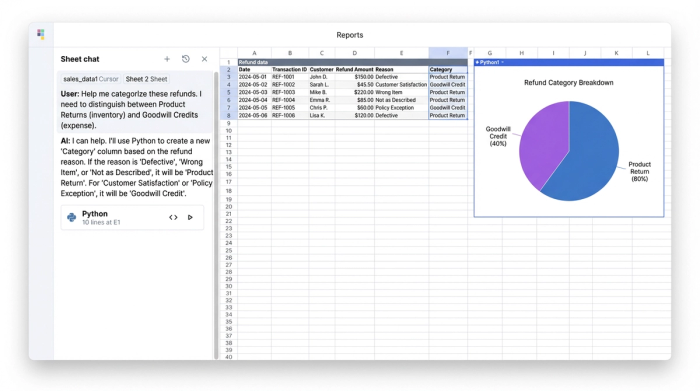
- Product Return: The customer returns the item. You refund the cash, but you also debit your Inventory Asset account because the stock has returned to the warehouse.
- Goodwill Credit: The customer keeps the item, but you refund the money (perhaps due to a shipping delay or minor defect). This is purely an expense, often categorized under marketing or customer experience, with no impact on inventory value.
In Quadratic, you can use Python logic to tag these transactions automatically based on order notes or return codes. If the return code is "damaged_keep," the system tags it as Goodwill. This ensures your GL impact is accurate without manual review.
Step 3: Handling partial and digital refunds
Partial refunds add another layer of complexity—for example, refunding shipping costs but not the item itself. Digital goods present even unique challenges. Digital marketplaces have specific rules regarding usage and entitlement. For instance, a refund Fortnite account request might be denied or partially credited based on how long the digital asset was used. Your schedule must capture this status accurately to ensure you aren't refunding money that the platform has already deemed non-refundable.
Reconciling timing and payouts
Timing discrepancies are the number one cause of book closing delays. A refund issued on January 31st might not be deducted from your processor payout until February 2nd. If you strictly recognize the refund on the day it was requested, your cash reconciliation for January will be off.
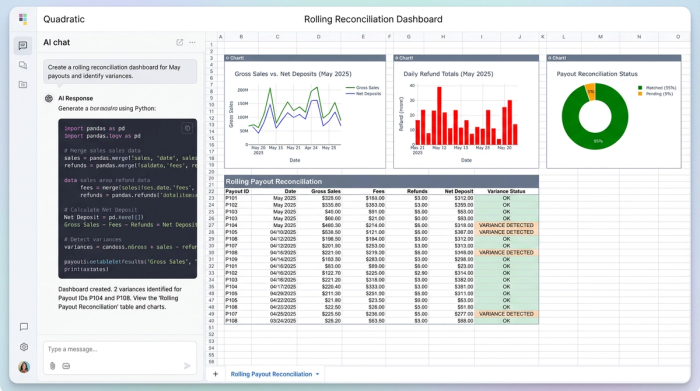
To fix this, you can build a "rolling reconciliation" view in Quadratic, which enables automated bank reconciliation by matching the refund to the specific payout ID rather than just the date. The key metric to track here is Net Deposits, calculated as: Gross Sales - Fees - Refunds = Net Deposit.
By scripting this calculation, you can instantly identify variances. Even in complex banking disputes, like a Capital One savings account settlement refund, timing discrepancies often obscure the actual cash position. A rolling schedule highlights these gaps immediately, allowing you to accrue the liability in the correct month.
Advanced scenarios: fraud, disputes, and sales tax
As transaction volume grows, so do the edge cases. A robust refund schedule must be able to handle these advanced scenarios without breaking the core workflow.
Sales tax reversal
When you issue accounting refunds, you must also reclaim the sales tax remitted to the state. If you refund the customer $108 ($100 product + $8 tax), you need to ensure that the $8 is deducted from your sales tax liability account. This applies to all jurisdictions, whether you are dealing with a Nevada State University class refunds account or a multi-state e-commerce nexus.
Disputes and chargebacks
Disputes, or "in-flight" chargebacks, should not be treated as immediate refunds, requiring specific chargeback accounting treatment. If a customer claims fraud—similar to a Wells Fargo account fraud refund denial scenario—the processor will often hold the funds in a suspense account until the dispute is resolved. Your schedule needs a status for "Disputed/Suspense" so that you do not prematurely book a refund that might be overturned in your favor.
Verification and audit trails
For high-value items, specifically in the digital space, you may need to track verification steps to prove validity before issuing a credit. You might track data points such as how to verify PayPal account for Fortnite refund requests within your dataset. This acts as an audit trail, proving to auditors that the refund was legitimate and compliant with internal controls.
Why Quadratic is better than manual spreadsheets
Finance teams often cling to Excel because it is familiar, but it lacks the horsepower of modern financial reconciliation tools. Quadratic bridges the gap.
- Live Data & Code: Instead of manually downloading and copy-pasting CSVs every month, you can script the import and cleaning process using Python or SQL directly in the grid. This reduces the risk of human error significantly.
- Audit Trail: In a standard spreadsheet, hard-coded numbers hide their origins. In Quadratic, you can see exactly how the "Net Refund" number was calculated, tracing it back to the specific line item and logic used.
- Flexibility: It sits between your messy operational data and your rigid accounting software, giving you the flexibility to handle new payment methods or refund types without waiting for IT to build a new integration.
Conclusion
Effective refund accounting is about more than just compliance; it is about operational efficiency and financial visibility. When you treat refunds as a data workflow rather than a manual task, you gain insight into why returns are happening and exactly how they impact your bottom line.
Stop manually keying journal entries and chasing variances at month-end. Use Quadratic to build a dynamic, automated refund schedule that handles the complexity of netting, goodwill, and multi-platform sales. By taking control of your accounting refunds, you turn a back-office headache into a streamlined financial process.
Try Quadratic, the AI spreadsheet that does your work for you
Use Quadratic to master accounting refunds
- Automate data aggregation: Pull raw exports from various payment processors and ERPs, then use SQL or Python to standardize varied column headers into a unified dataset.
- Precisely categorize refunds: Apply Python logic to automatically classify refunds as "Product Return" or "Goodwill Credit" based on specific criteria, ensuring accurate general ledger impact.
- Reconcile net payouts and timing: Build dynamic schedules that match refunds to specific payout IDs rather than just dates, instantly identifying timing discrepancies and accurately tracking net deposits.
- Manage complex refund scenarios: Automatically account for sales tax reversals, track in-flight chargebacks, and maintain robust audit trails for verification and compliance.
- Eliminate manual errors: Script data import, cleaning, and calculations directly in the grid, replacing manual copy-pasting and prone-to-error spreadsheet formulas with auditable code.
Ready to take control of your accounting refunds? Try Quadratic, the AI spreadsheet that does your work for you.
