
Table of contents
- The basics: what are itemized deductions for California taxes?
- Critical adjustments: where California breaks from federal rules
- The "haircut": understanding high-income phaseouts
- Tutorial: building a California 540 itemized deductions worksheet in Quadratic
- Analyzing the output: standard vs. itemized
- Conclusion
Tax season often brings a sense of relief once the federal return is drafted, but for California residents, the work is frequently far from over. The state’s tax code is notoriously complex due to its lack of conformity with federal law. California did not align with the federal Tax Cuts and Jobs Act (TCJA) of 2017, meaning the rules governing your federal return often do not apply to your state return. This creates a disconnect that static spreadsheets and paper forms struggle to handle, particularly when trying to accurately calculate California itemized deductions.
The challenge lies in data organization. You have one set of expenses, but two very different sets of rules applied to them. High-income earners face an additional layer of complexity with phaseouts that reduce the value of their deductions as income rises. Instead of relying on back-of-the-napkin math or rigid PDF worksheets, a modern approach involves using a computational workspace. By treating your tax preparation as a data staging project in Quadratic, you can ingest raw financial data, apply Python-based logic to handle the discrepancies between federal and state rules, and build a dynamic conformity engine that provides a clear answer on whether to itemize.
The basics: what are itemized deductions for California taxes?
To understand the strategy, you must first understand the structural difference between the two tax systems. At the federal level, the standard deduction was significantly increased under the TCJA, leading many taxpayers to stop itemizing. However, California’s standard deduction remains much lower.
For the 2023 tax year, for example, the California standard deduction for a single filer is $5,363, and for married filing jointly, it is $10,726. Contrast this with the federal standard deduction, which is nearly three times higher. This creates a common scenario where a taxpayer takes the standard deduction on their federal return but should still itemize on their state return to minimize liability.
When asking what are itemized deductions for California taxes, the categories generally mirror federal options—mortgage interest, property taxes, charitable contributions, and medical expenses—but the allowable amounts differ significantly. Because the state standard deduction is relatively low, even a moderate amount of mortgage interest or charitable giving can make itemizing the better financial choice. Itemized deductions California taxes rely on specific state statutes, meaning you cannot simply copy the numbers from your federal Schedule A to your California Form 540.
Critical adjustments: where California breaks from federal rules
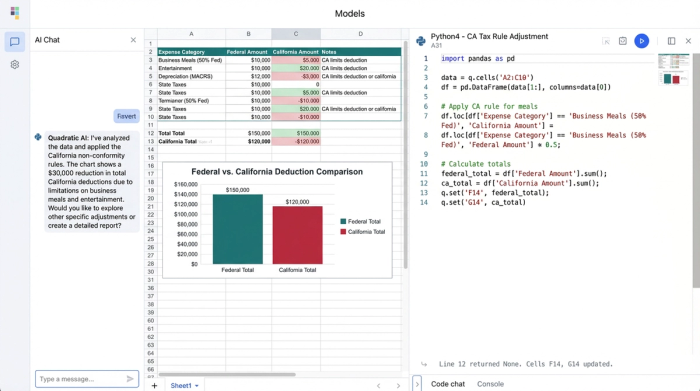
The friction in California tax preparation comes from the "adjustments" column. This is where you must add back or subtract amounts based on California’s specific non-conformity rules. A data-driven approach helps you isolate these variables to ensure accuracy.
State and local taxes (SALT)
The federal SALT cap of $10,000 is one of the most contentious aspects of the TCJA. However, California does not conform to this cap in the same way, but it also has its own restrictions. You cannot deduct state income tax against state income tax. However, California itemized deductions property tax rules allow you to deduct real estate taxes without the $10,000 federal limit, provided they are not for a trade or business. This is a critical calculation for homeowners in high-value areas who may have $15,000 or $20,000 in property taxes that are capped federally but fully deductible on the state side.
Mortgage interest
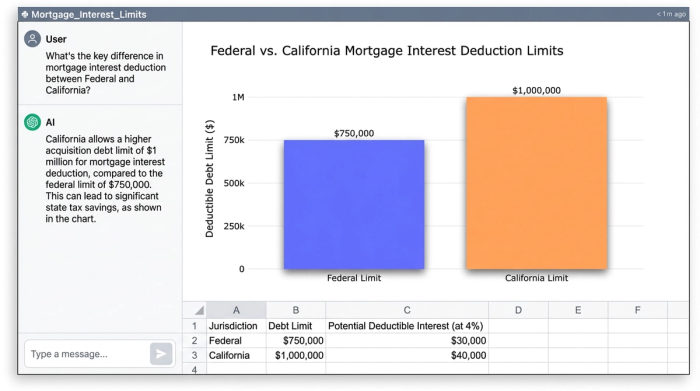
Federal law currently limits the mortgage interest deduction to the first $750,000 of indebtedness for loans taken out after December 15, 2017. California, however, conforms to the older federal rules, allowing interest deductions on up to $1 million of acquisition debt, plus an additional $100,000 for home equity debt in certain cases. If you hold a large mortgage, California adjustments to itemized deductions can result in thousands of dollars in additional write-offs that do not appear on your federal return.
Medical expenses
While both systems allow for medical expense deductions, the threshold for what is considered "deductible" is based on your Adjusted Gross Income (AGI). Because your Federal AGI and California AGI may differ due to other income adjustments (like HSA contributions, which are taxable in California), the floor for your medical deduction will shift, requiring a recalculation rather than a simple copy-paste.
The "haircut": understanding high-income phaseouts
For high-income earners, calculating the total deduction amount is not a simple sum. California imposes an itemized deduction limitation, often referred to as the "Pease limitation," which the federal government suspended.
If your California AGI exceeds specific thresholds (indexed annually for inflation, generally starting over $237,035 for single filers and $474,075 for joint filers for recent tax years), your total itemized deductions are reduced. The rule generally requires you to reduce your itemized deductions by the lesser of 6% of the amount your AGI exceeds the threshold, or 80% of your total allowable deductions.
This non-linear calculation is where static spreadsheets often break or require complex, brittle formulas. If your income changes slightly, or if you decide to defer a charitable donation, the phaseout math changes instantly.
Tutorial: building a California 540 itemized deductions worksheet in Quadratic
To handle this complexity effectively, you can build a California 540 itemized deductions worksheet in Quadratic. This transforms the process from a manual form-filling exercise into an automated data workflow.
Step 1: data ingestion
The first step is gathering your raw data. Instead of typing numbers into cells, you can drag and drop CSV files from your bank, mortgage lender, or accounting software directly into the Quadratic grid.
- Import your mortgage interest statement (Form 1098) data.
- Import your property tax payment history.
- Import a CSV of charitable donations.
This creates a raw data layer that serves as the single source of truth, eliminating transcription errors.
Step 2: automating the conformity logic
In a traditional spreadsheet, you might write a complex nested IF statement to handle the mortgage limits. In Quadratic, you can use Python directly in the cell to handle the logic.
For example, to calculate the deductible mortgage interest based on the loan date and amount, you could write a Python function that references your data columns:
def calculate_ca_interest(loan_amount, interest_paid, loan_date):

ca_limit = 1000000

if loan_amount > ca_limit:

deductible_ratio = ca_limit / loan_amount

return interest_paid * deductible_ratio

else:

return interest_paid
You can apply this logic to your entire dataset to generate a "California Amount" column next to your "Federal Amount" column. This allows you to see exactly where the California itemized deductions worksheet differs from the federal logic.
Step 3: calculating the phaseout
Finally, you can automate the high-income phaseout. Instead of manually recalculating the 6% reduction every time you adjust your income, you can use a Python cell to reference your estimated AGI and your total itemized deductions.
The script can check if your AGI exceeds the current year’s threshold and automatically apply the reduction formula. This provides a real-time view of your "Net California Deductions" whenever you update an underlying figure, such as adding a new charitable donation.
Analyzing the output: standard vs. itemized
Once your logic is built, the final step is comparison. You can create a summary table in Quadratic that pulls two key figures:
1. California Standard Deduction: A static number based on your filing status.
2. California Itemized Total: The dynamic result of your Python calculations, adjusted for limits and phaseouts.
By visualizing these two numbers side-by-side, the decision becomes binary. If the itemized deductions California total exceeds the standard deduction, you itemize.
Because the data is live, you can perform scenario planning. For example, you can toggle a large charitable donation to "Deferred" to see how it impacts your AGI and, consequently, your phaseout limitation. This level of interactivity turns tax compliance into tax planning, giving you a clear roadmap before you ever open your official tax filing software.
Conclusion
California’s non-conformity rules make state tax preparation significantly more difficult than federal filing, especially for high-income earners navigating phaseouts and varying deduction limits. However, the complexity of the rules does not have to result in a chaotic preparation process.
By moving your data into Quadratic, you create a "Conformity Engine"—a workspace that ingests raw financial data and applies Python-powered logic to resolve the differences between federal and state laws. This ensures that your California itemized deductions are calculated accurately and transparently. Rather than wrestling with static forms, you can rely on a flexible data staging environment to provide the clarity needed to file with confidence.
Use Quadratic to Calculate California Itemized Deductions
- Streamline raw data import: Easily drag and drop financial data (mortgage interest, property tax, charitable donations) into a single grid, eliminating manual entry and transcription errors.
- Automate California-specific adjustments: Use Python directly in cells to instantly apply complex state non-conformity rules for deductions like mortgage interest, property taxes, and medical expenses.
- Dynamically calculate high-income phaseouts: Automatically apply California’s "Pease limitation" to your itemized deductions, providing real-time adjustments as your AGI or expenses change.
- Compare standard vs. itemized totals instantly: Get a clear, live comparison between the California standard deduction and your calculated itemized total to make optimal filing decisions.
- Conduct interactive scenario planning: Adjust variables like charitable donations to immediately see how changes impact your California AGI and overall deduction limits, transforming compliance into proactive planning.
Ready to simplify your California tax calculations? Try Quadratic.
