
For early-stage founders and solopreneurs, tax season often triggers a specific kind of panic. It isn't just about paying what you owe; it is the administrative nightmare of untangling a year’s worth of transactions where personal life and business operations have inevitably blurred. While every accountant advises keeping finances separate, the reality of launching a startup often involves commingled finances, panic-buying servers on a personal credit card, or putting a client dinner on a debit card because the corporate card was maxed out.
The challenge isn't just understanding the tax code; it is the operational burden of applying those rules to thousands of rows of bank data, with small business owners often reported to spend an average of 16 hours per week on administrative tasks. Defining personal vs business expenses becomes a massive data engineering problem. Most founders tackle this by manually reviewing bank statements or relying on rigid accounting software that frequently mislabels niche transactions.
However, there is a more efficient way. By treating your expenses as a dataset rather than a digital stack of receipts, you can build a logic engine that automates the classification process. Using Quadratic, a spreadsheet that integrates Python and SQL directly into the grid, founders can create a flexible system that programmatically sorts the obvious transactions and intelligently routes the ambiguous ones for human review.
The rules: defining personal vs business expenses for compliance
Before building the automation, it is necessary to understand the logic that governs the system. The IRS standard for a business deduction is that the expense must be both "ordinary and necessary" for your trade or business.
For many transactions, this distinction is binary. A subscription to a CRM platform is clearly business; a grocery run for your home kitchen is clearly personal. However, for the modern solopreneur, the lines blur significantly in categories like travel, meals, home office equipment, and vehicle use.
The difficulty for founders often lies in the context. If you buy a laptop, is it for your child’s schoolwork or your coding environment? If you pay for a flight, is it for a vacation or a client meeting? When finances are commingled, the bank feed alone doesn't provide this context. This is where the manual workload explodes. You aren't just categorizing; you are remembering the intent behind a purchase made eight months ago.
Why standard "tagging" tools fail the solo founder
The standard advice to "just use two different cards" is excellent in theory but often fails in the chaos of early-stage growth. When a payment processor fails or a credit limit is reached, founders use whatever payment method works to keep the lights on.
Traditional SaaS accounting tools attempt to solve this with AI categorization, but they often function as "black boxes." They might correctly tag a gas station purchase as "Fuel," but they cannot discern that the specific trip was a personal weekend getaway rather than a drive to a supplier. Consequently, founders spend hours untagging and re-tagging transactions, fighting against the software's default assumptions.
On the other end of the spectrum, standard spreadsheets offer flexibility but demand tedious manual entry. Copy-pasting CSVs and manually selecting a category from a dropdown menu for 2,000 rows is a recipe for fatigue and error.
The ideal solution lies in the middle: a system that allows you to write your own rules based on your specific spending habits, automating the bulk of the work while acknowledging that some transactions require a human eye.
Building an automated classification workflow in Quadratic
By using Quadratic, you can move beyond simple cell-based editing and use Python or SQL to query your financial data, enabling robust travel and expense data analytics and allowing you to transform raw financial data into meaningful insights. This allows you to build a classification workflow that mimics the decision-making process of a human accountant but executes it in milliseconds.
Here is how a founder can set up this automated system.
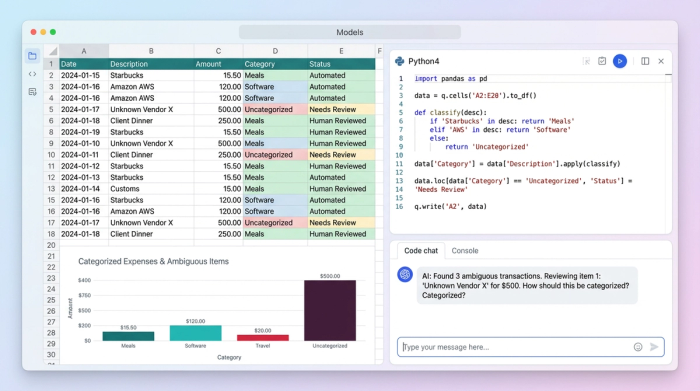
1. Ingesting and merging data streams
The first step is consolidation. A founder likely has data scattered across a business checking account, a personal credit card, and perhaps a PayPal or Stripe feed. In a standard spreadsheet, merging these involves messy copy-pasting and formatting nightmares.
In Quadratic, you can pull these data sources directly into the grid using API connectors or by dragging and dropping raw CSV files. Using SQL within the spreadsheet, you can merge these disparate tables into a unified "Master Ledger." This provides a single view of every dollar spent, regardless of the source account, allowing you to catch business expenses that may be hiding in personal statements.
2. Programming the "definition" logic
Once the data is centralized, the goal is to stop manually tagging and start programmatically defining personal vs business expenses. Instead of going row by row, you write Python scripts or SQL queries that apply logic to the entire dataset.
You can build a multi-layered filtering system based on the data available:
- Merchant patterns: You can write a rule that scans the
Merchantcolumn. If the string contains "AWS," "HubSpot," "Github," or "WeWork," the system automatically tags it as "Business." Conversely, if it contains "Netflix" or "Spotify," it tags it as "Personal." - Time-based logic: This is where Python shines. You can parse the transaction timestamps to apply context. For example, a ride-share charge during business hours on a weekday is likely a client visit. A ride-share charge at 11:00 PM on a Saturday is likely personal. You can program the system to tag these accordingly based on the day of the week and hour of the day.
- Location logic: If your transaction data includes location meta-data, you can create geofencing rules. Transactions occurring in your home city might be subject to stricter review, while transactions occurring in a city where you attended a conference can be auto-tagged as "Travel."
3. Handling ambiguity: the "review queue"
The strategic gap in most accounting software is the pretense of certainty. Most tools try to guess every single transaction, leading to errors. A better approach is to automate the 90% of transactions that fit clear logic rules and isolate the remaining 10%.
In Quadratic, you can write a script that says: "If a transaction does not meet any of the strict Business or Personal criteria, tag it as 'Review Needed'."
This changes the user workflow entirely. Instead of staring at a list of 2,000 transactions, the founder only needs to look at the 200 items in the "Review" bucket. These are usually the gray areas—Amazon purchases, meals, or mixed-use hardware. The system handles the rote memorization, leaving the founder to handle only the decisions that require judgment.
The output: a clean, audit-ready ledger
The result of this workflow is a clean, categorized dataset that is ready for tax filing. Because the logic is transparent (written in code right in the spreadsheet), you have an audit trail that meets IRS expectations for substantiation.
You can further enhance this by adding documentation prompts. For example, you can program a column to flag any "Business" expense over $75 with a "Missing Receipt" warning, prompting you to upload documentation only where legally required. This turns the ledger from a static list into a dynamic compliance tool.
Conclusion
Defining personal vs business expenses shouldn't be a manual burden that creates anxiety at the end of every fiscal year, a common challenge in small business bookkeeping. It is a data management challenge that can be solved with the right tools. By moving away from rigid accounting apps and manual spreadsheets to a logic-based workflow in Quadratic, founders can handle commingled finances with confidence.
This approach transforms expense reporting from a reactive cleanup job into a proactive, automated system for business expense tracking. It saves time, reduces errors, and ensures that when you hand your data over to a CPA, it is accurate, defensible, and complete.
If you are ready to stop manually tagging rows and start building a financial engine, such as an automated budget, that works for you, try Quadratic to build your own automated classification workflow.
Use Quadratic to define personal vs business expenses
- Automate expense classification by programming custom rules (Python/SQL) that sort thousands of transactions instantly.
- Consolidate all financial data—from personal credit cards to business accounts—into a single, unified ledger.
- Apply intelligent logic based on merchant patterns, transaction times, and locations to accurately define personal vs. business.
- Automatically flag ambiguous transactions for review, directing your focus only to the few items requiring human judgment.
- Produce an audit-ready financial ledger with transparent, code-based logic for easy compliance and tax preparation.
Ready to streamline your expense management and simplify tax season? Try Quadratic.
