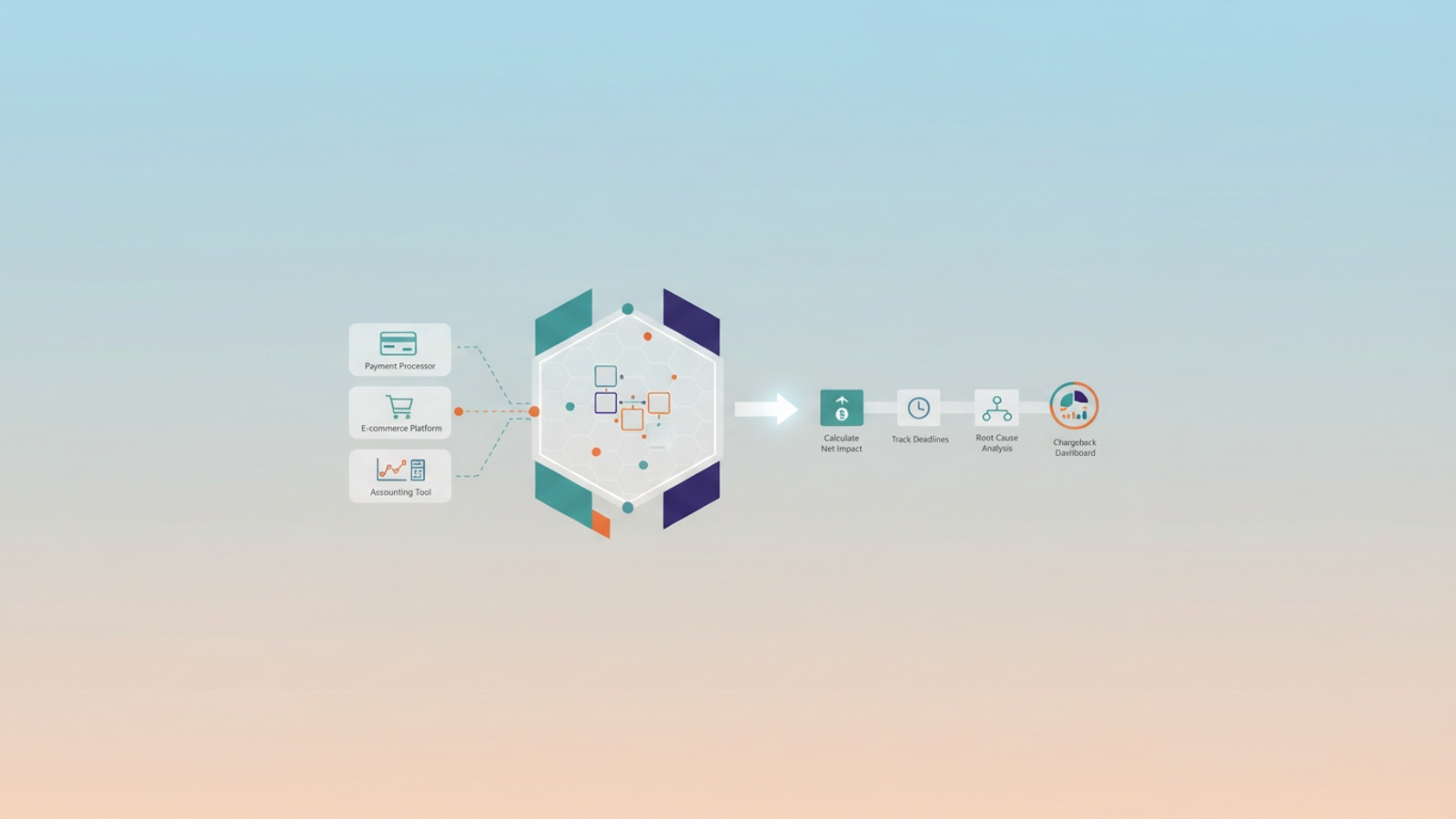
A $100 chargeback does not cost your business $100. When you factor in the non-refundable transaction fees, the $15 to $25 dispute fee levied by the processor, the cost of the lost inventory, the shipping expenses, and the operational time spent fighting the claim, the actual cost is often double the transaction value. For high-volume merchants, this leakage is invisible in standard reporting because it is scattered across different platforms.
The problem is that most businesses treat handling chargebacks as a customer service issue—a ticket to be resolved one at a time. In reality, it is a data reconciliation problem. The payment processor knows about the dispute, the shopping cart knows about the item, and the accounting software knows about the cash flow, but these systems rarely talk to each other effectively.
To stop the bleeding, finance and operations leaders must move beyond disjointed portals. The solution lies in centralizing data to link disputes directly to original orders, allowing you to calculate the true net impact and identify the root causes driving the losses.
The hidden financial impact of disputes
For a CFO or Ecommerce Manager, the frustration isn't just the lost revenue; it is the inability to forecast accurately. Disputes introduce volatility into cash flow that is difficult to track because of the timing mismatch. A customer might purchase an item in January, but the chargeback notice might not arrive until March.
When determining how to handle chargebacks financially, it is critical to distinguish between a simple refund and a forced reversal. A refund is a voluntary operational cost; a chargeback is an involuntary financial penalty that hits your merchant account immediately, often freezing funds before you even have a chance to respond.
Because the "Notice of Dispute" arrives weeks or months after the "Original Order," standard accounting software often fails to match the two events automatically. This leaves finance teams manually reconciling bank deposits that don't match daily sales figures, obscuring the true cost of goods sold (COGS) and overhead associated with these losses.
The operational challenge: the data linking gap
The core reason chargeback management fails at scale is the "silo problem." Your operational data lives in three distinct places:
1. Payment Processor (Stripe, Square, PayPal): Holds the dispute status, fee data, and bank adjustment details.
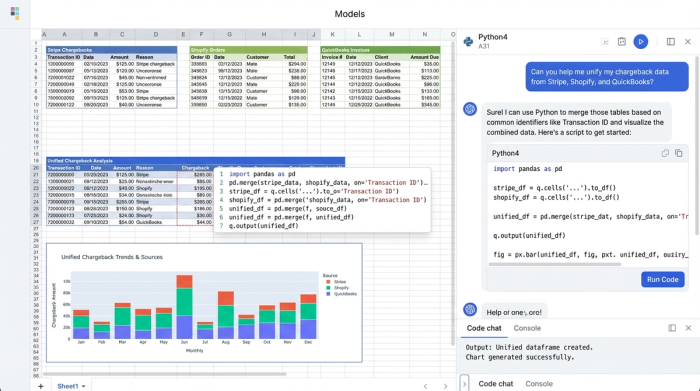
2. E-commerce Platform (Shopify, Magento, BigCommerce): Holds the SKU, customer history, and shipping tracking numbers.
3. Accounting Tool (QuickBooks, Xero): Holds the general ledger and bank reconciliation data.
There is rarely a native link between these three that provides a unified view. A payment processor might tell you that "Transaction XYZ" was disputed, but it won't tell you that the dispute was for "Product A" which has a known sizing defect. This forces operators to use manual spreadsheets, copying and pasting transaction IDs to find order numbers, leading to errors and wasted time.
To solve this, you need a connected workflow. By using a modern data grid like Quadratic, you can import data from all three sources and create a live link between them, turning a reactive process into a proactive analytical engine.
A better workflow for handling chargebacks (step-by-step)
To gain control, you must move from fighting individual fires to building a fireproof system. This involves a workflow that imports raw data, links it using common identifiers, and calculates the net impact programmatically.
1. Centralize your dispute data
Whether you are asking how does Stripe handle chargebacks or how does Square handle chargebacks regarding data access, the answer starts with exporting your raw dispute reports.
In Quadratic, you can import these CSVs or connect directly to your database. You need two specific datasets: the "Disputes/Chargebacks" table (which contains the dispute reason, fee, and status) and the "Balance/Payouts" table (which shows when the money was actually withdrawn). This centralization is the foundation of your analysis.
2. Linking disputes to original sales
Once your dispute data is in the grid, you need to bring in your "Orders" export from your e-commerce platform. The goal is to join the "Disputes Table" with the "Orders Table."
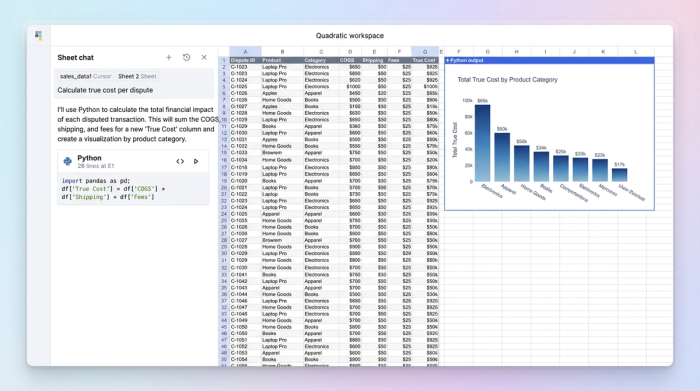
Using SQL or Python within the spreadsheet, you can match the Transaction ID from the payment processor with the Payment Reference in your order system. This link is vital. It allows you to append SKU data, customer lifetime value, and shipping details to every dispute row. You can now see not just that you lost $100, but that you lost it on a specific SKU sent to a specific region.
3. Calculating net impact per row
With the data linked, you can build a formula to calculate the true financial damage of every row. A standard spreadsheet might just sum the refund amounts, but a Python-enabled grid allows for more complex logic.
You can create a script that sums: (COGS + Shipping Cost + Processor Fee + Admin Cost). For complex industries like travel or events, you can build a handle chargebacks tours calculator logic directly into the grid. This allows you to account for industry-specific variables, such as non-refundable booking fees or third-party vendor penalties that trigger only when a cancellation is forced rather than voluntary.
4. Tracking status and deadlines
Managing the lifecycle of a dispute is time-sensitive. You need to track the status flow: New to Evidence Submitted to Won/Lost.
For high-value disputes, you may need to flag rows for legal review or specialized intervention. This workflow allows you to tag specific statuses like Stripe dispute chargeback handling for attorneys, creating a filtered view that exports evidence packages specifically designed for legal counsel review. This ensures that high-dollar disputes get the attention they need without clogging up the daily operational view.
Analyzing root causes and win rates
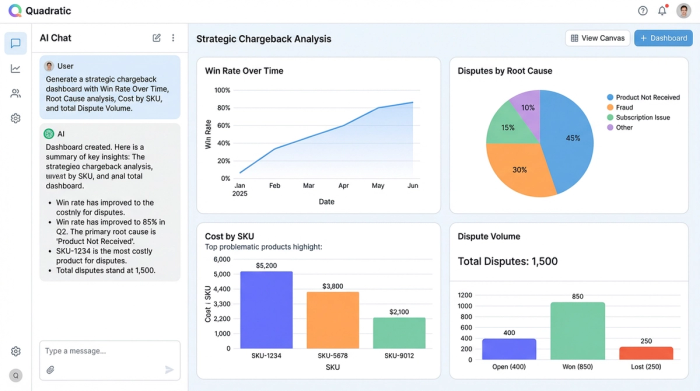
Once your workflow is active, the output is a dashboard that provides strategic insight rather than just financial reporting.
By calculating your specific win rate—(Won Disputes / Total Disputes)—you can benchmark the health of your evidence gathering. If your win rate drops, you know your evidence templates need updating.
More importantly, the data linking step allows you to tag root causes. You can differentiate between "Friendly Fraud" (where a customer forgets they bought the item) and "Merchant Error" (where the item arrived broken). Because you linked the dispute to the SKU, you might discover that "Product X" has a 5% dispute rate due to "Item Not as Described." This is actionable intelligence: changing the product description or sizing chart can prevent future losses, solving the problem at the source.
Platform-specific accounting nuances
While the operational workflow fixes the root cause, the financial reconciliation must still happen in your accounting software. Different platforms require different approaches to handle the negative cash flow correctly.
QuickBooks
One of the most common frustrations is recording the negative deposit that occurs when a processor withdraws funds. Users often struggle with how to handle a chargeback in QuickBooks Online because the software expects deposits to be positive.
Instead of manually editing individual invoices, which breaks the audit trail, use your centralized data grid to generate a monthly journal entry. This entry should summarize all chargeback fees and principal withdrawals. When figuring out how to handle chargeback in QuickBooks, the best practice is to route the withdrawal to a "Disputes Receivable" clearing account until the case is resolved, ensuring your P&L reflects the reality of the frozen funds.
Vertical specifics (travel/rentals)
For industries like vacation rentals, the stakes are higher due to the large transaction values. Operators looking for a how to handle chargebacks vacation rental payment solution face unique challenges regarding evidence.
Platforms like Airbnb have internal resolution centers, but for direct bookings, you are on your own. While you might wonder how does Airbnb handle chargebacks internally, your direct booking strategy must rely on maintaining your own evidence logs. Your data grid should house links to signed rental contracts, check-in timestamps, and communication logs next to the financial data. This ensures that when a dispute hits, the evidence is already associated with the transaction, ready for export.
Conclusion
Effective handling chargebacks is not just about winning an argument with a bank; it is about mastering your data. As long as your payment, order, and accounting data remain in silos, you will always be reactive, chasing losses after they occur.
By using Quadratic to link these disparate sources, you can calculate the exact cost of every dispute, automate the reconciliation process, and identify the root causes hurting your bottom line. Don't rely on averages or guesswork—build a workflow that turns your dispute data into a competitive advantage.
Use Quadratic to manage chargebacks
- Centralize raw dispute data from payment processors, e-commerce platforms, and accounting tools into a single, unified grid.
- Link disputes directly to original orders using SQL or Python to combine transaction IDs with order details, SKUs, and customer history.
- Accurately calculate the true financial impact of each chargeback by summing all associated costs, including COGS, shipping, fees, and admin.
- Track dispute statuses and deadlines in real time, enabling timely evidence submission and flagging high-value cases for legal review.
- Analyze root causes (e.g., product defects, friendly fraud) by linking disputes to specific SKUs and customer data, informing proactive prevention strategies.
- Automate accounting reconciliation by generating summarized journal entries for chargeback fees and principal withdrawals, streamlining financial reporting.
- Maintain comprehensive evidence logs, such as contracts and communication, directly alongside financial data for robust dispute resolution.
Stop chasing losses and start turning your dispute data into a strategic advantage. Try Quadratic.
