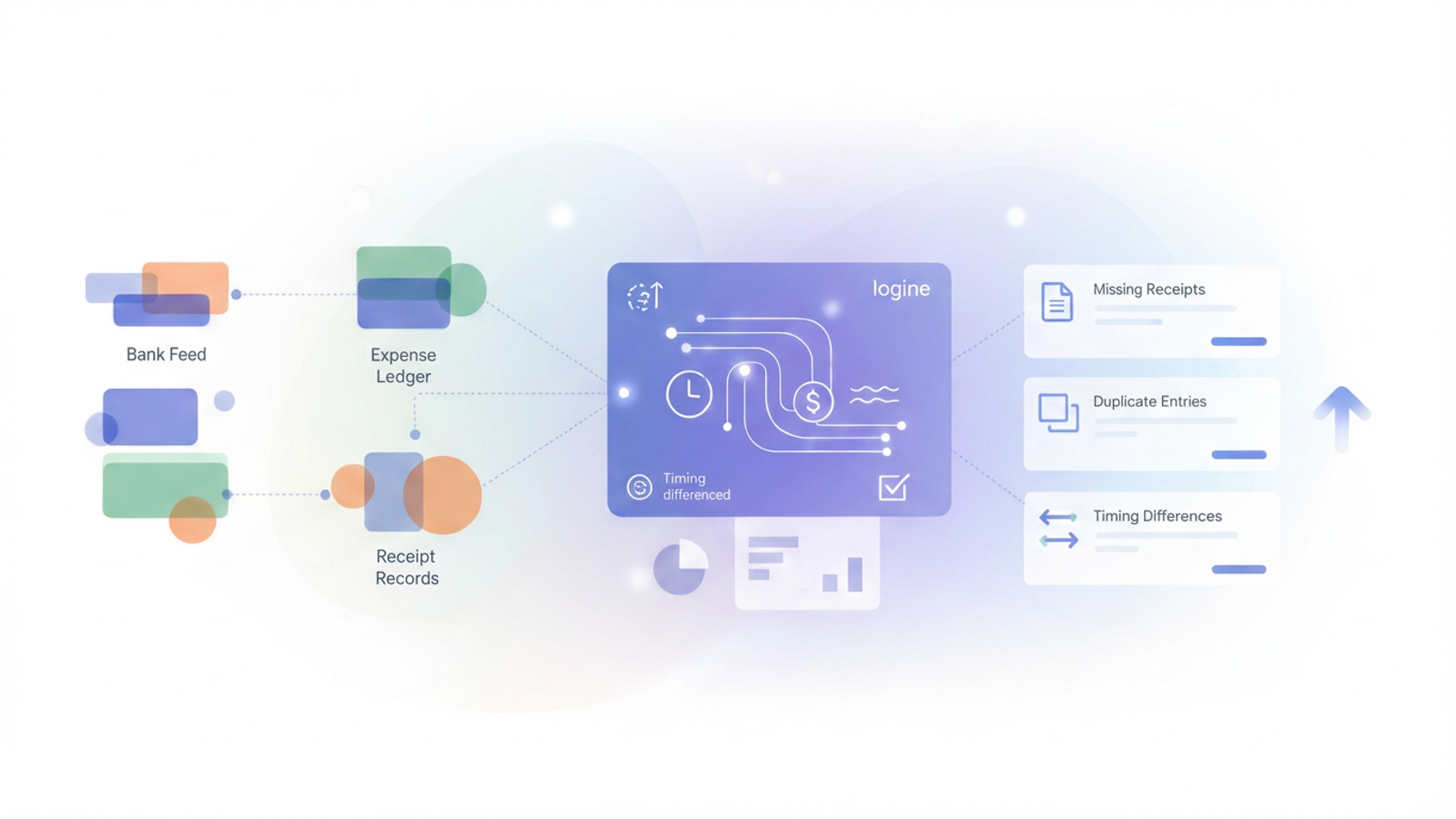
For many finance professionals, the goal to reconcile credit card statements against the general ledger is a monthly ritual that oscillates between tedious data entry and frustrating detective work, often fraught with common challenges in financial transaction reconciliation. Ideally, the process should be simple: you match the bank statement line items to your internal expense records, verify the amounts, and close the books. However, the reality is rarely that clean. Receipts get lost, restaurant tips change the final transaction amount, and timing differences mean a charge made on the 31st might not appear until the 3rd of the next month.
When you attempt to manage this in standard spreadsheets, you often run into the fragility of traditional formulas. A VLOOKUP or XLOOKUP function looks for exact matches, meaning a \$50.00 receipt and a \$60.00 posted charge (due to a tip) look like two completely different events to Excel. Conversely, relying solely on ERPs often forces you into a rigid workflow that is difficult to troubleshoot.
This is where a modern approach using Quadratic changes the workflow. By combining the familiarity of a spreadsheet with the logic of Python and SQL, you can build a custom reconciliation engine that handles the messy reality of financial data—tips, timing lags, and pending charges—before you ever attempt to finalize the books in your accounting software.
The "hidden" challenges of credit card reconciliation
To understand why automation often fails, it is helpful to clarify what should be reconciled to the monthly credit card statement. You are essentially trying to triangulate three data sources: the bank feed (truth), the employee receipt log (documentation), and the general ledger entries (accounting).
The friction arises not from the volume of transactions, but from the logic required to match them. There are three primary pain points that break standard reconciliation models:
Timing differences
The date on a physical receipt rarely matches the "Posting Date" on the bank feed. A software subscription might charge on the 28th, but the bank processes it on the 1st. If you are filtering strictly by month, these transactions fall out of scope and look like errors.
The "tip" discrepancy
This is the most common cause of matching failures for T&E (Travel and Expense) cards. An employee submits a receipt for a client dinner showing \$100.00. The bank feed eventually posts \$120.00 after the gratuity is added. A standard spreadsheet formula sees these as non-matches, forcing you to manually investigate every restaurant charge.
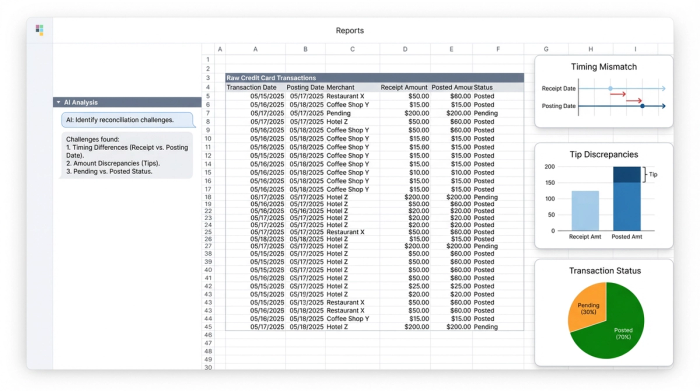
Data states: pending vs. posted
Bank feeds often include "Pending" transactions mixed in with "Posted" ones. If you reconcile a pending charge that subsequently drops off or changes amount, your general ledger will be incorrect. Separating these states effectively is critical for an accurate close.
Why traditional tools (and ERPs) struggle
When finance managers search for financial reconciliation tools, they often look for tutorials on how to reconcile credit card in Quickbooks or how to reconcile credit card payments in Xero. While these ERP systems are excellent for maintaining the final system of record, they are not designed for the investigation phase.
ERPs generally rely on feed rules that are somewhat rigid. If the data is messy—duplicates, missing receipts, or significant date lags—the ERP interface can become a bottleneck. You often find yourself clicking through individual transaction lines to force a match, which defeats the purpose of automation.
On the other side of the spectrum, traditional spreadsheets like Excel or Google Sheets offer flexibility but lack robust logic. You can export your data to CSVs, but cleaning transaction descriptions in financial data requires manual manipulation or complex, fragile formula chains. If you delete a row or sort a column incorrectly, the reconciliation breaks.
Quadratic serves as the "pre-reconciliation" layer. It allows you to ingest raw data, apply complex cleaning logic using Python or SQL, and verify everything is correct. Once the data is clean and matched, you can confidently move to the Quickbooks reconcile credit card screen knowing the numbers will tie out perfectly the first time.
Step-by-step: building a reconciliation engine in Quadratic
The most effective way to handle high-volume reconciliation is to treat it as a data engineering problem rather than a data entry task. Here is how you can build a workflow that automates the logic of matching.
1. Ingesting data: bank feeds vs. expense entries
The first step is bringing your disparate data sources into a single view. In Quadratic, you can pull your credit card statement (via CSV or API connection) and your internal expense ledger directly into the grid.
Unlike a standard spreadsheet where you might paste these into separate tabs and worry about cell references breaking, Quadratic allows you to treat these datasets as queryable tables. You can structure the bank feed on one side and the expense ledger on the other, ensuring all raw data is visible and accessible for the logic layer you are about to build.
2. Logic-based matching: handling tips and timing
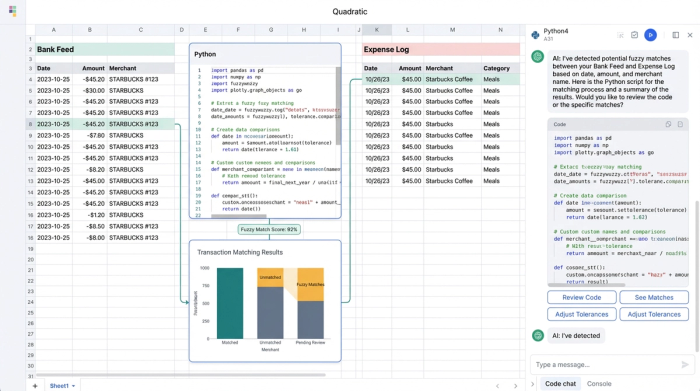
This is where the workflow pivots from manual checking to automated logic. Instead of writing a VLOOKUP that demands an exact match, you can use Python or SQL directly within the spreadsheet cells to create "fuzzy logic," also known as a fuzzy matching algorithm, for more flexible data comparisons.
For example, you can write a Python script that compares the two datasets with specific tolerance levels. You can instruct the sheet to identify a match if:
- The transaction dates are within +/- 3 days of each other.
- The transaction amounts are within a 20% variance (to account for tips).
- The merchant names share similar text strings.
This programmatic approach bridges the "logic gap." The system identifies that the \$100.00 receipt from "Steakhouse NYC" on Jan 28th corresponds to the \$120.00 charge from "Steakhouse New York" on Jan 30th. It links them automatically, saving you from manually ticking and tying those rows.
3. Filtering data states: posted vs. pending
Managing the state of data is crucial for an accurate monthly close. You do not want to reconcile credit card expenses that are still in a "Pending" state, as these amounts can change or disappear, a key consideration for treasury professionals mastering bank account reconciliation.
In a traditional workflow, you might manually delete these rows or highlight them in red. In Quadratic, you can use SQL to filter the view dynamically. You can write a query that selects only transactions where the status is "Posted" for your reconciliation report, while simultaneously generating a separate "Accruals" list for "Pending" items. This keeps your closed month clean while giving you visibility into upcoming liabilities.
4. The output: flagging discrepancies automatically
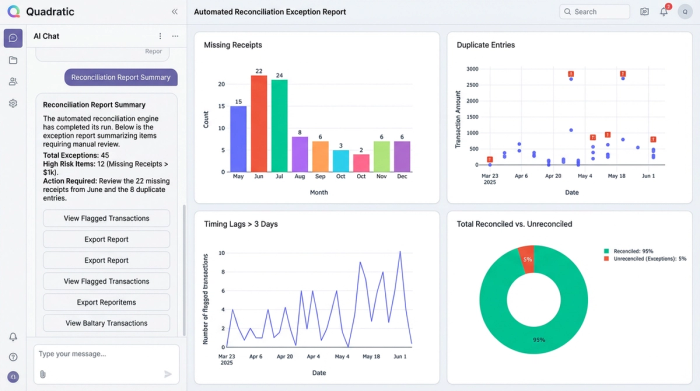
The final piece of the engine is the output report. Rather than staring at a list of thousands of rows, you can generate a summary table that only shows you what requires attention.
Your logic can automatically flag specific issues:
- Missing receipts: A list of bank charges that have no corresponding entry in the expense ledger.
- Duplicate entries: Identifying if an employee accidentally submitted the same receipt twice.
- Timing lags: Highlighting transactions where the gap between charge date and post date exceeds your standard threshold.
This transforms the reconciliation process from "check everything" to "fix the exceptions."
Best practices for audit-ready statements
Beyond the speed of the close, using a code-based workflow improves your audit readiness by providing a robust audit trail, which helps manage internal controls and enhance accountability. When you reconcile credit card statement data using manual edits in Excel, it is difficult to prove later why a certain match was made or where a number came from. Hard-coded values obscure the history of the transaction.
By using Quadratic, your logic is transparent. An auditor can look at the Python script or SQL query and see exactly how you defined a match, how you handled tips, and how you filtered pending charges. The code serves as a self-documenting audit trail for transaction reconciliation. This level of transparency is invaluable when questions arise months later regarding how do you reconcile a credit card in Quickbooks or why a specific adjustment was made.
Conclusion
The messy reality of financial data doesn't mean you have to choose between expensive, rigid software and fragile, manual spreadsheets. By using a tool that understands the nuance of your data—handling tips, timing, and status changes programmatically—you can turn a multi-day headache into a streamlined process.
Reconciling credit cards is ultimately about confidence in your numbers. When you automate bank reconciliation, you free yourself to focus on the discrepancies that actually matter, ensuring your books are accurate and your financial close is efficient.
Try Quadratic to build a reconciliation workflow that handles your specific logic automatically.
Use Quadratic to reconcile credit card expenses
- Consolidate all data sources into a single, queryable grid, eliminating the need to toggle between spreadsheets and separate tabs.
- Automate fuzzy matching logic using Python or SQL to handle common discrepancies like restaurant tips (amount variance) and timing differences (date tolerance).
- Filter transaction states dynamically to separate "Pending" from "Posted" charges, ensuring an accurate close without manual row deletion.
- Automatically flag exceptions such as missing receipts, duplicate entries, or significant timing lags, so you only investigate what truly needs attention.
- Create a transparent audit trail with code-based logic that clearly documents how matches were made and discrepancies were handled.
Ready to simplify your credit card reconciliation? Try Quadratic.
