
Every business owner knows the frustration of the "mixed receipt." It is the single credit card swipe at a big-box store that covers office supplies, a client gift, and a software subscription card. It is the lump-sum payment to a contractor that includes both labor hours and reimbursed hardware costs. When these messy real-world moments hit your bank feed, you are faced with a choice: dump the entire amount into a generic "General Expense" bucket and move on, or do the hard work of splitting transactions to reflect reality.
Splitting transactions is the process of dividing a single bank outflow into multiple expense categories, projects, or client billables. While it often feels like a tedious bookkeeping chore, it is actually a critical requirement for accurate profit and loss reporting. However, relying on rigid accounting software to handle this complex math often leads to errors. Instead of fighting with tiny pop-up windows in your ERP, finance operators are increasingly using Quadratic as a flexible modeling layer. By using Quadratic to calculate and validate these splits before they ever touch the books, you ensure your financial data remains pristine.
Why "good enough" allocation bleeds profit
There is a tangible cost to lazy bookkeeping. When you fail to allocate expenses accurately, you lose the ability to see which parts of your business are actually profitable. "Good enough" categorization creates a foggy financial picture that can lead to failed audits and lost revenue.
Tax compliance is the first hurdle. Mixing personal and business expenses, or lumping capital assets with operating expenses, creates a messy audit trail that is difficult to defend. But the more immediate pain point for agencies and service businesses is client billing accuracy. If you incur a cost on behalf of a client but bury it in your own overhead because the transaction was too hard to split, you cannot bill that cost back to the client.
Consider the complexity of payment splits for services and parts in one transaction. If a mechanic charges you $5,000, and $3,000 of that is for a specialized engine part for a specific project while $2,000 is for general labor, simply categorizing the whole check as "Repairs" is misleading. It skews your project margins and prevents you from recouping the hardware cost. The standard for clean books is simple: every dollar in the bank feed must be accounted for and categorized exactly where it belongs.
A better workflow: modeling splits in Quadratic
The solution to the mixed-transaction problem is not to force your accounting software to do things it wasn't designed for. The solution is to introduce a "middle layer" where you can model the data first. Here is how a founder or finance operator uses Quadratic to turn a messy bank feed into a precise ledger.
1. Ingesting the source data
The workflow begins by pulling raw transaction data into Quadratic. Because Quadratic connects directly to data sources and handles CSV imports seamlessly, you can bring in your "unreconciled bank feed" instantly. Instead of staring at a restrictive modal window inside an accounting app, you have an infinite, flexible canvas. You can see the raw data—dates, descriptions, and total amounts—laid out clearly in the grid.
2. Allocating across categories and clients
Once the data is in Quadratic, the allocation work begins. This is where the flexibility of the grid shines. You can take a single line item, such as a large software bill, and break it down into its component parts.
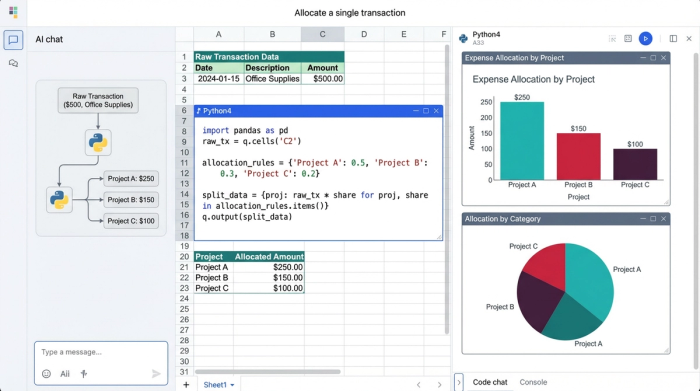
Using standard spreadsheet formulas or Python, you can assign specific amounts to different projects, expense categories, or clients. Unlike a standard spreadsheet where data is static, Quadratic allows you to pull these categories from a master list or a connected database. This ensures that you are always allocating costs to active clients and valid chart-of-accounts codes, reducing the risk of manual entry errors.
3. The validation check (the "checksum")
The most critical step in this workflow is verification. In a manual process, it is easy to split a $100 transaction into $40 and $50, inadvertently leaving $10 floating in the ether.
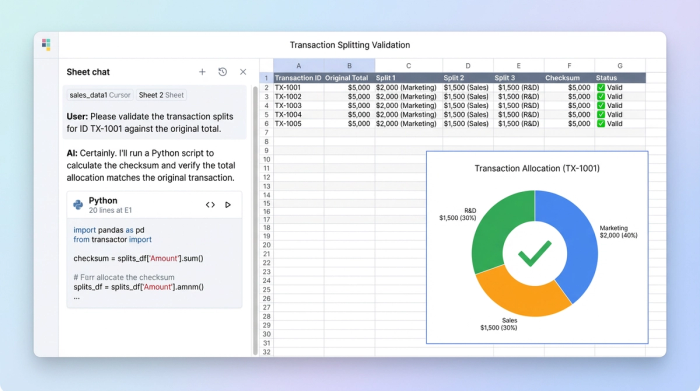
In Quadratic, you can set up a programmatic rule—a "checksum." You build a formula where the sum of your split allocations must equal the original transaction amount. If the math doesn't balance perfectly, Quadratic flags it immediately. This proactive validation prevents the nightmare of "unreconciled differences" that typically plague finance teams during the month-end close. You catch the penny-rounding error now, so you don't have to hunt for it later.
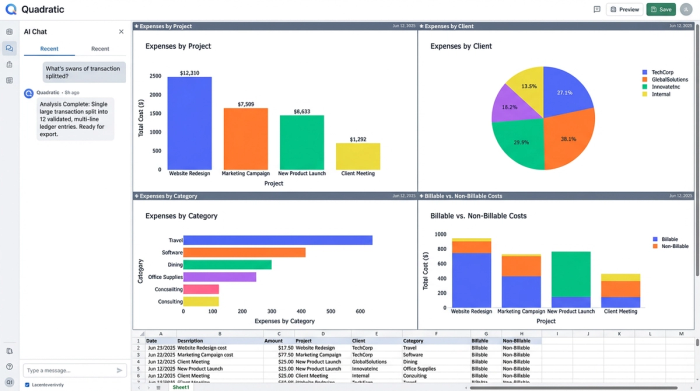
4. Generating the split ledger
The final output is a clean, multi-line ledger. What was once a single row in your bank feed is now five distinct rows, each properly coded to the correct client and category. This table becomes your source of truth. You can export this data specifically formatted for budgeting app split transactions or for direct import into your ERP, confident that the math is already proven correct.
Why native accounting tools fall short
If this process sounds thorough, you might wonder why you wouldn't just do this directly in your accounting software. The answer lies in the difference between a database (like QuickBooks) and a calculation engine (like Quadratic).
The limits of bank rules and automation
Users frequently search for shortcuts, asking questions like "can bank rules automatically split transactions?" The answer is generally yes, but with severe limitations. Most accounting platforms allow you to create bank rules that split a transaction by a fixed percentage or a fixed dollar amount.
However, real-world expenses are rarely fixed. A rule that splits a utility bill 50/50 between two departments fails the moment usage shifts to a 70/30 split. While it is true that can bank rules automatically split transactions in quickbooks online, they cannot account for variable context. Bank rules can automatically split transactions based on logic you set up months ago, but they cannot analyze the specific nuance of this month's invoice. Quadratic gives you the space to adjust those variables dynamically before the data is finalized.
Rigid interfaces vs. flexible data
When you search for tutorials on how to split a transaction in quickbooks online or look up ynab split transactions, the results usually point to a reactive workflow. You are typically editing a transaction that has already posted, clicking a "split" button, and doing mental math in a small pop-up window.
These interfaces are designed for data entry, not data modeling. If you are trying to handle a ynab split transaction for a complex reimbursement involving four different budget categories, the interface fights against you. A simple split transaction becomes a headache of clicks and calculator checks. Quadratic flips this dynamic. By modeling the split in a flexible environment first, you turn a reactive troubleshooting session into a proactive data workflow. You treat your accounting software as the destination for clean data, not the laboratory for fixing messy data.
Conclusion: the source of truth for your finances
Accurate bookkeeping is about more than just satisfying the tax authorities; it is about having a clear operational view of your business. When you know exactly where every dollar went—down to the specific client or project—you can make better decisions and bill with confidence.
Quadratic serves as the essential bridge between the messy reality of bank feeds and the strict requirements of accounting software. By splitting transactions in a flexible, powerful environment first, you ensure accuracy, maintain a perfect audit trail, and save hours of reconciliation time at the end of the month. Before you close your next month, try modeling your complex allocations in Quadratic to see the difference a proactive workflow makes.
Use Quadratic to split transactions accurately
- Model complex transaction splits in a flexible environment, ensuring accuracy before data touches your accounting software.
- Break down single bank outflows into multiple expense categories, projects, or client billables with precision.
- Validate allocations instantly with programmatic checksums, guaranteeing your splits always equal the original transaction amount.
- Ingest raw bank feed data and generate a clean, multi-line ledger ready for direct import into your ERP or budgeting tools.
- Move beyond rigid accounting software limitations and dynamically adjust variable splits as your business needs change.
Ready to bring clarity to your financial data? Try Quadratic.
