
February brought some of our biggest spreadsheet improvements yet, along with upgrades to AI, connections, Excel compatibility, and team workflows. We introduced conditional formatting and merged cells, launched the STOCKHISTORY formula, added a new Business plan, and continued improving how users connect, analyze, and organize data in Quadratic.
Conditional formatting
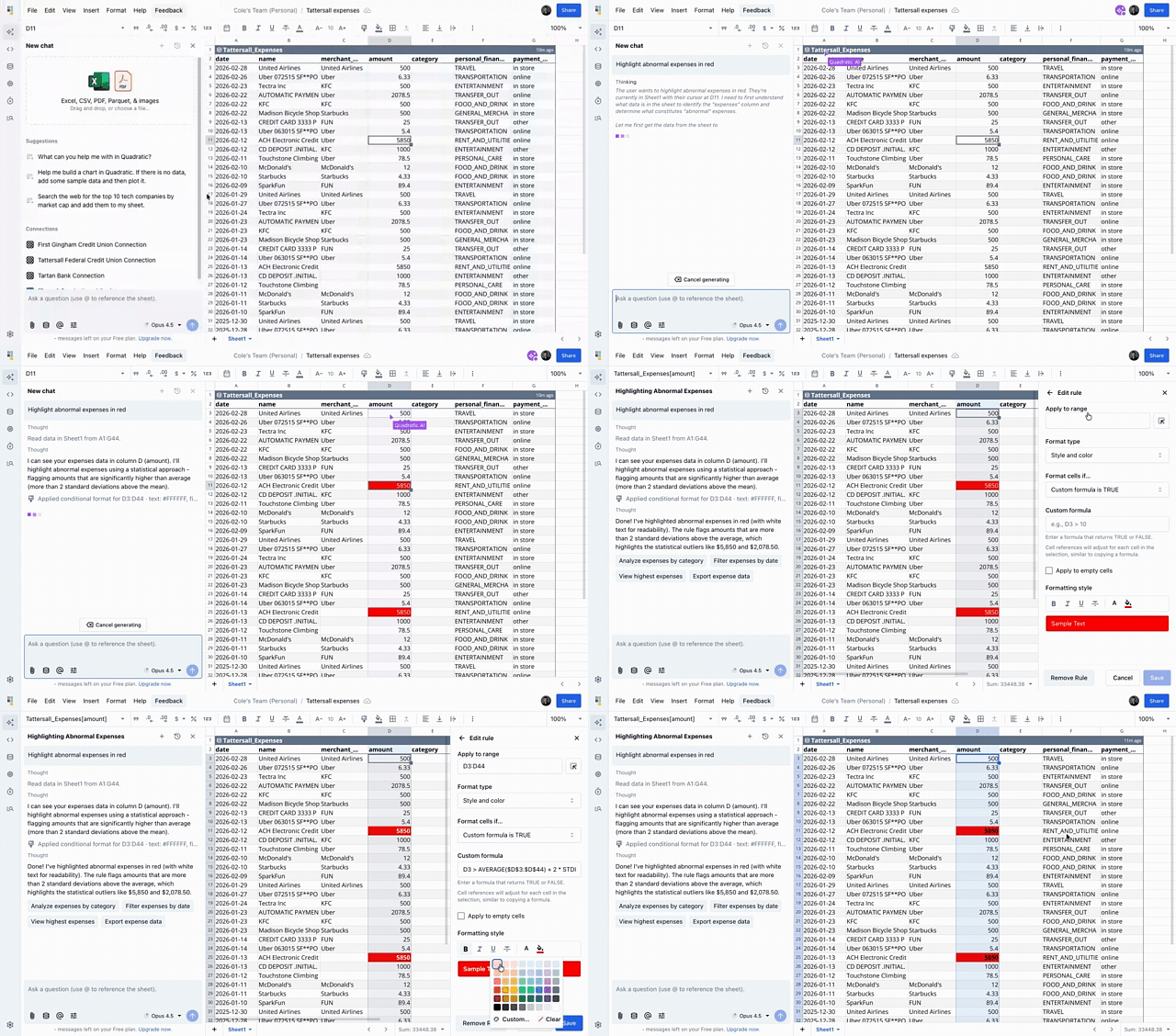
Quadratic now supports conditional formatting, making it easier to highlight important values, visualize trends, and spot outliers in your data.
You can create rules based on cell values, text, or custom formulas, and apply color scales and gradients to better understand numeric ranges at a glance. Conditional formatting also works with tables, merged cells, and sorted data, and AI can help create and manage rules for you.
This makes it much easier to turn raw spreadsheets into dashboards that are easier to scan and interpret.
Merge cells
You can now merge cells in Quadratic to create cleaner layouts and structure your spreadsheets more effectively.
Merged cells work across the rest of the spreadsheet experience, including inserting and deleting rows and columns, moving content around the sheet, sorting tables, and applying conditional formatting. This makes merged cells feel like a native part of the product rather than a standalone formatting feature.
STOCKHISTORY formula
We introduced the STOCKHISTORY formula for pulling historical stock price data directly into your spreadsheet.
You can query stock prices by ticker symbol and date range to return open, high, low, close, and volume data, making it easier to build financial models, analyze market trends, and track performance over time. The formula is powered by Intrinio for reliable historical financial data.
Intrinio data is also available through Python in Quadratic, which AI can write for you. That means you can go beyond spreadsheet formulas and pull both stock price data and company fundamentals directly into your file for deeper analysis.
This gives users flexible ways to work with market data in Quadratic, whether they want a simple formula-driven workflow or a more advanced Python-based approach.
Business plan
February also introduced a new Business plan tier with expanded features for teams.
Along with the new plan, we redesigned the billing UI with clearer plan comparisons and improved subscription management. We also added subscription reactivation support and removed file limits for educational users.
This update makes plan selection and team billing easier to understand while creating a clearer path for growing teams that need more from Quadratic.
Better AI models and Agent mode
We made several important upgrades to AI in February.
Agent mode introduced a more focused way to work with AI in Quadratic, with an expanded chat interface, contextual suggestions, smarter file import suggestions, and improved schema browsing for connections. You can switch between Agent mode and the standard experience directly from the top bar.
We also upgraded our AI models during the month. Auto mode now uses Opus 4.6, and the default thinking model was later upgraded to Sonnet 4.6. Model descriptions are now shown in the UI as well, making it easier to choose the right model for the task at hand.
We also improved AI reliability with smoother response streaming, better parsing, clearer context-length and memory-related error messages, and stronger validation before requests are sent to providers.
Google Analytics improvements
Google Analytics continued to get better in February.
Connections now use a streamlined OAuth flow with proper token refresh handling, making setup and syncing more reliable. We also expanded support around synced connections and semantic layers, helping users bring analytics data into Quadratic with less friction.
For teams building marketing dashboards, channel reporting, or traffic analysis workflows, this creates a more dependable path from Google Analytics into the spreadsheet.
Plaid connection improvements
We shipped several major improvements to the Plaid connection experience.
The data window now extends to 2 years when linking accounts, and we added new balances and liabilities tables with date support. We also flattened time series data for easier analysis and improved how AI understands Plaid connection schemas.
In addition, we created separate setup flows for banks, brokerages, and credit cards, making the connection process more intuitive depending on the type of financial data you want to analyze.
Better connections experience
Connections got a lot of attention across February.
We simplified the process for creating new connections, improved the connections list and sidebar UI, added inline help text and Learn more documentation links, and made connection options easier to understand. We also added proper visibility for the IP allow-list section when setting up database connections, so users can more easily add Quadratic’s IPs to their network allow-list.
Overall, connection setup should now feel cleaner, more guided, and more reliable.
Stronger Excel compatibility
We continued expanding Excel compatibility throughout February.
Quadratic now preserves font sizes on Excel import and export, properly decodes named ranges to A1 notation, and supports rich text import and export including bold, italic, underline, and strikethrough formatting. Color tints are also preserved, making it easier to move formatted spreadsheets between Excel and Quadratic without losing presentation details.
More spreadsheet power and performance
We also made core spreadsheet workflows more capable and more responsive.
Complex nested formulas now work more reliably, including deeply nested IF statements that previously could fail with a formula-too-complex error. We added support for moving multiple tables at once, improved paste speed for large batches of code cells, and continued optimizing performance for very large tables and large numbers of formulas.
We also fixed an issue that could create duplicate Stripe subscriptions during checkout, and added support for moving files between your personal space and team folders directly from within the spreadsheet.
Bug fixes
We shipped a wide range of bug fixes and stability improvements throughout February, including fixes for hyperlink editing, AI response parsing, scheduled task handling, onboarding issues, command palette bugs, merge cell warnings, connection processing, formula execution, and large-table rendering.
