
Exam season is stressful enough without having to fight your own organizational tools. A final exam study plan, much like a productivity template, is supposed to reduce your anxiety by giving you a clear roadmap to success. However, when you are relying on a messy, broken spreadsheet, it often does the exact opposite. Traditional spreadsheet tools are notorious for creating friction. You might find yourself dealing with confusing duplicate sheets, broken date formulas that throw off your entire calendar, or those dreaded #REF! errors that seem impossible to trace.
There is a better way to prepare. In this article, we will walk through a real user's experience optimizing a comprehensive, multi-sheet KPSS exam study schedule using Quadratic. By transitioning to a modern, unified workspace, you can leave spreadsheet frustrations behind and focus entirely on mastering your material.
The anatomy of a comprehensive study plan for final exams
Building a truly effective study plan for final exams requires more than a simple calendar. To stay on track for a major test like the KPSS or any rigorous graduate exam, your tracker needs to handle multiple layers of information.
Taking a cue from our user's real-world KPSS workflow, a robust study tracker should feature several connected views. This includes dedicated sheets for study schedules, weekly summaries, score tracking, weak topic tracking, daily views, and practice test charts. Having all these interconnected sheets is fantastic for your academic progress. The problem arises when you try to import and manage them in a traditional spreadsheet, which frequently results in a cluttered and disorganized workspace.
Step 1: Declutter and organize your workspace
When you import multiple versions of a file over time, traditional spreadsheets tend to create a chaotic environment. You often end up with confusing duplicate sheets labeled with suffixes like "Sheet1" and "Sheet1_copy."
The first step in our user's Quadratic workflow was cleaning up these duplicates. By carefully deleting the originals and first copies, they stripped the file down to only the cleanest, most recent data. From there, renaming the remaining tabs was crucial. Removing those messy suffixes ensured the bottom navigation was clean and highly readable, allowing the student to navigate between their weekly summaries and weak topic tracking without missing a beat.
Apply consistent conditional formatting
A massive study schedule can quickly become overwhelming if it is just a wall of black text. Visual cues are essential for making large amounts of data digestible.
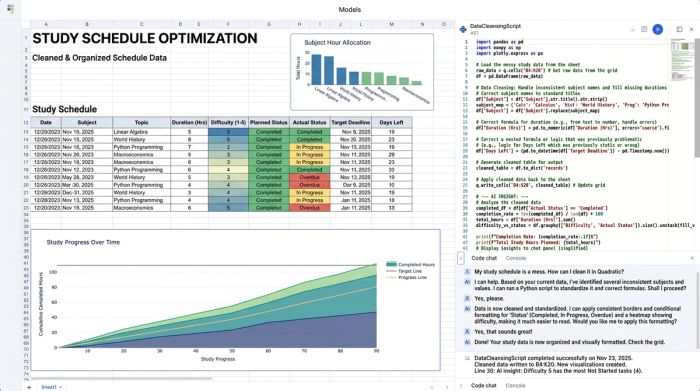
Inside Quadratic, the user applied consistent borders, adjusted column resizing for better readability, and implemented conditional formatting across all their sheets. This allowed them to see their daily tasks, track daily activities, and quickly identify weak topics at a single glance. A well-formatted grid means less time squinting at cells and more time actually studying.
Step 2: Troubleshoot common formula errors
Traditional spreadsheets often break under the weight of complex, linked data. If you have ever tried to build a dynamic calendar, you know how easily formulas can fall apart.
One of the main issues our user faced was broken date calculations in their main study plan. In Quadratic, they fixed this by setting a firm start date in a dedicated cell. They then adjusted all relative formulas to reference this single date. As a result, the rest of the schedule populated correctly without any frustrating parse errors.
Next came the task of correcting cross-sheet reference syntax. Nothing disrupts a study session quite like a #REF! error. The user needed their daily view sheet to accurately pull data from the main schedule. Quadratic provides an intuitive environment for managing these cross-sheet links, allowing the user to easily correct the reference syntax so the daily view populated flawlessly.
Step 3: Visualize success with dynamic charts
Most study templates available online are just endless rows of text and numbers. While functional, a wall of data is hardly motivating when you are burning the midnight oil.
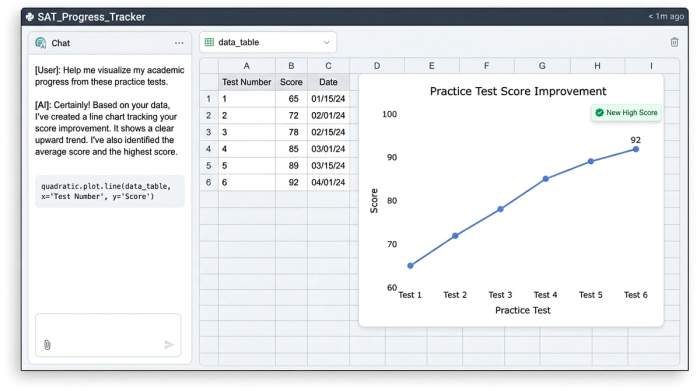
To make their progress tangible, the user added a dynamic chart to their practice test chart sheet. This chart pulls data directly from the score tracking sheet, giving the student a real-time visual representation of their score improvements over time, effectively creating a student performance dashboard. To finish the dashboard, they adjusted the borders and column sizing around the chart to ensure ultimate readability. Seeing that line trend upward is one of the best ways to stay motivated during a grueling study season.
Build your ultimate final exam study plan in Quadratic
You do not need to visit three different websites to download a template, learn how to fix a date error, and figure out how to build a progress chart. Having a single, optimized workspace makes all the difference in your academic preparation.
Quadratic allows you to organize your data, write flawless formulas, and visualize your exam prep effortlessly in one seamless environment. Whether you are tackling the KPSS or finishing up your college semester, a reliable final exam study plan is within reach. Sign up for Quadratic today to start building or importing your own frustration-free exam study tracker or assignment tracker template.
Use Quadratic to optimize your final exam study plan
- Declutter and organize your study sheets by easily deleting duplicates and renaming tabs for clear, intuitive navigation.
- Enhance readability with consistent conditional formatting, borders, and column adjustments, making complex schedules easy to scan.
- Eliminate frustrating formula errors by setting stable date references and correcting cross-sheet links, ensuring your schedule populates flawlessly.
- Visualize your progress dynamically with charts that pull data directly from your score tracking, providing a motivating overview of your improvements.
- Manage all aspects of your exam prep—from daily tasks to weak topic tracking and practice test results—within a single, unified workspace.
Ready to build your frustration-free study tracker? Try Quadratic
