
The month-end close is often a race against the clock, and few accounts cause as much friction as prepaid expenses. While the concept is straightforward—pay now, expense later—the operational reality involves tracking the "burn down" of assets across dozens of overlapping terms. You might have business insurance amortizing over twelve months, rent on a straight-line basis, and SaaS subscriptions renewing at odd intervals throughout the year.
Managing these schedules usually results in a version-control nightmare. Accountants often rely on static spreadsheets that require manual updates every month, increasing the risk of broken formulas and restatements. To maintain a clean balance sheet and accurate profit and loss statement, you need a dynamic prepaid expense tracker. This isn't just a list of invoices; it is a connected workflow that ties source data to automated amortization schedules and final journal entries.
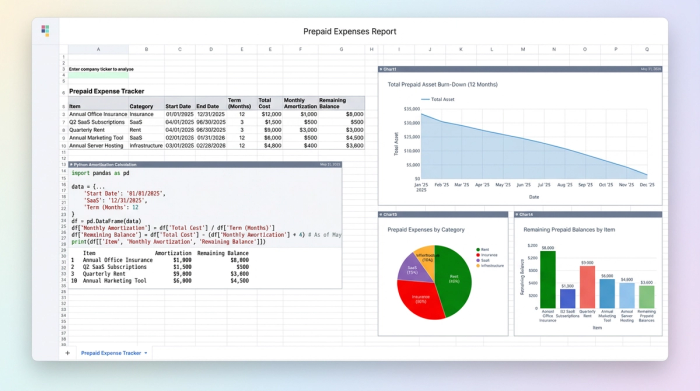
The accounting logic: from asset to expense
Before diving into the mechanics of building a tracker, it is helpful to revisit the accounting principles that necessitate this workflow. Under the accrual basis of accounting and the matching principle, expenses must be recognized in the period they are incurred, regardless of when the cash leaves the bank account.
The lifecycle of a prepaid item follows a specific two-step journey. First, the vendor sends an invoice, and you pay it. At this stage, the value is stored on the balance sheet as a current asset. Second, as time passes and the service is consumed, you move that value from the balance sheet to the income statement.
The journal entries typically look like this:
Day 1 (Payment):
Debit: Prepaid Expenses (Asset)
Credit: Cash (Asset)
Month end (Amortization):
Debit: Rent/Insurance/Software Expense
Credit: Prepaid Expenses (Asset)
The gap between knowing these entries and executing them lies in the volume and variety of data. Calculating the exact amortization amount for a single invoice is simple. Calculating it for 50 different invoices, all with different service start dates, contract lengths, and daily rates, is where standard tools often break down.
Why standard tools struggle with prepaids
Most finance teams default to what they know, leading to fragile prepaid expense tracking Excel workflows. While Excel is flexible, it relies heavily on cell-based formulas. To track a three-year software contract, you might have to drag a formula across 36 columns. If a date changes or a contract is terminated early, the manual adjustments required can ripple through the sheet, breaking totals and leading to reconciliation errors.
Alternatively, teams look to their ERP systems. While Xero prepaid expense tracking features exist, they often function as "black boxes." You enter the bill, set a rule, and the system posts the entries. This works for simple straight-line amortization but can be rigid when handling complex partial-month calculations or retroactive adjustments. Similarly, even advanced Sage AI-native ERP prepaid expense tracking features can struggle to provide the granular visibility an accountant needs to substantiate the balance sheet during an audit.
This creates a need for a "middle layer"—a tool that offers the transparency of a spreadsheet but the computational power of a database. Quadratic fills this gap by providing an infinite canvas where you can pull in raw data and use Python to handle the heavy lifting of amortization logic, ensuring your sub-ledger is both flexible and accurate.
Building a dynamic tracker in Quadratic
The most effective way to manage prepaids is to treat the process as a data pipeline rather than a static list. By using Quadratic, you can automate the flow from invoice to journal entry.
1. Ingesting the data
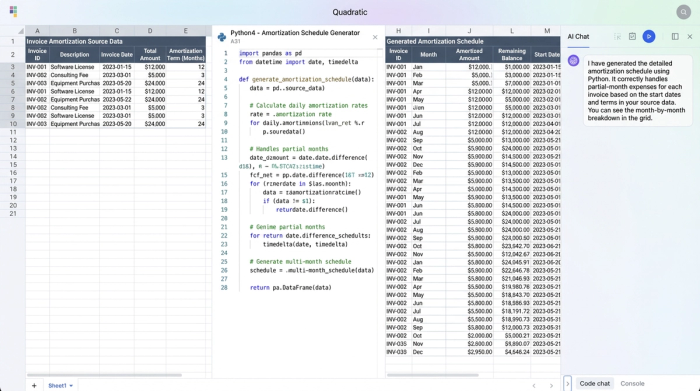
The foundation of a reliable tracker is accurate source data. Instead of manually typing invoice details into a spreadsheet, you can bring data directly into Quadratic. You might import a CSV export from your accounts payable system or connect directly to a database.
The goal is to create a raw data table that includes the essential fields: Invoice Number, Vendor Name, Service Start Date, Service End Date, GL Expense Account, and Total Amount. Because this data is imported rather than typed, you eliminate the risk of transposition errors right at the start.
2. Automating the schedule with Python
In a traditional spreadsheet, calculating the monthly expense for items with different terms requires complex "IF/AND" statements and dragging formulas across hundreds of columns. In Quadratic, you can use Python directly in the grid to generate the schedule automatically.
By referencing the raw data table, you can write a short Python script that iterates through each invoice. The script calculates the total number of days in the contract and determines the daily amortization rate. It then generates a schedule that allocates the expense to the correct months based on the specific number of days in that month.
This approach offers significant differentiation from standard spreadsheets. If you have a contract that starts on January 15th, Python can precisely calculate the partial month expense for January (17 days) without requiring manual intervention. The result is a generated dataset that expands or contracts automatically as you add new invoices to the source table.
3. The month-end summary view
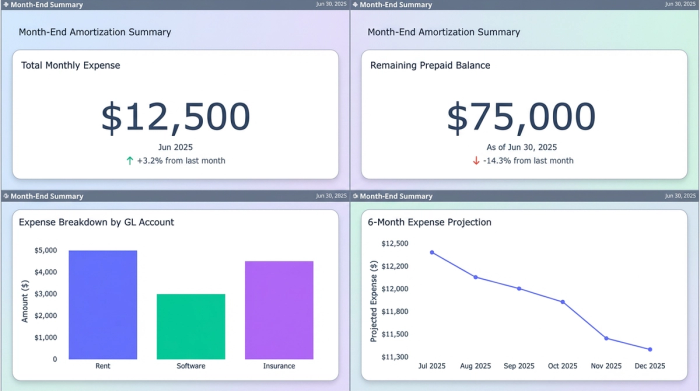
Once the amortization schedule is calculated, you need a view that tells you exactly what to book for the current close. In Quadratic, you can use SQL or Python to query your generated schedule and produce a clean summary table.
This summary view filters the data to show only the amortization amounts relevant to the current month. It aggregates the totals by General Ledger code, showing you exactly how much to debit Rent, Software, and Insurance, and the total amount to credit the Prepaid Asset account. This transforms a complex dataset into a clear instruction for your journal entry.
Bridging the tracker to the balance sheet
A prepaid expense tracker serves a dual purpose: it calculates expenses and substantiates the balance sheet. This document acts as your sub-ledger. The total "remaining balance" calculated in your Quadratic tracker must match the balance of the Prepaid Expense account in your ERP.
By maintaining this level of detail, you ensure that your current assets are not overstated. Overstated assets artificially inflate liquidity ratios, giving a false sense of financial health. During the month-end close, the reconciliation process becomes a simple check. You compare the ending balance in Quadratic against your ERP trial balance. If they match, you can proceed to book the journal entry summary generated in the previous step.
Advanced workflow: handling renewals and adjustments
The real world is rarely as clean as a textbook example. SaaS tools renew, insurance premiums change, and leases are renegotiated. A static spreadsheet often requires you to overwrite history to accommodate these changes, destroying your audit trail.
In a dynamic tracker, handling a renewal is as simple as adding a new line to your source data. Because the Python logic runs freshly against the data, it will generate the new amortization stream without disturbing the historical records. This allows you to maintain a rolling schedule that preserves the history of past expenses while projecting future cash flow and P&L impacts.
Conclusion
Moving from static spreadsheets to a dynamic data environment transforms the prepaid expense process from a monthly headache into an automated workflow. By using a tool that connects data ingestion, Python-based calculation, and reporting in a single view, you eliminate manual errors and gain confidence in your numbers.
Accountants should not have to spend hours calculating partial months or fixing broken formula links. Instead, you can rely on a tracker that does the heavy lifting for you.
Use Quadratic to do Prepaid Expense Tracking
Quadratic is designed to streamline your prepaid expense management, transforming a manual monthly task into an automated, accurate workflow.
- Automate complex amortization schedules: Use Python directly in the grid to precisely calculate and generate amortization schedules for dozens of prepaid items, including partial months and varying contract lengths.
- Centralize and ingest data: Import invoice details directly from your accounting systems, eliminating manual data entry errors and creating a single source of truth.
- Maintain dynamic accuracy: Automatically update schedules and journal entries as new invoices, renewals, or adjustments are added, ensuring your sub-ledger always matches your ERP.
- Generate clear month-end summaries: Query your amortization data with SQL or Python to produce aggregated journal entry summaries, simplifying your monthly close process.
- Ensure audit-ready visibility: Gain full transparency into every amortization calculation and adjustment, providing a robust and detailed audit trail for your prepaid assets.
Ready to simplify your financial workflows? Try Quadratic.
