Table of contents
- What is vendor name normalization (and why it fails in Excel)
- The goal: From messy data to vendor-level spend analytics
- The workflow: Standardizing vendor names in Quadratic
- Beyond cleaning: Compliance and reporting
- 3 best practices for maintaining a clean vendor master
- Conclusion
- Use Quadratic to standardize vendor names for spend analytics
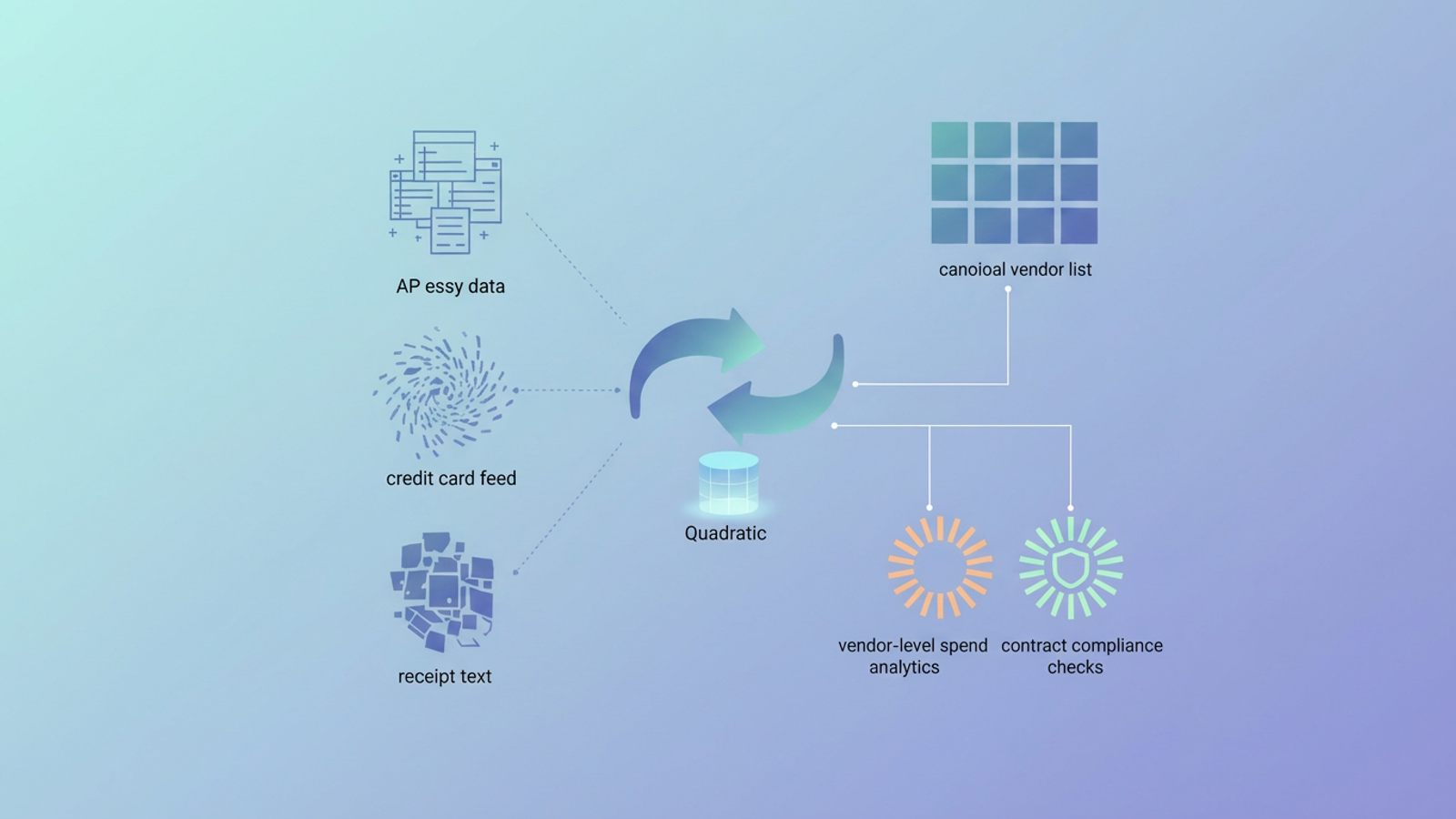
You are likely staring at three different spreadsheets right now. One is an accounts payable export, another is a credit card feed, and the third is raw text scraped from receipts. You know that "FedEx," "Federal Express," and "FedEx Kinko's - Store 102" are all the same vendor, but your data doesn't. To build a single accurate report, you have to manually find and replace every variation, a process that takes hours and leaves you prone to errors, hindering the true consolidation of financial information.
This is the reality of the "messy data" struggle. Without effective vendor name normalization, you cannot achieve accurate spend analytics. If your data says you spent $50,000 with "Amazon" and $20,000 with "AMZN Mktp," you might unknowingly negotiate a volume discount based on only part of your actual volume.
The good news is that you don't need to choose between manual Excel drudgery and a complex, code-heavy data science environment. By using a tool like Quadratic, you can bridge the gap, combining the visibility of a spreadsheet with the power of Python for cleaning transaction descriptions in financial data efficiently.
What is vendor name normalization (and why it fails in Excel)
Vendor name normalization is the process of mapping variant vendor names—including typos, abbreviations, franchise locations, and "doing business as" (DBA) names—to a single "canonical vendor name" or master ID. It is the act of telling your dataset that "Intl Bus Mach" and "IBM Corp" are the same entity.
For years, analysts have tried to solve this in traditional spreadsheets, usually hitting a bottleneck. You might build a massive VLOOKUP table to map variants to clean names, but this method is brittle. The moment a new spelling or a new store number appears in next month's export, the formula breaks, and you are back to manual review.
On the other end of the spectrum, enterprise procurement software often promises to handle this, but these tools act as "black boxes." They are rigid, expensive, and require heavy IT involvement to set up. Furthermore, they struggle to solve the "silo" problem. Merging a CSV from American Express with an export from SAP is difficult when the naming conventions in those systems differ entirely.
The goal: From messy data to vendor-level spend analytics
It is important to remember that we aren't cleaning data just for the sake of being tidy. Vendor name normalization is a means to a specific business end. When you standardize your vendor master file, you unlock critical financial insights.
First, you gain total visibility into spend per vendor. This is your primary leverage during contract negotiations. If you can prove you are spending significantly more than a vendor realizes because their records are split across five different account names, you can demand better pricing.
Second, you enable contract compliance checks. You need to know if employees are buying from approved vendors or engaging in "maverick spend" with unapproved suppliers. If your data is fragmented, rogue spend hides in the cracks of misspelled names.
Finally, clean data allows for better category management. You can accurately group spend by category (e.g., software, logistics, office supplies) only if the underlying vendor names are consistent.
The workflow: Standardizing vendor names in Quadratic
The most effective way to handle this process is to move beyond the limitations of standard spreadsheets without abandoning the spreadsheet interface entirely. In Quadratic, you can replicate the workflow of a data scientist—using SQL to pull data and Python to clean it—while working in a familiar grid.
Here is how a procurement analyst can standardize vendor names across AP exports, credit card feeds, and receipt text using Quadratic as part of a broader procurement process assessment.
1. Centralizing data silos
The first step is bringing your disparate sources together. In a traditional workflow, you might be juggling multiple workbook tabs or trying to copy-paste millions of rows into a single sheet that crashes your computer.
In Quadratic, you work on an infinite canvas. You can pull in your AP export, connect directly to a database for credit card feeds via SQL, and import receipt OCR text all in the same workspace, a crucial step for effective corporate travel data analytics. You can see all your data sources side-by-side. This immediate visibility allows you to spot patterns across datasets that would be impossible to see if they were hidden in different files.
2. Creating the "canonical" master list
Once your data is centralized, you need to define your "Golden Record." This is your master list of approved, correctly spelled vendor names. The goal is to map every variant in your raw data to one of these clean names.
Visualizing this mapping helps clarify the task:
- Variant: "FedEx Kinko's - Store 102" maps to Canonical: "FedEx"
- Variant: "Federal Express Corp" maps to Canonical: "FedEx"
- Variant: "AMZN Mktp" maps to Canonical: "Amazon"
In Quadratic, you can set up this mapping table right next to your raw data, serving as the source of truth for your analysis.
3. The "power" step: Using Python in the grid
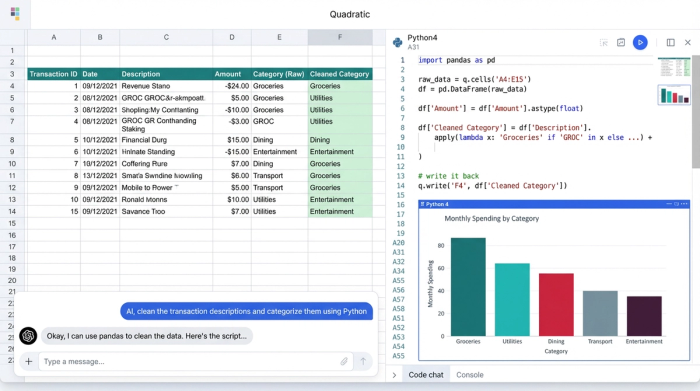
This is where the workflow shifts from manual labor to automated efficiency. In a standard spreadsheet, you would be stuck writing complex nested IF statements or manually finding and replacing text. In Quadratic, you can use Python directly in a cell to perform advanced data cleaning.
For example, you can utilize Python libraries like fuzzywuzzy or pandas to perform fuzzy matching. Instead of looking for exact matches (which fails when "Inc." is missing), fuzzy matching looks for strings of text that are approximately similar. You can write a short script that looks at your messy column, compares it to your master list, and suggests the best match based on a similarity score.
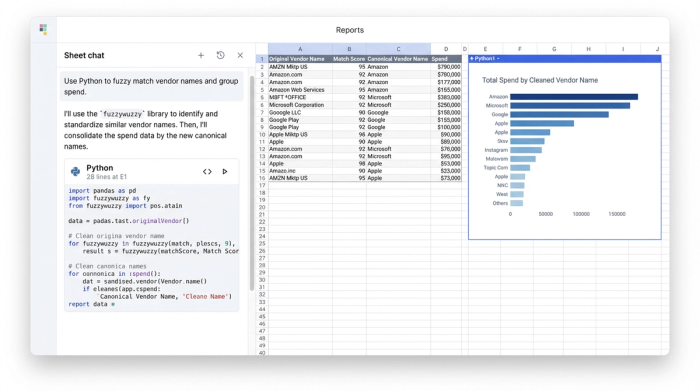
This allows you to cluster thousands of variations into clean groups automatically. You get the power of code—automating the repetitive work—while retaining the visibility of a spreadsheet, so you can spot-check the results instantly.
Beyond cleaning: Compliance and reporting
Once your vendor names are normalized, the real value begins. With a clean dataset, you can pivot the data to show total spend by the canonical vendor name, giving you the accurate volume numbers needed for reporting.
You can also cross-reference this clean list against a "Contracted Vendors" list. This allows you to flag non-compliant spend immediately, which is especially vital for robust travel and expense data analytics. For instance, if your company policy is to use "Staples" for office supplies, but your normalized data reveals $10,000 spent at "Office Depot," you can identify that leakage instantly.
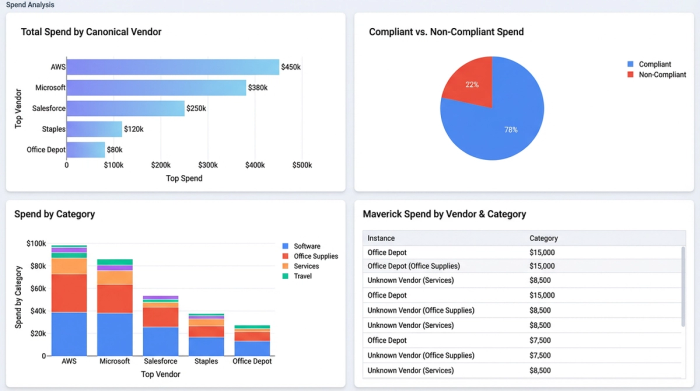
Because Quadratic handles visualization natively, you can turn these tables into charts and graphs within the same interface, creating a dashboard that updates as new data flows in.
3 best practices for maintaining a clean vendor master
Cleaning your data once is a victory, but maintaining it is a strategy. Here are three best practices to keep your procurement data healthy.
Standardize on entry
The best way to clean data is to prevent it from getting dirty in the first place. Implement strict data governance rules at the point of entry. If a vendor is being set up in your ERP, ensure the naming convention matches your master file immediately. Don't wait until the end of the quarter to fix it.
Use unique identifiers
Relying on names alone is risky. "ABC Corp" in New York might be a completely different company than "ABC Corp" in London. Wherever possible, map your vendors to a unique identifier, such as a Tax ID or a D-U-N-S number. This ensures that even if the name changes or is entered incorrectly, the underlying identity remains constant.
Automate the rules
You should never have to fix the same typo twice. If you map "FedEx Kinko's" to "FedEx" in January, your system should remember that rule in February. By using Python scripts in Quadratic, you can build a reusable workflow where your cleaning logic is saved and applied to new data automatically, turning a monthly headache into a one-click update.
Conclusion
Vendor name normalization is the prerequisite for any meaningful financial insight. Without it, your reports are just guesses. But you don't need to wait for a massive ERP overhaul or a team of engineers to fix your data. By moving your messy exports into Quadratic, you can leverage the flexibility of a spreadsheet and the power of Python to build a clean, reliable spend report in minutes. Import your data today and start seeing the truth behind your spend.
Use Quadratic to standardize vendor names for spend analytics
- Centralize messy vendor data from AP exports, credit card feeds, and receipt text onto an infinite canvas.
- Build and maintain your canonical vendor master list directly alongside raw data for clear, consistent mapping.
- Automate vendor name matching and normalization using Python in the grid, leveraging fuzzy matching to catch variations and typos.
- Eliminate manual VLOOKUPs and repetitive find-and-replace with reusable workflows that automatically clean new data.
- Unlock accurate spend analytics and identify maverick spend by unifying all vendor transactions.
- Generate dynamic dashboards and reports from clean vendor data to strengthen contract negotiations and compliance.
Ready to clean your vendor data and gain accurate spend insights? Try Quadratic.
