Table of contents
- Why modern startups need an AI business budget generator
- Step 1: From raw data to structured baseline
- Step 2: Building scenarios with logic (not just guesses)
- Step 3: The "staying alive" metric: Dynamic cash runway
- Common budgeting pitfalls (and how AI solves them)
- Getting started with a free AI budget generator workflow
- Use Quadratic to build an AI budget generator
For many founders and finance leaders, budgeting exists in two equally frustrating states: the "back-of-the-napkin" math that lacks detail, and the brittle, over-complicated spreadsheet that breaks every time you add a row. As a startup scales, the gap between these two extremes becomes dangerous. You need a startup financial model that is sophisticated enough to handle seasonality and hiring plans, but flexible enough to update instantly when reality changes.
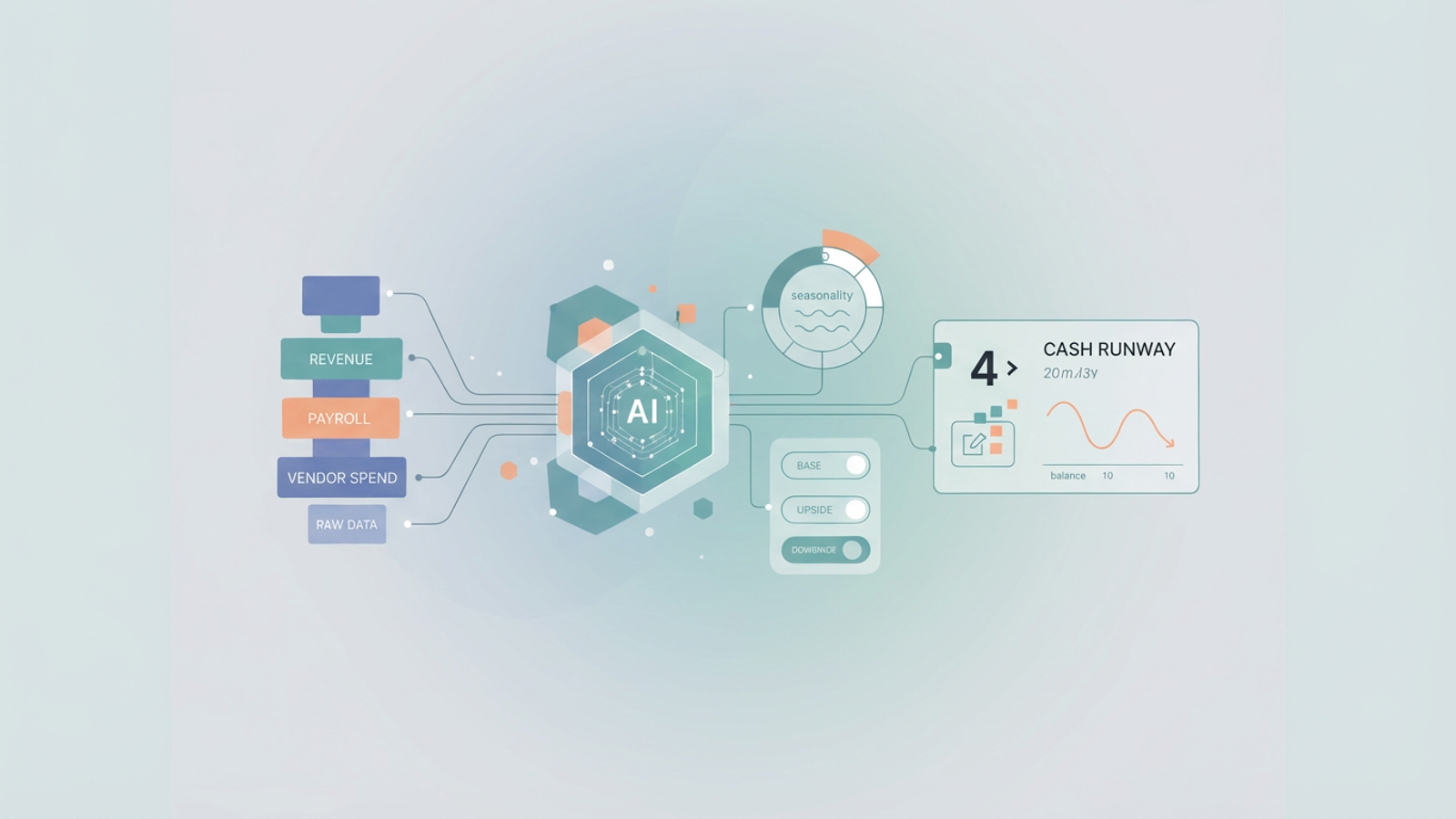
This is where the shift to an AI budget generator transforms the workflow. Rather than manually linking hundreds of cells or writing complex macros from scratch, modern finance professionals are using AI to structure raw historical data into dynamic financial models, reflecting the broader trend of AI-driven innovations in forecasting and scenario modeling. In tools like Quadratic, this isn't about asking a chatbot to write a generic text summary of your finances. It is about using AI to construct a living, 12-month budget that ingests your history, projects your runway, and allows for real-time scenario planning.
The following workflow demonstrates how a real user—a founder managing revenue, payroll, and vendor spend—utilizes a Quadratic workflow to automate the heavy lifting of financial planning.
Why modern startups need an AI business budget generator
The traditional method of building a budget involves exporting CSVs from your bank or accounting software, cleaning the data manually, and then building formulas to project the future. This process is slow, prone to human error, and creates static artifacts. By the time you finish the budget, the month is over, and the data is stale.
An AI business budget generator fundamentally changes this dynamic. Instead of spending hours formatting columns and debugging broken reference errors, you use AI to detect patterns in your uploaded data and generate the structure for you. The advantage here is speed and adaptability. When you use a budget generator AI, you are not just getting a static table; you are getting a system that understands the difference between a recurring SaaS subscription and a one-time consultant fee, which is crucial for building an accurate saas financial model template.
For mid-sized enterprises and fast-moving startups, the ability to move from "raw data" to "strategic insight" in minutes is a competitive advantage. It allows the finance team to focus on high-level strategy—like extending runway or optimizing burn—rather than data entry.
Step 1: From raw data to structured baseline
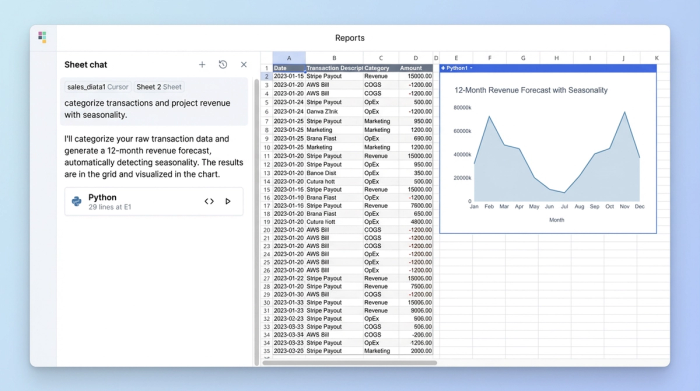
The first step in this workflow is establishing a baseline based on reality, not guesswork. In a standard spreadsheet, this requires manually categorizing every transaction from your bank export. In Quadratic, the user simply pastes their raw CSV data—containing revenue history, payroll details, and vendor spend—directly onto the infinite canvas.
Once the data is on the canvas, the AI takes over the heavy lifting. The user prompts the AI to categorize messy vendor data, grouping disparate entries like "AWS," "Google Cloud," and "Azure" under a unified "Infrastructure" category. This cleans the data instantly, preparing it for financial data analysis and projection.
The most powerful feature of an ai generated budget in this context is seasonality detection in time series data. A common mistake in manual budgeting is assuming linear growth. However, the AI analyzes historical revenue and identifies trends, such as a consistent dip in revenue every July or a spike in December. It then automatically projects these seasonal curves into the 12-month p&l forecast. This ensures that the baseline budget reflects the actual rhythm of the business, rather than an idealized straight line.
Step 2: Building scenarios with logic (not just guesses)
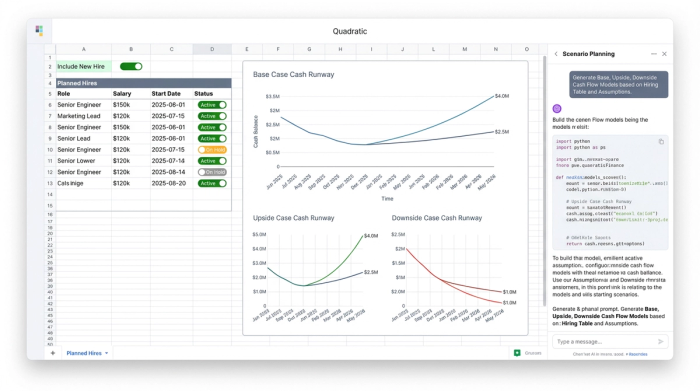
A static budget is a dangerous tool because it assumes the future is fixed. A robust financial model must account for variables, adhering to the principles of dynamic financial modeling. This is where Quadratic’s integration of Python and AI becomes essential. After the AI constructs the baseline budget, the user can implement Python-backed logic to create "Base," "Upside," and "Downside" scenarios.
Consider the "Hiring" variable. In this workflow, the founder inputs a list of planned hires with their expected start dates and salaries. Instead of hard-coding these costs into the budget, the model uses a toggle switch. If the founder wants to see the impact of delaying the "VP of Sales" hire by three months, they simply toggle that specific hire from "Active" to "On Hold."
Because the model is dynamic, this change instantly ripples through the entire 12-month projection, updating the estimated burn rate and cash balance for every subsequent month. This capability is vital for teams looking for budget-friendly generative AI tools for mid-sized enterprises, as it replaces the need for expensive, dedicated FP&A modeling software. It allows founders to perform sophisticated risk management—visualizing the financial impact of today's decisions before they are made—without leaving the spreadsheet.
Step 3: The "staying alive" metric: Dynamic cash runway
The ultimate output of any startup budget is the cash runway—the estimated date the company runs out of money. In traditional models, this is often a static number calculated once a quarter. In this AI-assisted workflow, the runway is a "living" metric.
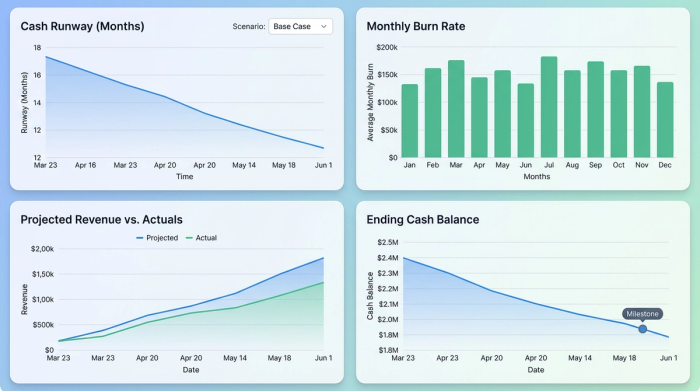
The user sets up a Cash Runway Summary on the canvas, which pulls data directly from the scenario-enabled budget. The power of this system lies in the monthly updates. As the month closes, the user pastes the actual financial results into the model. The AI budget generator logic automatically reconciles the actuals against the forecast and recalculates the remaining runway.
The financial data visualization is a clear, dashboard-style indicator showing exactly when cash runs out based on the currently selected scenario. If the user toggles from the "Upside" revenue case to the "Downside" case, the runway date updates instantly. This provides the founder with a constant, accurate view of the company’s survival horizon, eliminating the surprise of a sudden cash crunch.
Common budgeting pitfalls (and how AI solves them)
Even experienced finance professionals fall into cognitive traps when building models manually, highlighting common budgeting pitfalls. Utilizing an AI-assisted workflow helps mitigate these standard errors.
Linearity Bias: Humans tend to project growth as a straight line (e.g., "we will grow 5% every month"). This rarely happens in the real world. AI solves this by analyzing historical volatility and seasonality, projecting curves that mimic reality.
Static Assumptions: A manual spreadsheet often relies on hard-coded assumptions that are easily forgotten. If you decide to delay a project but forget to update the cell in row 45, your entire model is broken. By using Python-integrated toggles for variables like hiring or major projects, the model updates holistically, ensuring that a change in strategy is immediately reflected in the numbers.
Isolation: frequently, the "Runway Model" lives in one spreadsheet and the "Operating Budget" lives in another. This separation leads to version control issues. Quadratic’s infinite canvas allows both the inputs (raw CSVs) and the outputs (Runway Dashboard) to exist in a single view, ensuring the data source is always connected to the strategic output.
Getting started with a free AI budget generator workflow
The transition from static spreadsheets to dynamic, AI-powered modeling does not require a massive enterprise contract or a degree in data science. The goal is to start simple: get your data out of isolated silos and into an environment where it can be structured and analyzed effectively.
You can begin testing this logic using ai budget generator free tiers or financial forecast templates available within Quadratic. By starting with a template, you can see firsthand how Python and AI work together to categorize spend and project runway. Stop relying on fragile sheets that break with every new hire. Move your financial planning to a canvas that works as fast as your business does.
Use Quadratic to build an AI budget generator
- Automate data structuring: Instantly transform raw CSVs of revenue, payroll, and vendor spend into a structured baseline budget using AI.
- Generate dynamic 12-month projections: Create a living budget that ingests historical data, detects seasonality, and projects your 12-month outlook accurately.
- Build flexible "what-if" scenarios: Implement Python-backed logic to model "Base," "Upside," and "Downside" scenarios, such as adjusting hiring plans or project delays.
- Gain real-time insights: See the immediate impact of scenario changes on your burn rate, cash balance, and overall financial projections.
- Monitor dynamic cash runway: Maintain a "living" cash runway metric that automatically reconciles actuals against forecasts and updates instantly with scenario adjustments.
- Consolidate your financial workflow: Keep all raw data, complex models, and strategic dashboards in a single, unified workspace, eliminating version control issues.
Stop relying on fragile spreadsheets that break with every update. Start building dynamic financial models today. Try Quadratic
