
For the growing homeschooling population, managing a 180-day school year is challenging enough without drowning in endless, cluttered spreadsheets. For many parents and educators, tracking homeschool attendance means wrestling with rigid templates that quickly become overwhelming. A dynamic planner changes this completely.
It is a daily habit tracker that adapts to your specific schedule, hides what you do not need, and keeps important data front and center. Instead of fighting with legacy tools, you can use Quadratic to build an intelligent, automated planner. Quadratic, a Python spreadsheet, combines the familiarity of a traditional spreadsheet with built-in data handling capabilities, making it the perfect workspace to create a clean, responsive record of your academic year.
The challenge of the traditional homeschool attendance record
Most states require tracking around 180 days of subjects and completed work, with specific state requirements for tracking attendance varying by location. In a standard spreadsheet, this translates to hundreds of rows. As the year progresses, using a traditional homeschool attendance record becomes a chore, much like managing a complex employee attendance sheet. You are forced to scroll past weeks of empty rows or irrelevant past months just to log today's assignments.
If you search for ways to fix this in legacy tools like Google Sheets or Microsoft Excel, the advice is usually frustrating. Most tutorials suggest manually hiding rows every week or writing complex, easily breakable scripts just to keep your view clean. These workarounds are clunky and time-consuming. You need a solution that manages the clutter automatically so you can focus on teaching.
Step-by-step: building your dynamic homeschool attendance tracker in Quadratic
Creating a personal productivity spreadsheet that actively works with you requires a tool built for flexibility. Quadratic allows you to combine standard spreadsheet features with powerful automated data management in a single browser-based canvas. Here is how to build a unified, practical homeschool attendance tracker that eliminates manual upkeep.
1. Setting up the 180-day framework and input areas
The foundation of your planner starts with structure. Begin by creating individual monthly sheets that allow for the daily input of subjects and completed work. A core principle of good spreadsheet design is separating your raw data input areas from your clean viewing areas. In Quadratic, you can designate specific columns strictly for logging daily activities while keeping your main dashboard clean. This ensures your 180-day framework remains organized from the very first day.
2. Improving navigation: sticky headers and visual cues
When you are logging data every day, you need to know exactly where you are in the week. By using the Freeze Panes feature, you can lock your Monday-to-Friday header row at the top of your screen. This keeps your days of the week visible as you scroll down through the month.
Next, you can use Conditional Formatting to create visual anchors. Set up a rule to automatically bold all "Monday" entries in Column A. This simple formatting trick breaks up the visual monotony of a long list and makes weekly navigation incredibly easy to read at a glance.
3. Automating clutter: dynamically removing empty rows
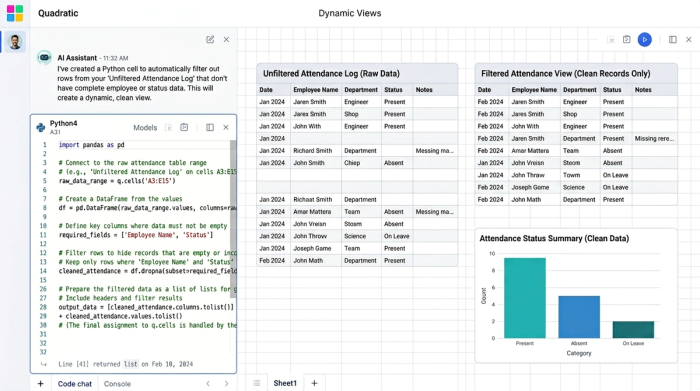
This is where the true power of Quadratic shines. In a traditional spreadsheet, a month with unexpected days off leaves you with gaping blank spaces. In Quadratic, you can set up your sheet to automatically filter out or hide unused rows containing empty attendance days.
Because Quadratic supports native Python and advanced formulas directly in the grid, you can create a dynamic view that only displays relevant, active data at the top of your screen. This eliminates endless scrolling. Instead of relying on the clunky scripts required by older spreadsheet tools, Quadratic handles this data transformation seamlessly.
4. Creating an adaptive layout: managing start dates and monthly sheets
Not every academic schedule starts in September. Your planner needs to adapt to your specific timeline. You can build a configuration tab with a user-defined start date. Based on this input, Quadratic can dynamically hide or disregard entire monthly sheets that fall before this start date. This ensures the file begins at the exact right month for any new user, instantly customizing the planner to fit a unique schedule without manual deletion.
3 best practices for a clean homeschool attendance sheet
A well-designed homeschool attendance sheet is as much about visual clarity as it is about data entry. To keep your workspace optimized, follow these overarching spreadsheet design principles:
- Embrace minimalism: Delete blank worksheets and unused columns entirely. This reduces file weight and visual noise, keeping your focus strictly on the data you need.
- Use color coding sparingly: Instead of coloring every row, use subtle shades to indicate input fields versus automated formula fields. This guides the user on exactly where to type without causing eye strain.
- Standardize naming conventions: Keep your monthly tab names and subject headers perfectly consistent. This ensures that any dynamic formulas or automated workflows you build in Quadratic will run smoothly across the entire 180-day year.
Build your free homeschool attendance tracker today
By combining sticky headers, conditional formatting, and dynamic row management, you get a planner that actually works for you. You no longer have to spend your weekends maintaining a rigid file or fixing broken scripts. Quadratic gives you the tools to build a responsive, intelligent system that adapts to your life.
Ready to experience a smarter way to organize your academic year? Start a free trial of Quadratic and build your free homeschool attendance tracker today. With a clean workspace and automated logic handling the heavy lifting, you can get back to focusing on the education that matters most.
Use Quadratic to track homeschool attendance
- Automate clutter management: Automatically hide empty rows and irrelevant past months, ensuring your attendance record stays focused on active data without endless scrolling.
- Adapt to your unique schedule: Dynamically adjust your planner for custom start dates and automatically account for unexpected days off.
- Enhance navigation and readability: Use sticky headers and conditional formatting to keep important information visible and make daily logging clear and efficient.
- Build robust, flexible systems: Leverage native Python and advanced formulas directly in the grid for powerful, seamless automation that eliminates manual upkeep and fragile scripts.
Ready to simplify your academic year tracking? Try Quadratic and build your dynamic homeschool attendance planner today.
