
Table of contents
- The core components of an accounting month end close checklist
- Why static "checklist templates" fail at scale
- Building a connected workflow (The "living" checklist)
- Automating the close package for leadership sign-off
- Best practices for maintaining your process
- Conclusion
- Use Quadratic to Automate Your Month End Close Checklist
For most finance teams, the days spanning from the end of one month to the start of the next are a blur of exported reports, frantic emails, and late nights. The month end close is universally recognized as a pressure cooker, where accuracy battles against the clock. The difference between a chaotic scramble and a controlled process often comes down to governance, embodying key financial close best practices. A well-structured month end close checklist is not merely a to-do list; it is the central nervous system of the accounting department, ensuring that every balance is substantiated and every variance explained.
However, the traditional tools used to manage this process are failing modern teams, especially when they lack a reliable QuickBooks spreadsheet sync for bringing accounting data into a more flexible workflow.. Most controllers rely on a static month end close checklist excel template that lives in isolation from the actual work. You might check a box saying "Bank Reconciliations Complete," but the checklist itself doesn't know if the numbers actually tie out. This disconnect creates common financial close challenges, including inadequate visibility and forces managers to constantly chase updates.
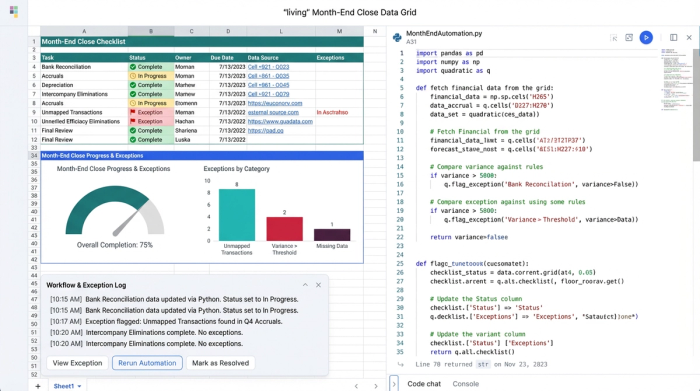
This article outlines the essential accounting procedures required for a successful close, but it goes a step further. We will explore how to evolve your process from a static text document into a "living" data grid using Quadratic. By connecting your task tracking directly to your financial data, you can automate status updates, flag exceptions in real-time, and streamline leadership sign-off without the heavy lift of enterprise software.
The core components of an accounting month end close checklist
Before diving into automation, it is critical to establish the foundational steps that every finance team must cover. Whether you are a team of two or twenty, these procedures ensure your financial statements are accurate and compliant. A comprehensive accounting month end close procedures checklist generally follows the flow of the balance sheet, followed by the profit and loss statement.
Balance sheet reconciliations This is the heart of the month end close process checklist.
- Bank reconciliations: Cash is king, and it must be the first account reconciled. This involves tying the general ledger cash balance to the ending balance on the bank statement, adjusting for outstanding checks and deposits in transit.
- AR/AP tie-outs: Verify that the detailed aging reports from your sub-ledgers match the control account balances in the General Ledger.
- Fixed assets & inventory: Run depreciation schedules for fixed assets and reconcile physical inventory counts or perpetual inventory records to the GL.
Once the balance sheet is secure, the focus shifts to revenue and expenses.
- Accruals & prepaids: Ensure expenses are booked in the correct period. This includes amortizing prepaid expenses (like software subscriptions) and accruing for services received but not yet invoiced.
- Payroll reconciliation: Match the gross wages, tax liabilities, and benefits expense from your payroll provider’s register to the expense accounts in your ledger.
Why static "checklist templates" fail at scale
If you search for a month end close checklist template, you will find hundreds of free downloads. While these provide a good starting point for what to do, they are terrible at helping you manage how it gets done.
The fundamental problem is visibility, which is exactly why stronger QuickBooks analytics and reporting workflows matter during close. In a standard spreadsheet, the checklist is a passive text file. A controller cannot see real-time progress without emailing the team to ask, "Is the prepaid schedule done?" Furthermore, the data is disconnected. The checklist lives in one file, but the actual work—the massive reconciliation spreadsheets—lives in ten other files stored in various folders.
This creates a "swivel-chair" workflow where you are constantly switching between the tracker and the work papers. There is no programmatic link between the task and the evidence. This is where the "programmable middle" opportunity lies. Teams need a solution that sits between manual Excel sheets and expensive, rigid close management software like BlackLine. This is where a connected data grid like Quadratic transforms the process.
Building a connected workflow (The "living" checklist)
Imagine a workflow where the checklist updates itself based on the work being done. In Quadratic, a Finance Operations Manager can build a "living" checklist that acts as both a project management tool and a data repository.
Step 1: Sequencing & ownership
The manager begins by setting up the primary grid. Column A lists the standard tasks: Bank Recs, AR Tie-out, AP Tie-out, Accruals, Prepaid Amortization. Column B assigns a specific "Owner" to each task, and Column C establishes the "Deadline." Because Quadratic allows for multiple users to collaborate in the browser simultaneously, the entire team knows exactly who is responsible for what, eliminating version control issues.
Step 2: Auto-populating statuses
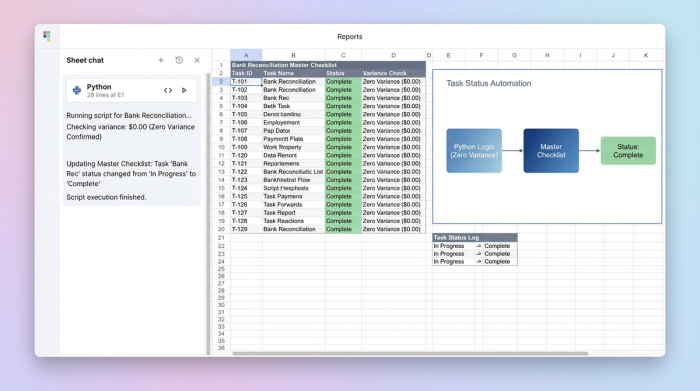
This is the key differentiator. In a typical month end financial close checklist, a human must manually type "Complete" into a cell. In a connected Quadratic workflow, the status cell is powered by Python or SQL formulas that reference the actual data.
For example, the manager creates a separate tab in the same grid for "Bank Reconciliations." The accountant performs the rec in that tab, pulling in bank data and GL data. The manager then writes a simple Python script for the checklist tab: If the variance cell in the 'Bank Rec' tab equals 0, set the Status to 'Complete'. If not, set to 'In Progress'.
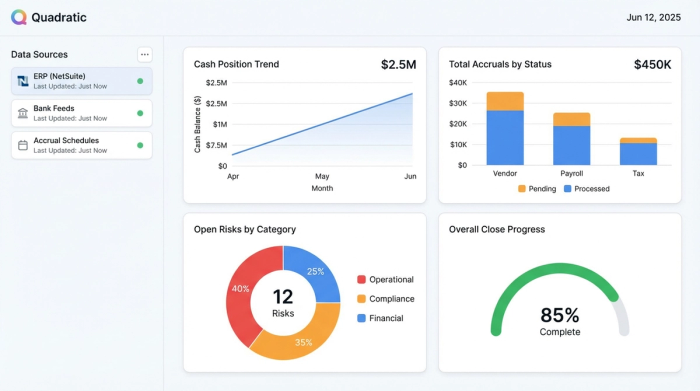
This means the checklist reflects the mathematical reality of the financials, not just a user's opinion.
Step 3: Exception management
With the data connected, the manager can program conditional formatting to flag risks immediately. If a deadline passes and the status is not "Complete," the cell turns red. If a reconciliation shows a variance greater than a set threshold (e.g., $50), the row highlights yellow. This allows the manager to manage by exception, focusing only on the areas that need attention rather than reviewing every single line item.
Automating the close package for leadership sign-off
The final hurdle of the month end close checklist accounting process is reporting to leadership, which often involves the consolidation of financial information. Traditionally, this involves summarizing the results and emailing a zip file of spreadsheets to the CFO or Controller for sign-off.
The summary view
In the connected grid, the detailed checklist rolls up into a high-level "Close Package Summary." This view aggregates the data, showing the cash position, total accruals booked, and any open risks. Because the underlying data is live, the summary is always up to date.
Exception notes
During the review, if the Finance Ops Manager spots a flagged item—perhaps an un-invoiced accrual that is higher than usual—they can add context directly in the grid. A "Notes" column allows for narrative explanations right next to the numbers.
The sign-off
Instead of reviewing disjointed files, leadership opens the Quadratic link. They see the summary, the status of all tasks, and the explanatory notes in one view. They can drill down into the tabs to see the actual reconciliation work if necessary. Once satisfied, they can mark the month as "Closed" directly in the system. This creates a fully auditable trail for all transaction reconciliation without the email clutter.
Best practices for maintaining your process
To keep this month end close checklist excel workflow efficient, continuous improvement in accounting is necessary.
Continuous improvement
After the close is finalized, hold a brief "post-mortem." Look at the tasks that were flagged red or missed deadlines. Was it a resource issue, or was the process itself flawed? Adjust the logic in your checklist grid for the next month to prevent recurrence.
Standardization
Ensure that all team members use the same format for their reconciliation tabs. When everyone standardizes their layouts, it becomes much easier to write the Python or SQL scripts that feed the master checklist. This discipline turns a loose collection of spreadsheets into a cohesive financial application.
Conclusion
A robust month end close checklist is vital for speed, accuracy, and peace of mind. However, the tool you use to manage that checklist matters just as much as the steps you follow. Sticking to static text documents leaves you blind to the real status of your financials until it is too late.
By moving away from passive tracking and adopting a connected data grid, you turn your checklist into an active workflow. You gain the ability to automate status updates, link tasks directly to data, and drive the close to completion with confidence.
If you are ready to stop chasing updates and start automating your close, try building your own connected close checklist in Quadratic.
Use Quadratic to Automate Your Month End Close Checklist
- Transform your static checklist into a "living" data grid where task statuses update automatically based on real financial data.
- Gain real-time visibility into the close process, eliminating the need to chase manual updates from your team.
- Manage by exception with automated flags for missed deadlines or variances that exceed your set thresholds.
- Streamline leadership sign-off with a consolidated, live close package, including all underlying data and contextual notes.
- Collaborate with your team in a single, browser-based workspace, ensuring everyone works on the latest version without email clutter.
Ready to stop chasing updates and start automating your close? Try Quadratic.
