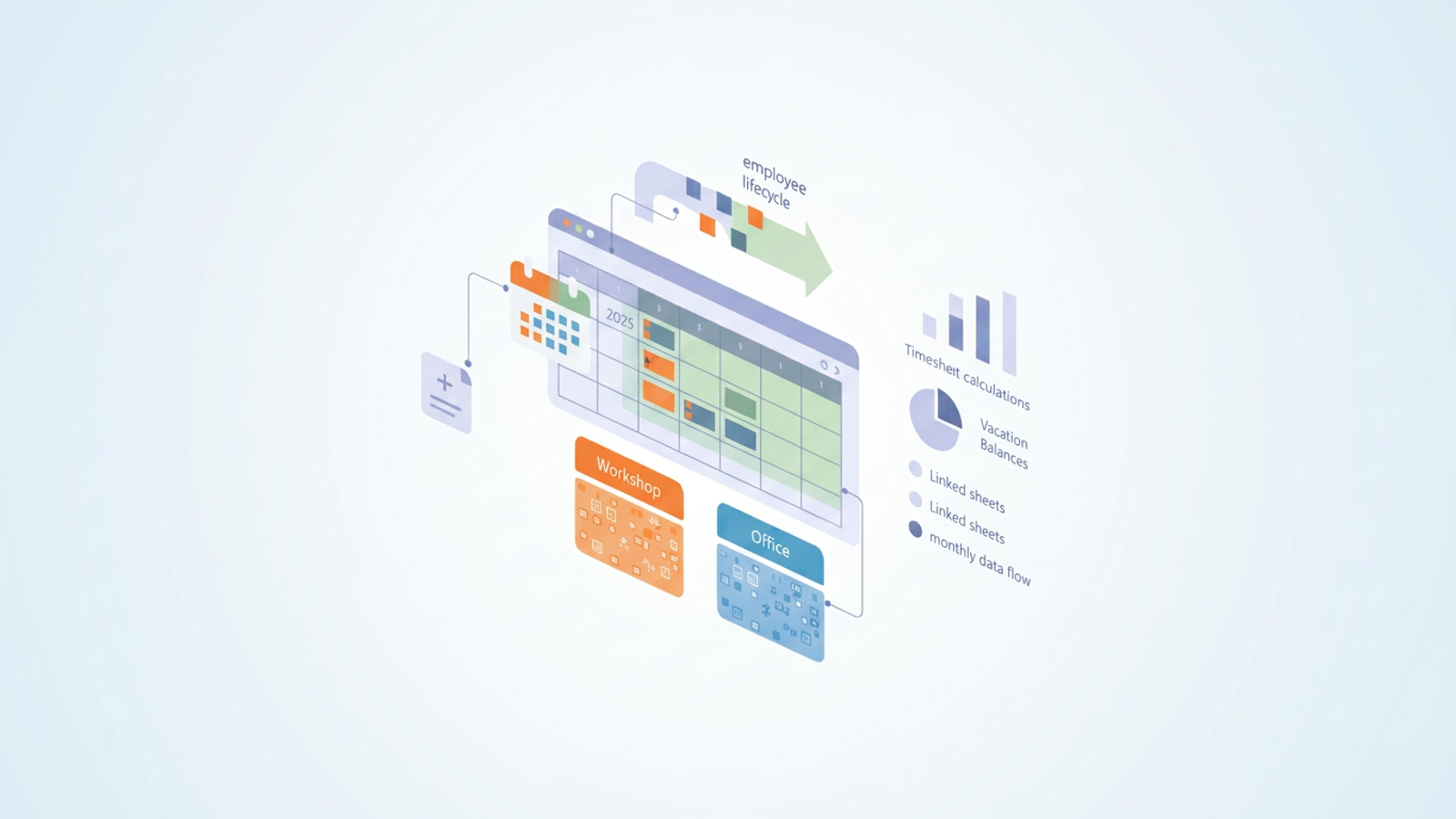
Managing employee time off, shift hours, and daily attendance is a massive headache when dealing with growing teams. Relying on manual data entry often leads to payroll errors that can cost businesses billions a day and cause endless frustration. If you are looking for a reliable way to track your workforce, building an effective employee attendance management system is the critical first step.
In this guide, we explore a real world scenario where a company needed to manage two distinct departments: a workshop and a corporate office, each with completely different schedules. We will show you how Quadratic serves as the ideal tool to build this system, combining the flexibility of a traditional spreadsheet with the power of custom software.
The "spreadsheet vs. software" dilemma for HR teams
Traditional spreadsheets are great for static lists but break down quickly when handling dynamic hire and fire dates or different shift hours, highlighting the common disadvantages of spreadsheets for complex operations. Conversely, dedicated HR software is often too rigid and expensive, lacking the deep customization required for unique company setups.
Most online tutorials only show you how to build a basic tracker for a single, uniform schedule. However, real businesses are far more complex. HR managers and operations leads need a tool that can adapt to their specific workflow without requiring a massive software budget.
Step-by-step guide: building your employee attendance and leave management system
Building your own employee attendance and leave management system requires a solid architecture. We will walk through how to set up dynamic calendars, multi-department sheets, timesheet calculations, and form integrations inside Quadratic.
Step 1: automating dynamic employee lifecycles and calendars
The foundation of any robust tracker is an accurate calendar and an up to date staff list. In Quadratic, you can create dynamic dropdowns for selecting months and years, starting from 2025, with calendar days automatically adjusting to match your selection. This means you do not have to manually rebuild your tracking sheet every month.
Furthermore, Quadratic can automatically update employee lists based on their hire and termination dates. By linking this data, your tracker is never cluttered with inactive staff, ensuring your HR team only sees the active workforce for any given period.
Step 2: managing multi-department schedules (workshop vs. office)
A major challenge for operations managers is handling complex, multi layered scheduling in one ecosystem, often facing significant challenges of coordinating schedules across multiple departments. In our real world scenario, the user needed to track attendance for a workshop with specific shift hours alongside an office running on a standard nine to five schedule.
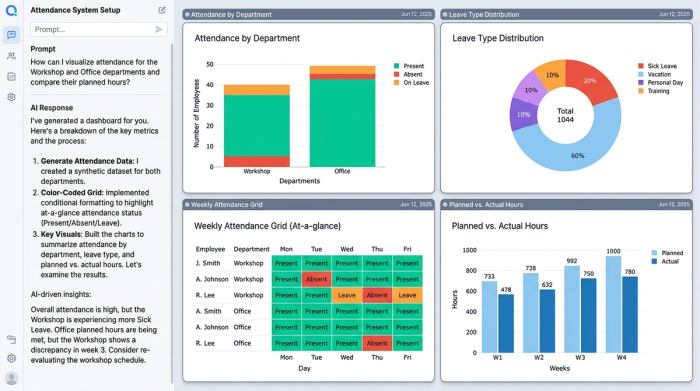
Quadratic allows you to set up separate tracking logic for each department within the same workspace. You can apply color coded conditional formatting to make visual identification of shifts, weekends, and leave types instantly recognizable on the dashboard. This visual clarity ensures team leads can assess daily attendance at a glance.
Step 3: calculating timesheets and vacation balances
Accurate HR metrics are the backbone of your tracker. A powerful calculation engine is necessary to automatically compute planned versus actual workdays, total hours, weekends, vacations, personal leave, sick leave, absences, and online work.
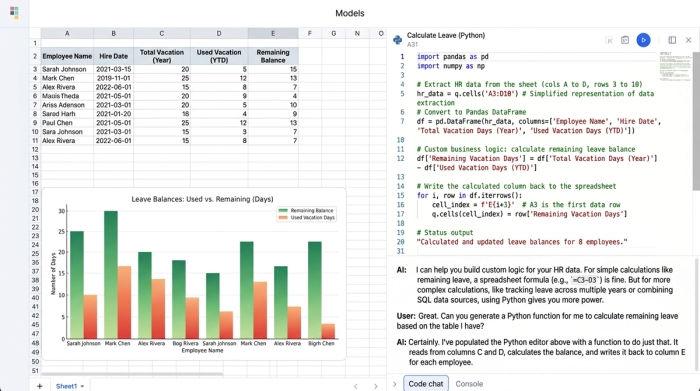
Quadratic handles these complex calculations effortlessly. The system aggregates vacation usage and remaining balances per work year, keeping your HR department compliant with official guidance on employee leave management and your employees informed. Because Quadratic natively supports Python, SQL, and traditional formulas in the same grid, you can build advanced logic to calculate these metrics exactly how your company policies dictate.
Step 4: integrating Google Forms for real-time absence tracking
Collecting data efficiently is just as important as analyzing it. A highly sought after solution is integrating external data collection directly into your spreadsheet, offering numerous benefits of integrating real-time attendance data. You can connect a single Google Form to your Quadratic system to log absence reasons in real time.
The form fields can include calendar date pickers, arrival times, and employee comments. When an employee submits the form, their arrival time automatically calculates into worked hours. This form data pipes directly into a dedicated absence tracking sheet in Quadratic, which remains manually editable for HR review.
Quadratic filters this incoming data separately for the workshop and office vacation schedules. Everything is saved monthly and linked seamlessly across sheets, providing a clear, uninterrupted view of employee availability.
Why Quadratic is the ultimate online employee attendance management system
When you review the workflow above, it becomes clear why Quadratic is the ultimate online employee attendance management system. It easily handles the complexities that break standard spreadsheets, such as multi department filtering, dynamic lifecycles, and direct form integrations.
By keeping all logic, context, and outputs in one place, Quadratic acts as a single source of truth. It is highly visual, deeply customizable, and fully automated. You get the familiar grid interface combined with advanced capabilities, allowing you to build production grade workflows without the pain of rigid, out of box software.
Conclusion & next steps
A reliable attendance system saves HR professionals hours of manual data entry and prevents costly payroll errors. By leveraging dynamic calendars, multi department tracking, and automated timesheet calculations, you can build a workflow that perfectly matches your organization's needs.
Are you ready to upgrade from basic spreadsheets and rigid HR tools? Sign up for Quadratic today to build your own advanced HR tracker and experience how intuitive data management can truly be.
Use Quadratic to manage employee attendance
- Automate dynamic employee attendance calendars: Automatically update monthly calendars and employee lists, ensuring your tracker always reflects active staff without manual adjustments.
- Manage complex multi-department schedules: Track distinct shift hours and attendance rules for various teams (e.g., workshop vs. office) within a single, visually clear workspace.
- Accurately calculate timesheets and leave balances: Leverage native Python, SQL, and formulas to automate calculations for workdays, hours, and vacation accruals, minimizing payroll errors.
- Streamline real-time absence reporting: Integrate Google Forms to automatically log employee absences and arrival times, piping data directly into editable tracking sheets for HR review.
- Consolidate all attendance data into one source of truth: Keep all tracking logic, context, and outputs in a single, flexible, and automated system for clear insights and compliance.
Ready to build a more efficient employee attendance system? Try Quadratic.
