Purpose of this brrrr calculator
This template evaluates real estate investments using the Buy, Repair, Rent, Refinance, Repeat strategy, much like a real estate pro forma template would. It allows you to compare capital requirements and cash flow between "With Refinance" and "Without Refinance" scenarios. By combining basic user inputs with embedded Python visualizations, it automates complex property metric calculations, similar to a Real Estate ROI Calculator, in a single workspace.
Template components
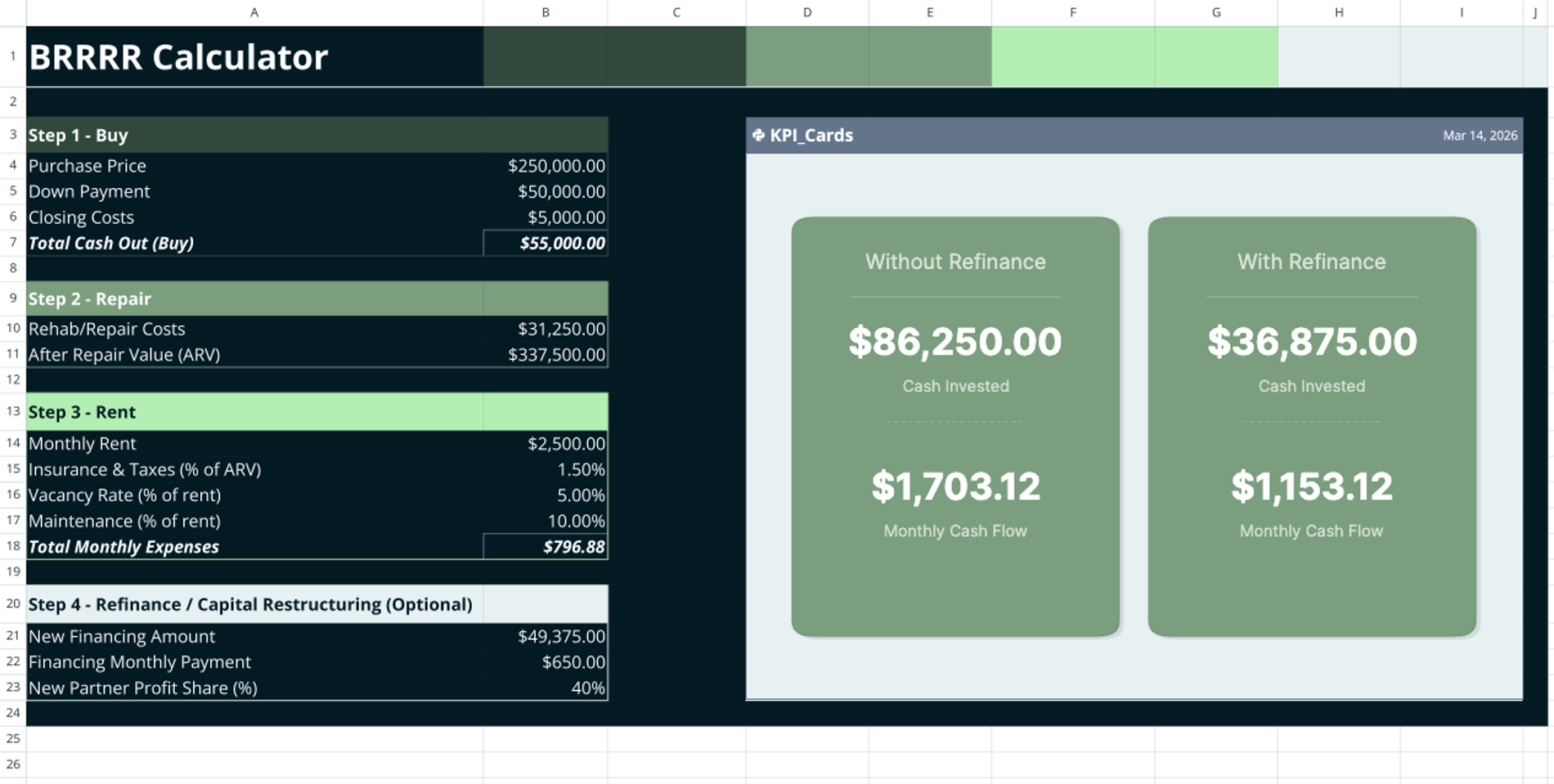
The template uses a single-sheet layout designed for linear, vertical data entry in columns A and B. It is structured around four distinct input sections: Buy, Repair, Rent, and Refinance/Capital Restructuring.
Intermediate spreadsheet formulas calculate the initial cash outlay and monthly expenses based on the provided assumptions. Adjacent to the inputs, an embedded Python cell anchored at D3 reads the spreadsheet data to power a dynamic dashboard. This Plotly-based visual dashboard displays side-by-side KPI cards, allowing for immediate scenario comparison without additional sheets or external connections.
How to use this free brrrr calculator spreadsheet
Step 1: Buy
- Enter the purchase price, down payment amount, and closing costs in the designated rows.
- Review the automated formula output computing the total cash outlay required at acquisition.
Step 2: Repair
- Input the estimated rehab and repair costs necessary to improve the property.
- Enter the projected after-repair value (ARV) of the property, which can be determined using a comparative market analysis template.
Step 3: Rent
- Input the expected gross monthly rent, which can be tracked with a rent roll template.
- Define your expense assumptions as percentages: insurance and taxes (as a percentage of ARV), vacancy rate (as a percentage of rent), and maintenance (as a percentage of rent).
- Review the automatically calculated total monthly expenses.
Step 4: Refinance
- Enter the new financing amount and the new monthly financing payment.
- Input a partner profit-share percentage, which the template uses to adjust equity and maintenance calculations.
Visualizing the brrrr method calculator results
As you change inputs in columns A and B, the Python-generated KPI dashboard updates automatically.
- Review the "Without Refinance" card to see the total cash invested (down payment, closing costs, and rehab) and the baseline monthly cash flow.
- Review the "With Refinance" card to see the adjusted cash invested (reduced by the new financing) and the adjusted monthly cash flow (subtracting the new financing payment and partner profit share).
Who this brrrr calculator is for
This template is built for real estate investors analyzing asset acquisition and capital restructuring. It serves users looking for a dynamic alternative to a standard brrrr calculator excel download. Property analysts who need a free brrrr calculator that instantly visualizes comparative cash flow scenarios will find this tool highly practical for evaluating investment outcomes.
Use Quadratic to Analyze BRRRR Real Estate Investments
- Compare "With Refinance" and "Without Refinance" scenarios side-by-side.
- Automate complex property metric calculations using embedded Python.
- Visualize investment outcomes with a dynamic, updating KPI dashboard.
- Input all Buy, Repair, Rent, and Refinance data in a single, linear sheet.
- Instantly see adjusted cash invested and monthly cash flow as you change inputs.