
Table of contents
- What is the accounting cycle?
- The accounting cycle steps in order (overview)
- Setting up the workflow in Quadratic
- Step 1 — Recording journal entries
- Step 2 — Posting to the ledger
- Step 3 — Preparing the unadjusted trial balance
- Step 4 — Recording adjusting journal entries
- Step 5 — Preparing the adjusted trial balance and financial statements
- Step 6 — Recording closing entries
- Step 7 — Preparing the post-closing trial balance
- Why building the accounting cycle in Quadratic beats manual worksheets
- Frequently asked questions
- Conclusion: a connected, repeatable accounting workflow
- Use Quadratic to manage your accounting cycle steps
The accounting cycle steps are the backbone of every clean set of financial statements, but most guides explain them in theory rather than showing you how to actually execute them. This walkthrough takes a different approach: instead of describing the cycle in the abstract, we'll move through it end-to-end inside Quadratic, a modern spatial spreadsheet where adjustments flow automatically into the trial balance, financial statements, and post-closing trial balance.
By the end, you'll have a complete, connected accounting workflow built around a small business bookkeeping template, moving from the first journal entry to a fully reconciled post-closing trial balance with every step linked to the next.
What is the accounting cycle?
The accounting cycle is the standardized sequence of steps accountants use to record, classify, and summarize financial transactions over a reporting period.
If you've ever asked what are the steps in the accounting cycle, the short answer is that there are typically eight: from identifying transactions to preparing a post-closing trial balance. Some textbooks expand the framework to ten by separating out reversing entries or adjusting worksheet preparation, but the eight-step model captures the core workflow.
Below, we'll walk through the steps of the accounting cycle in order, using a hypothetical small service-based business as our example.
The accounting cycle steps in order (overview)
Here are the accounting cycle steps in order:
1. Identify transactions
2. Record journal entries
3. Post to the ledger
4. Prepare an unadjusted trial balance
5. Record adjusting entries
6. Prepare the adjusted trial balance and financial statements
7. Record closing entries
8. Prepare a post-closing trial balance
For this walkthrough, imagine a small consulting business that completed its first month of operations. It billed clients, paid rent, purchased supplies, and accrued some expenses it hasn't yet paid. We'll take its raw transactions through every stage of the cycle.
Setting up the workflow in Quadratic
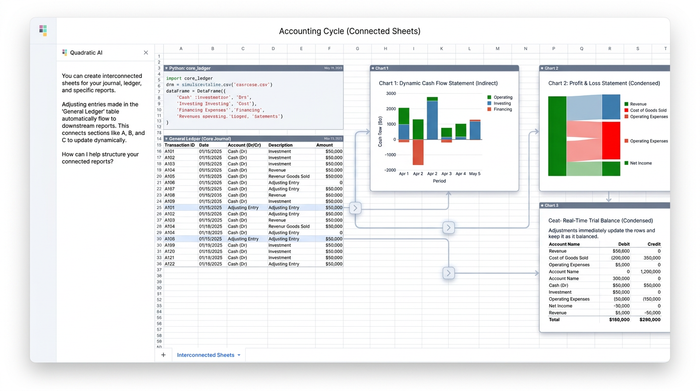
Before recording a single entry, it helps to think about layout. A traditional accounting worksheet lives on paper or in a static accounting spreadsheet, where each step is recalculated by hand. Quadratic is built differently: cells reference each other across sheets, formulas update dependent reports automatically, and the canvas layout makes it easy to mirror the structure of a ten-column worksheet.
For this project, the file is organized into connected sections:
- Journal
- Ledger
- Unadjusted trial balance
- Adjusting entries
- Adjusted trial balance and ten-column worksheet
- Income statement, statement of owner's equity, and balance sheet
- Closing entries
- Post-closing trial balance
The advantage is simple. Once these sheets are linked, you stop redoing math at every step. Correct an adjusting entry, and the trial balance, financial statements, and post-closing trial balance all update at the same time.
Step 1 — Recording journal entries
The first action in the accounting cycle is journalizing. Every business transaction is recorded as a debit and a credit in a chronological journal, capturing the date, accounts affected, amounts, and a short description.
In Quadratic, the journal is a simple table with columns for Date, Account, Debit, Credit, and Description. For our consulting business, the first few entries might look like this:
- Owner invested $20,000 cash to start the business (Debit Cash $20,000 / Credit Owner's Capital $20,000)
- Paid $1,200 for one year of prepaid insurance (Debit Prepaid Insurance $1,200 / Credit Cash $1,200)
- Purchased $500 of office supplies on account (Debit Supplies $500 / Credit Accounts Payable $500)
- Billed clients $8,000 for consulting services (Debit Accounts Receivable $8,000 / Credit Service Revenue $8,000)
- Paid $2,000 in rent for the month (Debit Rent Expense $2,000 / Credit Cash $2,000)
- Paid $1,500 in wages (Debit Wages Expense $1,500 / Credit Cash $1,500)
A quick SUM formula at the bottom of the Debit and Credit columns confirms that the two totals match. If they don't, you know immediately that an entry is unbalanced, before any of that error has a chance to propagate downstream.
Step 2 — Posting to the ledger
To streamline this process, you can use a general ledger accounting template that automatically organizes your accounts and tracks balances.
In Quadratic, the ledger references the journal directly. Each account, Cash, Accounts Receivable, Service Revenue, and so on, pulls its debits and credits from the relevant rows of the journal using formulas like SUMIF. The result is a set of T-accounts (or running balance ledgers) that update automatically whenever a journal entry changes.
This eliminates the most common source of student and bookkeeping errors: transcribing numbers from one place to another. Every ledger balance traces directly back to its journal source.
Step 3 — Preparing the unadjusted trial balance
The unadjusted trial balance summarizes the ending balance of every ledger account at the end of the period, with debits in one column and credits in another. Its purpose is to verify that total debits equal total credits before any adjustments are made.
In Quadratic, the trial balance is built by referencing the ending balance of each ledger account. A single SUM at the bottom of each column, paired with a quick equality check (=SUM(debits)=SUM(credits)), flags any imbalance instantly. If the trial balance doesn't tie, the issue is somewhere upstream in the journal or ledger, and you can fix it before moving on.
Step 4 — Recording adjusting journal entries
Adjusting entries bring accounts in line with the accrual basis of accounting at period end. They typically fall into a few categories: accrued revenue, accrued expenses, prepaid expense amortization, depreciation, and unearned revenue recognition.
For our consulting business, the adjusting entries at month-end might include:
- Insurance expense for one month: $1,200 prepaid / 12 = $100 (Debit Insurance Expense $100 / Credit Prepaid Insurance $100)
- Supplies used during the month: $500 purchased, $200 remaining (Debit Supplies Expense $300 / Credit Supplies $300)
- Accrued wages owed but not yet paid: $400 (Debit Wages Expense $400 / Credit Wages Payable $400)
- Depreciation on equipment: $150 for the month (Debit Depreciation Expense $150 / Credit Accumulated Depreciation $150)
In Quadratic, each adjusting entry is recorded in its own section but linked directly into the worksheet. Because the cells are connected, the moment you enter an adjustment, the adjusted balances downstream begin to shift.
Step 5 — Preparing the adjusted trial balance and financial statements
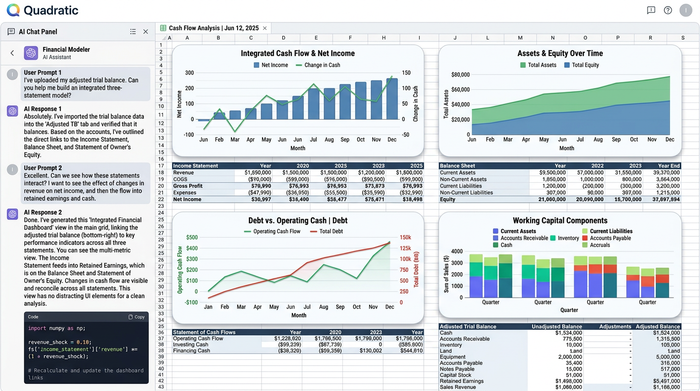
This is where Quadratic's connected layout pays off. A traditional ten-column worksheet/04%3A_The_Adjustment_Process/4.05%3A_Prepare_Financial_Statements_Using_the_Adjusted_Trial_Balance) pairs the unadjusted trial balance, adjustments, adjusted trial balance, income statement, and balance sheet side by side. In Quadratic, that worksheet is fully dynamic: each column references the previous one with formulas, so the adjusted trial balance is just unadjusted balances plus adjustments, computed automatically.
From the adjusted trial balance, the three core financial statements branch off to form a fully integrated 3 statement financial model.
Income statement
The income statement pulls revenue and expense accounts from the adjusted trial balance to calculate net income, effectively operating as a dynamic profit and loss statement template for your business. For our consulting business:
- Service Revenue: $8,000
- Rent Expense: $2,000
- Wages Expense: $1,900 ($1,500 paid + $400 accrued)
- Insurance Expense: $100
- Supplies Expense: $300
- Depreciation Expense: $150
- Net Income: $3,550
Statement of owner's equity
The statement of owner's equity uses the net income figure from the income statement, the owner's beginning capital, and any draws to compute ending capital. Because net income is a referenced cell, this statement updates automatically when anything upstream changes.
- Beginning Capital: $20,000
- Plus: Net Income: $3,550
- Less: Owner Draws: $0
- Ending Capital: $23,550
Balance sheet
The balance sheet pulls asset, liability, and equity accounts from the adjusted trial balance, with ending capital sourced from the statement of owner's equity. A simple formula confirms that the accounting equation (Assets = Liabilities + Equity) holds.
The narrative payoff: if you discover later that the depreciation adjustment should have been $200 instead of $150, you change one cell. The adjusted trial balance, income statement, statement of owner's equity, and balance sheet all update at once. No re-keying, no chasing down stale numbers.
Step 6 — Recording closing entries
Closing entries zero out temporary accounts (revenues, expenses, and owner's draws) and transfer the net result into permanent equity. There are four standard closing entries:
1. Close revenue accounts to Income Summary
2. Close expense accounts to Income Summary
3. Close Income Summary to Owner's Capital
4. Close Owner's Draws to Owner's Capital
In Quadratic, the closing entries are recorded in their own section and reference the adjusted balances directly. Once recorded, the ledger reflects zero balances in all temporary accounts, and owner's capital reflects the post-closing total.
Step 7 — Preparing the post-closing trial balance
The post-closing trial balance contains only permanent accounts: assets, liabilities, and equity. Its job is to confirm that debits still equal credits after closing and that ending owner's capital matches the figure on the statement of owner's equity.
This is the consistency check that ties the entire cycle together. In Quadratic, because every report references the same source data, you can verify in seconds that:
- Total debits equal total credits on the post-closing trial balance
- Ending owner's capital on the post-closing trial balance matches the statement of owner's equity
- All temporary accounts show zero balances
If any of these checks fail, the issue almost always traces back to a single broken reference, which is easy to find precisely because everything is linked.
Why building the accounting cycle in Quadratic beats manual worksheets
Most accounting curricula still teach the cycle on paper or in a static spreadsheet, where each step is recalculated by hand. That's useful for learning the mechanics, but it's slow and error-prone, and a single mistake early in the cycle means redoing several reports.
On the other end of the spectrum, enterprise accounting platforms automate the cycle but hide the mechanics. That's overkill for a student learning the fundamentals, a bookkeeper handling a small client, or an early-career accountant practicing applied scenarios.
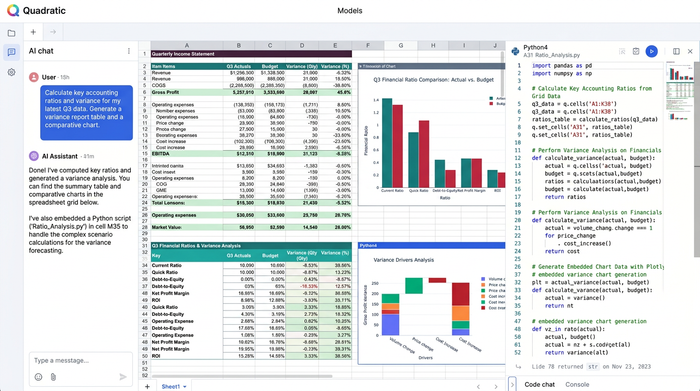
Quadratic sits in the middle. It's a modern spreadsheet you can open in a browser, with cross-sheet references that make the cycle's interconnections visible. For accountants who want to go further, AI assistance and Python in cells make it easy to layer in analysis, like ratio calculations, variance reports, or scenario modeling, right alongside the core statements.
The result is a workflow that's accessible enough to learn from, but powerful enough to use for real bookkeeping and analysis.
Frequently asked questions
What are the steps in the accounting cycle?
The steps in the accounting cycle are: identify transactions, record journal entries, post to the ledger, prepare an unadjusted trial balance, record adjusting entries, prepare an adjusted trial balance and financial statements, record closing entries, and prepare a post-closing trial balance.
How many steps are in the accounting cycle?
Most textbooks teach an eight-step cycle, though some break it into ten by separating worksheet preparation and reversing entries. The underlying workflow is the same; the difference is mostly how granularly the steps are labeled.
What's the difference between adjusting and closing entries?
Adjusting entries update account balances to reflect accruals, deferrals, and depreciation at the end of a period so that financial statements are accurate. Closing entries zero out temporary accounts (revenues, expenses, and owner's draws) and transfer the net effect to permanent equity, preparing the books for the next period.
What is a post-closing trial balance?
A post-closing trial balance is a list of all permanent account balances after closing entries have been recorded. Its purpose is to confirm that debits still equal credits and that the books are ready for the next accounting period.
Can I complete the full accounting cycle in a spreadsheet?
Yes, and Quadratic is well-suited to this kind of interconnected workflow. Because cells can reference across sheets and formulas update dependent reports automatically, you can build a complete cycle, from journal to post-closing trial balance, that updates end-to-end when any underlying entry changes.
Conclusion: a connected, repeatable accounting workflow
Working through the accounting cycle steps in order, from journal entries through the post-closing trial balance, gives you a clear view of how every transaction ultimately shapes the financial statements. When each step is connected, the cycle becomes faster, less error-prone, and far easier to learn.
That's the real advantage of building the workflow in Quadratic: the steps stop being isolated exercises and start behaving like a single, living system. Adjust one number, and the entire set of reports updates in lockstep. That's how accounting actually works in practice, and it's how the cycle is easiest to understand.
If you want to try this workflow yourself, open Quadratic and build out the journal, ledger, and worksheet for your own hypothetical business. Once the connections are in place, running the full cycle the next time around is a matter of new transactions, not new spreadsheets.
Use Quadratic to manage your accounting cycle steps
- Connect your entire ledger: Link journal entries directly to your T-accounts to eliminate manual transcription errors and keep your ledger perfectly updated.
- Automate downstream calculations: Adjust a single transaction and watch your unadjusted trial balance, adjusted trial balance, and financial statements update instantly in lockstep.
- Build dynamic financial models: Create a fully integrated three-statement model where the income statement, statement of owner's equity, and balance sheet flow into one another automatically.
- Verify balances instantly: Set up simple formulas to run automatic consistency checks, ensuring total debits equal total credits from your first journal entry to your post-closing trial balance.
- Layer in advanced analysis: Use native Python, SQL, and AI assistance right in the spreadsheet grid to calculate financial ratios, generate charts, and build custom dashboards.
Ready to streamline your financial workflows and see how your numbers connect in real time? Open a blank canvas or import your existing templates to Try Quadratic
