
Managing educational or vocational programs across multiple sites is a complex logistical puzzle. Training coordinators usually find themselves forced to choose between buying bulky, expensive software or wrestling with messy, manual spreadsheets.
This article will demonstrate a better, hybrid approach to organizing multi-site timelines, performing necessary data cleansing on inconsistent scheduling inputs, and assigning personnel flawlessly. By rethinking how we approach instructor scheduling software, you can achieve the flexibility of a spreadsheet combined with the programmatic power needed to handle real-world data effectively.
The multi-site scheduling dilemma: rigid systems vs. messy spreadsheets
Program administrators face a clear split when trying to solve their resource management challenges. On one side, traditional training management systems (TMS) and learning management systems offer robust tools for high-level resource allocation. However, these platforms often force teams into rigid workflows that simply do not fit the specific nuances of their multi-site training programs.
On the other side, While many coordinators attempt to connect spreadsheets in excel to merge their schedules, they quickly become a liability when dealing with inconsistent data from different site managers. While spreadsheets offer ultimate flexibility, they quickly become a liability when dealing with inconsistent data from different site managers. Program coordinators often find themselves searching for spreadsheet tutorials just to figure out why basic A-Z filters fail. When dates are formatted differently across columns, simple tasks become time-consuming roadblocks.
Building a scalable multi-site workflow in Quadratic
Consider the real-world workflow of a program administrator managing multi-site timelines. They need to juggle datasets that include program details, personnel assignments, and various scheduling dates like preferred, offered, and confirmed times.
Quadratic provides the familiar, intuitive grid of a python spreadsheet, but it includes built-in Python, SQL, and AI capabilities directly within the browser-based canvas. Quadratic provides the familiar, intuitive grid of a modern spreadsheet, but it includes built-in Python, SQL, and AI capabilities directly within the browser-based canvas. Here is how a training coordinator can use Quadratic to leverage data analysis using sql and build a flawless scheduling workflow. Here is how a training coordinator can use Quadratic to build a flawless scheduling workflow.
Step 1: Centralizing program data and personnel
The first step involves importing the raw datasets into Quadratic. This data typically includes program details, a pool of available personnel, and various scheduling dates. A coordinator might receive a messy excel sheet where one site uses standard numeric dates, while another writes them out completely. A coordinator might receive a spreadsheet where one site uses standard numeric dates, while another writes them out completely. Centralizing and establishing basic data standardization guidelines for this information in one grid is the crucial first step toward building an accurate schedule.
Step 2: Conquering the date sorting nightmare
Anyone who has tried to sort by date in spreadsheets knows the frustration of standard filters breaking down. This happens when dates are formatted inconsistently across columns. You might have MM/DD/YYYY in one cell, a European format in another, and a written date in the next.
Instead of manually retyping hundreds of cells, Quadratic offers a programmatic fix. Because Quadratic supports native Python in the spreadsheet grid, you can write a simple script using functions like pandas.to_datetime (or ask the built-in AI to generate one) to robustly parse and standardize these inconsistent inputs. Standardizing date formats into a single, clean chronological output proves that Quadratic can handle granular data manipulation far better than standard spreadsheet functions.
Step 3: Segmenting by site and sorting chronologically
Now that the dates are standardized, the next objective is to organize the data by location. Functioning as a robust sql spreadsheet, Quadratic makes it easy to segment the cleaned data by program site using SQL queries or standard spreadsheet formulas. Quadratic makes it easy to segment the cleaned data by program site using SQL queries or standard spreadsheet formulas.
Once segmented, you can sort the program offerings chronologically by the earliest scheduled date using your newly cleaned preferred, offered, and confirmed columns. The outcome is a clear, unified timeline for every single location. This level of clarity is essential for managing multi-site training schedules without confusion or overlap.
Step 4: Flawless instructor allocation
With clean data and clearly segmented timelines, you can connect your schedules back to high-level resource optimization strategies. The final step is to match the chronologically ordered site schedules with your pool of available personnel.
Having accurate, standardized timelines allows you to assign the right people to the right locations at the right times. This visibility prevents double-booking and ensures efficient oversight across all programs. Effective instructor allocation is no longer a guessing game but a data-driven process.
Why Quadratic outperforms traditional instructor scheduling software
When evaluating instructor scheduling software, you do not need to settle for a heavy LMS to get automated scheduling, nor do you need to suffer through manual data wrangling to get your dates sorted.
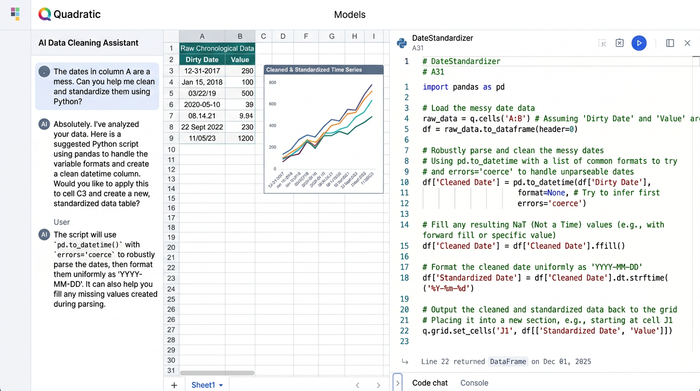
Quadratic stands out because it handles both ends of the spectrum. It offers the granular data manipulation required to fix messy inputs (like Python-powered date parsing) and the high-level operational output needed for multi-site scheduling. You get the flexibility of a spreadsheet with the power of a modern data stack, allowing you to move from raw, chaotic data to a perfectly allocated schedule in a single workspace.
Conclusion and next steps
Managing educational and vocational programs requires precise coordination. By combining the familiarity of a spreadsheet with the power of Python and SQL, you can achieve clean data, clear site segmentation, chronological accuracy, and efficient resource allocation.
If you are tired of rigid systems and broken spreadsheet filters, it is time to upgrade your workflow. Try Quadratic to clean up your messy scheduling data and build a scalable, automated timeline for your team. Visit the Quadratic website to sign up and start transforming your data into actionable insights today.
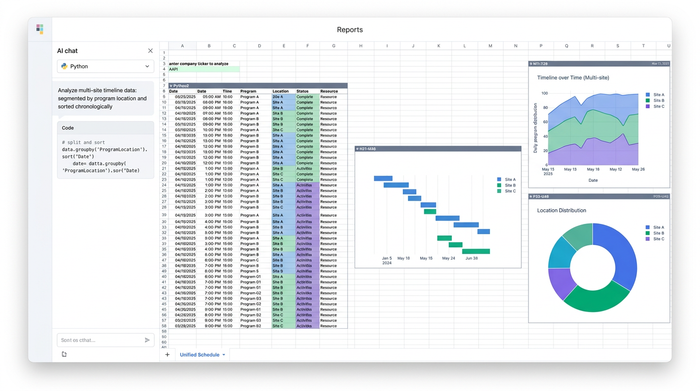
Use Quadratic as your instructor scheduling software
- Standardize inconsistent date formats across different sites using native Python and AI, eliminating manual data entry and broken filters.
- Segment raw scheduling datasets by location using SQL queries directly within your spreadsheet grid.
- Create clear chronological timelines by sorting preferred, offered, and confirmed dates across all program sites.
- Allocate instructors accurately to prevent double-booking and ensure optimal coverage across multiple training locations.
- Collaborate with site managers in a real-time, browser-based multiplayer canvas to keep schedules updated without emailing attachments back and forth.
Ready to eliminate date-sorting headaches and streamline your multi-site program timelines? Try Quadratic
